1. Танилцуулга
Худалдан авалт хийсэнд баярлалааasing the XO F41 Mirror Bluetooth Speaker. This device combines a digital clock display with a portable Bluetooth speaker, offering multiple playback options including Bluetooth, TF card, and FM radio. Please read this manual carefully before use to ensure proper operation and to maximize your experience with the product.

Image 1.1: The XO F41 Mirror Bluetooth Speaker in use, showing its digital clock display.
2. Бүтээгдэхүүний онцлог
- Bluetooth 5.3 холболт: For stable and efficient wireless audio streaming.
- Толин тусгал дэлгэц: Clear digital time display with adjustable brightness.
- Олон тоглуулах горим: Supports Bluetooth, TF card, and FM radio.
- Нэгдсэн микрофон: Гар ашиглахгүй дуудлага хийх зориулалттай.
- Урт тоглуулах хугацаа: Up to 8 hours at 50% volume, 5 hours at 100% volume.
- Авсаархан, зөөврийн дизайн: Easy to carry and place anywhere.
- USB-C цэнэглэх: Орчин үеийн, тохиромжтой цэнэглэгч порт.
3. Багцын агуулга
Дараах зүйлсийн багцад байгаа эсэхийг шалгана уу.
- XO F41 Mirror Bluetooth Speaker
- USB-C цэнэглэгч кабель
- Хэрэглэгчийн гарын авлага

Image 3.1: The XO F41 Mirror Bluetooth Speaker packaging.
4. Төхөөрөмжийн зохион байгуулалт ба удирдлага
Чанга яригчийн товчлуур болон портуудтай танилцана уу:
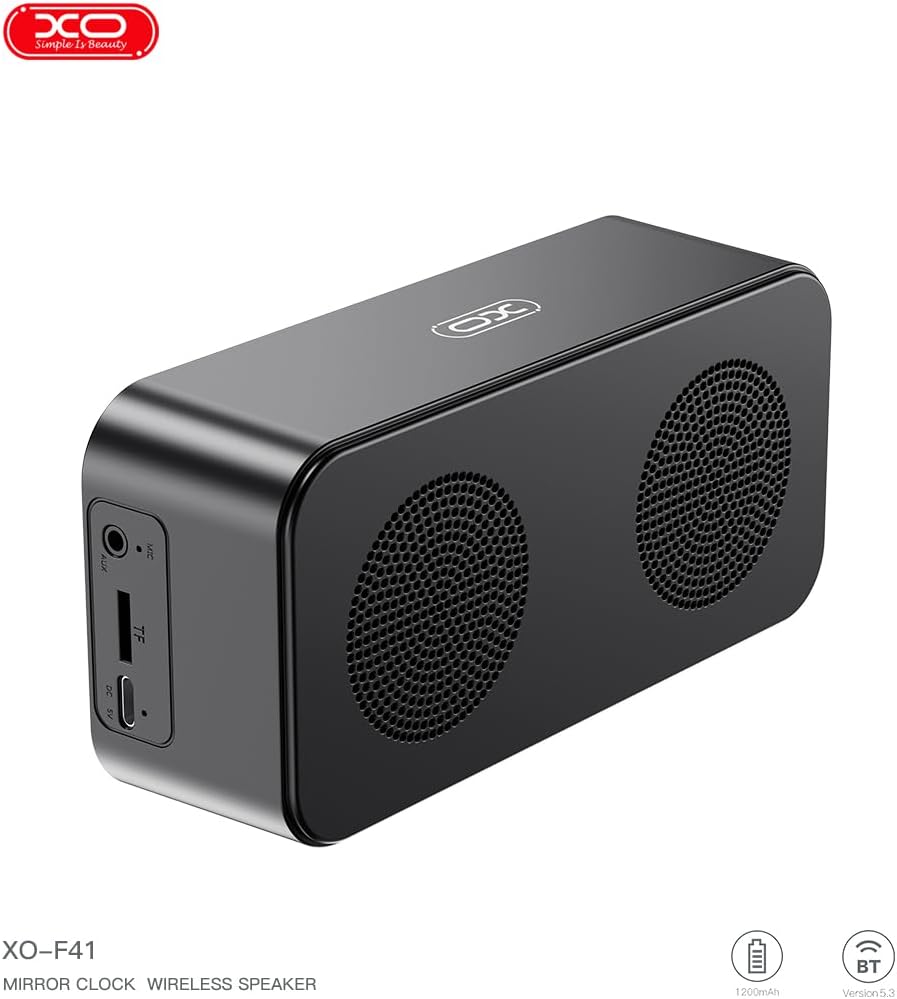
Зураг 4.1: Хажуу тал view of the XO F41 with ports labeled.
- Цахилгаан товч: Press and hold to power on/off. Short press to switch modes.
- Тоглуулах/түр зогсоох товчлуур: Аудио тоглуулах эсвэл түр зогсоох. Дуудлагад хариулах/дуусгах.
- Дууг нэмэгдүүлэх/Дараагийн дуу: Дууны хэмжээг нэмэгдүүлэхийн тулд богино дарж, дараагийн дууг удаан дарна уу.
- Дууг бууруулах/Өмнөх дуу: Дууны дууг багасгахын тулд богино дарж, өмнөх дууг удаан дарна уу.
- USB-C порт: Төхөөрөмжийг цэнэглэхэд зориулагдсан.
- TF картын оролт: Insert a TF (MicroSD) card for local music playback.
- AUX порт: Утастай аудио оролтын хувьд.
5. Тохиргоо
5.1 Чанга яригчийг цэнэглэх
- Өгөгдсөн USB-C кабелийг чанга яригчийн цэнэглэх порттой холбоно уу.
- Кабелийн нөгөө үзүүрийг USB тэжээлийн адаптер (дагаагүй) эсвэл компьютерийн USB порт руу холбоно уу.
- The charging indicator will illuminate. It takes approximately 3 hours for a full charge.
- The indicator will turn off or change color once fully charged.
5.2 Асаах/унтраах
- Асаахын тулд: Press and hold the Power button for approximately 3 seconds. You will hear an audible prompt.
- Унтраахын тулд: Press and hold the Power button for approximately 3 seconds. You will hear an audible prompt.
6. Ашиглалтын заавар
6.1 Bluetooth холболт
- Ensure the speaker is powered on and in Bluetooth mode. If not, short press the Power button to cycle through modes until "BT" or a Bluetooth icon appears on the display.
- Мобайл төхөөрөмж дээрээ Bluetooth-г идэвхжүүлж, боломжтой төхөөрөмжүүдийг хай.
- Select "XO-F41" from the list of devices.
- Хослуулсны дараа чанга яригч амжилттай холболтыг зааж өгөх бөгөөд та төхөөрөмжөөсөө аудио тоглуулж эхлэх боломжтой.
6.2 TF картын горим
- MP3 аудио бүхий TF (MicroSD) картыг оруулна уу fileTF картны үүрэнд оруулна.
- The speaker will automatically switch to TF card mode and begin playing music. If not, short press the Power button to cycle to TF card mode.
- Use the Volume Up/Down buttons for track navigation and the Play/Pause button for playback control.
6.3 FM радио горим
- Short press the Power button to switch to FM radio mode. The display will show the FM frequency.
- Long press the Play/Pause button to automatically scan and save available FM stations.
- Short press the Volume Up/Down buttons to switch between saved stations.
6.4 Clock and Alarm Settings
The XO F41 features a digital clock display. Specific instructions for setting the time and alarm are typically found in the detailed manual included with the product. Generally, a dedicated 'M' (Mode) or 'Set' button is used to enter time/alarm setting mode, and volume buttons are used to adjust values.

Image 6.1: The XO F41 speaker functioning as a bedside clock.
6.5 Дэлгэцийн гэрэлтүүлгийг тохируулах
The display brightness is adjustable. Look for a dedicated button (often labeled with a sun icon or similar) or a combination of button presses (e.g., double-pressing the Power button) to cycle through brightness levels. Refer to the included quick start guide for exact steps.
7. Засвар үйлчилгээ
- Цэвэрлэгээ: Чанга яригчийн гадаргууг зөөлөн, хуурай даавуугаар цэвэрлэ. Зүлгүүрийн цэвэрлэгч, уусгагчийг бүү ашигла.
- Хадгалах: Чанга яригчийг удаан хугацаагаар ашиглахгүй байх үед нарны шууд тусгал, хэт температураас хол, сэрүүн, хуурай газар хадгална.
- Усны эсэргүүцэл: Энэ төхөөрөмж ус нэвтэрдэггүй. Ус эсвэл хэт их чийгэнд өртөхөөс зайлсхий.
- Батерейны арчилгаа: Зайны ашиглалтын хугацааг уртасгахын тулд зайгаа ойр ойрхон бүрэн цэнэггүй болгохоос зайлсхий. Тогтмол хэрэглээгүй байсан ч төхөөрөмжийг тогтмол цэнэглэ.
8. Алдаа засах
| Асуудал | Боломжит шалтгаан | Шийдэл |
|---|---|---|
| Чанга яригч асахгүй байна. | Батерей бага. | Чанга яригчийг дор хаяж 30 минутын турш цэнэглэ. |
| Bluetooth-ээр холбох боломжгүй. | Чанга яригч хослуулах горимд байхгүй байна; Төхөөрөмж дээр Bluetooth идэвхгүй байна; төхөөрөмжөөс хэт хол байна. | Ensure speaker is in Bluetooth mode. Enable Bluetooth on your device. Move speaker closer to your device (within 10 meters). |
| No sound from TF card. | TF картыг зөв оруулаагүй байна; дэмжигдээгүй байна file format; no audio files on card. | TF картыг дахин оруулна уу. Баталгаажуулна уу files are in MP3 format. Verify audio files are present on the card. |
| FM радио хүлээн авах чадвар муу. | Сул дохио; хүрээлэн буй орчны хөндлөнгийн оролцоо. | Move the speaker to a different location. Re-scan for stations. |
9. Техникийн үзүүлэлтүүд
| Онцлог | Дэлгэрэнгүй |
|---|---|
| Загварын дугаар | XO-F41 |
| Bluetooth хувилбар | Bluetooth V5.3 |
| Bluetooth давтамж | 2.402GHz-2.480GHz |
| Зайны багтаамж | 1200 мАч |
| Цэнэглэх оролт | USB-C, DC5V/0.5A |
| Цэнэглэх хугацаа | Ойролцоогоор 3 цаг |
| Тоглох цаг | 8H (50% volume); 5H (100% volume) |
| Үр дүнтэй зай | 10 метрээс бага |
| Хамгийн их хүч | 5W |
| Чанга яригч төхөөрөмж | 52 мм |
| Дуу шуугианы харьцаа | >80дБ |
| Бүтээгдэхүүний хэмжээс | 15 x 3.81 x 11 см (ойролцоогоор 150 x 45 x 72 мм) |
| Бүтээгдэхүүний жин | 320 g (approx. 0.28 kg) |
| Материал | Хуванцар |
| Онцлог шинж чанар | Тохируулах гэрэлтүүлэг |

Зураг 9.1: Бүтээгдэхүүний дэлгэрэнгүй параметрүүд.
10. Баталгаат хугацааны мэдээлэл
The XO F41 Mirror Bluetooth Speaker comes with a standard manufacturer's warranty. Please refer to the warranty card included in your package for specific terms, conditions, and duration. Keep your purchase receipt as proof of purchase for any warranty claims.
11. Хэрэглэгчийн дэмжлэг
For further assistance, technical support, or inquiries regarding your XO F41 Mirror Bluetooth Speaker, please contact the retailer or manufacturer's customer service department. Contact details are typically provided on the product packaging or the official brand webсайт.