Бүтээгдэхүүн дууссанview
The SMART Board MX286-V5 is an 86-inch 4K Ultra HD collaboration display designed for interactive learning and professional environments. Featuring HyPr Touch Technology, this touchscreen monitor offers a responsive and intuitive user experience. It comes equipped with 8 GB DDR4 SDRAM, a 16:9 aspect ratio, and a resolution of 3840 x 2160 pixels, delivering crisp and vibrant visuals. Connectivity options include USB, HDMI, VGA, and Bluetooth, running on Android 13 for versatile functionality.
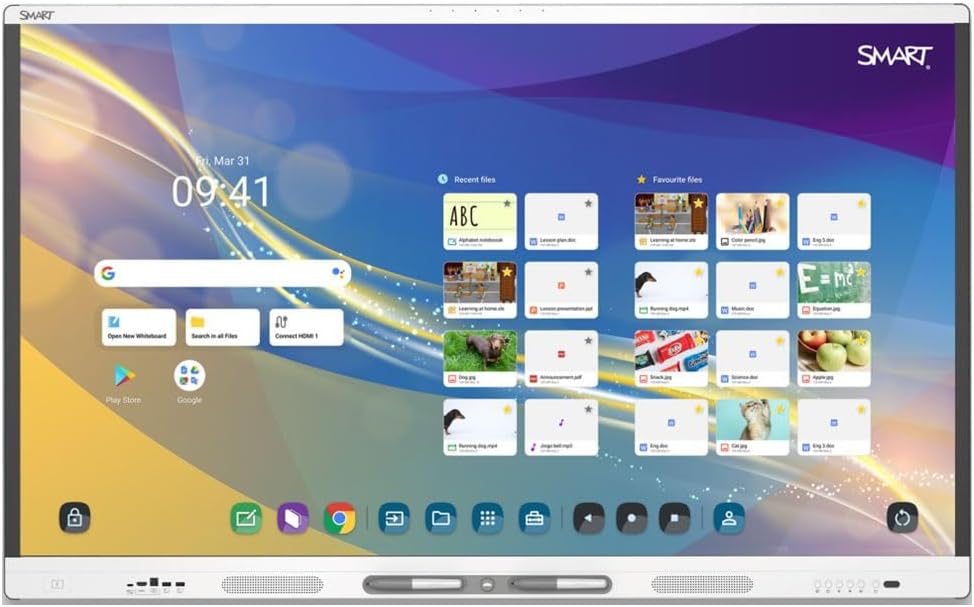
Figure 1: The SMART Board MX286-V5 display showing its interactive home screen with various applications and files.
Тохируулах гарын авлага
1. Савыг задлах
- Carefully open the packaging and remove the display. It is recommended to have at least two people for safe handling due to the size and weight (149.6 pounds).
- Check all contents against the packing list to ensure all accessories are present.
- Ирээдүйд тээвэрлэх эсвэл хадгалахын тулд анхны сав баглаа боодлыг хадгална уу.
2. Mounting/Placement
- Ensure the mounting surface or stand can support the display's weight (149.6 pounds).
- Follow the instructions provided with your specific wall mount or stand for secure installation.
- Place the display in a location with adequate ventilation and away from direct sunlight or heat sources.
3. Захын төхөөрөмжүүдийг холбох
- Эрчим хүч: Цахилгааны кабелийг дэлгэцийн тэжээлийн оролтод, дараа нь газардуулсан цахилгааны залгуурт холбоно.
- HDMI/VGA: Connect external devices (e.g., computers, media players) using HDMI or VGA cables to the corresponding input ports on the display.
- USB: Use the USB ports to connect external storage devices, cameras, or other USB peripherals.
- Сүлжээ: Connect an Ethernet cable for wired network access, or configure Wi-Fi settings after powering on.
Ашиглалтын заавар
1. Асаах/унтраах
- Асаах: Press the power button located on the display's frame. The display will boot up to the Android 13 home screen.
- Унтраах: Press and hold the power button until a power-off menu appears, then select 'Power Off'. Alternatively, a short press will put the display into standby mode.
2. Үндсэн навигаци
- Хүрэх дохио: Use single tap for selection, drag for moving items, pinch-to-zoom for scaling, and swipe for scrolling.
- Үндсэн дэлгэц: The central hub for accessing apps, settings, and input sources.
- Хажуугийн хэрэгслийн самбар: Access common tools like pen, eraser, and screenshot from the floating toolbar on the side of the screen.

Figure 2: The SMART Board MX286-V5 demonstrating its interactive whiteboard feature with numbered elements, ideal for educational activities.
3. Мэдрэгчтэй дэлгэцийн функц
- The HyPr Touch Technology supports multiple touch points, allowing for collaborative interaction.
- Use your finger or the included stylus for precise input.

Figure 3: The SMART Board MX286-V5 showcasing various ready-made activity templates within its software, facilitating quick content creation.
4. Оролтын эх үүсвэрийн сонголт
- From the home screen or the quick settings panel, select the desired input source (e.g., HDMI 1, VGA, Internal Android).
5. Android OS Features
- Access pre-installed applications or download new ones from the Google Play Store.
- Adjust display settings, network connections, and user profiles through the Settings menu.

Figure 4: A user interacting with the SMART Board MX286-V5, demonstrating its large interactive surface and collaborative capabilities.
Засвар үйлчилгээ, арчилгаа
1. Дэлгэц цэвэрлэх
- Turn off and unplug the display before cleaning.
- Зөөлөн, хөвөнгүй даавууг бага зэрэг хэрэглээрэй dampусаар эсвэл зүлгүүргүй дэлгэц цэвэрлэгчээр дүүргэнэ.
- Do not spray liquid directly onto the screen. Avoid using harsh chemicals, alcohol, or ammonia-based cleaners.
2. Ерөнхий тусламж үйлчилгээ
- Keep the display free from dust by regularly wiping the frame and vents.
- Хэт халалтаас сэргийлэхийн тулд дэлгэцийн эргэн тойронд агааржуулалтыг сайтар хангана уу.
- Avoid placing heavy objects on the display or subjecting it to physical shock.
Алдааг олж засварлах
| Асуудал | Боломжит шалтгаан | Шийдэл |
|---|---|---|
| Хүч чадалгүй | Цахилгаан кабель салгагдсан; Цахилгаан залгуурын асуудал | Check power cable connection; Try a different outlet; Ensure power button is pressed. |
| Дэлгэц дээр зураг байхгүй | Incorrect input source; Loose video cable | Select correct input source (HDMI/VGA); Reconnect video cables securely. |
| Мэдрэгчтэй дэлгэц хариу өгөхгүй байна | Software glitch; Calibration needed | Restart the display; Check for firmware updates; Perform touchscreen calibration if available in settings. |
| Дуу байхгүй | Volume too low; Muted; External device audio settings | Increase volume; Unmute display; Check audio output settings on connected device. |
| Wi-Fi холболтын асуудал | Нууц үг буруу; Чиглүүлэгчийн асуудал; Дохионы хөндлөнгийн оролцоо | Verify Wi-Fi password; Restart router; Move display closer to router or reduce interference. |
Техникийн үзүүлэлтүүд
| Онцлог | Тодорхойлолт |
|---|---|
| Бүтээгдэхүүний хэмжээс | 3.5 x 47.2 x 78.03 инч |
| Зүйлийн жин | 149.6 фунт |
| Байнгын дэлгэцийн хэмжээ | 86 инч |
| Харьцаа | 16:9 |
| Шийдвэр | 4K UHD 2160p (3840 x 2160) |
| Дэлгэцийн гадаргуугийн тодорхойлолт | Гялгар |
| Дэлгэцийн технологи | LED арын гэрэлтүүлэг бүхий LCD |
| Гэрэлтүүлэг | 400 нит |
| RAM | 8 ГБ DDR4 SDRAM |
| Үйлдлийн систем | Android 13 |
| Мэдрэгч технологи | HyPr Touch Technology |
| Холболт | USB, HDMI, VGA, Bluetooth |
Баталгаат болон дэмжлэг
For detailed warranty information and technical support, please refer to the official Smart Ink webсайтаас авах эсвэл тэдний хэрэглэгчийн үйлчилгээтэй шууд холбогдоно уу. Баталгаат хугацааны нөхцөл, болзол нь бүс нутаг болон худалдан авсан огнооноос хамаарч өөр өөр байж болно.
Онлайн дэмжлэг: -д зочилно уу Smart Ink Store on Amazon бүтээгдэхүүний мэдээлэл, нөөцийн хувьд.


