Танилцуулга
Thank you for choosing the COLBOR CF5 Portable Fog Machine. This compact and powerful device is designed to create atmospheric effects for various applications, including photography, stage performances, parties, cosplay, streaming, and weddings. With its advanced features like adjustable smoke density, RGB lighting, and flexible design, the CF5 offers precise control and versatility. This manual provides essential information for safe and effective operation, setup, maintenance, and troubleshooting. Please read it thoroughly before using the product.

Figure 1: COLBOR CineFlare CF5 Portable Fog Machine, designed for atmosphere creation.
Аюулгүй байдлын мэдээлэл
Төхөөрөмжийг аюулгүй ажиллуулах, гэмтээх, гэмтээхээс урьдчилан сэргийлэхийн тулд дараах аюулгүй байдлын удирдамжийг дагаж мөрдөнө үү.
- Зөвхөн ашиглах food-grade plant glycerin fog liquid with the CF5. Using other liquids may damage the machine or produce harmful fumes.
- Do not block the air vents or smoke outlet during operation.
- The machine generates heat during operation. Avoid touching the smoke outlet directly to prevent burns.
- Ensure adequate ventilation in the operating area.
- Keep the device away from water and other liquids. Do not operate in wet conditions.
- Төхөөрөмжийг ашиглаагүй үед сэрүүн, хуурай газар хадгална.
- Хүүхэд, тэжээвэр амьтдын гар хүрэхгүй газар хадгална уу.
- Төхөөрөмжийг өөрөө задлах, засах гэж бүү оролдоорой. Үйлчилгээ авахын тулд мэргэшсэн ажилтнуудтай холбоо барина уу.

Figure 2: The CF5 uses food-grade plant glycerin, ensuring safe and odorless fog production.
Багцын агуулга
Багцыг нээхдээ доор жагсаасан бүх зүйл байгаа бөгөөд сайн нөхцөлд байгаа эсэхийг шалгаарай.
- COLBOR CF5 Portable Fog Machine
- Алсын удирдлага
- Уян хоолой
- Хамар бүрхэвч
- Various Adapters/Nozzles
- USB цэнэглэгч кабель
- Зөөврийн цүнх
- Fog Liquid (sampле лонх)
- Хэрэглэгчийн гарын авлага (энэ баримт бичиг)

Figure 3: All components included with the COLBOR CF5 Portable Fog Machine.
Бүтээгдэхүүн дууссанview
The COLBOR CF5 features a compact and ergonomic design with key components for versatile operation.
- Adjustable Body: The main body can be adjusted up to 60 degrees, allowing precise direction of smoke flow for various angles, including low-angle effects.
- Утааны гарц: Where the fog is emitted. Equipped with a magnetic RGB light ring.
- Хяналтын самбар: Features buttons for power, density adjustment, fan speed, and cycle settings. Includes a display screen for current settings.
- Fog Liquid Chamber: 12 ml capacity for fog liquid.
- USB-C порт: Дотоод зайг цэнэглэхэд зориулагдсан.
- Magnetic Fan: Built-in fan with adjustable speed (3 settings) to shape smoke flow.

Figure 4: The CF5's foldable body allows for flexible smoke direction.

Figure 5: Integrated RGB light and adjustable fan for enhanced effects.
Тохиргоо
- Төхөөрөмжийг цэнэглэх: Before first use, fully charge the COLBOR CF5 using the provided USB-C cable. The battery indicator on the display will show charging status.
- Fill Fog Liquid:
- Locate the fog liquid chamber.
- Carefully pour the food-grade plant glycerin fog liquid into the chamber, ensuring not to overfill the 12 ml capacity.
- Securely close the chamber cap.
- Дагалдах хэрэгслийг хавсаргах (заавал биш):
- For broader smoke dispersion or specific effects, attach the flexible tube or desired nozzle adapter to the smoke outlet.
- The nozzle cover can be used for specific directional control.

Figure 6: External accessories for varied smoke dispersion.
Ашиглалтын заавар
- Асаах/унтраах: Төхөөрөмжийг асаах эсвэл унтраахын тулд удирдлагын самбар дээрх асаах товчийг дараад барина уу.
- Adjust Smoke Density:
- The CF5 offers 25 levels of smoke density adjustment.
- Use the '+' and '-' buttons on the control panel to increase or decrease the smoke output intensity.
- The current density level will be displayed on the screen.
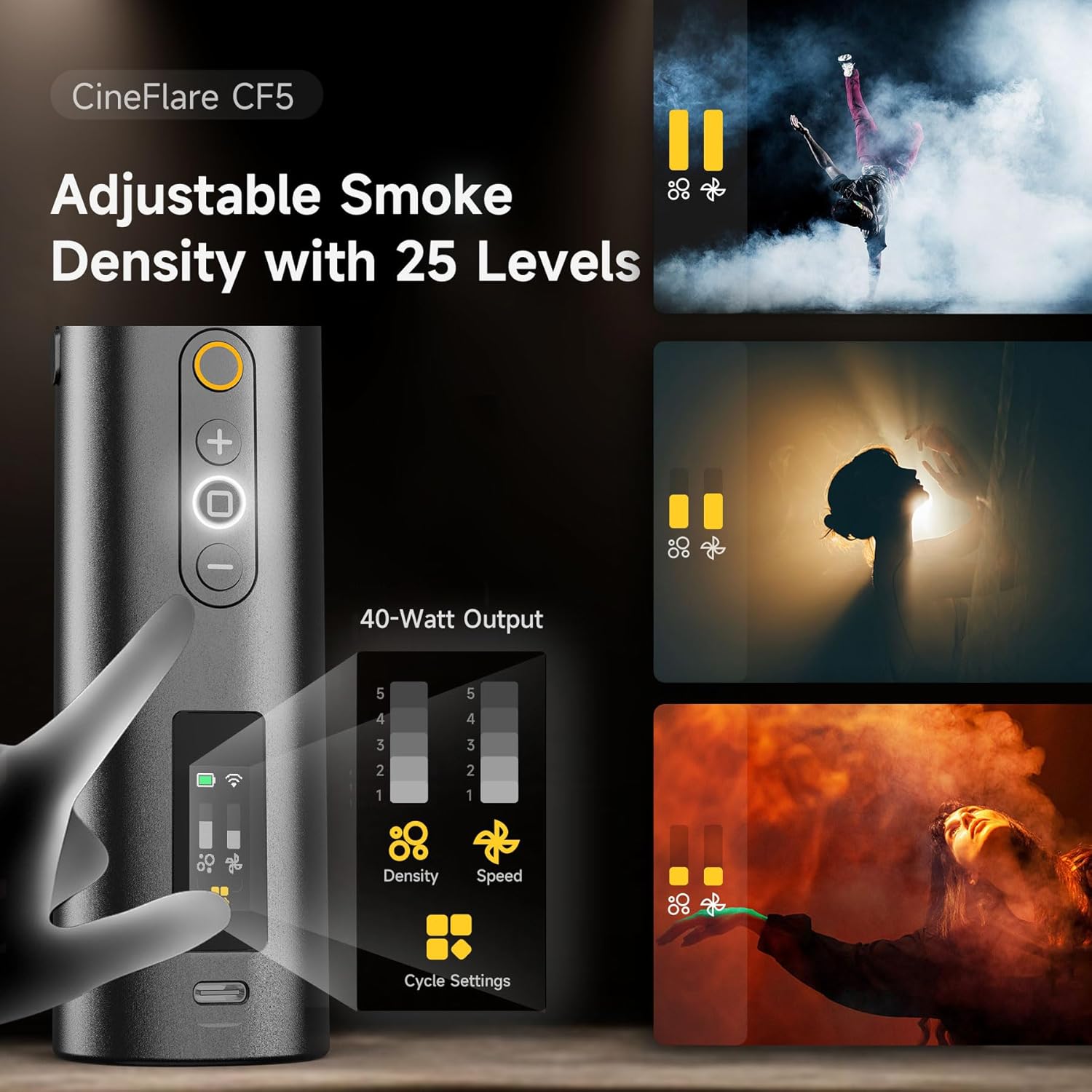
Figure 7: Control panel for adjusting smoke density and fan speed.
- Сэнсний хурдыг тохируулах:
- The built-in magnetic fan has 3 adjustable speed settings.
- Use the dedicated fan speed button (if available, or cycle through settings using a multi-function button) to change the fan speed. This affects how the smoke disperses.
- Control RGB Light:
- The 360-degree RGB light ring can add color to your smoke effects.
- Refer to the on-screen menu or dedicated light button to cycle through colors or adjust brightness.
- Алсын удирдлагатай ажиллагаа:
- The included remote control allows wireless operation up to 10 meters.
- Use the remote to power on/off, adjust smoke density, and control other settings from a distance.
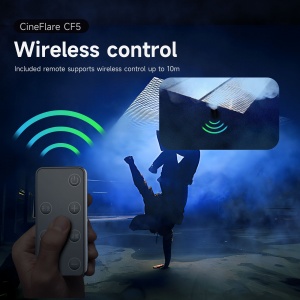
Зураг 8: Тохиромжтой ажиллахад зориулсан утасгүй алсын удирдлага.
- Custom Smoke Settings:
- The CF5 supports custom settings for continuous smoke duration, interval timing, and the number of smoke bursts.
- Access these settings via the control panel's menu or dedicated cycle settings button.
- The device can maintain continuous maximum smoke output for up to 10 minutes.

Figure 9: Advanced settings for precise smoke control.
Засвар үйлчилгээ
- Цэвэрлэгээ: Regularly wipe the exterior of the machine with a soft, dry cloth. Do not use abrasive cleaners or solvents.
- Fog Liquid Chamber: If the machine will not be used for an extended period, empty the fog liquid chamber and run the machine briefly to clear any remaining liquid from the internal pump and heater.
- Хадгалах: Store the COLBOR CF5 in its carrying case in a cool, dry place, away from direct sunlight and extreme temperatures.
Алдааг олж засварлах
| Асуудал | Боломжит шалтгаан | Шийдэл |
|---|---|---|
| Утаа гарахгүй |
|
|
| Утааны гаралт сул байна |
|
|
| Алсын удирдлага ажиллахгүй байна |
|
|
Үзүүлэлтүүд
| Онцлог | Дэлгэрэнгүй |
|---|---|
| Загвар | CF5 |
| Гаралтын хүч | 40 ватт |
| Fog Liquid Capacity | 12 мл |
| Smoke Density Levels | 25 түвшин |
| Фен хурдны тохиргоо | 3 түвшин |
| Adjustable Body Angle | 60 градус хүртэл |
| Алсын удирдлагын хүрээ | 10 метр хүртэл |
| Зайны төрөл | Лити ион (оруулсан) |
| Зүйлийн жин | 2 фунт |
| Багцын хэмжээ | 11.59 x 5.5 x 3.7 инч |
Баталгаат болон дэмжлэг
COLBOR products are manufactured to high-quality standards. For information regarding warranty coverage, please refer to the warranty card included with your product or visit the official COLBOR webсайт.
For technical support, troubleshooting assistance, or inquiries about replacement parts, please contact COLBOR customer service through their official channels.
- Official COLBOR Webсайт: www.colborlight.com
- Amazon дэлгүүр: Visit the COLBOR Store on Amazon


