1. Танилцуулга
This manual provides detailed instructions for the ACEMIC AT-5 Acoustic Guitar Wireless Microphone System. This system is designed to provide high-fidelity audio transmission for plucked string instruments, offering freedom of movement and clear sound reproduction. It utilizes UHF frequency for stable wireless connectivity and features a flexible gooseneck microphone for precise sound capture.
2. Багцын агуулга
Доор жагсаасан бүх зүйл таны багцад байгаа эсэхийг шалгана уу.
- 1 x ACEMIC AT-5 Wireless Microphone Transmitter (with gooseneck microphone)
- 1 x ACEMIC AT-5 Wireless Receiver (with 6.35mm jack and antenna)
- 1 х USB-C цэнэглэх кабель
- 1 x 3.5mm Audio Jack Adapter
- 5 x Velcro Adhesive Attachments
- 1 x Нэмэлт микрофоны хөөсөн бүрхүүл
- 1 х хэрэглэгчийн гарын авлага
- 1 x үүрэх цүнх
3. Бүтээгдэхүүн дууссанview
The ACEMIC AT-5 system consists of two main components: the Transmitter and the Receiver.
3.1. Transmitter (Microphone Unit)
- Галуун хүзүүний микрофон: Flexible arm for precise positioning.
- Microphone Foam Cover: Reduces plosives and wind noise.
- Цахилгаан товч: For turning the unit on/off.
- Цэнэглэх порт (USB-C): Дотоод зайг цэнэглэхэд зориулагдсан.
- IR мэдрэгч: For automatic pairing with the receiver.
3.2. Хүлээн авагч
- 6.35 мм аудио залгуур: Холбогддог amplifiers, mixers, or PA systems.
- Антен: For stable signal reception.
- Цахилгаан товч: For turning the unit on/off.
- Цэнэглэх порт (USB-C): Дотоод зайг цэнэглэхэд зориулагдсан.
- Дэлгэц: Сувгийн мэдээллийг харуулна.
- Суваг солих товчлуур: For manual channel selection.
- IR мэдрэгч: For automatic pairing with the transmitter.

4. Тохируулах заавар
Follow these steps to set up your ACEMIC AT-5 wireless microphone system:
4.1. Нэгжийг цэнэглэх
- Connect the USB-C charging cable to the charging ports on both the transmitter and receiver units.
- Кабелийн нөгөө үзүүрийг USB цахилгаан адаптер (дагалдахгүй) эсвэл тэжээлтэй USB порт руу залгаарай.
- The charging indicator will illuminate. A full charge typically takes 2.5 to 3 hours.
- Once fully charged, the indicator light will change or turn off, depending on the unit.

4.2. Attaching the Transmitter to Your Instrument
- Select a suitable location on your acoustic guitar, typically near the sound hole, where the transmitter can be securely attached without obstructing your playing.
- Peel the backing from one of the Velcro adhesive attachments.
- Apply the adhesive side firmly to the chosen spot on your guitar.
- Attach the transmitter unit to the Velcro. Ensure it is secure.
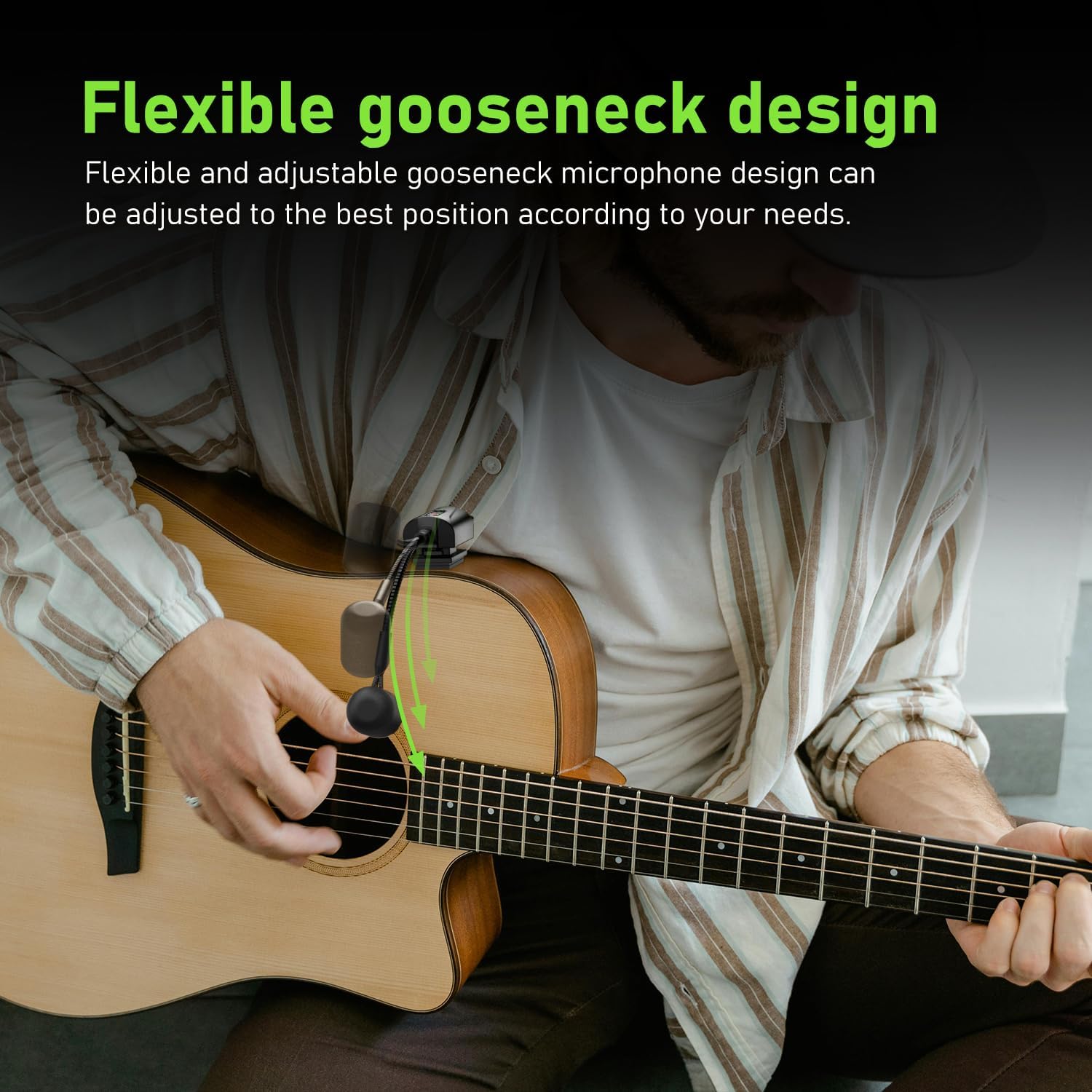
- Adjust the flexible gooseneck microphone to point towards the sound hole or strings for optimal sound capture.

4.3. Хүлээн авагчийг холбох
- Ensure the antenna on the receiver is correctly installed and extended.
- Plug the 6.35mm audio jack of the receiver directly into the input of your amplifier, PA system, or audio mixer.
- If your device requires a 3.5mm input, use the provided 3.5mm audio jack adapter.
4.4. Нэгжүүдийг хослуулах
The ACEMIC AT-5 system features automatic infrared pairing:
- Power on both the transmitter and the receiver units.
- Place the IR sensors of the transmitter and receiver close to each other (within a few inches).
- The units will automatically pair. A successful connection is usually indicated by a stable light on both units.

5. Үйл ажиллагаа
5.1. Асаах/унтраах
Press and hold the power button on each unit to turn it on or off.
5.2. Сувгийн сонголт
The system offers 16 preset groups of adjustable channels to mitigate potential interference. If you experience interference, you can manually switch channels on the receiver using the channel switch button. Ensure that the transmitter and receiver are on the same channel for proper operation.

5.3. Микрофоны байршил
Adjust the flexible gooseneck microphone to achieve the desired sound. Experiment with different angles and distances from the sound hole or strings to find the optimal position for your instrument and playing style. The built-in high-sensitivity condenser microphone is designed to capture clear and realistic audio.

5.4. Утасгүй дамжуулалт
The ACEMIC AT-5 system uses UHF frequency for stable transmission up to 130 feet (approximately 40 meters) in open areas. Performance may vary depending on environmental factors and obstacles.

6. Засвар үйлчилгээ
6.1. Цэвэрлэгээ
Wipe the units with a soft, dry cloth. Do not use liquid cleaners or solvents, as they may damage the finish or internal components.
6.2. Хадгалах
When not in use, store the ACEMIC AT-5 system in its carrying bag in a cool, dry place, away from direct sunlight and extreme temperatures. Ensure the units are turned off before storage.
6.3. Зайны арчилгаа
To prolong battery life, avoid completely discharging the units regularly. Recharge them periodically, even if not in frequent use.
7. Алдаа засах
If you encounter issues with your ACEMIC AT-5 system, refer to the following common problems and solutions:
| Асуудал | Боломжит шалтгаан | Шийдэл |
|---|---|---|
| Дууны гаралт байхгүй | Цахилгаангүй төхөөрөмжүүд Хослуулаагүй нэгжүүд Receiver not connected to audio input Receiver antenna not installed/extended Батерей бага | Дамжуулагч болон хүлээн авагч хоёулаа асаалттай байгаа эсэхийг шалгаарай. Re-pair the units using the infrared sensors. Verify the receiver is securely plugged into your ampөргөгч/холигч. Ensure the receiver antenna is properly installed and extended. Хоёр төхөөрөмжийг бүрэн цэнэглэ. |
| Хөндлөнгийн оролцоо эсвэл статик чимээ | Ойролцоох электрон төхөөрөмжүүд Other wireless signals Obstacles between units | Хөндлөнгийн нөлөөллийн болзошгүй эх үүсвэрээс холдох. Change the operating channel on the receiver. Ensure a clear line of sight between the transmitter and receiver. |
| Poor sound quality (e.g., muffled, weak) | Incorrect microphone placement Микрофон дууны эх үүсвэрээс хэт хол байна Батерей бага | Adjust the gooseneck microphone closer to the sound hole or strings. Ensure units are fully charged. |
| Богино дамжуулалтын хүрээ | Саадыг хаах дохио Байгаль орчны хүчин зүйлүүд Батерей бага | Minimize obstacles between transmitter and receiver. Ensure units are fully charged. |
| Transmitter not attaching securely | Velcro adhesive worn out | Use a fresh Velcro adhesive attachment. (5 spare pieces are included). |
8. Техникийн үзүүлэлтүүд
| Онцлог | Дэлгэрэнгүй |
|---|---|
| Загварын нэр | AT-5 |
| Брэнд | ACEMIC |
| Холболтын технологи | UHF |
| Микрофоны хэлбэр хүчин зүйл | Галуун хүзүү |
| Сувгийн тоо | 16 |
| Эрчим хүчний эх үүсвэр | Батерейгаар ажилладаг (2 лити полимер батерей шаардлагатай) |
| Ашиглалтын хугацаа | 6 цаг |
| Цэнэглэх хугацаа | 2.5-3 цаг |
| Дамжуулах хүрээ | Up to 130 feet (approx. 40 meters) in open areas |
| Sampling Rate | 48 кГц |
| Хоцролт | <6 мс |
| Зүйлийн жин | 0.46 килограмм (1.01 фунт) |
| Туйлын загвар | Нэг чиглэлтэй |
| Холбогч төрөл | 6.35mm Jack (with 3.5mm adapter included) |
| UPC | 797417770397 |
9. Баталгаат хугацаа ба дэмжлэг
For warranty information and technical support, please refer to the documentation provided with your purchase or contact the seller/manufacturer directly. Specific warranty terms may vary by region and retailer.


