Танилцуулга
Welcome to your JLab Go Lux ANC Wireless Headphones. This manual provides detailed instructions to help you get the most out of your new headphones, covering setup, operation, maintenance, and troubleshooting.
Хайрцагт юу байна
- JLab Go Lux ANC Wireless Headphones
- USB-C цэнэглэгч кабель

Image: JLab Go Lux ANC Headphones and included USB-C charging cable.
Бүтээгдэхүүн дууссанview
Familiarize yourself with the key components and controls of your JLab Go Lux ANC Wireless Headphones.

Зураг: Ойролцоогоор view of the right earcup, highlighting the power button, volume controls, and ANC/Be Aware mode button.
Гол онцлогууд:
- Холимог идэвхтэй дуу чимээг цуцлах (ANC): Reduces external distractions by up to 30 dB.
- Be Aware Mode: Аудио сонсож байхдаа хүрээлэн буй орчныг сонсох боломжийг танд олгоно.
- Cloud Foam Comfort: Ergonomically shaped Form-Fit Earcups with 1-inch Cloud Foam cushions and adjustable hinges for extended comfort.
- JLab App Customization: Personalize ANC/Be Aware settings, touch controls, and sound preferences.
- Crystal Clear дуудлага: Equipped with noise-canceling microphones for clear communication.
- Bluetooth олон цэг: Хоёр төхөөрөмжид нэгэн зэрэг холбогдох.
- Wireless Share Mode: Share audio wirelessly between two Lux headphones.
- Google Fast Pair & Microsoft Swift Pair: Effortless pairing with Android and Windows devices.
- Google Find My Device: Locate your headphones if misplaced.
- Эвхэгддэг загвар: Rotating earcups for compact storage and portability.
Тохиргоо
1. Анхны цэнэглэлт
Before first use, fully charge your headphones using the provided USB-C cable. The LED indicator will show charging status.
2. Асаах/унтраах
- Асаах: LED заагч асах хүртэл асаах товчийг удаан дар.
- Унтраах: LED заагч унтрах хүртэл асаах товчийг удаан дар.
3. Bluetooth хослол
- Turn on your JLab Go Lux ANC headphones.
- The headphones will automatically enter pairing mode (LED will flash blue/red).
- On your device (smartphone, laptop, etc.), open Bluetooth settings and select "JLab Go Lux ANC" from the list of available devices.
- Холбогдсоны дараа LED нь цэнхэр өнгөтэй болно.
Google Fast Pair & Microsoft Swift Pair: For supported Android and Windows 10/11 devices, simply turn on your headphones near the device, and a pop-up notification will prompt you to connect with a single click.
4. JLab аппликейшны тохируулга
Download the JLab App from the App Store or Google Play Store to unlock full customization options for your headphones.
- ANC/Мэдлэгтэй байх тохиргоог өөрчлөх.
- Adjust touch controls.
- Fine-tune sound with the equalizer (JLab Signature, Balance, Bass Boost presets available).
- Enable Safe Hearing with volume limits.
- Програм хангамжийн шинэчлэлтийг хүлээн авах.

Image: The JLab App interface on a smartphone, demonstrating sound and noise control customization options.
Ашиглалтын заавар
1. Active Noise Cancelling (ANC) & Be Aware Mode
Toggle between ANC, Be Aware, and ANC Off modes using the dedicated button on the earcup.
- Hybrid ANC: Eliminates external distractions for an immersive audio experience.
- Be Aware Mode: Энэ нь хүрээлэн буй орчны дуу чимээг нэвтрүүлэх боломжийг олгож, таныг хүрээлэн буй орчныг тань мэддэг байх болно.

Image: A person wearing the headphones, demonstrating the use of ANC or Be Aware mode in a public environment.
2. Дуудлага хийх функцууд
The built-in noise-canceling microphones ensure clear calls.
- Дуудлагад хариулах/дуусах: Олон үйлдэлт товчлуурыг нэг удаа дарна уу.
- Дуудлагаас татгалзах: Олон үйлдэлт товчлуурыг удаан дар.
- Дуут туслахыг идэвхжүүлэх: Олон үйлдэлт товчийг хоёр удаа дарна уу.

Image: A person engaged in a phone call while wearing JLab Go Lux ANC headphones, emphasizing the clear call feature.
3. Хөгжим тоглуулах
- Тоглуулах/түр зогсоох: Олон үйлдэлт товчлуурыг нэг удаа дарна уу.
- Дууг нэмэгдүүлэх: "+" товчийг богино хугацаанд дарна уу.
- Дууг багасгах: '-' товчийг богино хугацаанд дарна уу.
- Дараагийн дуу: '+' товчийг удаан дар.
- Өмнөх бичлэг: '-' товчийг удаан дар.
4. Bluetooth Multipoint
Connect your headphones to two devices simultaneously. For example, connect to your laptop for work calls and your phone for music. The headphones will intelligently switch between devices.
5. Wireless Share Mode
Share your audio with another pair of JLab Lux headphones. Refer to the JLab App or JLab support for detailed instructions on activating Wireless Share Mode.
6. Google Find My Device
If you misplace your headphones, use the Google Find My Device feature to locate them. Ensure this feature is enabled and configured on your connected Android device.

Image: A person using the Google Find My Device app on a smartphone to locate their JLab headphones.
Тайтгарал, тохиромжтой
The JLab Go Lux ANC headphones are designed for comfort during extended use.
- Form-Fit Earcups: Ergonomically shaped to the natural outline of the ear.
- Cloud Foam Cushions: 1-inch thick cushions provide plush comfort.
- Тохируулах нугас: Customize the fit for various head sizes and shapes.

Image: A person wearing JLab Go Lux ANC headphones, showcasing the comfortable Cloud Foam earcups.
Цэнэглэх ба батерейны ашиглалтын хугацаа
Your JLab Go Lux ANC headphones offer extended battery life.
- Зайны хугацаа: Up to 70+ hours of playtime (40+ hours with ANC on).
- Цэнэглэж байна: Use the included USB-C cable to charge. A full charge typically takes a few hours.
- LED үзүүлэлт: The LED light on the earcup indicates charging status and battery level.
Засвар үйлчилгээ
- Clean headphones with a soft, damp даавуу. Химийн хүчтэй бодисоос зайлсхий.
- Ашиглаагүй үед сэрүүн, хуурай газар хадгална.
- Хэт их температур, чийгэнд бүү өрт.
- The headphones are not water resistant. Avoid contact with liquids.
- The foldable design with rotating earcups allows for compact storage.
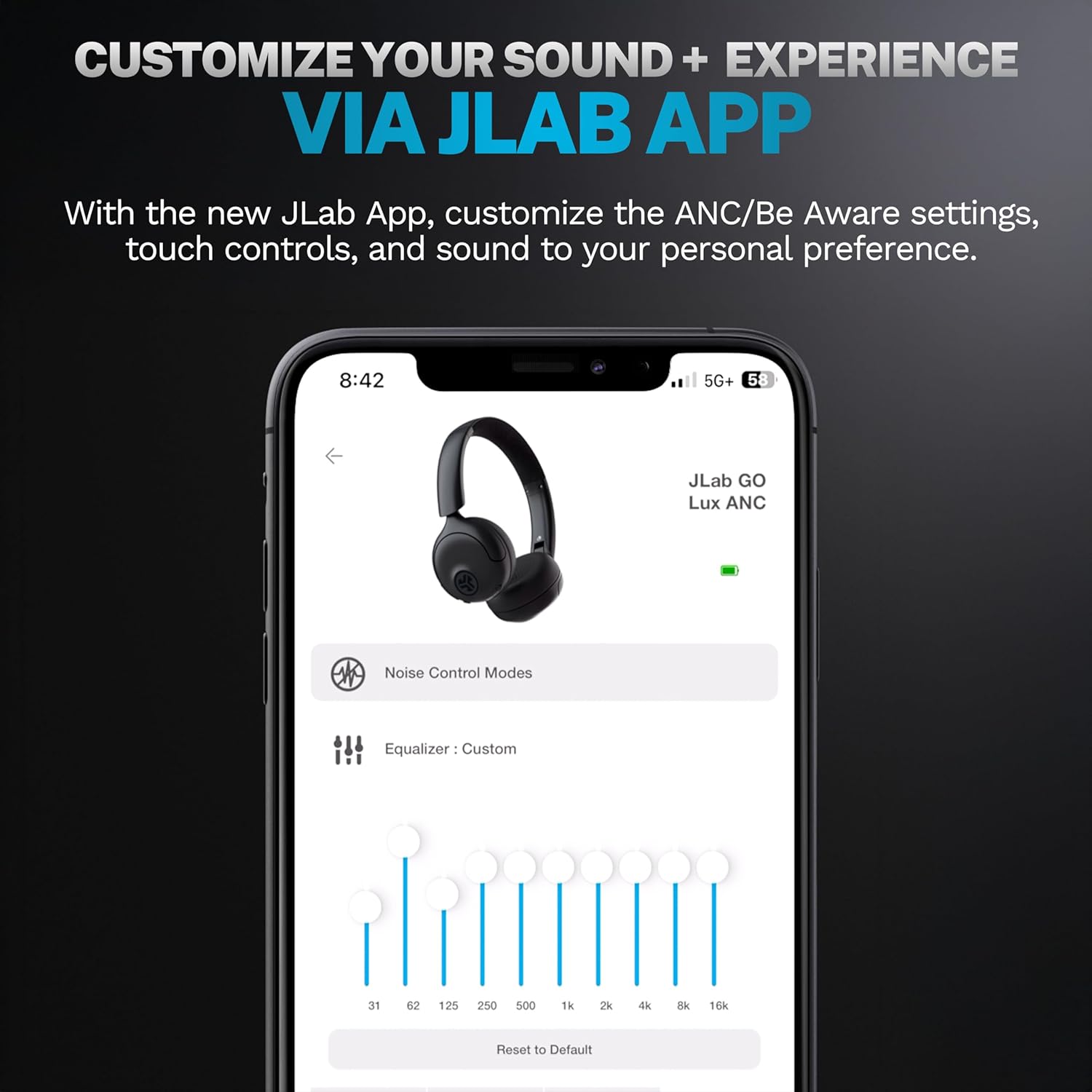
Image: JLab Go Lux ANC headphones in their folded position, demonstrating portability.
Алдааг олж засварлах
| Асуудал | Шийдэл |
|---|---|
| Чихэвч асахгүй байна | Ensure headphones are charged. Press and hold the power button for 3-5 seconds. |
| Төхөөрөмжтэй хослуулах боломжгүй | Make sure Bluetooth is enabled on your device. Ensure headphones are in pairing mode (flashing blue/red LED). Forget the device in your Bluetooth settings and re-pair. |
| Дуугүй эсвэл дуу багатай | Чихэвч болон холбогдсон төхөөрөмжийнхөө дууны түвшинг шалгана уу. Чихэвч зөв холбогдсон эсэхийг шалгаарай. |
| АН үр дүнтэй ажиллахгүй байна | Ensure ANC mode is activated. Adjust headphone fit to ensure a good seal around your ears. |
| Дуудлагын чанарын асуудал | Ensure microphones are not obstructed. Check your device's connection and signal strength. |
Үзүүлэлтүүд
| Онцлог | Дэлгэрэнгүй |
|---|---|
| Загварын нэр | HBGOLUXANCMVE20WEB |
| Холболтын технологи | Утасгүй (Bluetooth) |
| Bluetooth хувилбар | 5.0 |
| Чихэвчний хэлбэр | Чихэн дээр |
| Дуу чимээний хяналтын онцлогууд | Hybrid Active Noise Canceling, Be Aware Mode |
| Аудио драйверын төрөл | Динамик драйвер (40мм) |
| Давтамжийн хариу үйлдэл | 20 Гц - 20 КГц |
| Мэдрэмж | 104 дБ |
| Зайны ашиглалт | Up to 70+ hours (40+ hours with ANC) |
| Хяналтын арга | Хүрнэ үү, Програмын удирдлага |
| Зүйлийн жин | 10.6 унц (0.3 килограмм) |
| Бүтээгдэхүүний хэмжээс | 2.95 x 6.1 x 7.48 инч |
| Усны эсэргүүцлийн түвшин | Усанд тэсвэртэй биш |
Баталгаат болон дэмжлэг
Your JLab Go Lux ANC Wireless Headphones come with a JLab 2 Year Warranty.
For detailed warranty information, product support, or to contact customer service, please visit the official JLab webсайтаас эсвэл таны бүтээгдэхүүнд багтсан баталгаат картаас лавлана уу.
Та мөн зочилж болно Амазон дээрх JLab дэлгүүр Дэлгэрэнгүй мэдээлэл болон дагалдах хэрэгслийн талаар мэдээлэл аваарай.


