Танилцуулга
This user manual provides detailed instructions for the Reacher R9BT-RA-DE, a versatile 4-in-1 device designed for convenience and functionality. It integrates a 15W magnetic wireless charger, a digital alarm clock with natural sound options, an FM radio with 40 presets, and a 10W Bluetooth 5.3 speaker. Please read this manual thoroughly to ensure proper setup, operation, and maintenance of your device.

Image: The Reacher R9BT-RA-DE highlighting its four core functionalities: wireless charging, Bluetooth speaker, FM radio, and alarm clock, presented as a stylish clock.
Бүтээгдэхүүн дууссанview
The Reacher R9BT-RA-DE is engineered to simplify your daily routine by combining multiple essential functions into one elegant unit. Its design features a grey textile body with a wood-look top panel, suitable for various interior styles.
Гол онцлогууд:
- 15Вт-ын соронзон утасгүй цэнэглэлт: Fast and secure charging for compatible smartphones, especially iPhone 12-16 series with magnetic alignment.
- Дижитал сэрүүлэгтэй цаг: Features a dimmable LED display (0-100%), 12/24-hour format, 6 natural alarm sounds (bird, sea, beep, wind chimes, piano, radio), and a 9-minute snooze function.
- FM радио: Stable reception (87.5-108 MHz) with an extendable antenna, supporting up to 40 preset stations and both manual and automatic tuning.
- Bluetooth 5.3 чанга яригч: 10W stereo speakers deliver 360° sound, offering stable connection up to 10 meters for streaming music and podcasts. Automatic time synchronization upon phone connection.
- Хэрэглэгчдэд ээлтэй дизайн: Intuitive button layout on the top panel and rotary controls on the back for volume and display brightness.

Image: The Reacher R9BT-RA-DE in operation, showing a smartphone wirelessly charging on its magnetic pad and the digital clock display.
Тохиргоо
1. Савлах, байрлуулах:
- Төхөөрөмжийг сав баглаа боодолоос нь болгоомжтой авч хая.
- Place the device on a stable, flat surface, such as a bedside table or office desk.
- Төхөөрөмжийн эргэн тойронд хангалттай агааржуулалтыг хангах.
2. Цахилгааны холболт:
- Connect the provided power cable to the DC input port on the back of the device.
- Цахилгааны кабелийн нөгөө үзүүрийг стандарт залгуурт холбоно.
- Дэлгэц асах бөгөөд энэ нь төхөөрөмж асаалттай байгааг илтгэнэ.
3. Анхны цагийн тохиргоо:
- Upon initial power-on, the time may need to be set manually or will synchronize automatically when connected via Bluetooth to a smartphone.
- Refer to the "Alarm Clock and Display" section for manual time adjustment instructions.
Ашиглалтын заавар
1. Утасгүй цэнэглэх:
- Place your Qi-compatible smartphone (e.g., iPhone 12-16 series) on the magnetic charging pad located on the top surface of the device.
- The strong magnet will automatically align your phone for optimal charging.
- Charging will begin automatically. The device supports up to 15W fast charging.
- Ensure your phone case is compatible with MagSafe and is not thicker than 8mm for efficient charging.
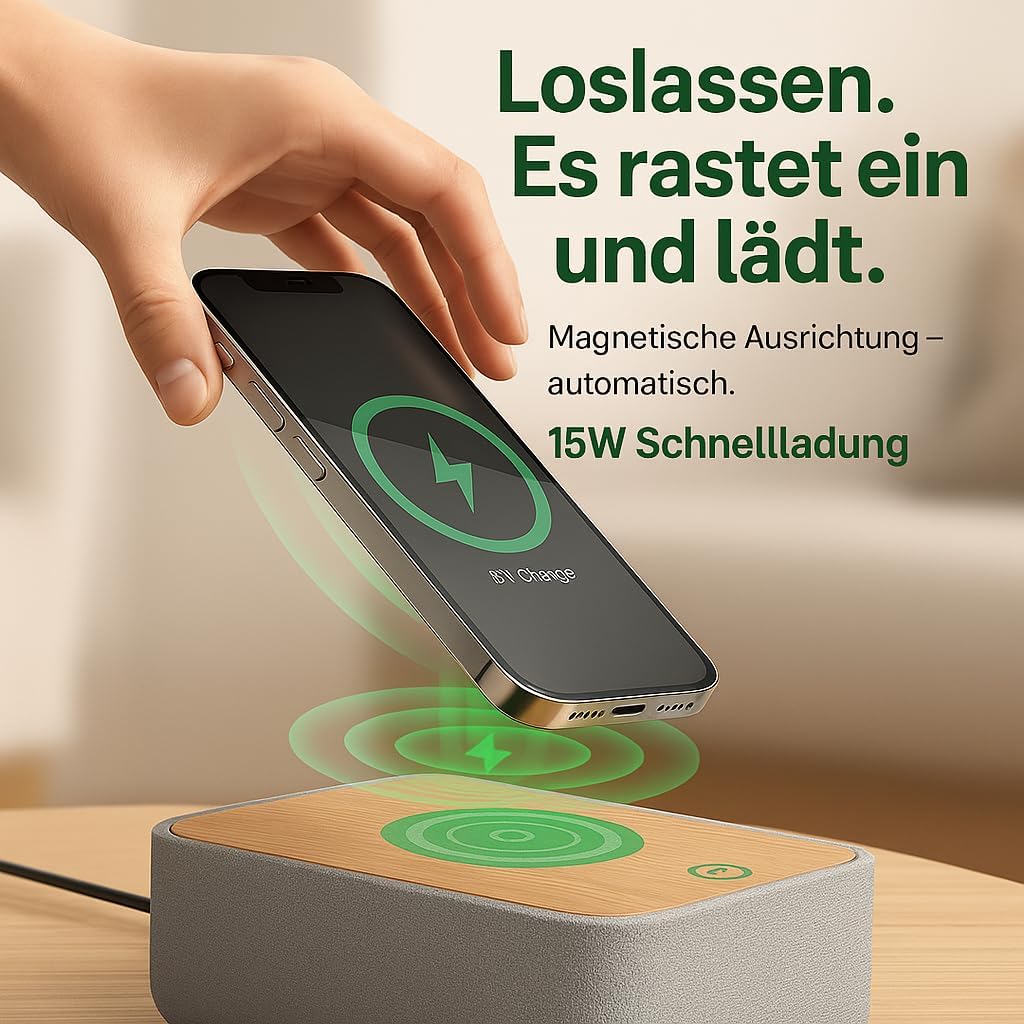
Image: Illustrates the magnetic alignment feature for wireless charging, showing a phone being placed on the charging pad.

Image: Demonstrates the 15W fast wireless charging capability of the device.
2. FM радио:
- Extend the antenna located at the back of the device for optimal reception.
- дээр дарна уу FM FM радио горимд шилжихийн тулд товчлуурыг дарна уу.
- Автомат тааруулах: -г удаан дар Сканнердах button (or similar, refer to device buttons) to automatically scan and save available stations (up to 40 presets).
- Гараар тааруулах: -г ашиглана уу Ая +/- buttons (or rotary knob) to manually adjust the frequency (87.5-108 MHz).
- Урьдчилсан тохиргоог сонгох: -г ашиглана уу Preset +/- Хадгалсан станцуудаар шилжих товчлуурууд.
- Adjust the volume using the rotary knob on the back of the device.

Image: Visual guide to the FM radio features, showing options for manual and automatic tuning, and the capacity for 40 preset stations.
3. Bluetooth Speaker:
- дээр дарна уу Bluetooth button to enter Bluetooth pairing mode. The Bluetooth icon on the display will flash.
- On your smartphone or other Bluetooth-enabled device, search for "R9BT-RA-DE" (or similar device name) in the Bluetooth settings.
- Select the device to pair. Once connected, the Bluetooth icon will stop flashing and remain solid.
- You can now stream audio from your connected device.
- The device features 10W stereo speakers for 360° sound and Bluetooth 5.3 for stable connection up to 10 meters.
- When connected, the device may automatically synchronize its time with your phone.
- Adjust the volume using the rotary knob on the back of the device (30 volume levels available).
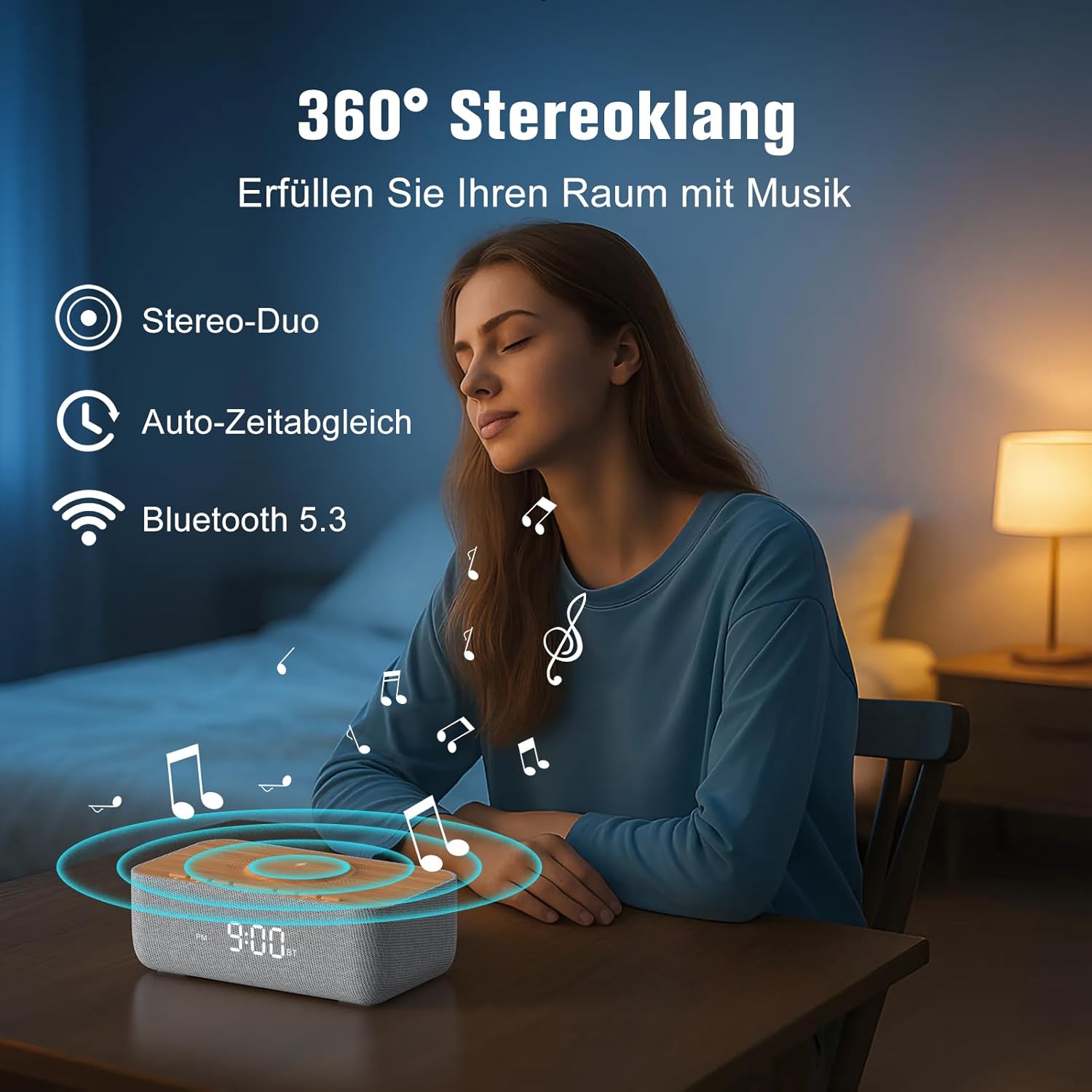
Image: Depicts the device's 360-degree stereo sound capability, Bluetooth 5.3 connectivity, and automatic time synchronization.
4. Alarm Clock and Display:
- Цагийг тохируулах: дээр дарна уу Цагийн тохиргоо товч. -г ашиглана уу +/- buttons to adjust hours and minutes. Press Цагийн тохиргоо дахин баталгаажуулна уу.
- 12/24 цагийн формат: дээр дарна уу 12/24 цаг 12 цагийн (AM/PM заагчтай) болон 24 цагийн форматын хооронд шилжих товчийг дарна уу.
- Сэрүүлгийг тохируулах: дээр дарна уу Сэрүүлэг товч. Ашиглах +/- Сэрүүлгийн цагийг тохируулахын тулд дарна уу. Сэрүүлэг again. Then, use +/- to select one of the 6 alarm tones (bird, sea, beep, wind chimes, piano, or FM radio). Press Сэрүүлэг баталгаажуулах.
- Сэрүүлгийг идэвхжүүлэх/идэвхгүй болгох: дээр дарна уу Сэрүүлэг асаах/унтраах button to toggle the alarm. An alarm icon will appear on the display when active.
- Залгах функц: Сэрүүлэг дуугарахад товчийг дарна уу Түр хойшлуулах button (usually a large button on top) to temporarily silence it for 9 minutes.
- Сэрүүлгийг зогсоох: To turn off the alarm for the day, press any button other than Snooze.
- Дэлгэцийн тод байдал: Use the rotary knob on the back of the device to adjust the LED display brightness from 0% (off) to 100%.

Image: Illustrates the 0-100% dimmable LED display, showing how the brightness can be adjusted.
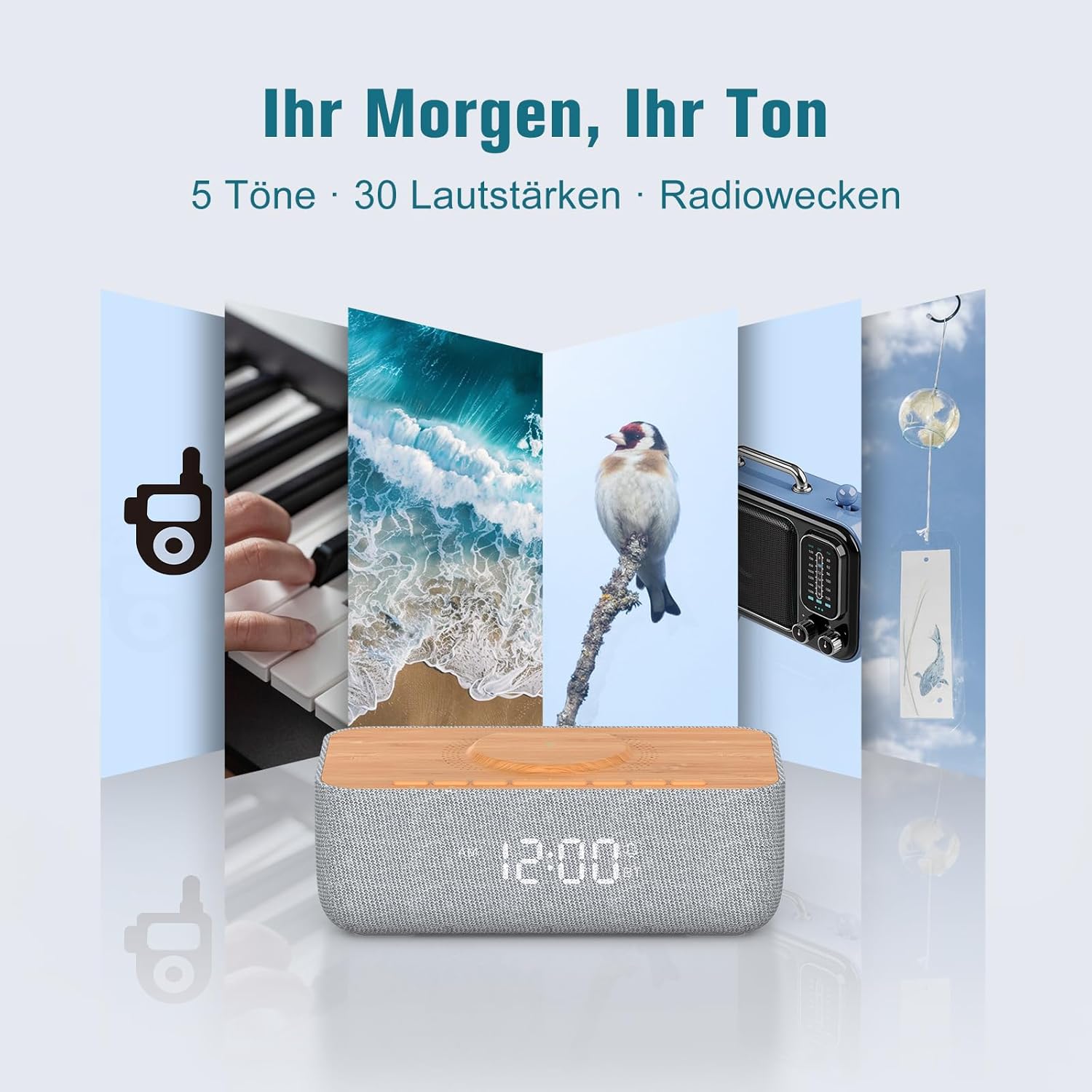
Image: Displays the variety of alarm tones, including natural sounds and FM radio, available on the device.
Засвар үйлчилгээ
- Цэвэрлэгээ: Use a soft, dry cloth to wipe the device. Do not use liquid cleaners or abrasive materials.
- Хадгалах: If storing the device for an extended period, unplug it from the power source and store it in a cool, dry place.
- Уснаас зайлсхийх: This device is for indoor use only and is not waterproof. Keep it away from water and high humidity.
- Эрчим хүчний хангамж: Зөвхөн нийлүүлсэн тэжээлийн адаптер эсвэл баталгаажуулсан түүнтэй адилтгах төхөөрөмжийг ашиглана уу.
Алдааг олж засварлах
| Асуудал | Боломжит шалтгаан | Шийдэл |
|---|---|---|
| Төхөөрөмж асахгүй байна. | Цахилгааны кабель холбогдоогүй эсвэл залгуур ажиллахгүй байна. | Ensure the power cable is securely connected to both the device and a functional power outlet. |
| Утасгүй цэнэглэгч ажиллахгүй байна. | Phone not Qi-compatible, misaligned, or phone case too thick. | Ensure your phone supports Qi wireless charging. Realign the phone on the charging pad. Remove thick phone cases (over 8mm) or non-MagSafe cases. |
| FM радио хүлээн авах чадвар муу. | Antenna not extended or environmental interference. | Fully extend the FM antenna. Try repositioning the device or antenna for better signal. |
| Bluetooth холбогдоогүй байна. | Төхөөрөмж хослуулах горимд байхгүй, хамрах хүрээнээс гадуур эсвэл өөр төхөөрөмжтэй аль хэдийн холбогдсон байна. | Ensure the device is in Bluetooth pairing mode (flashing icon). Move your phone closer. Disconnect from other Bluetooth devices. |
| Alarm volume too low/high. | Volume not adjusted correctly. | Adjust the volume using the rotary knob on the back of the device. Note that some alarm tones may have a gradual volume increase. |
| Дэлгэц хэт тод/бүдэг байна. | Гэрэлтүүлгийн тохиргоог тохируулах шаардлагатай. | Use the rotary knob on the back of the device to adjust the display brightness. |
Үзүүлэлтүүд
| Брэнд | RACHER |
| Загварын дугаар | R9BT-RA-DE |
| Өнгө | Саарал / Бор |
| Бүтээгдэхүүний хэмжээ (L x W x H) | 25 x 12.5 x 8.05 см |
| Зүйлийн жин | 700 грамм |
| Утасгүй цэнэглэх гаралт | 15 Вт хүртэл |
| Утасгүй цэнэглэх нийцтэй байдал | Qi-compatible smartphones, iPhone 12-16 series (magnetic alignment) |
| FM радио давтамжийн хүрээ | 87.5 - 108 МГц |
| FM радиогийн урьдчилсан тохиргоо | 40 хүртэлх станц |
| Bluetooth хувилбар | 5.3 |
| Bluetooth хүрээ | 10 метр хүртэл |
| Чанга яригчийн гаралт | 10W стерео |
| Дэлгэцийн төрөл | Дижитал LED |
| Дэлгэцийн тод байдал | 0-100% Dimmable |
| Сэрүүлгийн ая | 6 (Bird, Sea, Beep, Wind Chimes, Piano, FM Radio) |
| Түр хойшлуулах хугацаа | 9 минут |
| Эрчим хүчний эх үүсвэр | Цахилгаан кабель |
| Хүрээний материал | Wood (top panel) |
| Батерейнууд багтсан | Үгүй |
Баталгаат болон дэмжлэг
For warranty information and customer support, please refer to the documentation included with your purchase or visit the official REACHER website. If you encounter any issues not covered in this manual, please contact REACHER customer service for assistance.
Product is certified CE and RoHS compliant, with integrated overcurrent and short-circuit protection.


