Танилцуулга
Welcome to the user manual for your new Kalobee Watch 4 PRO+ Smart Watch. This guide provides essential information on setting up, operating, maintaining, and troubleshooting your device. Please read this manual thoroughly to ensure optimal performance and longevity of your smartwatch.
The Kalobee Watch 4 PRO+ features a vibrant AMOLED display, versatile interchangeable straps, and convenient wireless charging, designed to seamlessly integrate into your daily life.
Багцын агуулга
Upon opening your Kalobee Watch 4 PRO+ package, please verify that all the following items are included:
- Kalobee Watch 4 PRO+ Smart Watch (Model SK38)
- Three (3) Interchangeable Straps (e.g., leather, silicone, metal)
- Утасгүй цэнэглэх цэг
- Хэрэглэгчийн гарын авлага (энэ баримт бичиг)

Image: The Kalobee Watch 4 PRO+ packaging, displaying the smartwatch alongside its three distinct interchangeable straps, highlighting the complete package contents.
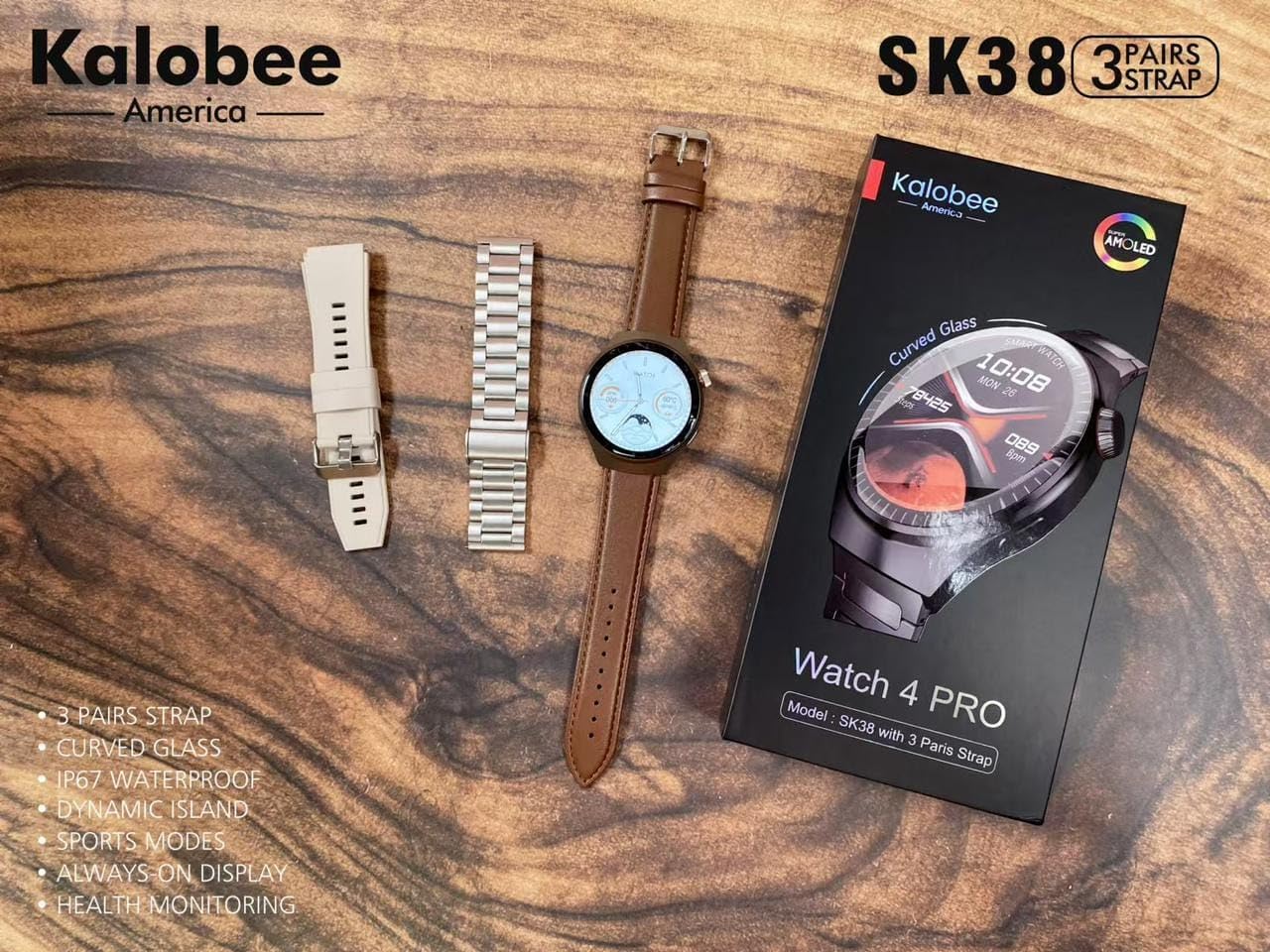
Image: A flat lay of the Kalobee Watch 4 PRO+ components, including the smartwatch, its retail box, and the three different strap options (leather, silicone, and metal), ready for assembly.
Тохиргоо
1. Анхны цэнэглэлт
Before first use, fully charge your Kalobee Watch 4 PRO+. This ensures optimal battery calibration and performance.
- Connect the wireless charging dock to a USB power adapter (not included) and plug it into a power outlet.
- Place your Kalobee Watch 4 PRO+ onto the charging dock. Ensure the watch is properly aligned for charging to begin.
- Цагны дэлгэц цэнэглэлтийн төлөвийг харуулах болно. Бүрэн цэнэглэлт нь ойролцоогоор 2-3 цаг шаардагдана.
2. Оосор суурилуулах
The Kalobee Watch 4 PRO+ comes with interchangeable straps, allowing you to customize its appearance. To install or change a strap:
- Locate the quick-release pins on the back of each strap.
- Slide the pin inwards to detach or attach the strap to the watch lugs.
- Ensure the pin clicks securely into place, indicating the strap is properly fastened.

Зураг: нэг тал view of the Kalobee Watch 4 PRO+ featuring a sleek metal strap, demonstrating one of the interchangeable strap options.
3. Төхөөрөмжтэйгээ холбох (Bluetooth)
To unlock the full smart features of your watch, pair it with your smartphone via Bluetooth.
- Download the official Kalobee companion app from your smartphone's app store (iOS App Store or Google Play Store).
- Ухаалаг утсан дээрээ Bluetooth идэвхжсэн эсэхийг шалгаарай.
- Open the Kalobee app and follow the on-screen instructions to add a new device.
- On your watch, navigate to the Bluetooth settings (refer to "Basic Navigation" section if needed).
- Select your watch from the list of available devices in the app. Confirm the pairing request on both your phone and watch.
- Once paired, the watch will synchronize data and notifications with your smartphone.
Ашиглалтын заавар
1. Үндсэн навигаци
The Kalobee Watch 4 PRO+ features an intuitive touch screen and physical buttons for navigation.
- Мэдрэгчтэй дэлгэц: Swipe left/right, up/down to navigate through menus and widgets. Tap to select an item.
- Титэм товчлуур: Typically used to return to the home screen, scroll through lists, or zoom in/out. Press and hold for power options.
- Хажуугийн товчлуур: Often customizable, it can be set to quickly access a specific app or feature.

Image: The Kalobee Watch 4 PRO+ displaying its main watch face, showing time, date, steps, and calories, illustrating the primary user interface.
2. Цагны нүүрийг өөрчлөх
Цагны нүүрийг өөрчилснөөр цагаа тохируулаарай:
- From the home screen, press and hold the watch face.
- Swipe left or right to browse available watch faces.
- Tap on a watch face to select it. Some watch faces may offer further customization options (e.g., complications, colors) which can be adjusted by tapping the "Customize" option.
- Additional watch faces can be downloaded and managed via the Kalobee companion app.
3. Эрүүл мэндийн хяналтын онцлог
Your Kalobee Watch 4 PRO+ is equipped with various health monitoring capabilities:
- Зүрхний цохилтын хяналт: Access the heart rate app on your watch to measure your current heart rate. Continuous monitoring can be enabled in the app settings.
- Үйл ажиллагааг хянах: Өдрийн турш шатсан алхмууд, зай, калори зэргийг хянадаг. View daily summaries on the watch or in the companion app.
- Унтлагын хяналт: Wears the watch to bed to monitor sleep patterns, including deep sleep, light sleep, and awake times. Data is available in the app.
- Спортын горимууд: Select from various sports modes (e.g., running, cycling) to track specific workout data.
4. Мэдэгдэл
Receive notifications from your paired smartphone directly on your watch:
- Ensure notifications are enabled in the Kalobee companion app for desired applications.
- When a notification arrives, the watch will vibrate and display the content.
- Цагийн нүүрний дээд хэсгээс доош шударна уу view таны мэдэгдлийн түүх.
Засвар үйлчилгээ
1. Цагаа цэвэрлэх
Тогтмол цэвэрлэгээ нь цагныхаа гадаад төрх байдал, ажиллагааг хадгалахад тусалдаг.
- Цагны их бие: Wipe the watch body with a soft, lint-free cloth. If necessary, slightly dampдаавуугаар усаар. Химийн хатуу бодис, зүлгүүрийн материал ашиглахаас зайлсхий.
- Оосор: Clean silicone straps with mild soap and water. Leather straps should be wiped with a dry or slightly damp cloth and allowed to air dry. Metal straps can be cleaned with a soft brush and mild soapy water, then rinsed and dried thoroughly.
- Цагийг цэнэглэх эсвэл зүүхээсээ өмнө бүрэн хуурай байгаа эсэхийг шалгаарай.
2. Зайны арчилгаа
Батерейны ашиглалтын хугацааг уртасгахын тулд:
- Байнга зайгаа бүрэн цэнэглэхээс зайлсхий.
- Charge the watch regularly, ideally before the battery level drops below 20%.
- Do not expose the watch to extreme temperatures (hot or cold) for extended periods.
3. Хадгалах
When not in use for an extended period, store your watch in a cool, dry place. It is recommended to charge the watch to about 50% before long-term storage.
Алдааг олж засварлах
If you encounter issues with your Kalobee Watch 4 PRO+, refer to the following common solutions:
| Асуудал | Боломжит шийдэл |
|---|---|
| Цаг асахгүй байна | Ensure the watch is fully charged. Connect it to the charging dock for at least 30 minutes. If still unresponsive, perform a forced restart (refer to "Basic Navigation" for button functions). |
| Ухаалаг утастай хослуулах боломжгүй | Ensure Bluetooth is enabled on both devices. Make sure the watch is in pairing mode. Restart both the watch and smartphone. Clear previous Bluetooth connections on your phone if necessary. |
| Эрүүл мэндийн буруу мэдээлэл | Ensure the watch is worn snugly on your wrist, not too loose or too tight. Clean the sensors on the back of the watch. Update the watch firmware via the companion app. |
| Мэдэгдэл харагдахгүй байна | Check notification settings in the Kalobee companion app and your smartphone's system settings. Ensure the watch is connected via Bluetooth. |
| Батерейны богино хугацаа | Reduce screen brightness, disable always-on display, limit background app refresh, and turn off unnecessary features like continuous heart rate monitoring if not needed. |
Үзүүлэлтүүд
- Загвар: SK38
- Дэлгэц: AMOLED дэлгэц
- Үйлдлийн систем: AsteroidOS
- Холболт: Bluetooth
- Зайны багтаамж: 449 Amp Цаг
- Цэнэглэж байна: Утасгүй цэнэглэх
- Оруулсан бүрэлдэхүүн хэсгүүд: Watch Band (3 pairs), Wireless Charging Dock
- Үйлдвэрлэгч: HUAYING COMMUNICATION CO.,LTD
- Гарал үүслийн улс: Хятад
Баталгаат болон дэмжлэг
Information regarding product warranty and customer support is not available in this manual. Please refer to the product packaging or the official Kalobee website for details on warranty coverage and how to contact customer support for service or inquiries.


