1. Танилцуулга
The ORICO MiniMate Thunderbolt 4 External SSD is designed to provide high-speed storage expansion for your Mac Mini M4. Featuring a Thunderbolt 4/3 interface and an Intel JHL7440 chipset, it offers data transfer speeds up to 3100MB/s. This device is specifically engineered to complement the Mac Mini M4's dimensions and aesthetics, providing a seamless integration for your desktop setup. It is compatible only with Thunderbolt interfaces.
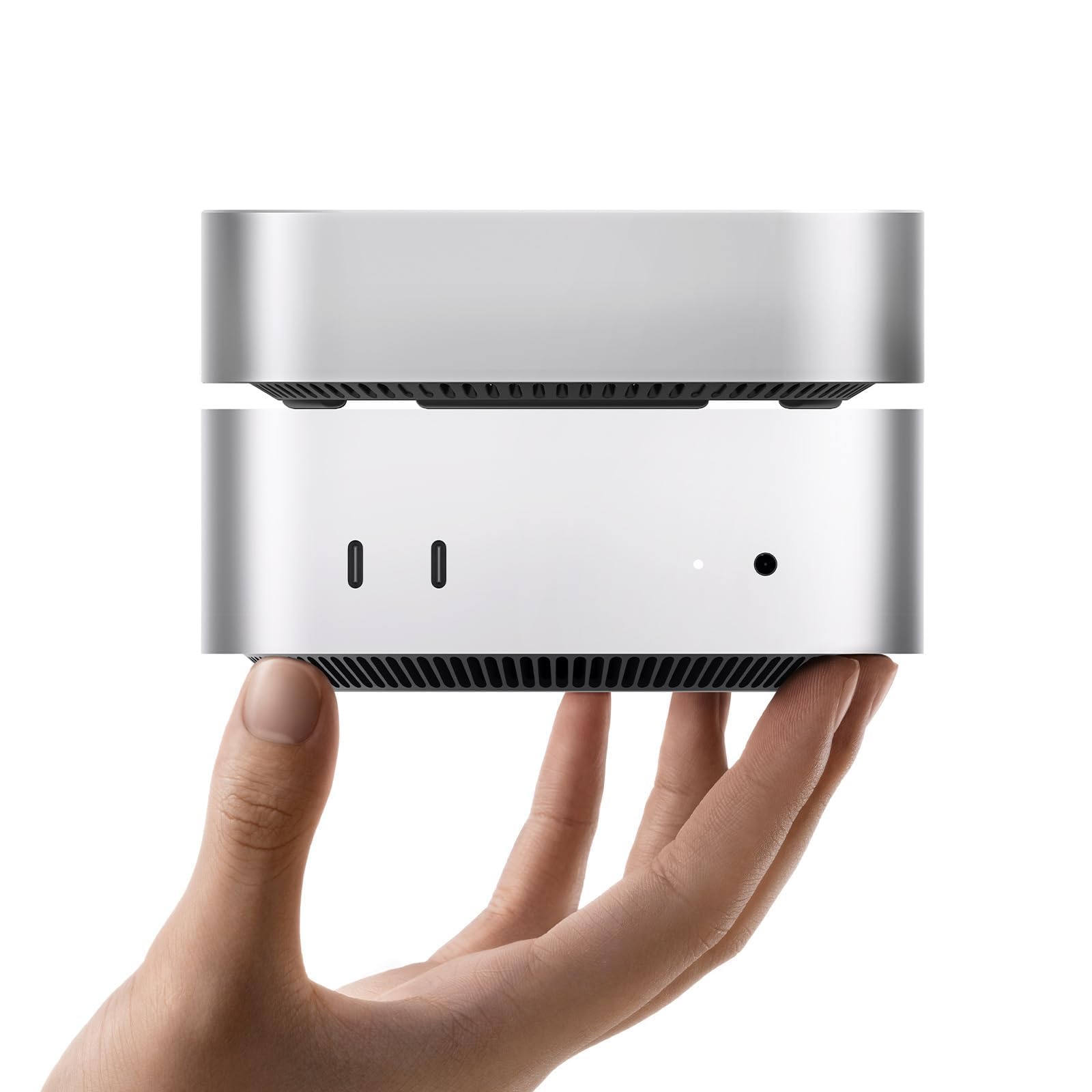
Image: The ORICO MiniMate Thunderbolt 4 External SSD, a compact device designed for storage expansion.
2. Хайрцагт юу байна
Бүх зүйл багцад байгаа эсэхийг шалгана уу:
- ORICO MiniMate External SSD
- Хэрэглэгчийн гарын авлага
- 40Gbps USB-C to USB-C Cable

Image: Contents of the ORICO MiniMate package, including the SSD unit, user manual, and USB-C to USB-C cable.
3. Тохируулах заавар
Follow these steps to set up your ORICO MiniMate External SSD:
- Positioning the MiniMate: Place the ORICO MiniMate directly beneath your Mac Mini M4. The MiniMate is designed to match the dimensions of the Mac Mini M4 for a stable and integrated setup.
- Кабель холбох: Use the provided 40Gbps USB-C to USB-C cable. Connect one end to the Thunderbolt port on the ORICO MiniMate and the other end to a Thunderbolt 3 or Thunderbolt 4 port on your Mac Mini M4. Ensure a secure connection.
- Асаах: Ensure your Mac Mini M4 is powered on. The ORICO MiniMate does not require a separate power adapter as it draws power directly from the Thunderbolt connection.
- Системийг таних: Your Mac Mini M4 should automatically detect the ORICO MiniMate. A new drive icon may appear on your desktop or in Finder under "Locations".
- Initial Formatting (if necessary): For first-time use or if you wish to change the file system, you may need to format the SSD.
- Нээлттэй Дискний хэрэгсэл on your macOS device (Applications > Utilities > Disk Utility).
- Select the ORICO MiniMate drive from the sidebar.
- дарна уу Устгах.
- Choose a format (e.g., APFS for macOS, ExFAT for cross-platform compatibility) and a scheme (e.g., GUID Partition Map).
- дарна уу Устгах дахин баталгаажуулна уу. Warning: This will delete all data on the drive.

Image: The ORICO MiniMate positioned beneath a Mac Mini M4, illustrating the integrated setup.
Видео: Дууслааview of the ORICO MiniMate, demonstrating its physical integration with the Mac Mini M4 and highlighting its features. This video shows the connection process and general use.
4. Үйл ажиллагаа
The ORICO MiniMate provides fast and reliable external storage for various applications.
4.1. Өгөгдөл дамжуулах
Leverage the Thunderbolt 4/3 interface for high-speed data transfers. With speeds up to 3100MB/s, large files, such as 4K videos, high-resolution images, and extensive project files, can be moved quickly and efficiently between your Mac Mini M4 and the MiniMate.

Image: A graphic illustrating the data transfer speeds of Thunderbolt (40Gbps) compared to various USB-C standards, emphasizing the high performance of the ORICO MiniMate.
4.2. Хадгалалтын өргөтгөл
The MiniMate serves as a direct storage expansion for your Mac Mini M4. You can store documents, videos, photos, and other materials on the MiniMate, freeing up internal storage on your Mac Mini for applications and system files. This setup is ideal for managing growing data needs without impacting your primary system performance.

Image: A visual representation of the ORICO MiniMate as a storage expansion companion, showing various data types like videos, information, and databases being stored.
4.3. Хэрэглээний хувилбарууд
- Creative Workflows: Ideal for video editing, graphic design, and music production, where large project files and media libraries benefit from fast external storage.
- Програм хангамж хөгжүүлэлт: Store development environments, large code repositories, and virtual machines for quick access and improved workflow efficiency.
- Тоглоом: Install large game titles on the external SSD to reduce load times and expand your game library without consuming internal drive space.
- General Data Storage: Use it for backups, archiving important documents, or simply extending your available storage for everyday files.

Image: Depicts the ORICO MiniMate being used in various scenarios such as creative work (video editing), coding, and gaming, highlighting its versatility.
5. Засвар үйлчилгээ
Proper maintenance ensures the longevity and optimal performance of your ORICO MiniMate:
- Цэвэрлэгээ: Төхөөрөмжийн гадна талыг цэвэрлэхийн тулд зөөлөн, хуурай даавуу ашиглаарай. Шингэн цэвэрлэгч эсвэл зүлгүүрийн материалаас зайлсхий.
- Байгаль орчны нөхцөл: Operate the MiniMate within typical room temperatures. Avoid extreme heat, cold, or high humidity.
- Аюулгүй салгах: Always eject the drive from your operating system before physically disconnecting the cable to prevent data corruption.
- Програм хангамжийн шинэчлэлтүүд: Periodically check the ORICO official website for any available firmware updates for your device to ensure optimal performance and compatibility.
6. Алдаа засах
If you encounter issues with your ORICO MiniMate, refer to the following common problems and solutions:
- Төхөөрөмжийг танихгүй байна:
- Ensure the USB-C to USB-C cable is securely connected to both the MiniMate and a Thunderbolt 3/4 port on your Mac Mini M4.
- Verify that your Mac Mini M4 is powered on.
- Restart your Mac Mini M4.
- Confirm that the port on your Mac Mini M4 is a Thunderbolt interface. The MiniMate is таарахгүй with non-Thunderbolt USB-C ports.
- Check Disk Utility to see if the drive is detected but unformatted.
- Удаан өгөгдөл дамжуулах хурд:
- Ensure you are using the provided 40Gbps USB-C to USB-C cable.
- Confirm that the MiniMate is connected to a Thunderbolt 3 or Thunderbolt 4 port on your Mac Mini M4. Using a standard USB-C port will result in lower speeds.
- Close any background applications that might be heavily utilizing system resources or other storage devices.
- Ер бусын дуу чимээ:
- The MiniMate features an upgraded silent fan designed to keep noise below 40dB during normal operation. If you experience excessive or unusual noise, ensure the device is placed on a flat, stable surface and that the fan vents are not obstructed.

Зураг: Нарийвчилсан view of the Intel JHL7440 Chipset, which ensures stable and high-speed data transfer and compatibility with Thunderbolt 4/3 ports.
7. Техникийн үзүүлэлтүүд
| Онцлог | Дэлгэрэнгүй |
|---|---|
| Брэнд | ORICO |
| Загварын дугаар | M4T4-512GB |
| Хатуу дискний төрөл | Хатуу төлөвт диск (SSD) |
| Дижитал хадгалах багтаамж | 512 ГБ |
| Хатуу дискний интерфейс | Аянга |
| Холболтын технологи | USB (Thunderbolt 3/4 compatible) |
| Өгөгдөл дамжуулах хурд | 3100 МБ/с хүртэл |
| Чипсет | Intel JHL7440 |
| Тохиромжтой байдал | Mac Mini M4 (Thunderbolt 3/4 interfaces only) |
| Онцлог шинж чанар | Backward Compatible (with Thunderbolt 3) |
| Зүйлийн жин | 3.17 унц |
| Багцын хэмжээ | 5.91 x 4.25 x 0.98 инч |
8. Баталгаат хугацаа ба дэмжлэг
ORICO products come with a standard manufacturer's warranty. For specific warranty details, duration, and terms, please refer to the warranty card included in your product packaging or visit the official ORICO webсайт.
If you require technical assistance, troubleshooting beyond this manual, or have questions regarding your product, please contact ORICO customer support through their official webсайт эсвэл таны бүтээгдэхүүний баримт бичигт заасан холбоо барих мэдээлэл.
ORICO Official Webсайт: www.oricotech.com


