1. Танилцуулга
This manual provides essential information for setting up, operating, and maintaining your JVC LT-55NQ7165C AI Vision Series QLED Google TV. Please read it thoroughly before use to ensure proper functionality and safety.

The JVC LT-55NQ7165C is a 55-inch 4K Ultra HD QLED Google TV, featuring a 60Hz refresh rate, AI Vision technology, and integrated smart functionalities. It offers a vibrant display with HDR and HLG support, powerful 60 Watts Dolby Atmos sound, and extensive connectivity options.
Дууслааview of JVC AI Vision Series QLED Android TV features.
2. Хайрцагт юу байна
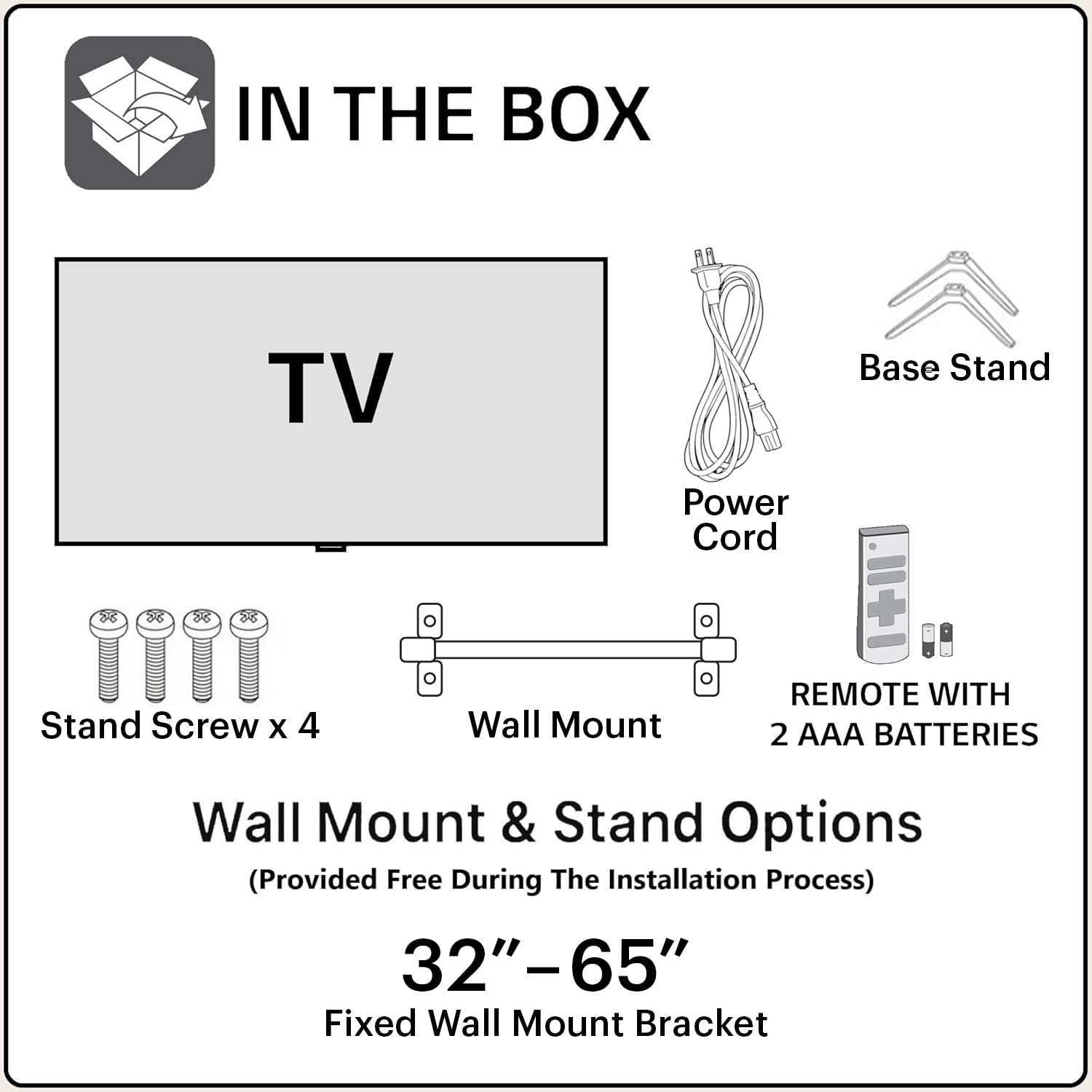
Сав баглаа боодлыг нээхдээ дараах бүх бүрэлдэхүүн хэсгүүд байгаа эсэхийг шалгана уу.
- 1N JVC LT-55NQ7165C LED TV
- 1N алсын удирдлага (2 AAA батерейтай)
- 1N хананд бэхлэх хаалт
- 1N Table Top Stand (Base Stand)
- 4х тулгуур боолт
- 1N цахилгааны утас
- Хэрэглэгчийн гарын авлага (энэ баримт бичиг)
3. Тохиргоо ба суурилуулалт
Your JVC TV offers both table-top and wall-mount installation options. Ensure the TV is placed on a stable surface or securely mounted to a wall.
3.1. Table-Top Installation
- Зурааснаас сэргийлэхийн тулд зурагтын дэлгэцийг зөөлөн, цэвэр гадаргуу дээр болгоомжтой байрлуул.
- Attach the two base stands to the bottom of the TV using the provided screws. Ensure they are firmly secured.
- Place the TV on a flat, stable surface, ensuring adequate ventilation around the unit.
3.2. Wall-Mount Installation
For wall-mount installation, it is recommended to seek professional assistance. The provided wall mount bracket is suitable for this model.
- Identify a suitable wall location, ensuring it can support the weight of the TV.
- Follow the instructions provided with the wall mount bracket to securely attach it to the wall.
- Carefully attach the TV to the wall mount bracket. Ensure all connections are secure before releasinзурагт.
Анхааруулга: Improper wall mounting can result in serious injury or damage to your TV. Always follow safety guidelines.
3.3. Анхдагч асаалт
- Цахилгааны утсыг зурагт, дараа нь цахилгаан залгуурт холбоно.
- Insert the included AAA batteries into the remote control.
- Алсын удирдлага эсвэл ТВ дээрх цахилгаан товчийг дарж асаана уу.
- Follow the on-screen instructions for initial setup, including language selection, network connection, and Google account login.
4. Холболт
The JVC LT-55NQ7165C offers a variety of ports for connecting external devices and network access.

- HDMI портууд (3): Connect gaming consoles, set-top boxes, Blu-ray players, and other HDMI-enabled devices. Supports ALLM (Auto Low Latency Mode) and eARC (Enhanced Audio Return Channel).
- USB портууд (2): Медиа тоглуулахын тулд хатуу диск, USB флаш диск болон бусад USB төхөөрөмжүүдийг холбоно уу.
- Хос зурвасын Wi-Fi: Connect to your home network wirelessly (2.4GHz / 5GHz).
- Ethernet (LAN) порт: Утастай интернет холболтын хувьд.
- Bluetooth 5.0: Connect wireless headphones, speakers, or other Bluetooth accessories.
- Оптик аудио гаралт: Connect to external sound systems or soundbars for high-quality audio.

5. ТВ-ээ ажиллуулах
5.1. Алсын удирдлага
The included remote control allows you to navigate the TV's features. It includes dedicated buttons for popular streaming services and Google Assistant voice control.

- Цахилгаан товч: ТВ-г асаах эсвэл унтраана.
- Google туслах товч: Дуут командыг идэвхжүүлдэг.
- Навигацийн самбар: Цэсийн навигацийн хувьд.
- Дууны хэмжээг нэмэгдүүлэх/доошруулах: Аудио дууны хэмжээг тохируулна.
- Суваг дээш/доошоо: Телевизийн сувгийг өөрчилдөг.
- Netflix, Prime Video, YouTube товчлуурууд: Эдгээр урсгалын програмуудад шууд хандах.
5.2. Google TV-ийн онцлогууд
Your JVC TV runs on the Google TV operating system, providing access to a vast library of content and smart features.
- Апп хандалт: Download and install over 10,000 apps and games from the Google Play Store, including Netflix, Prime Video, YouTube, Zee5, Disney+ Hotstar, SonyLIV, MX Player, JioCinema, Apple TV, and Voot.
- Google Туслах: Use voice commands to search for content, control smart home devices, get answers, and more. Press the Google Assistant button on your remote and speak into the microphone.
- Screen Mirroring (Chromecast built-in): Cast content from your compatible smartphone, tablet, or computer directly to your TV screen.
- Хувь хүний зөвлөмжүүд: Google TV learns your preferences and suggests content tailored to you.


5.3. Дэлгэцийн онцлог
Experience stunning visuals with the TV's advanced display technologies.
- 4K Ultra HD нягтрал: Enjoy incredibly sharp and detailed images with 3840 x 2160 pixels.
- QLED технологи: Quantum Dot LED display delivers vibrant colors and improved brightness.
- HDR (High Dynamic Range) & HLG: Provides enhanced contrast, brightness, and a wider color gamut for a more lifelike picture.
- AI Vision Series: AI-powered processing optimizes picture quality for various content types.
- 1.1 тэрбум өнгө: Experience a rich and extensive color palette.
- 60 Гц сэргээх хурд: Smooth motion for most content.


5.4. Аудио онцлог
Immerse yourself in rich and clear audio with the TV's integrated sound system.
- 60 ватт гаралт: Powerful audio delivery for an engaging listening experience.
- Dolby Digital Plus & Dolby Atmos: Provides immersive, multi-dimensional sound that moves around you.
- DTS-TruSurround: Enhances surround sound effects for a cinematic audio experience.

5.5. Тоглоом
The TV is designed to enhance your gaming experience with features like ALLM (Auto Low Latency Mode) and a responsive display.

6. Алдаа засах
Нийтлэг асуудлууд болон тэдгээрийн шийдлүүдийг энэ хэсгээс харна уу.
6.1. Эрчим хүчгүй
- Цахилгааны утсыг телевизор болон ажиллаж байгаа цахилгааны залгуурт найдвартай холбосон эсэхийг шалгаарай.
- Өөр төхөөрөмжийг залгах замаар цахилгаан залгуур ажиллаж байгаа эсэхийг шалгана уу.
- Verify that the remote control batteries are correctly inserted and not depleted.
6.2. No Picture / Poor Picture Quality
- Бүх кабелийн холболтууд (HDMI, антен гэх мэт) найдвартай эсэхийг шалгана уу.
- Алсын удирдлага ашиглан зөв оролтын эх үүсвэрийг сонгоно уу.
- ТВ цэсэнд зургийн тохиргоог (тод байдал, тодосгогч, өнгө) тохируулна уу.
- If using an external device, check its output settings.
6.3. No Sound / Poor Sound Quality
- Дууг хаагаагүй эсвэл хэт бага тохируулаагүй эсэхийг шалгаарай.
- Гадаад дууны системд аудио кабелийн холболтыг шалгана уу.
- Adjust audio settings in the TV menu.
- If using external speakers, ensure they are powered on and functioning correctly.
6.4. Сүлжээний холболтын асуудлууд
- Таны Wi-Fi чиглүүлэгч асаалттай, ажиллаж байгаа эсэхийг шалгаарай.
- Чиглүүлэгч болон модемоо дахин эхлүүлнэ үү.
- ТВ-ийн сүлжээний тохиргоо руу очоод Wi-Fi сүлжээндээ дахин холбогдоно уу.
- Хэрэв утастай холболт ашиглаж байгаа бол Ethernet кабель найдвартай холбогдсон эсэхийг шалгаарай.
7. Техникийн үзүүлэлтүүд
| Онцлог | Дэлгэрэнгүй |
|---|---|
| Загварын нэр | LT-55NQ7165C |
| Дэлгэцийн хэмжээ | 55 инч (140 см) |
| Дэлгэцийн технологи | QLED, IPS Display |
| Шийдвэр | 4K Ultra HD (3840 x 2160) |
| Сэргээх хурд | 60 Гц |
| Онцлог шинж чанарууд | Dolby Digital Plus, HDR, DTS-TruSurround, Google Assistant, Dolby Atmos, AI Vision Series |
| Үйлдлийн систем | Google TV |
| RAM | 2 ГБ |
| Хадгалах (ROM) | 16 ГБ |
| Аудио гаралт | 60 ватт |
| Холболт | Dual Band Wi-Fi, 3 HDMI, 2 USB, Bluetooth 5.0, Optical, Ethernet |
| Бүтээгдэхүүний хэмжээ (LxWxH) | 124 x 12 x 71 см |
| Зүйлийн жин | 10.4 кг |
| Эрчим хүчний эх үүсвэр | AC |
| Viewing өнцөг | 178 градус |
| Зургийн ялгаатай харьцаа | 4000:1 |

8. Баталгаат хугацаа ба дэмжлэг
Your JVC LT-55NQ7165C TV comes with a standard manufacturer's warranty.
- Бүтээгдэхүүний баталгаа: Худалдан авсан өдрөөс хойш 1 жил.
- Алсын удирдлагатай дагалдах хэрэгслийн баталгаа: Худалдан авсан өдрөөс хойш 6 сар.
To avail warranty services, please retain your purchase invoice. The user manual can also be accessed from the brand's website under the product details section.
Баталгаат үл хамаарах зүйлүүд: Баталгаат хугацаа нь тодорхой саарал түвшинд үүссэн хөнгөн цус алдалт болон цэгэн асуудал (Mura асуудал)-ыг хамрахгүй бөгөөд Mura шалгалтын стандартын дагуу үүнийг хүлээн зөвшөөрөгдсөн гэж үзнэ. ND (Саармаг нягтрал) шүүлтүүрийн 2%-ийн удирдамжийн дагуу үүнийг самбарын согог гэж үзэхгүй.
For further assistance or technical support, please refer to the contact information provided on the official JVC webсайт эсвэл таны худалдан авалтын баримт бичиг.


