1. Танилцуулга
This manual provides comprehensive instructions for the Mycket portable DAB/DAB+/FM radio, Model D009. It covers setup, operation, maintenance, and troubleshooting to ensure optimal performance and longevity of your device. Please read this manual carefully before using the product.
The Mycket D009 radio features advanced signal reception technology for clear audio, Bluetooth 5.0 for wireless streaming, USB playback, AUX-in connectivity, a dual alarm clock, and a sleep timer. Its integrated rechargeable battery offers portability for use in various environments.
2. Аюулгүй ажиллагааны заавар
- Төхөөрөмжийг бороо, чийг, хэт өндөр температурт бүү гарга.
- Төхөөрөмжийг унагах эсвэл хүчтэй нөлөөнд оруулахаас зайлсхий.
- Төхөөрөмжийг өөрөө задлах эсвэл засах гэж бүү оролдоорой. Бүх засвар үйлчилгээг мэргэшсэн ажилтнуудад даатга.
- Төхөөрөмжийг радиатор, халаалтын төхөөрөмж, зуух болон бусад төхөөрөмж (үүнд ... орно) зэрэг дулааны эх үүсвэрээс хол байлга. ampөргөгч) дулаан үүсгэдэг.
- Use only the specified charging cable and power adapter (5V via USB) to charge the device.
- Ensure proper ventilation around the device during operation and charging.
- Батерей болон электрон эд ангиудыг орон нутгийн дүрэм журмын дагуу хариуцлагатайгаар устгана уу.
3. Бүтээгдэхүүн дууссанview
3.1 Багцын агуулга
- 1 x Mycket Portable DAB Radio (Model D009)
- 1 x USB цэнэглэгч кабель
- 1 х хэрэглэгчийн гарын авлага
3.2 Төхөөрөмжийн зохион байгуулалт ба удирдлага
Familiarize yourself with the main components and controls of your Mycket radio.

Зураг 1: Урд view of the Mycket D009 portable DAB radio, showing the speaker grille, LCD display, control buttons (MODE, OK, O/M, FAV, 1-4), and the telescopic antenna extended. The right side shows the DC 5V USB-C port, reset button, and headphone jack.
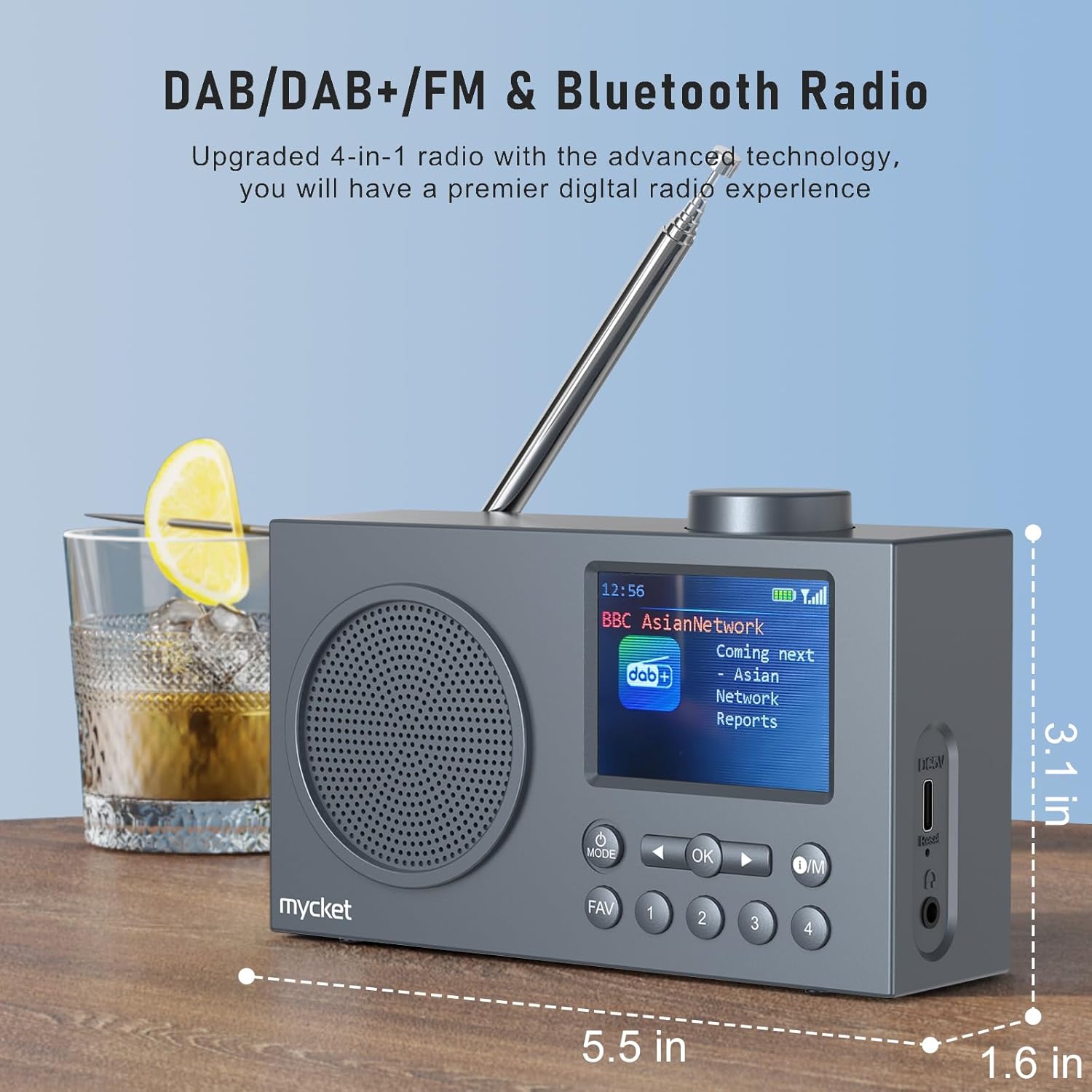
Зураг 2: Хажуу тал view of the Mycket D009 radio illustrating its compact dimensions: approximately 5.5 inches (length), 1.6 inches (width), and 3.1 inches (height). The image also highlights its DAB/DAB+/FM and Bluetooth capabilities.
- Дэлгэц: 2.4-inch TFT color display for station information, time, and settings.
- Илтгэгч: Integrated Hi-Fi speaker for audio output.
- Телескоп антен: For optimal radio signal reception.
- MODE товчлуур: Switches between DAB, FM, Bluetooth, USB, and AUX modes.
- OK товчлуур: Сонголтыг баталгаажуулах эсвэл цэс рүү орно.
- O/M Button: Power On/Off and Menu access.
- FAV товчлуур: Accesses favorite presets.
- Тоон товчлуурууд (1-4): Direct access to stored presets.
- Навигацийн товчлуурууд (зүүн/баруун): Navigates menus or tunes stations.
- Эзлэхүүний товчлуур: Аудио дууны хэмжээг тохируулна.
- DC 5V USB-C Port: Дотоод зайг цэнэглэхэд зориулагдсан.
- Дахин тохируулах товч: Resets the device (use a thin object to press).
- 3.5 мм чихэвчний залгуур: Хувийн сонсох зориулалттай.
4. Тохиргоо
4.1 Зайг цэнэглэх
The radio is equipped with a built-in 2200mAh lithium battery. Before first use, fully charge the device.
- Connect the provided USB charging cable to the DC 5V USB-C port on the side of the radio.
- USB кабелийн нөгөө үзүүрийг тохирох USB тэжээлийн адаптер (дагаагүй) эсвэл компьютерийн USB порт руу холбоно уу.
- The charging indicator on the display will show the charging status. A full charge typically takes approximately 2.5 hours and provides up to 12 hours of playback time at 70% volume.

Зураг 3: The Mycket D009 radio display showing a full battery indicator, emphasizing its long playback time on a single charge.
4.2 Антенны тохируулга
Радио хүлээн авах оновчтой байхын тулд телескоп антенныг бүрэн сунгана. Дохионы чанарыг хамгийн сайн байлгахын тулд түүний байрлалыг тохируулна уу.
4.3 Анхдагч асаалттай
-г удаан дар O/M button to power on the radio. The display will light up, and the device will typically start in the last used mode or initiate a DAB scan if it's the first use.
5. Ашиглалтын заавар
5.1 шилжих горим
дээр дарна уу MODE button repeatedly to cycle through available modes: DAB, FM, Bluetooth, USB, and AUX.
5.2 DAB/DAB+ радиогийн ажиллагаа
- ашиглан DAB горим руу шилжинэ үү MODE товч.
- The radio will automatically perform a full scan for available DAB/DAB+ stations upon first use or if no stations are found. To initiate a manual scan, press and hold the OK button, then select "Full Scan" from the menu.
- Once the scan is complete, use the navigation buttons (Left/Right) to browse through the list of available stations.
- дарна уу OK to select and listen to a station.

Зураг 4: The Mycket D009 radio display showing a DAB station and highlighting the auto-scan and 40 preset features (20 DAB & 20 FM).
5.2.1 Storing DAB Presets
The radio supports up to 20 DAB presets.
- Хүссэн DAB станц руугаа тохируулна уу.
- Press and hold one of the number buttons (1-4) эсвэл FAV button to save the current station to a preset slot. Follow the on-screen prompts to select a slot if using the FAV button.
- To recall a preset, briefly press the corresponding number button or the FAV button and select from the list.
5.3 FM радиогийн ажиллагаа
- ашиглан FM горимд шилжинэ MODE товч.
- FM станцуудыг автоматаар скан хийхийн тулд товчийг дараад барина уу OK button. The radio will scan and store available stations.
- To manually tune, use the navigation buttons (Left/Right) to adjust the frequency.
- дарна уу OK to confirm the station.
5.3.1 FM урьдчилсан тохиргоог хадгалах
The radio supports up to 20 FM presets, similar to DAB presets.
- Хүссэн FM станц руугаа тааруулна уу.
- Press and hold one of the number buttons (1-4) эсвэл FAV button to save the current station.
- To recall a preset, briefly press the corresponding number button or the FAV button and select from the list.
5.4 Bluetooth 5.0 хослуулалт
Connect your smartphone or tablet to the radio via Bluetooth for wireless audio streaming.
- ашиглан Bluetooth горим руу шилжинэ үү MODE button. The radio display will show "Bluetooth Pairing" or similar.
- Мобайл төхөөрөмж дээрээ Bluetooth-г идэвхжүүлж, боломжтой төхөөрөмжүүдийг хай.
- Select "Mycket D009" from the list of devices.
- Once paired, the radio will confirm the connection, and you can play audio from your device through the radio.

Зураг 5: The Mycket D009 radio displaying "Playing" in Bluetooth mode, next to a smartphone showing "Mycket D009" as a connected Bluetooth device.
5.5 USB тоглуулах
MP3 аудио тоглуулах fileUSB дискнээс шууд.
- MP3 агуулсан USB дискийг оруулна уу fileUSB порт руу оруулна.
- ашиглан USB горим руу шилжинэ үү MODE товч.
- The radio will automatically detect and begin playing MP3 files. Use the navigation buttons to skip tracks.
5.6 AUX-ин холболт
3.5 мм-ийн аудио кабель (дагалдахгүй) ашиглан гадаад аудио төхөөрөмжүүдийг холбоно уу.
- Connect one end of a 3.5mm audio cable to the AUX-in port on the radio.
- Нөгөө үзүүрийг гадаад төхөөрөмжийн чихэвчний залгуур эсвэл аудио гаралт руу холбоно уу.
- ашиглан AUX горимд шилжинэ MODE товч.
- Өөрийн гадаад төхөөрөмжөөс тоглуулахыг удирдах.
5.7 Сэрүүлэгтэй цагны функц
Set up to two independent alarms.
- -г удаан дар O/M товчийг дарж цэс рүү орно.
- Navigate to "Alarm Settings" using the navigation buttons and press OK.
- Сэрүүлэг 1 эсвэл Сэрүүлэг 2-ыг сонгоно уу.
- Set the alarm time, source (DAB, FM, or Buzzer), and volume.
- Тохиргоог дарж баталгаажуулна уу OK.
5.8 Унтах цагийн функц
Тодорхой хугацааны дараа радиог автоматаар унтрахаар тохируулна уу.
- -г удаан дар O/M товчийг дарж цэс рүү орно.
- Navigate to "Sleep Timer" and press OK.
- Select the desired duration (e.g., 15, 30, 60 minutes).
- The radio will automatically power off after the set time.
5.9 Чихэвчний хэрэглээ
Connect 3.5mm headphones to the headphone jack for private listening. The internal speaker will be muted automatically.
6. Засвар үйлчилгээ
- Цэвэрлэгээ: Радиогийн гадна талыг цэвэрлэхийн тулд зөөлөн, хуурай даавуу ашиглаарай. Зүлгүүрийн цэвэрлэгч эсвэл уусгагч хэрэглэж болохгүй.
- Батерейны арчилгаа: Зайны ашиглалтын хугацааг уртасгахын тулд зайгаа ойр ойрхон бүрэн цэнэггүй болгохоос зайлсхий. Төхөөрөмжийг удаан хугацаагаар ашиглаагүй байсан ч тогтмол цэнэглэ.
- Хадгалах: Радиог нарны шууд тусгал, хэт температураас хол, сэрүүн, хуурай газар хадгална.
7. Алдаа засах
| Асуудал | Боломжит шалтгаан | Шийдэл |
|---|---|---|
| Цахилгаан байхгүй / Радио асахгүй байна. | Батерей дуусч байна. | Өгөгдсөн USB кабелийг ашиглан радиог цэнэглэ. |
| Радио хүлээн авах чадвар муу (DAB/FM). | Antenna not fully extended or positioned correctly. Weak signal area. | Fully extend and adjust the telescopic antenna. Try moving the radio to a different location. Perform a full scan for stations. |
| Bluetooth хослол амжилтгүй боллоо. | Radio not in Bluetooth mode. Device too far. Bluetooth not enabled on external device. | Ensure the radio is in Bluetooth mode. Keep devices within range (approx. 10 meters). Enable Bluetooth on your external device and search for "Mycket D009". |
| Чанга яригчаас дуу гарахгүй. | Дууны түвшин хэт бага байна. Чихэвч холбогдсон байна. | Increase the volume. Disconnect headphones if not intended for private listening. |
| USB тоглуулах ажиллахгүй байна. | USB drive not inserted correctly. Incompatible file формат. | USB драйв бүрэн хийгдсэн эсэхийг шалгана уу. files нь MP3 форматтай байна. |
| Төхөөрөмж хариу өгөхгүй байна. | Програм хангамжийн түр зуурын алдаа. | Press the reset button on the side of the radio using a thin object (e.g., a paperclip). |
8. Техникийн үзүүлэлтүүд
| Брэнд | Mycket |
| Загвар | D009 |
| Радио горимууд | DAB, DAB+, FM |
| Bluetooth хувилбар | 5.0 |
| Тоглуулах сонголтууд | FM, DAB, DAB+, Bluetooth, USB MP3, AUX-in |
| Чанга яригчийн гаралтын чадал | 5 ватт |
| Чанга яригч | 4 Ω10 W 78 mm x 1 |
| Дэлгэц | 2.4 инчийн TFT өнгөт LCD |
| Урьдчилсан тохируулгууд | 40 (20 DAB, 20 FM) |
| Зайны төрөл | Built-in Lithium-ion (18650) |
| Зайны багтаамж | 2200 mAh (3.7V - 2.2 Ah) |
| Тоглуулах хугацаа | Approx. 8-9 hours at 70% volume (up to 12 hours) |
| Цэнэглэх хугацаа | Ойролцоогоор 2.5 цаг |
| Эрчим хүчний оролт | USB-ээр дамжуулан 5V |
| Хэмжээ (Бүтээгдэхүүн) | Ойролцоогоор 14 см (У) x 4 см (Ө) x 7.8 см (H) |
| Гаралтын холболтууд | 3.5 мм чихэвчний залгуур |
9. Баталгаат хугацаа ба дэмжлэг
Mycket products are designed for reliability and performance. This product comes with:
- 12 сарын баталгаа: Enjoy a hassle-free 12-month warranty from the date of purchase.
- Хэрэглэгчийн дэмжлэг: For any questions, issues, or support needs, please contact Mycket customer service.
Баталгаат заргад зориулж худалдан авалтаа нотлох баримтаа үлдээнэ үү.


