Танилцуулга
This manual provides detailed instructions for the setup, operation, and maintenance of your Taiahiro Wireless Gaming Keyboard and Mouse Combo. This combo features a 98-key RGB backlit mechanical keyboard with blue switches and an ergonomic wireless gaming mouse, offering versatile connectivity options (USB-C, 2.4G, Bluetooth 5.0) for various devices.
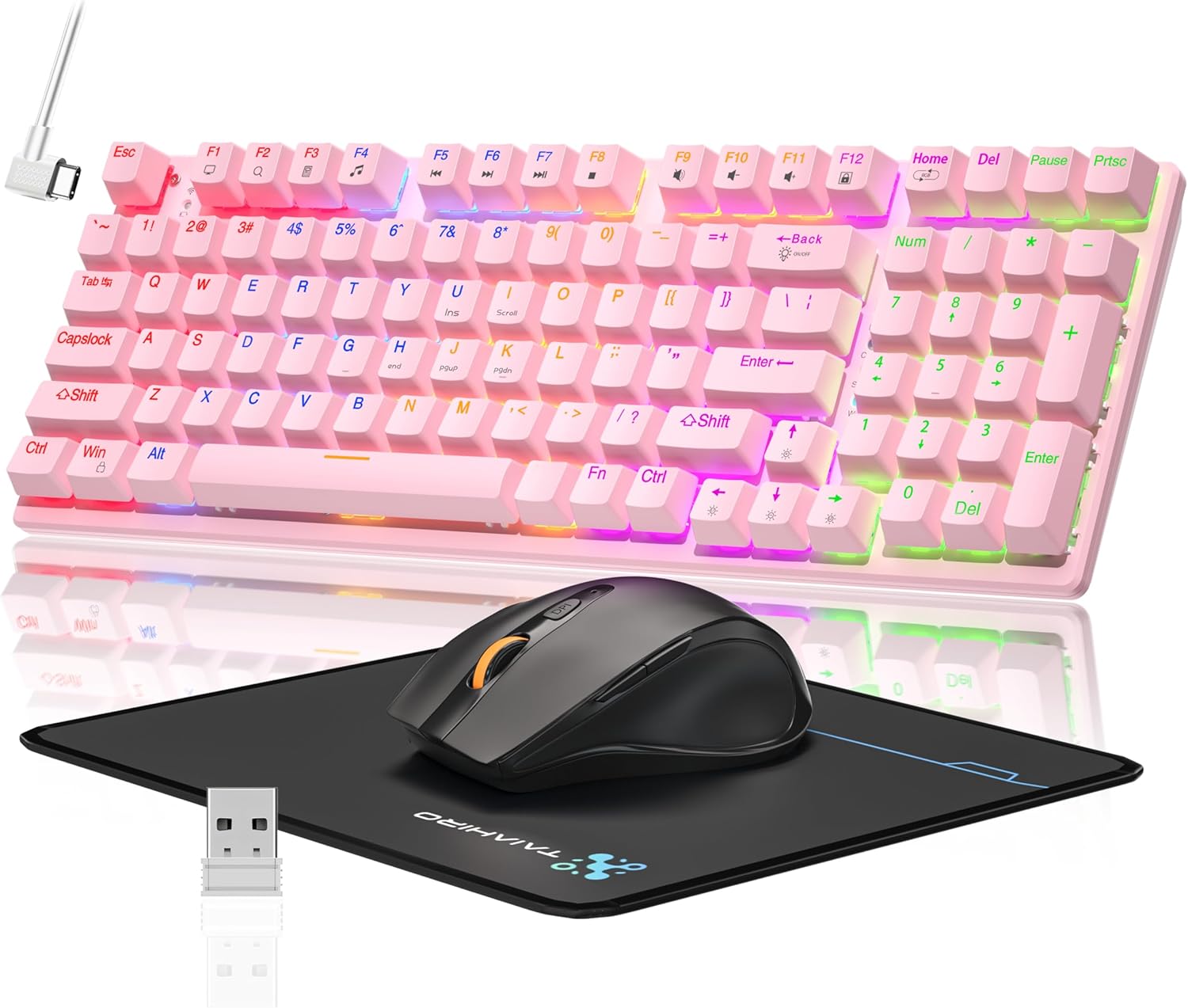
Image: The Taiahiro Wireless Gaming Keyboard and Mouse Combo, featuring a pink 98-key mechanical keyboard with RGB backlighting, a black ergonomic mouse, and a mouse pad. A USB receiver is also visible.
Багцын агуулга
- Утасгүй механик гар
- Утасгүй тоглоомын хулгана
- USB-C кабель
- 2.4G USB хүлээн авагч
- Хулганы дэвсгэр
- Хэрэглэгчийн гарын авлага (энэ баримт бичиг)
Тохиргоо
Гарны тохиргоо
The keyboard supports three connectivity modes: USB-C wired, 2.4G wireless, and Bluetooth 5.0.
- USB-C утастай холболт: Connect the provided USB-C cable from the keyboard to an available USB port on your computer. The keyboard will be recognized automatically.
- 2.4G утасгүй холболт:
- Locate the 2.4G USB receiver, typically stored in the mouse or keyboard compartment.
- 2.4G USB хүлээн авагчийг компьютер дээрх боломжтой USB порт руу залгаарай.
- Ensure the keyboard's mode switch (usually on the back or side) is set to 2.4G mode.
- Гар автоматаар холбогдох ёстой.
- Bluetooth 5.0 холболт:
- Гарын горимын унтраалга Bluetooth горимд тохируулагдсан эсэхийг шалгана уу.
- Төхөөрөмж дээрээ (компьютер, зөөврийн компьютер, таблет, ухаалаг утас) Bluetooth-г асаагаад шинэ төхөөрөмжүүдийг хайгаарай.
- Select "Taiahiro Keyboard" (or similar name) from the list of available devices.
- Хослолтыг дуусгахын тулд дэлгэцэн дээрх дурын зааврыг дагана уу.

Image: A pink mechanical keyboard connected to various devices (monitor, laptop, tablet) illustrating its triple-mode connectivity via Bluetooth, 2.4GHz, and USB-C.
Хулганы тохиргоо
Хулгана нь 2.4G утасгүй болон Bluetooth холболтыг дэмждэг.
- 2.4G утасгүй холболт:
- Insert 1 AA battery (not included) into the mouse.
- Plug the 2.4G USB receiver (shared with keyboard) into an available USB port on your computer.
- Ensure the mouse's power switch is turned ON.
- Хулгана автоматаар холбогдох ёстой.
- Bluetooth холболт:
- Insert 1 AA battery (not included) into the mouse.
- Ensure the mouse's power switch is turned ON and set to Bluetooth mode.
- Төхөөрөмж дээрээ Bluetooth-г идэвхжүүлээд шинэ төхөөрөмжүүдийг хайгаарай.
- Select "Taiahiro Mouse" (or similar name) from the list of available devices.
- Хослолтыг дуусгахын тулд дэлгэцэн дээрх дурын зааврыг дагана уу.

Image: A wireless gaming mouse highlighting its 4 adjustable DPI levels and showing the battery compartment with a tiny USB receiver and space for a 1AA battery.
Ашиглалтын заавар
Гарны функцууд
- RGB арын гэрэлтүүлэг: The keyboard features 8 different RGB lighting modes.
- дарна уу Fn + Нүүр хуудас гэрэлтүүлгийн горимуудаар ээлжлэн солих.
- дарна уу Fn + ↑/↓ to adjust brightness (5 levels).
- дарна уу Fn + ←/→ to adjust breathing speed (5 levels).
- Мультимедиа түлхүүрүүд: -г ашиглана уу Fn key in combination with F-keys for multimedia controls (e.g., Fn+F1 for media player, Fn+F2 for volume down, etc.). Refer to the keycap legends for specific functions.
- Тохируулах хөл: The keyboard has adjustable feet on the underside to change the typing angle for ergonomic comfort.
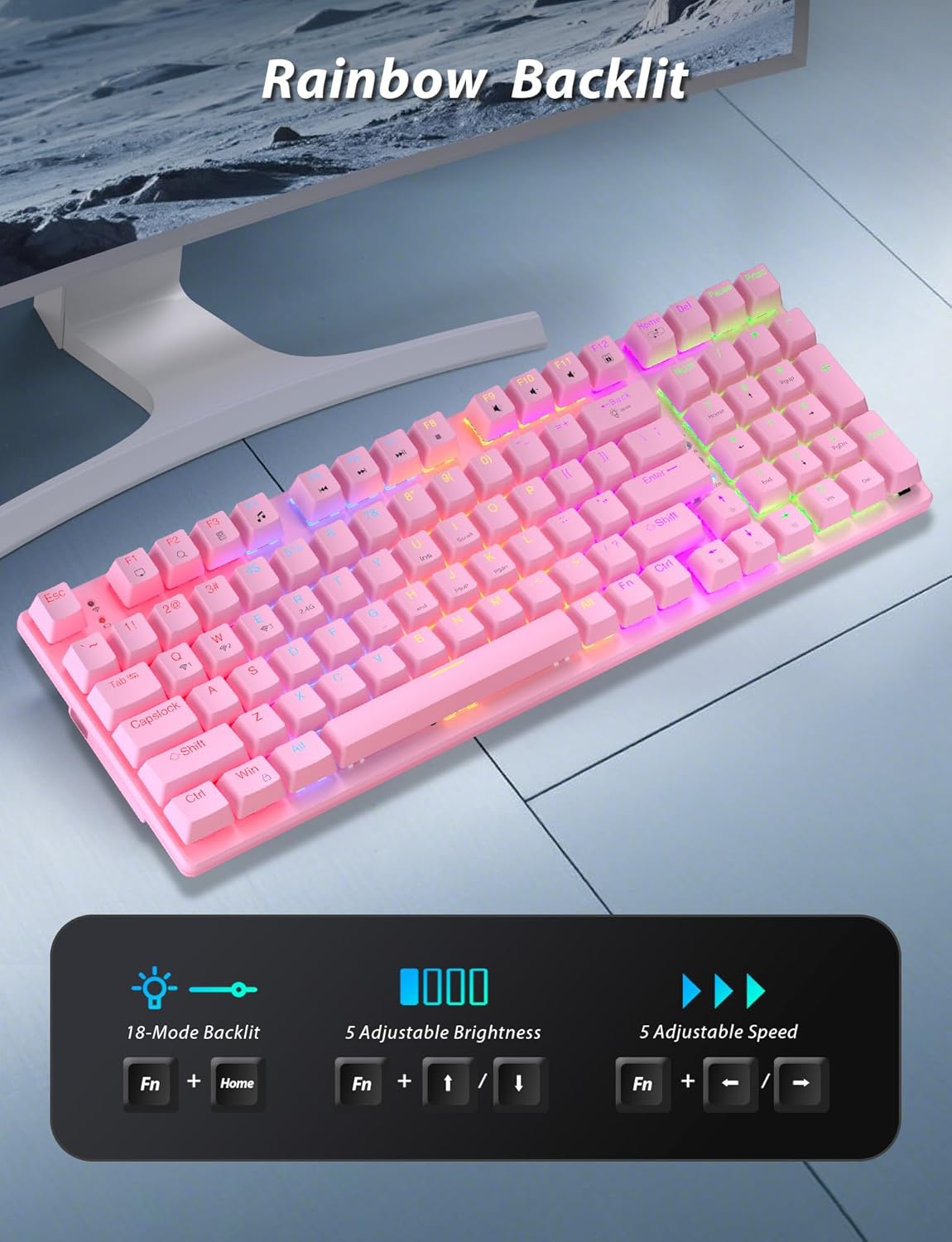
Image: A pink mechanical keyboard displaying its rainbow backlit keys, with an overlay showing the key combinations (Fn + Home, Fn + ↑/↓, Fn + ←/→) for controlling 8 modes, 5 adjustable brightness levels, and 5 adjustable speeds.

Зураг: Ойрын зураг view of the side of the pink mechanical keyboard, showing its ergonomic sloped design and the adjustable feet extended for comfortable typing. The accompanying mouse is also shown on a mousepad.
Хулганы функцууд
- DPI тохируулга: The mouse features 4 adjustable DPI levels (800/1600/2400/3200). Press the DPI button (usually located behind the scroll wheel) to cycle through the sensitivity settings.
- Эргономик дизайн: The contoured shape of the mouse is designed to fit comfortably in your hand, reducing fatigue during extended use.
- Anti-skid Scroll Wheel: Provides precise scrolling control.

Image: A wireless gaming mouse with a prominent scroll wheel and DPI button, illustrating its 4 adjustable DPI levels (800/1600/2400/3200), ergonomic shape, and forward/back buttons.
Засвар үйлчилгээ
- Цэвэрлэгээ: Use a soft, dry cloth to clean the surfaces of the keyboard and mouse. For deeper cleaning, a slightly damp cloth can be used, ensuring no liquid enters the internal components. Avoid harsh chemicals or abrasive materials.
- Зай солих: For the mouse, replace the AA battery when performance degrades. For the keyboard, recharge via the USB-C cable when the battery indicator shows low power.
- Хадгалах: Удаан хугацаагаар ашиглаагүй тохиолдолд комбог сэрүүн, хуурай газар, нарны шууд тусгал болон хэт өндөр температураас хол хадгална уу.
Алдааг олж засварлах
| Асуудал | Шийдэл |
|---|---|
| Keyboard/Mouse not connecting via 2.4G. |
|
| Гар/хулгана нь Bluetooth-ээр холбогдоогүй байна. |
|
| RGB backlighting not working or dim. |
|
| Mouse cursor erratic or unresponsive. |
|
Үзүүлэлтүүд
| Онцлог | Дэлгэрэнгүй |
|---|---|
| Загварын дугаар | BK6301 |
| Гарны төрөл | 98 товчлууртай механик гар |
| Шилжүүлэгчийн төрөл | Цэнхэр унтраалга |
| Гарын холболт | USB-C (Утастай), 2.4G Утасгүй, Bluetooth 5.0 |
| Хулганы холболт | 2.4G утасгүй, Bluetooth |
| Хулганы DPI түвшин | 800/1600/2400/3200 |
| Арын гэрэлтүүлэг | RGB (8 Modes, 5 Brightness, 5 Speed) |
| Тохиромжтой төхөөрөмжүүд | PC, Laptop, Smartphone, Tablet (Windows, macOS, Android) |
| Keyboard Key Life | 50 сая товшилт |
| Гарны хэмжээ | Approx. 14.96 x 5.51 x 3.15 inches (from Package Dimensions) |
| Зүйлийн жин | 2.72 pounds (combo weight) |
| Хулганы батерей | 1 x AA зай (оруулаагүй) |
| Гарны батерей | 1 x C battery (included) Note: This seems unusual for a keyboard, usually Li-ion. Based on input "1 C batteries required. (included)". Will state as per input. |

Зураг: Ойрын зураг view of the mechanical blue switches on the keyboard, showing the keycap removed and the switch mechanism, along with specifications like 50,000,000 keystrokes life, key force, and stroke travel.
Баталгаат болон дэмжлэг
Taiahiro products are designed for reliability and performance. For warranty information or technical support, please refer to the contact details provided on the product packaging or visit the official Taiahiro webсайт. Баталгаат зардлаа авахын тулд худалдан авалтын баримтаа хадгална уу.
For further assistance, you may contact Taiahiro customer service through their official channels. Please provide your product model number (BK6301) and a detailed description of the issue when seeking support.


