1. Танилцуулга
This manual provides detailed instructions for the setup, operation, maintenance, and troubleshooting of your Keychron Q6 HE QMK Wireless Custom Mechanical Keyboard. Please read this guide thoroughly to ensure optimal performance and longevity of your device.
The Keychron Q6 HE is a full-size layout wireless QMK custom keyboard featuring Hall Effect Gateron 2.0 magnetic switches, offering advanced customization and a premium typing experience.
2. Багцын агуулга
Таны багцад бүх зүйл байгаа эсэхийг шалгана уу:
- Keychron Q6 HE Keyboard
- Keyboard PCB
- Кейс
- Хөнгөн цагаан хавтан
- Keycaps (Mac & Windows compatible)
- USB-C-аас USB-C кабель
- USB-A-аас USB-C адаптер
- Шилжүүлэгч татагч
- Товчлуур татагч
- Хэрэглэгчийн гарын авлага

Image: Keychron Q6 HE keyboard with included accessories, showcasing the full package contents.
3. Тохиргоо
3.1 Анхны холболт
The Keychron Q6 HE supports three connection modes: 2.4 GHz Wireless, Bluetooth 5.1, and Wired (USB-C).
3.1.1 утастай холболт
- Өгөгдсөн USB-C кабелийг гарын USB-C порт руу холбоно уу.
- Кабелийн нөгөө үзүүрийг компьютерийнхаа USB порт руу холбоно уу.
- Ensure the mode switch on the back of the keyboard is set to 'Cable' mode.
- The keyboard will be recognized automatically by your operating system.
3.1.2 2.4 GHz утасгүй холболт
- Locate the 2.4 GHz receiver (dongle) included with your keyboard.
- Plug the 2.4 GHz receiver into an available USB port on your computer.
- Set the mode switch on the back of the keyboard to '2.4G' mode.
- The keyboard should automatically connect to the receiver. If not, press and hold the 'Fn' + '4' keys for 4 seconds to initiate pairing.
3.1.3 Bluetooth холболт
- Set the mode switch on the back of the keyboard to 'Bluetooth' mode.
- To enter pairing mode, press and hold 'Fn' + '1' (for device 1), 'Fn' + '2' (for device 2), or 'Fn' + '3' (for device 3) for 4 seconds until the indicator light flashes rapidly.
- On your computer, smartphone, or tablet, enable Bluetooth and search for 'Keychron Q6 HE'.
- Хослуулах гарыг сонгоно уу. Холбогдсоны дараа заагч гэрэл анивчихаа болино.
- You can switch between paired Bluetooth devices by pressing 'Fn' + '1', 'Fn' + '2', or 'Fn' + '3' briefly.
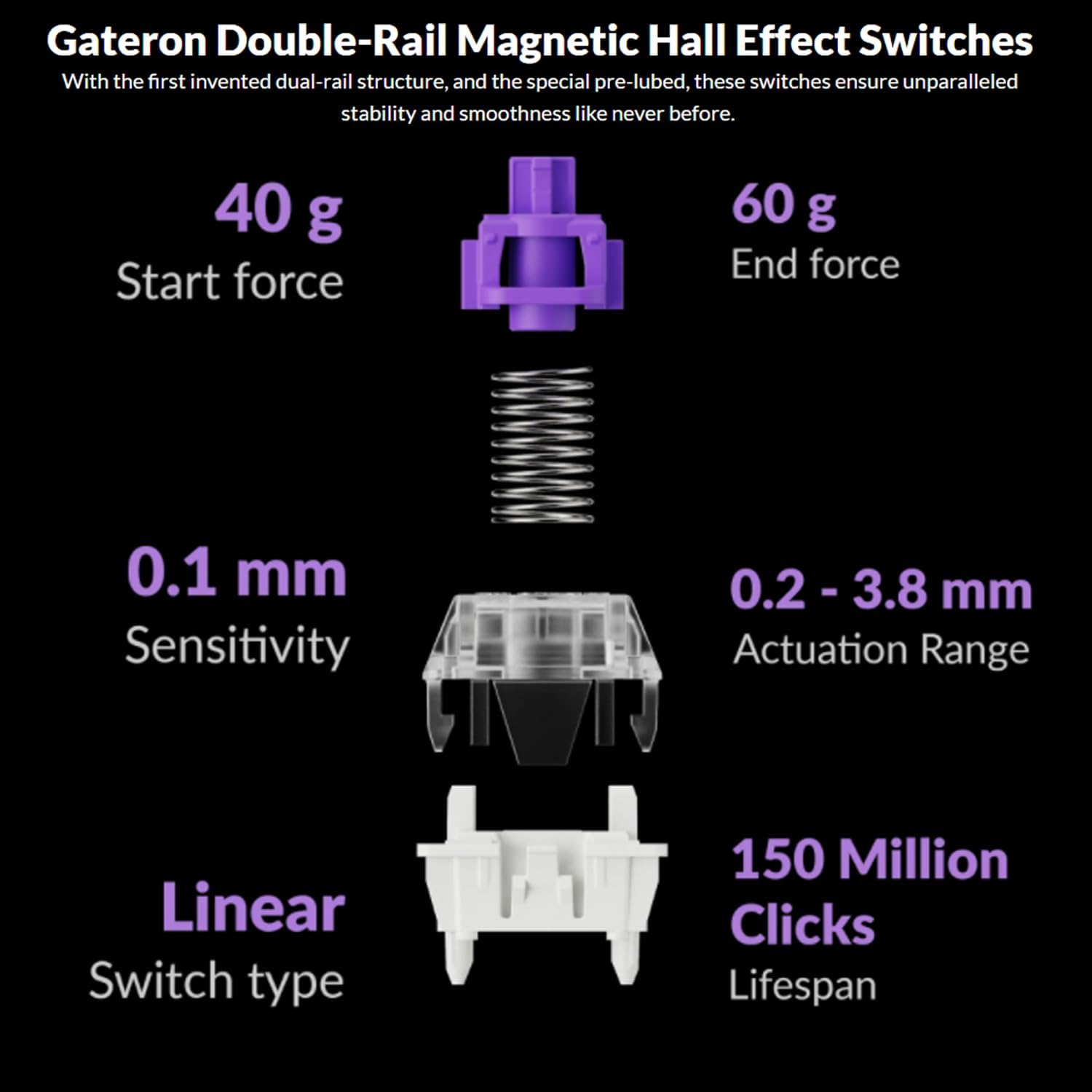
Image: The Keychron Q6 HE keyboard connected to a computer and a tablet, demonstrating its multi-device connectivity.
3.2 Үйлдлийн системийн шилжүүлэгч
The keyboard has a switch to toggle between Mac and Windows layouts. Ensure this switch, located on the back of the keyboard, is set to your current operating system for correct key mapping.
3.3 Зайг цэнэглэх
The keyboard is equipped with a 4000 mAh Lithium Ion battery. Connect the USB-C cable to the keyboard and a power source (computer USB port or USB wall adapter) to charge. The charging indicator light will show the charging status.
4. Ашиглалтын заавар
4.1 Үндсэн түлхүүр функцууд
The Q6 HE features a standard 100% layout. All keys function as labeled. Use the 'Fn' key in combination with other keys for secondary functions (e.g., media controls, backlight adjustments).
4.2 Programmable Knob
The rotary knob on the top right of the keyboard is programmable. By default, it controls volume (rotate) and media play/pause (press). Its functions can be customized using the Keychron Launcher web апп.
4.3 Gateron Magnetic Hall Effect Switches
The Q6 HE utilizes Gateron Double-Rail Magnetic Hall Effect Switches, which allow for dynamic customization of key behavior.

Image: Diagram illustrating the adjustable actuation points of the magnetic switches, ranging from 0.5mm to 3.5mm.
4.3.1 Adjustable Actuation Points
The actuation point (the distance a key needs to travel to register a press) can be adjusted from 0.1 mm to 3.8 mm using the Keychron Launcher web app. This allows for personalized typing and gaming sensitivity.
4.3.2 Шуурхай гох
Rapid Trigger functionality allows a key to reactivate instantly upon reset, without needing to return to its original position. This feature is highly beneficial for competitive gaming and can be configured via the Keychron Launcher.

Image: Detailed breakdown of Gateron Double-Rail Magnetic Hall Effect Switches, showing components and specifications like start force, end force, sensitivity, actuation range, switch type, and lifespan.
4.4 RGB арын гэрэлтүүлэг
The keyboard features south-facing RGB LED lights. You can cycle through various lighting effects and adjust brightness using 'Fn' key combinations or through the Keychron Launcher web апп.
4.5 Keychron Launcher Web Апп
The Keychron Launcher is a web-based application for advanced customization. It allows you to:
- Түлхүүрүүдийг дахин тохируулах
- Adjust actuation points for magnetic switches
- Create personalized macro commands
- Set shortcuts and key combinations
- RGB гэрэлтүүлгийн эффектүүдийг тохируулах

Image: Screenshot of the Keychron Launcher web app interface, showing options for key remapping, actuation point adjustment, and macro creation.
5. Засвар үйлчилгээ
5.1 Гарыг цэвэрлэх
Гараа цэвэрлэхийн тулд:
- Disconnect the keyboard from all power sources and devices.
- Зөөлөн, хөвөнгүй даавууг бага зэрэг хэрэглээрэй dampтүлхүүрийн таг болон гэрийг ус эсвэл зөөлөн цэвэрлэгээний уусмалаар арчина.
- Илүү гүн цэвэрлэхийн тулд дагалдах товчлуурын тагийг татаж, товчлуурын тагийг авч, доогуур нь шахсан агаар эсвэл жижиг сойзоор цэвэрлээрэй.
- Шингэнийг гар руу шууд шүршихээс зайлсхий.
5.2 Халуун сольж болдог унтраалга
The Q6 HE features hot-swappable magnetic switches, allowing you to replace individual switches without soldering.

Зураг: Ойролцоогоор view of the Keychron Q6 HE keyboard with several keycaps and switches removed, highlighting the hot-swappable magnetic switch design.
5.2.1 Replacing Switches
- Use the switch puller to carefully remove the desired switch. Grip the switch firmly and pull straight up.
- Шинэ унтраалгын зүүг хэлхээний самбар дээрх нүхнүүдтэй зэрэгцүүл.
- Gently press the new switch into place until it clicks. Ensure it is seated correctly and not bent.
5.3 Батерейны арчилгаа
Батерейны ашиглалтын хугацааг уртасгахын тулд:
- Байнга зайгаа бүрэн цэнэглэхээс зайлсхий.
- Гараа удаан хугацаагаар ашиглаагүй бол сэрүүн, хуурай газар хадгална.
- Гарыг хэт өндөр температурт бүү гарга.
6. Алдаа засах
6.1 Гар хариу өгөхгүй байна
- Утастай горим: USB-C кабель нь гар болон компьютерт найдвартай холбогдсон эсэхийг шалгана уу. Өөр USB порт эсвэл кабель ашиглаж үзнэ үү.
- 2.4 GHz горим: Verify the 2.4 GHz receiver is plugged in and the keyboard is set to '2.4G' mode. Re-pair by holding 'Fn' + '4' for 4 seconds.
- Bluetooth горим: Check if Bluetooth is enabled on your device and the keyboard is paired. Re-pair if necessary by holding 'Fn' + '1/2/3' for 4 seconds.
- Зай: Ensure the keyboard battery is charged. Connect it to a power source.
6.2 Keys Not Registering or Double Typing
- Үйлдлийн цэг: Adjust the actuation point for the affected keys using the Keychron Launcher. A higher actuation point (e.g., 2.0mm or 3.0mm) can help prevent accidental presses or double typing.
- Switch Issue: If a specific key consistently malfunctions, the magnetic switch might be faulty. Consider replacing the hot-swappable switch.
- Програм хангамж: Ensure your keyboard firmware is up to date via the Keychron Launcher.
6.3 RGB арын гэрэлтүүлгийн асуудлууд
- Гэрэлтүүлэг: Adjust backlight brightness using 'Fn' key combinations.
- Үр нөлөө: Cycle through different RGB effects using 'Fn' key combinations.
- Програм хангамж: Use the Keychron Launcher to customize and troubleshoot RGB settings.
7. Техникийн үзүүлэлтүүд
| Загварын дугаар | Q6H-P1 |
| Брэнд | Түлхүүр товч |
| Холболтын технологи | 2.4 GHz Wireless, Bluetooth 5.1, USB-C Wired |
| Гарын тайлбар | Full-size, Ergonomic |
| Онцлог шинж чанарууд | Hall Effect Magnetic Switches, Programmable Knob, Large Battery Capacity, Hot-Swappable |
| Тохиромжтой төхөөрөмжүүд | PC, Mac, Smartphone, Tablet, Gaming Console |
| Гарны арын гэрэлтүүлэг | RGB (Өмнөд харсан) |
| Материал | 6063 Aluminum (Case) |
| Батерей | 4000 мАч литийн ион (багцад багтсан) |
| Зүйлийн жин | 6.49 фунт (ойролцоогоор 2.94 кг) |
| Багцын хэмжээ | 19 x 8.5 x 3 инч |

Image: An exploded diagram showing the internal layers and components of the Keychron Q6 HE keyboard, including keycaps, knob, magnetic switches, top case, sound absorbing foam, gaskets, plate, PCB, latex bottom pad, bottom case PET film, bottom case acoustic foam, battery, and silicone gaskets.
8. Баталгаат хугацааны мэдээлэл
Keychron products typically come with a limited manufacturer's warranty. For specific warranty terms, conditions, and duration, please refer to the official Keychron webсайт эсвэл таны бүтээгдэхүүнд багтсан баталгаат карт. Баталгаат нэхэмжлэл гаргахын тулд худалдан авалтаа нотлох баримтаа хадгалаарай.
9. Дэмжлэг
For further assistance, technical support, or to download the latest firmware and software, please visit the official Keychron webсайт:
You can also visit the Keychron store on Amazon for product information and customer service:


