1. Танилцуулга
This manual provides essential information for the proper setup, operation, and maintenance of your ZEISS DTI 6/20 Thermal Imaging Camera. Please read these instructions carefully before using the device to ensure optimal performance and longevity.
2. Хайрцагт юу байна
Дараах бүх бүрэлдэхүүн хэсгүүд таны багцад байгаа эсэхийг шалгаарай.
- Дулааны дүрсний камер
- Lens (20 mm)
- Неопрен оосор
- Carrying case including shoulder strap
- USB кабель
- Оптик цэвэрлэх даавуу
- Лити-ион батерей
- Түргэн гарын авлага
- Аюулгүй байдлын тэмдэглэл
- Баталгаат карт
- EULA баримт бичиг
3. Бүтээгдэхүүн дууссанview
The ZEISS DTI 6/20 is a high-resolution thermal imaging monocular designed for detailed observation in low-light conditions. It features advanced image processing and ergonomic design for ease of use.

Зураг 1: Өнцөгтэй view of the ZEISS DTI 6/20 Thermal Imaging Camera. This image displays the overall design, including the objective lens, eyepiece, and the ZEISS branding on the side.
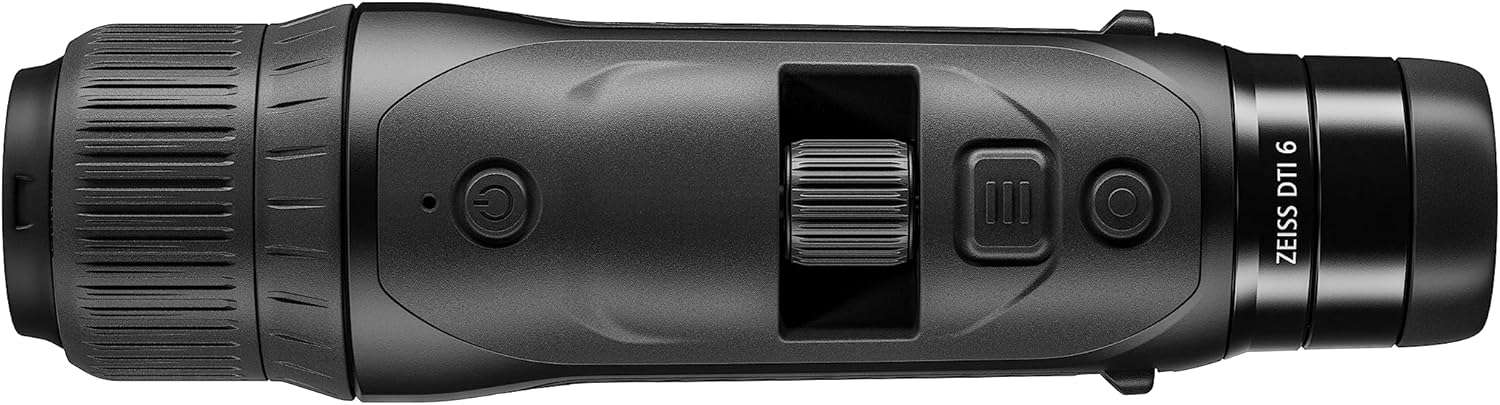
Зураг 2: Топ view of the ZEISS DTI 6/20, highlighting the power button, scroll wheel for magnification control, and other operational buttons. The ergonomic placement of controls is visible.
Гол онцлогууд:
- ZSIP Pro Image Technology: Delivers sharp, high-contrast thermal images.
- Өндөр нарийвчлалтай дэлгэц: AMOLED display with 1024x768 resolution, paired with a 640x480 sensor and 12µm pixel pitch.
- Томруулах: 1.5x optical magnification with up to 10x digital zoom, controlled by a scroll wheel.
- Тохируулга: 4 preset scene modes and up to 5 user-created layouts. Adjustable zoom settings, display brightness, and color palettes.
- Дотоод санах ой: 16GB for capturing images and videos.
- Зайны хугацаа: Up to 6.5 hours of continuous operation with a removable lithium-ion battery.
- Эргономик дизайн: Suitable for both left and right-handed users, with controls positioned for natural access even with gloves.
- Апп холболт: Seamless data transfer and live streaming to smartphones via the ZEISS Hunting App using Bluetooth, USB, or WLAN.
4. Тохиргоо
4.1 Батерей суурилуулах
- Төхөөрөмж дээрх батерейны тасалгааг олоорой.
- Тасалгааны тагийг нээ.
- Insert the provided lithium-ion battery, ensuring correct polarity.
- Зайны тасалгааны тагийг сайтар хаа.
4.2 Анхдагч асаалттай
- Press and hold the power button (refer to Figure 2) until the ZEISS logo appears on the display.
- Allow the device to initialize. This may take a few seconds.
- Adjust the diopter on the eyepiece for clear focus according to your vision.
5. Ашиглалтын заавар
5.1 Асаах/унтраах
- Асаахын тулд: Цахилгаан товчийг удаан дар.
- Унтраахын тулд: Press and hold the power button until the shutdown sequence initiates.
5.2 Magnification Control
Use the scroll wheel located on the top of the device (refer to Figure 2) to adjust the digital zoom level. Rotate the wheel forward to increase magnification and backward to decrease it.
5.3 үзэгдлийн горим
The DTI 6/20 offers 4 preset scene modes optimized for different observation conditions. Access these modes through the device's menu to enhance image clarity based on your environment.
5.4 Тохируулах
The device allows for extensive personalization:
- User Layouts: Create and save up to 5 custom display layouts.
- Дэлгэцийн тохиргоо: Adjust display brightness to suit ambient light conditions.
- Өнгөт палитр: Select from various color palettes to optimize thermal contrast and target identification.
5.5 App Connectivity (ZEISS Hunting App)
Enhance your experience by connecting the DTI 6/20 to the ZEISS Hunting App on your smartphone.

Зураг 3: A user operating the ZEISS DTI 6/20 thermal imaging camera in an outdoor environment, demonstrating its ergonomic handling and practical application.
- Өгөгдөл дамжуулах: Transfer images and videos from the device's 16GB internal storage to your smartphone via Bluetooth, USB, or WLAN.
- Шууд дамжуулалт: Stream live thermal footage directly to your smartphone for shared viewбичих эсвэл бичих.
- Further Customization: The app provides additional options for device settings and management.
6. Засвар үйлчилгээ
6.1 Цэвэрлэгээ
- Use the provided optics cleaning cloth to gently wipe the lenses. Avoid abrasive materials.
- Төхөөрөмжийн биеийн хувьд зөөлөн, damp даавуу. Химийн хатуу бодис, уусгагчийг бүү ашигла.
- Цэвэрлэхийн өмнө төхөөрөмжийг унтраасан эсэхийг шалгаарай.
6.2 Батерейны арчилгаа
- Эхний хэрэглээний өмнө зайг бүрэн цэнэглэ.
- Төхөөрөмж болон батерейг удаан хугацаагаар ашиглаагүй тохиолдолд сэрүүн, хуурай газар хадгална уу.
- Батерейг хэт өндөр температурт байлгахаас зайлсхий.
7. Алдаа засах
7.1 Төхөөрөмж асахгүй байна
- Батерейг зөв суурилуулж, бүрэн цэнэглэсэн эсэхийг шалгаарай.
- Try charging the battery for at least 30 minutes before attempting to power on again.
7.2 Image Appears Blurry
- Adjust the diopter on the eyepiece for your vision.
- Ensure the objective lens is clean and free from smudges or debris.
- Check the focus of the thermal image using the manual focus ring if available.
7.3 Connectivity Issues with ZEISS Hunting App
- Ensure Bluetooth or WLAN is enabled on both the device and your smartphone.
- Verify that the ZEISS Hunting App is updated to the latest version.
- Restart both the thermal camera and your smartphone.
8. Техникийн үзүүлэлтүүд
| Онцлог | Тодорхойлолт |
|---|---|
| Бүтээгдэхүүний хэмжээс | 9.06 x 2.44 x 2.68 инч |
| Зүйлийн жин | 1.52 фунт (24.33 унц) |
| Загварын дугаар | 527020-9911-000 |
| Брэнд | ZEISS |
| Загварын нэр | DTI 6/20 |
| Нүдний линзний тодорхойлолт | Плёссл |
| Фокусын төрөл | Гараар фокус |
| Эрчим хүчний эх үүсвэр | Батерейгаар ажилладаг (Лити-ион) |
| Тохиромжтой төхөөрөмжүүд | Ухаалаг утас |
| Фокусын уртын тодорхойлолт | 300 мм |
| Талбар View | 10 градус |
| Томруулах харьцаа | 3x Optical, up to 10x Digital |
| Sensor Resolution | 640 x 480 with 12 micron pixel pitch |
| Дэлгэцийн нягтрал | 1024 x 768 HD AMOLED |
| Дотоод санах ой | 16 ГБ |
| Батерейны ажиллах хугацаа | 6.5 цаг (тасралтгүй) |
9. Баталгаат хугацаа ба дэмжлэг
The ZEISS DTI 6/20 Thermal Imaging Camera is manufactured by ZEISS. For detailed warranty information, please refer to the included warranty card or visit the official ZEISS website. For technical support, service, or inquiries, please contact ZEISS customer service through their official channels.
Үйлдвэрлэгч: ZEISS


