Танилцуулга
Худалдан авалт хийсэнд баярлалааasing the Memorex MX-SBDA220 32-inch Bluetooth Dolby Atmos Soundbar. This soundbar is designed to enhance your home audio experience with immersive Dolby Atmos sound, delivering powerful and clear audio for movies, music, and gaming. This manual provides essential information for setting up, operating, and maintaining your new soundbar. Please read it thoroughly before use and retain it for future reference.
Аюулгүй байдлын чухал заавар
- Read all instructions before operating the soundbar.
- Энэ гарын авлагыг цаашид лавлах зорилгоор хадгална уу.
- Энэ төхөөрөмжийг усны ойролцоо бүү ашигла.
- Зөвхөн хуурай даавуугаар цэвэрлэ.
- Агааржуулалтын нүхийг хааж болохгүй. Үйлдвэрлэгчийн зааврын дагуу суурилуулна.
- Радиатор, халаалтын төхөөрөмж, зуух болон бусад төхөөрөмж (үүнд ampөргөгч) дулаан үүсгэдэг.
- Цахилгааны утсыг гишгэх, хавчихаас хамгаалаарай, ялангуяа залгуур, залгуур, төхөөрөмжөөс гарах цэг дээр.
- Зөвхөн үйлдвэрлэгчээс заасан хавсралт/дагалдах хэрэгслийг ашиглана уу.
- Аянга шуурганы үед эсвэл удаан хугацаагаар ашиглаагүй үед энэ төхөөрөмжийг цахилгааны залгуураас салга.
- Бүх үйлчилгээг мэргэшсэн үйлчилгээний ажилтнуудад шилжүүлээрэй. Төхөөрөмж нь цахилгаан тэжээлийн утас, залгуур гэмтсэн, шингэн асгарсан, эд зүйл унасан, бороо, чийгэнд өртсөн, хэвийн ажиллахгүй байгаа тохиолдолд засвар үйлчилгээ хийх шаардлагатай. , эсвэл хасагдсан.
Хайрцагт юу байна
Carefully unpack your soundbar and ensure all items are present:
- Memorex MX-SBDA220 Soundbar
- Алсын удирдлага
- Цахилгаан кабель
- Түргэн эхлүүлэх гарын авлага

Image: The Memorex MX-SBDA220 soundbar displayed with various connection cables including Optical, HDMI, and USB, alongside the Bluetooth logo, illustrating the multiple connectivity options.
Бүтээгдэхүүн дууссанview
Урд View
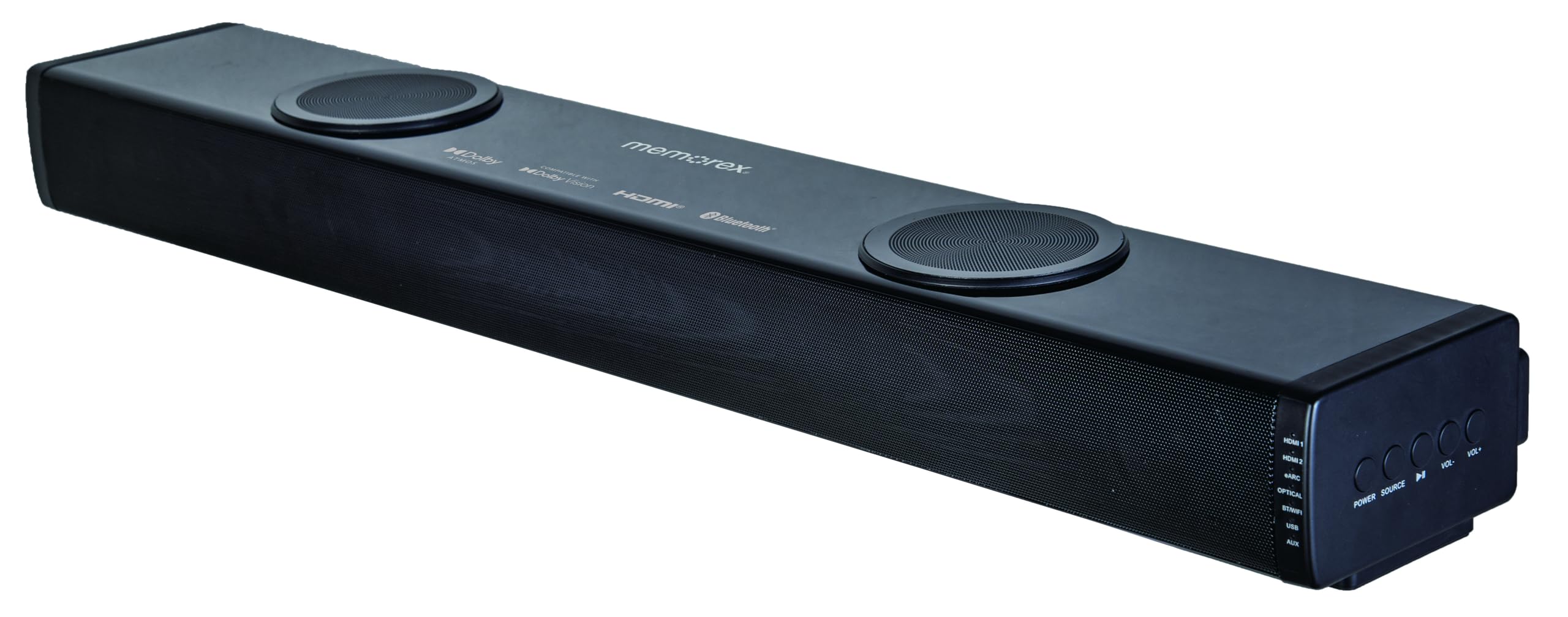
Зураг: Шууд урд тал view of the Memorex MX-SBDA220 soundbar, highlighting its sleek design, front speaker grille, and the two circular top-firing speakers for Dolby Atmos effects.
Хажуугийн самбарын хяналт

Зураг: өнцөгт view of the Memorex MX-SBDA220 soundbar, revealing the control panel on the right side. Buttons for Power, Source selection, Play/Pause, Volume Down, and Volume Up are visible, along with input indicators.
Алсын удирдлага

Image: The Memorex MX-SBDA220 soundbar shown with its full-function remote control positioned above it. The remote features buttons for power, input selection, sound modes, volume, bass, and treble adjustments.
Тохируулах гарын авлага
1. Физик байрлал
Place the soundbar on a stable, flat surface directly in front of your television. Ensure there are no obstructions blocking the front or top-firing speakers for optimal sound delivery, especially for Dolby Atmos effects.
2. Таны ТВ/төхөөрөмжүүдтэй холбогдож байна
The MX-SBDA220 offers multiple connectivity options:
- HDMI ARC (Аудио буцах суваг): For the best audio quality and control, connect an HDMI cable from the soundbar's HDMI ARC output to your TV's HDMI ARC input. This allows your TV remote to control the soundbar's volume.
- Оптик оролт: Connect an optical cable from the soundbar's OPTICAL input to your TV's optical digital audio output.
- HDMI IN (x2): Connect external devices like Blu-ray players or gaming consoles to the soundbar's HDMI IN ports. Then, connect the soundbar's HDMI ARC output to your TV's HDMI ARC input.
- Bluetooth: For wireless audio streaming from smartphones or tablets, select the Bluetooth input on the soundbar and pair your device.
- USB тоглуулагч: Аудио бүхий USB дискийг оруулна уу fileшууд тоглуулахын тулд USB порт руу оруулна.
- AUX оролт: Use a 3.5mm audio cable to connect devices with an analog audio output to the soundbar's AUX input.
3. Эрчим хүчний холболт
Connect the provided power cable to the soundbar's power input and then plug it into a wall outlet. The soundbar will enter standby mode.
Ашиглалтын заавар
Асаах/унтраах
дээр дарна уу ХҮЧ төхөөрөмжийг асаах, унтраахын тулд дууны самбар эсвэл алсын удирдлага дээрх товчлуурыг дарна уу.
Оролтын сонголт
дээр дарна уу ЭХ СУРВАЛЖ button on the soundbar or the corresponding input button (HDMI1, HDMI2, eARC, OPT, BT, USB, AUX) on the remote control to switch between audio sources. The LED display will indicate the active input.
Дууны хяналт
дарна уу VOL+ or VOL- buttons on the soundbar or remote control to adjust the master volume.
Дууны горимууд
The soundbar features 5 optimized sound modes. Press the corresponding button on the remote control to select:
- Кино: Enhances cinematic audio with dynamic range.
- Хөгжим: Хөгжим тоглуулахын тулд дууг оновчтой болгодог.
- Шөнө: Илүү чимээгүй сонсохын тулд динамик хүрээг багасгадаг бөгөөд шөнө орой сонсоход тохиромжтой. viewing.
- Дуу хоолой: Enhances vocal clarity for dialogue-heavy content.
- Тоглоом: Provides an immersive audio experience for gaming.
Басс болон өндөр давтамжийн тохируулга
-г ашиглана уу BASS+ / BASS- болон ДАВХАР ТҮВШИН+ / ДАВХАР ТҮВШИН- алсын удирдлага дээрх товчлууруудыг ашиглан нам ба өндөр давтамжийг өөрийн үзэмжээр нарийн тохируулна уу.
Bluetooth хослуулах
- -г сонгоно уу BT input on the soundbar. The LED display will flash, indicating pairing mode.
- On your mobile device, enable Bluetooth and search for "MX-SBDA220".
- Select the soundbar to pair. Once connected, the LED display will stop flashing.
USB тоглуулах
Insert a USB flash drive into the USB port. The soundbar will automatically switch to USB input and begin playing compatible audio files. Use the remote control for playback functions (Play/Pause, Skip Track).
Арчилгаа, засвар үйлчилгээ
- Цэвэрлэгээ: Саундбарын гадаргууг цэвэрлэхийн тулд зөөлөн, хуурай даавуу ашиглаарай. Шингэн цэвэрлэгч эсвэл аэрозоль шүршигч бүү хэрэглээрэй.
- Агааржуулалт: Хэт халалтаас урьдчилан сэргийлэхийн тулд агааржуулалтын нүхийг хаагаагүй эсэхийг шалгаарай.
- Хадгалах: Хэрэв дууны самбарыг удаан хугацаагаар хадгалах бол цахилгааны залгуураас салгаад сэрүүн, хуурай газар хадгална уу.
- Чийгнээс зайлсхийх: Саундбарыг ус, бороо, хэт их чийгшилээс хол байлга.
Алдааг олж засварлах гарын авлага
| Асуудал | Боломжит шийдэл |
|---|---|
| Хүч чадалгүй |
|
| Дуу алга |
|
| Алсын удирдлага ажиллахгүй байна |
|
| Bluetooth холболттой холбоотой асуудлууд |
|
Техникийн үзүүлэлтүүд
| Онцлог | Тодорхойлолт |
|---|---|
| Загварын дугаар | MX-SBDA220 |
| Чанга яригчийн төрөл | Atmospheric (Dolby Atmos 2.0.2CH) |
| Нийт гаралтын чадал | 100 Watts (20W x 2 front + 30W x 2 top) |
| Холболтын технологи | Bluetooth 5.0, HDMI (ARC x1, IN x2), Optical, USB, AUX |
| Bluetooth хүрээ | 10 метр (33 фут) хүртэл |
| Бүтээгдэхүүний хэмжээ (D x W x H) | 5.93" x 8.1" x 37.57" (ойролцоогоор) |
| Зүйлийн жин | 2.2 фунт |
| Оруулсан бүрэлдэхүүн хэсгүүд | Soundbar, Remote Control, Power Cable, Quick Start Guide |
| UPC | 838689000208 |
Баталгаат хугацааны мэдээлэл
Memorex products are manufactured to the highest quality standards. For specific warranty details, including coverage period and terms, please refer to the warranty card included with your product or visit the official Memorex webсайт. Худалдан авалтын баримтаа аливаа баталгаат нэхэмжлэлийг худалдан авсан баримт болгон хадгална уу.
Хэрэглэгчийн дэмжлэг
If you encounter any issues or have questions regarding your Memorex MX-SBDA220 Soundbar that are not covered in this manual, please contact Memorex customer support. Contact information can typically be found on the official Memorex webсайт эсвэл бүтээгдэхүүнтэй хамт өгсөн Түргэн эхлүүлэх гарын авлагад байгаа.


