1. Бүтээгдэхүүн дууссанview
The Nokia G310 5G Smartphone (Model TA-1573) offers lightning-fast 5G connectivity and modern mobile technology. It features a vibrant display for various tasks, a powerful processor for smooth performance, and an advanced camera system for detailed photos. Designed for daily use, it provides a comfortable grip and durable build quality. Enjoy extensive network compatibility, ample storage, a long-lasting battery with quick charging, and a user-friendly interface with regular software updates.
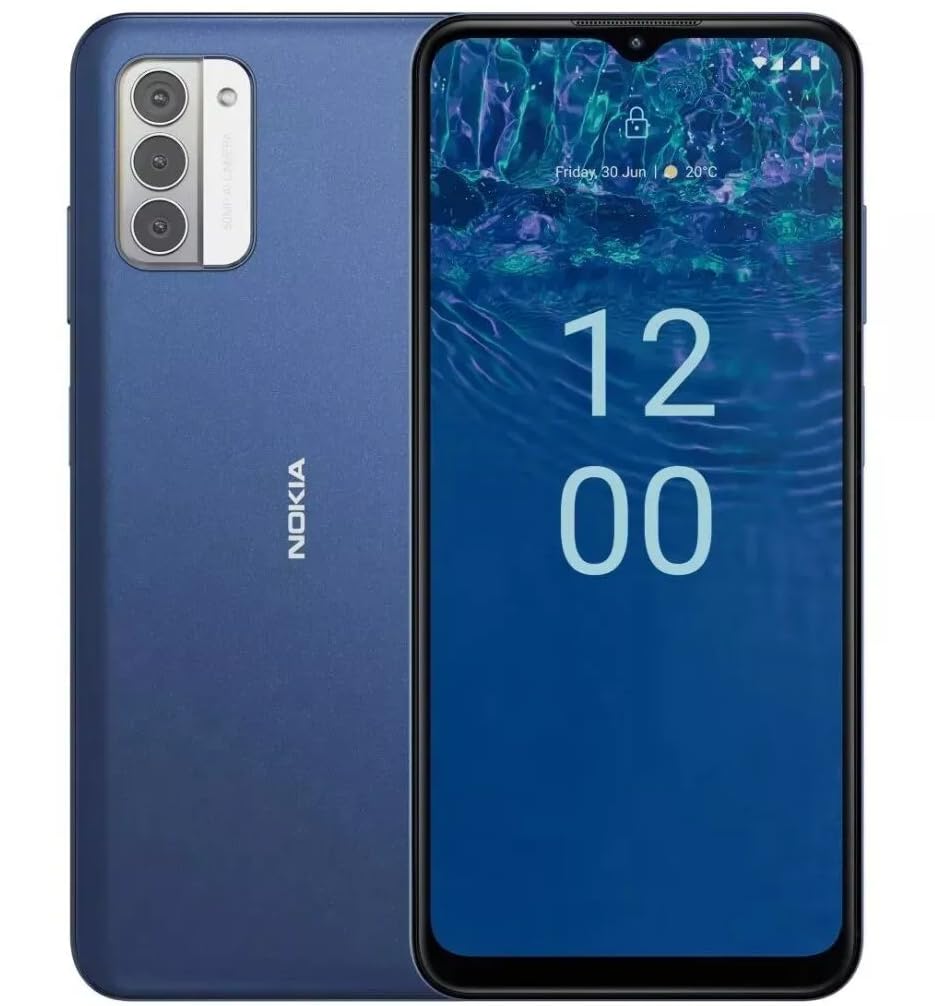
Зураг: Ар талд view of the Nokia G310 5G Smartphone, showcasing the triple camera module and Nokia branding.
Гол онцлогууд
- 5G холболт: Experience ultra-fast mobile data speeds and low latency.
- Хурц дэлгэц: Large touchscreen display delivers vibrant colors and sharp visuals.
- Үр дүнтэй гүйцэтгэл: Processor handles everyday tasks smoothly, from browsing to gaming.
- Бат бөх дизайн: Sleek and modern smartphone design with durable construction.
2. Эхлэл
Хайрцагт юу байна
- Nokia G310 5G ухаалаг гар утас
- Цэнэглэгч
SIM and MicroSD Card Installation
Locate the SIM/MicroSD card tray on the side of your device. Use the provided SIM ejector tool to open the tray. Insert your Nano-SIM card(s) and/or MicroSD card into the designated slots. Ensure the cards are correctly oriented. Gently push the tray back into the device until it clicks into place.
Асаах/унтраах
To power on your Nokia G310, press and hold the Power/Fingerprint Sensor button located on the right side of the device until the Nokia logo appears. To power off, press and hold the Power/Fingerprint Sensor button, then select 'Power off' from the options that appear on the screen.
3. Төхөөрөмжийн зохион байгуулалт
Физик товчлуурууд болон портууд
- Дууны товчлуурууд: Located on the right side, above the Power/Fingerprint Sensor button, for adjusting media and call volume.
- Power/Fingerprint Sensor Button: Located on the right side, used for powering the device on/off, locking/unlocking the screen, and fingerprint authentication.
- USB-C порт: Доод талд байрлах бөгөөд цэнэглэх, өгөгдөл дамжуулахад ашигладаг.
- 3.5 мм аудио залгуур: Located at the bottom, for connecting wired headphones.
- Илтгэгч: Аудио гаралтын доод хэсэгт байрладаг.
- Микрофон: Дуудлага болон дуут командыг нэгтгэсэн.
Камерын модуль
The rear of the device features a multi-lens camera module, including a main camera, along with a flash for low-light photography. The front-facing camera is discreetly placed within a notch at the top of the display.
4. Ашиглалтын заавар
Үндсэн навигаци
The Nokia G310 operates on the Android operating system, offering an intuitive touchscreen interface. Swipe up from the bottom of the screen to access the app drawer, swipe down from the top for notifications and quick settings, and use gestures or navigation buttons (configurable in settings) to move between apps and screens.
Холболт
- 5G үүрэн дата: The device supports 5G connectivity for ultra-fast mobile data speeds. Ensure your SIM card and plan support 5G.
- Wi-Fi: Connect to wireless networks for internet access. Go to Settings > Network & internet > Wi-Fi to manage connections.
- Bluetooth: Pair with other Bluetooth-enabled devices like headphones or speakers. Go to Settings > Connected devices > Bluetooth.
- GPS: Utilize built-in GPS for location services and navigation.
5. Камерын хэрэглээ
The Nokia G310 features an advanced camera system designed to capture memorable moments. Access the camera app from your home screen or app drawer.
Зураг авах
Open the Camera app, frame your shot, and tap the shutter button on the screen to take a picture. The advanced AI camera assists in optimizing settings for various scenes.
Видео бичлэг хийх
In the Camera app, switch to video mode, then tap the record button to start and stop recording. The phone supports various video resolutions.
Камерын горимууд
Explore different camera modes available in the camera app, such as Portrait, Panorama, and Night mode, to enhance your photography experience.
6. Зайны удирдлага
Төхөөрөмжөө цэнэглэж байна
The Nokia G310 is equipped with a 5000 Milliamp Hours (5000.0 Battery Power Rating) battery. Connect the provided USB-C charger to the port at the bottom of the device. The phone supports quick charging for reduced downtime.
Батерейны ашиглалтын хугацааг оновчтой болгох
- Дэлгэцийн гэрлийг тав тухтай түвшинд тохируулна уу.
- Батерейны цэнэг багатай үед Батарей хэмнэгч горимыг идэвхжүүлнэ.
- Цаана ажиллаж байгаа ашиглагдаагүй програмуудыг хаа.
- Ашиглаагүй үед Wi-Fi, Bluetooth эсвэл GPS-г идэвхгүй болгох.
7. Техникийн үзүүлэлтүүд
| Загварын дугаар | TA-1573 |
| Үйлдлийн систем | Android |
| CPU загвар | MediaTek Helio P60T |
| Үүрэн холбооны технологи | 5G |
| Утасгүй зөөгч | Түгжээг тайлсан |
| Санах ойн хадгалах багтаамж | 4 ГБ |
| Шийдвэр | 1080 x 2340 |
| Хүний интерфейсийн оролт | Мэдрэгчтэй дэлгэц |
| Зайны багтаамж | 5000 саяamp Цаг |
| Аудио залгуур | 3.5 мм |
| Өнгө | Цэнхэр |
| Үйлдвэрлэгч | Nokia |
| Эхний боломжтой огноо | 31 оны нэгдүгээр сарын 2025 |
8. Алдаа засах
If you encounter issues with your Nokia G310, try the following common troubleshooting steps:
- Төхөөрөмж хариу өгөхгүй байна: Дахин асаахын тулд Power товчийг 10-15 секундын турш барина уу.
- Холболтын асуудал: Toggle Wi-Fi or Bluetooth off and on. Restart your device. Check network settings.
- Апп ажиллахгүй байна: Тохиргоо > Аппликешн хэсэгт програмын кэш болон өгөгдлийг устгана уу. Хэрэв асуудал хэвээр байвал програмыг устгаад дахин суулгана уу.
- Батерей хурдан дуусдаг: Review battery usage in Settings > Battery to identify power-hungry apps. Adjust screen brightness and enable Battery Saver.
- Хадгалах сан дүүрсэн: Шаардлагагүй устга files, photos, or apps. Transfer media to a computer or cloud storage. Consider using a MicroSD card for additional storage.
9. Засвар үйлчилгээ, арчилгаа
- Цэвэрлэгээ: Төхөөрөмжөө цэвэрлэхдээ зөөлөн, хөвөнгүй даавуу ашиглаарай. Хүчтэй химийн бодис эсвэл зүлгүүрийн материалаас зайлсхий.
- Програм хангамжийн шинэчлэлтүүд: Regularly check for and install software updates to ensure your device runs optimally and has the latest security features. Go to Settings > System > System update.
- Хадгалах менежмент: Үе үе дахинview your device's storage to free up space and maintain performance.
- Байгаль орчны нөхцөл: Avoid exposing your device to extreme temperatures, direct sunlight, or excessive moisture.
10. Баталгаат хугацаа ба дэмжлэг
For warranty information, please refer to the warranty card included in your product packaging or visit the official Nokia support website. For further assistance, contact Nokia customer support.


