1. Танилцуулга
This manual provides detailed instructions for the installation, operation, and maintenance of your Haloview Byte Tango BT6 Touch RV Backup Camera System. Please read this manual thoroughly before using the product to ensure proper function and safety.
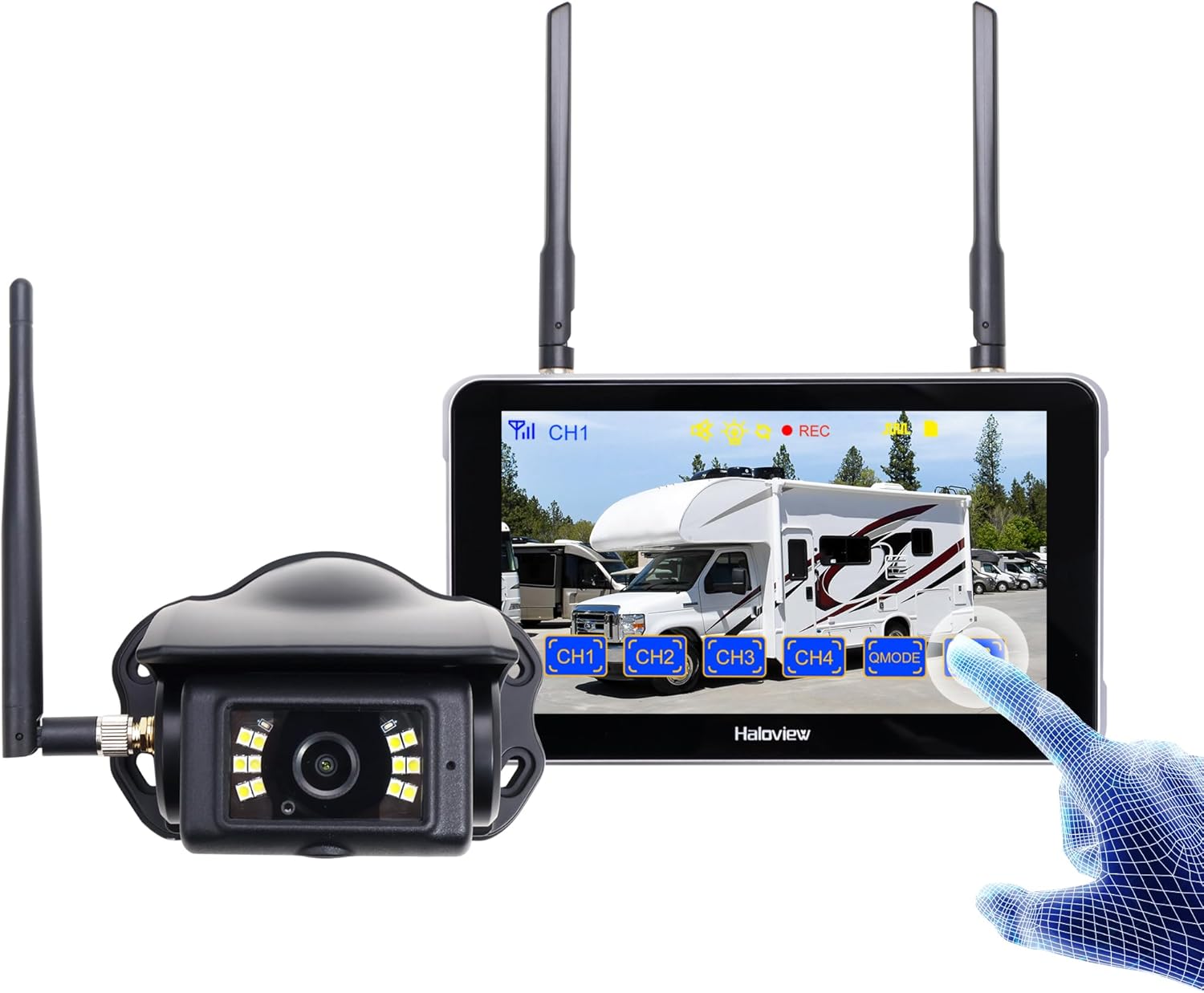
Image 1.1: Haloview Byte Tango BT6 Touch RV Backup Camera System components, including the 5.5-inch touch screen monitor and the wireless camera.
Гол онцлогууд:
- 2.5D Curved Glass 5.5'' Touch Screen: Offers a smooth and responsive user interface.
- Low Latency Wireless Technology: Ensures minimal lag and interference-free signal transmission, supporting vehicles up to 65ft in length (e.g., RVs, travel trailers, trucks, campers, vans, pickups, tractors, fifth wheels, motorhomes).
- Full-Color Dim-Light Night Vision: Advanced image sensors provide full-color video even in low-light conditions. Night Vision Fill Lights can be activated or deactivated remotely via the monitor.
- Аудио зураг авалт: Built-in speaker alerts users to pedestrians, animals, or unusual sounds in the surroundings.
- Баригдсан DVR: Supports real-time recording and video playback with 1080P@30fps FHD resolution.
2. Хайрцагт юу байна
Доор жагсаасан бүх зүйл таны багцад байгаа эсэхийг шалгаарай.

Image 2.1: All components included in the Haloview Byte Tango BT6 Touch system package.
- BT6 Touch Screen Monitor
- BTC128 камер
- Сорох аяга суурилуулах бэхэлгээ
- 3M холбох хаалт
- Type-C кабель
- Камер хувиргах кабель
- Furrion Pre-wired RV-д зориулсан цахилгаан хувиргагч
- Хослуулах кабель
- Тамхины асаагууртай цахилгаан хувиргагч
3. Тохиргоо ба суурилуулалт
3.1 Камер суурилуулах
- Суулгах байршлыг сонгоно уу: Select a suitable surface mount location at the rear of your vehicle, ensuring a clear view and protection from direct impact.
- Камерыг хамгаалах: Mount the BTC128 camera securely using appropriate fasteners. Ensure the antenna is positioned for optimal signal reception.
- Эрчим хүчний холболт: Connect the camera to a 12V DC power source. If your RV is pre-wired for Furrion, use the provided power adapter. Otherwise, connect to your vehicle's reverse light circuit or another suitable 12V power source.
3.2 Монитор суурилуулах
- Mount the Monitor: Attach the 5.5-inch monitor to your dashboard or windshield using either the suction cup mount bracket or the 3M adhesive mount bracket. Ensure the monitor is positioned for easy viewжолоодоход тань саад учруулахгүйгээр жолоодох view.
- Power the Monitor: Connect the monitor to power using the provided cigarette lighter power adapter or the Type-C cable for USB power.
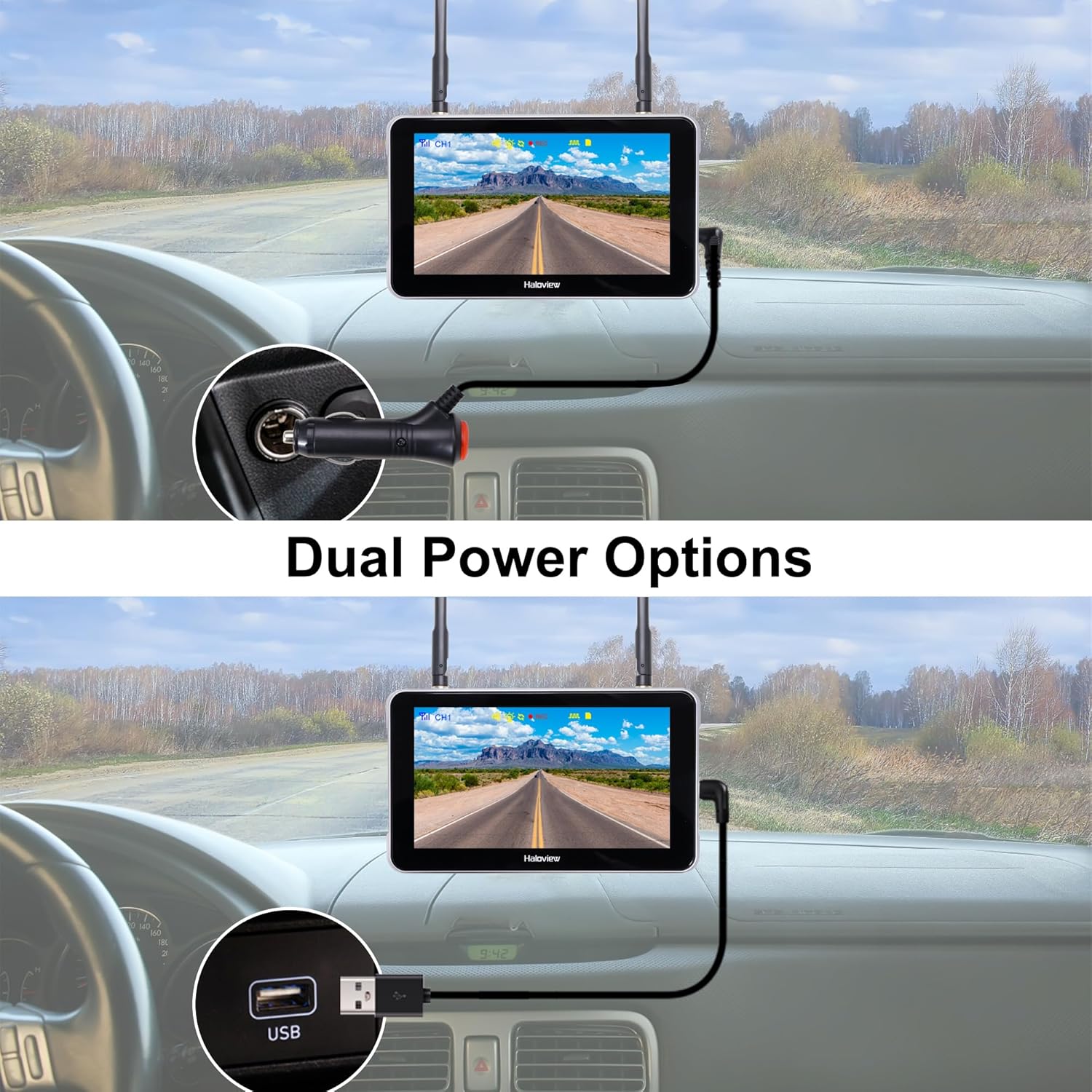
Image 3.1: The monitor can be powered via a cigarette lighter adapter or a USB Type-C cable.
3.3 Pairing the Camera and Monitor
The camera and monitor are typically pre-paired from the factory. If no image appears or you are adding additional cameras, follow these steps:
- Камер болон дэлгэцийг хоёуланг нь асаана уу.
- On the monitor, navigate to the pairing menu (refer to the operating section for menu access).
- Select an available channel for pairing.
- Press the pairing button on the camera (if applicable, consult camera-specific instructions) or follow the on-screen prompts on the monitor to initiate pairing.
- Once paired, the camera's video feed will appear on the monitor.

Image 3.2: Wireless signal transmission between the camera and monitor.
4. Ашиглалтын заавар
4.1 Үндсэн үйл ажиллагаа
- Асаах/унтраах: Press and hold the power button on the monitor to turn it on or off.
- Мэдрэгчтэй дэлгэцийн интерфейс: Navigate through menus and settings by tapping and swiping on the 5.5-inch touch screen.
- Суваг солих: If multiple cameras are connected, tap the channel buttons (CH1, CH2, etc.) on the screen to switch between camera views.

Image 4.1: The touch screen allows for intuitive control of the system.
4.2 Нарийвчилсан онцлог
- Зургийн флип: Access the settings menu to adjust the image orientation (horizontal/vertical flip) to match your camera's mounting position.

Image 4.2: The image flip function allows for various display orientations.
- Шөнийн хараа: The system automatically adjusts for low-light conditions. Night Vision Fill Lights can be manually controlled via the monitor settings if ambient light is extremely low.

Image 4.3: The camera provides full-color images even in dim light conditions.
- DVR бичлэг: Insert a Micro-SD card (not included) into the monitor's slot to enable continuous recording. Access recorded footage through the playback menu. The system records in 1080P at 30 frames per second.

Image 4.4: The monitor supports Micro-SD card recording for continuous video capture.
- Rear Assist Marker Lines: Customizable parking guidelines can be activated and adjusted via the monitor settings to aid in reversing and parking maneuvers.
Image 4.5: Customizable rear assist marker lines for precise maneuvering.
5. Засвар үйлчилгээ
- Цэвэрлэгээ: Use a soft, dry cloth to clean the monitor screen and camera lens. For stubborn dirt, slightly dampдаавуугаар усаар. Зүлгүүрийн цэвэрлэгч эсвэл уусгагчаас зайлсхий.
- Кабелийн холболтууд: Periodically check all cable connections for tightness and signs of wear. Ensure power cables are securely plugged in.
- Камерын линз: Keep the camera lens clear of dirt, snow, or ice to maintain optimal image quality.
- Антенууд: Ensure antennas on both the camera and monitor are securely attached and positioned for best signal.
6. Алдаа засах
- Монитор дээр зураг байхгүй:
- Ensure both the camera and monitor are powered on.
- Бүх цахилгаан холболтыг шалгана уу.
- Verify that the camera and monitor are properly paired (refer to Section 3.3).
- Check for obstructions between the camera and monitor that might block the wireless signal.
- Зургийн чанар муу:
- Камерын линзийг цэвэрлэ.
- Камерыг найдвартай суурилуулсан, чичиргээгүй эсэхийг шалгаарай.
- Ойролцоох хүчтэй хөндлөнгийн эх үүсвэрийг шалгана уу.
- Бичлэгийн асуудал:
- Ensure a compatible Micro-SD card is inserted correctly.
- Check if the Micro-SD card is full; format it if necessary (this will erase all data).
- Verify recording settings in the monitor menu.
- Monitor Not Responding to Touch:
- Restart the monitor by powering it off and on again.
- Дэлгэц цэвэр, хог хаягдалгүй эсэхийг шалгаарай.
7. Техникийн үзүүлэлтүүд
| Онцлог | Тодорхойлолт |
|---|---|
| Бүтээгдэхүүний хэмжээс (Хяналт) | 6.1 x 1 x 8.8 инч (155 мм L x 25 мм W x 88 мм H) |
| Зүйлийн жин | 2.7 фунт |
| Дэлгэцийн хэмжээ | 5.5 инч |
| Дэлгэцийн технологи | LCD |
| Утасгүй холболт | 2.4G дижитал утасгүй |
| Тохиромжтой төхөөрөмжүүд | BTC128, BTC129, BTC126, BTC125, BTC131 |
| Суурилуулалтын төрөл | Гадаргуугийн бэхэлгээ |
| Үйл ажиллагааны ботьtage | 12 вольт (ДС) |
| Оптик мэдрэгчийн технологи | CMOS |
| Линзний төрөл | Fixed Wide Angle |
| Бодит өнцөг View | 120 градус |
| Видео бичлэгийн нягтрал | 1080P@30fps FHD |

Image 7.1: Physical dimensions of the Haloview monitor and a summary of key features.
8. Баталгаат хугацаа ба дэмжлэг
8.1 Баталгаат хугацааны мэдээлэл
Сайн ууview products are covered by a limited warranty. Please refer to the warranty card included with your product or visit the official Haloview webнарийвчилсан баталгаат нөхцөлийг сайтаас авна уу. Худалдан авалтын баримтаа баталгаат нэхэмжлэлд зориулж худалдан авалтын баталгаа болгон хадгална уу.
8.2 Хэрэглэгчийн дэмжлэг
For technical assistance, troubleshooting, or product inquiries, please contact Haloview дараах сувгуудаар дамжуулан хэрэглэгчийн дэмжлэг:
- Webсайт: Visit the official Haloview webТүгээмэл асуултууд, тусламжийн эх сурвалжууд болон холбоо барих маягтуудын сайт.
- Имэйл: Refer to your product packaging or the Haloview webхэрэглэгчийн тусламжийн цахим шуудангийн хаягийн сайт.
- Утас: Contact numbers may be available on the official webшууд дэмжлэг үзүүлэх сайт.
When contacting support, please have your product model (BT6 Touch) and purchase information ready.


