1. Бүтээгдэхүүн дууссанview
The eXtremeRate Luna Spider Armor Front Shell and RISE4 Remap Kit are designed to enhance your PlayStation 5 controller. The kit includes a custom front shell with a touchpad and a programmable back button attachment, allowing for advanced customization and improved gameplay. This manual provides detailed instructions for installation and operation.
2. Тохиромжтой байдал
The RISE4 Remap Kit is compatible with PS5 controller models BDM-010 болон BDM-020. The custom front shell is compatible with PS5 controller models BDM-010, BDM-020, BDM-030, BDM-040, and BDM-050. Please verify your controller's model number before proceeding with installation.

Зураг: Guide for identifying your PS5 controller model. Use a tool to pry off the R1 button and check the internal structure, specifically the spring location and mainboard markings, to determine if it is BDM-010, BDM-020, BDM-030, BDM-040, or BDM-050.
3. Суулгах заавар
Installation of this kit requires high hands-on skills. Soldering is optional for certain functionalities. It is highly recommended to watch the official installation videos before beginning the process.
3.1. Required Tools and Components
The kit includes all necessary components and tools for installation. Please ensure all parts are present before starting.

Зураг: All components included in the eXtremeRate RISE4 Remap Kit, including the custom front shell, back button attachment, circuit boards, ribbons, screws, and screwdrivers.
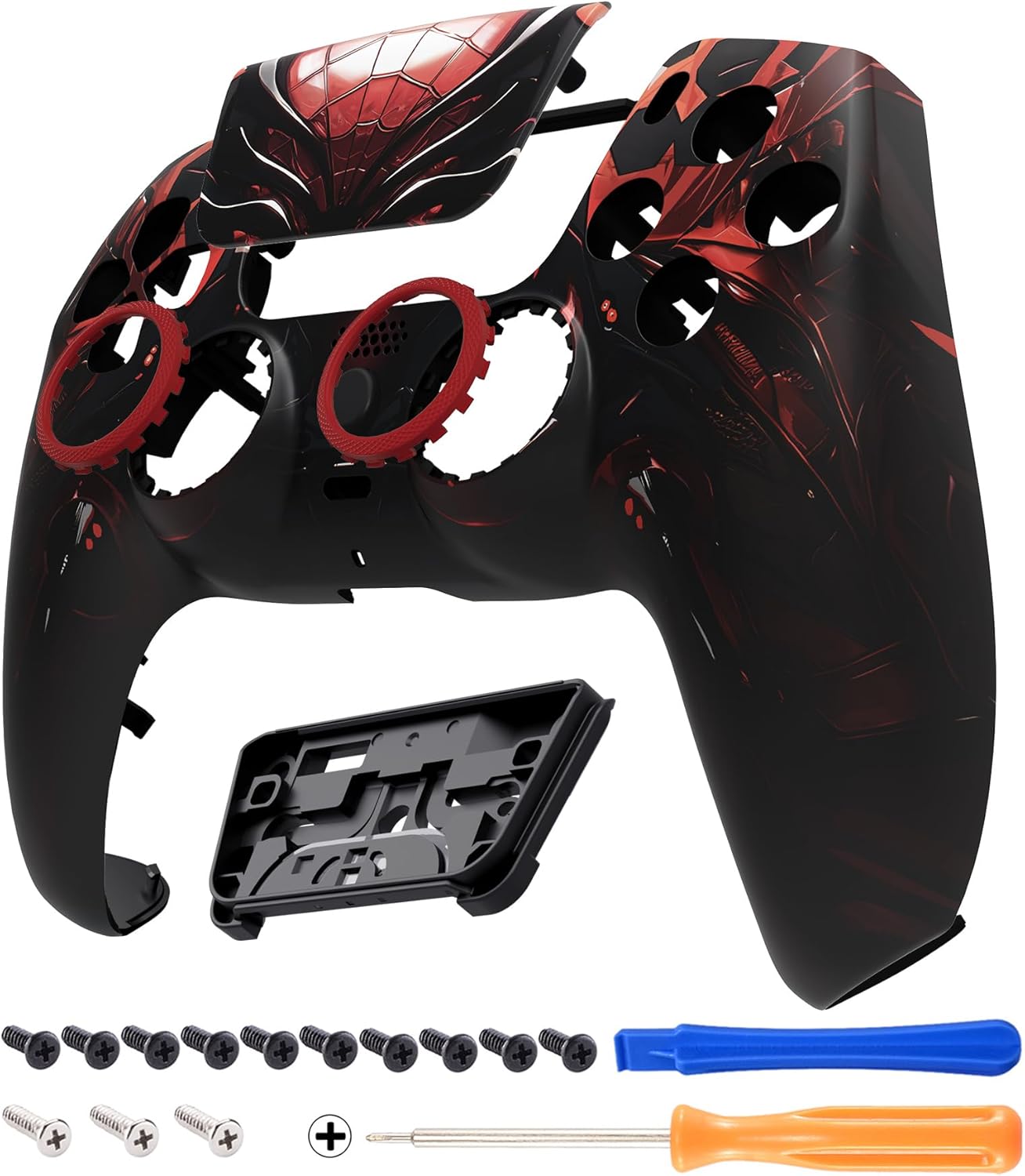
Зураг: The eXtremeRate Luna Spider Armor Front Shell and included tools, such as screwdrivers and prying tools, essential for disassembling the controller.
3.2. Installation Video Resources
For a comprehensive visual guide, please refer to the official installation videos:
- RISE4 Remap Kit Installation: Search YouTube for "eXtremeRate RISE4 Remap Kit for PS5" or use video ID "DdFUF4c3HE".
- LUNA Shell Installation: Search YouTube for "eXtremeRate LUNA shell for ps5 controller" or use video ID "4TCikOPFAq8".
Follow the steps in the video carefully. Disassembly and reassembly of the controller must be performed with precision to avoid damage.
4. Operating Instructions (Button Remapping)
The RISE4 Remap Kit adds four ergonomic, programmable back buttons to your PS5 controller. These buttons can be assigned to various functions for improved control.

Зураг: Арын view of the controller with the RISE4 Remap Kit installed, showing the four back buttons, the setting button, and the LED indicator.
4.1. Assignable Buttons
A maximum of 15 buttons can be assigned to the back buttons. These include: X, O, Triangle, Square, Up, Down, Left, Right, L1, L2, R1, R2, L3, R3, and Touchpad Button.

Зураг: A PS5 controller with various buttons highlighted in green, indicating the 15 buttons that can be assigned to the back paddles of the RISE4 Remap Kit.
4.2. Remapping Procedure
- Enter Remap Mode: Press and hold the 'Setting Button' (located on the back of the controller, between the back paddles) for 3 seconds until the LED indicator blinks.
- Assign a Button: Press the back button you wish to program (e.g., K1), then press the desired face button or trigger you want to assign to it (e.g., X button). The LED indicator will blink to confirm the assignment.
- Exit Remap Mode: Press and hold the 'Setting Button' again for 3 seconds until the LED indicator turns off. The new mapping is now saved.
Repeat the process for each back button you wish to remap. The settings are saved even after the controller is powered off.
5. Засвар үйлчилгээ
To ensure the longevity of your eXtremeRate custom shell and remap kit, follow these maintenance guidelines:
- Цэвэрлэгээ: Use a soft, dry cloth to clean the surface of the controller. Avoid abrasive cleaners or solvents that may damage the finish.
- Хадгалах: Store the controller in a clean, dry environment away from extreme temperatures and direct sunlight.
- Харьцуулах: Handle the controller with care to prevent physical damage to the shell or internal components.
6. Алдаа засах
If you encounter issues with your eXtremeRate kit, consider the following:
- Хариу өгөхгүй товчлуурууд: Ensure all ribbon cables are securely connected during installation. Re-check the compatibility of your controller model with the kit.
- Remapping Issues: Verify that you are correctly following the remapping procedure (Section 4.2). Ensure the LED indicator responds as expected.
- Биеийн гэмтэл: If the shell or buttons are physically damaged, replacement parts may be required.
For further assistance, please refer to the official eXtremeRate support resources or contact customer service.
7. Бүтээгдэхүүний техникийн үзүүлэлтүүд
| Бүтээгдэхүүний нэр | eXtremeRate Luna Spider Armor Front Shell & RISE4 Remap Kit |
| Брэнд | Хэт их хурд |
| RISE4 Remap Kit Compatibility | PS5 Controller BDM-010, BDM-020 |
| Front Shell Compatibility | PS5 Controller BDM-010, BDM-020, BDM-030, BDM-040, BDM-050 |
| Програмчлагдах товчлуурууд | 4 Back Buttons |
| Даалгавар өгөх функцууд | 15 (X, O, Triangle, Square, Up, Down, Left, Right, L1, L2, R1, R2, L3, R3, Touchpad Button) |
| ASIN | B0DX2BNB72 |
| Эхний боломжтой | 13 оны хоёрдугаар сарын 2025 |
8. Баталгаат хугацаа ба дэмжлэг
eXtremeRate products are designed for quality and performance. For information regarding product warranty, returns, or technical support, please visit the official eXtremeRate webсайт эсвэл харилцагчийн үйлчилгээтэй шууд холбогдоно уу. Баталгаат зарга авахын тулд худалдан авалтын баримтаа хадгална уу.
You can also visit the eXtremeRate Store on Amazon for more information: eXtremeRate Amazon Store.


