1. Бүтээгдэхүүн дууссанview
The KUAIQU SPPS-K3010 is a high-precision variable DC power supply designed for laboratory, R&D, and industrial applications. It features a 5-digit TFT color display, offering both numerical and graphical (curve) representations of output voltage and current. This unit provides precise control over voltage (0-30V) and current (0-10A) with microampere-level resolution (0.01mA), ensuring accurate power delivery for sensitive electronic equipment.
Key features include advanced safety protections (Over-Voltage Protection - OVP, Over-Current Protection - OCP, Short-Circuit Protection - SCP), a memory function for storing and recalling up to four sets of parameters, and a user-friendly lock function to prevent accidental adjustments. It also incorporates USB-A and USB-C charging ports for convenience and an intelligent temperature-controlled cooling fan for stable, quiet operation.

Зураг 1.1: Урд view of the KUAIQU SPPS-K3010 DC Power Supply, showcasinавсаархан дизайн болон тод дэлгэцтэй.
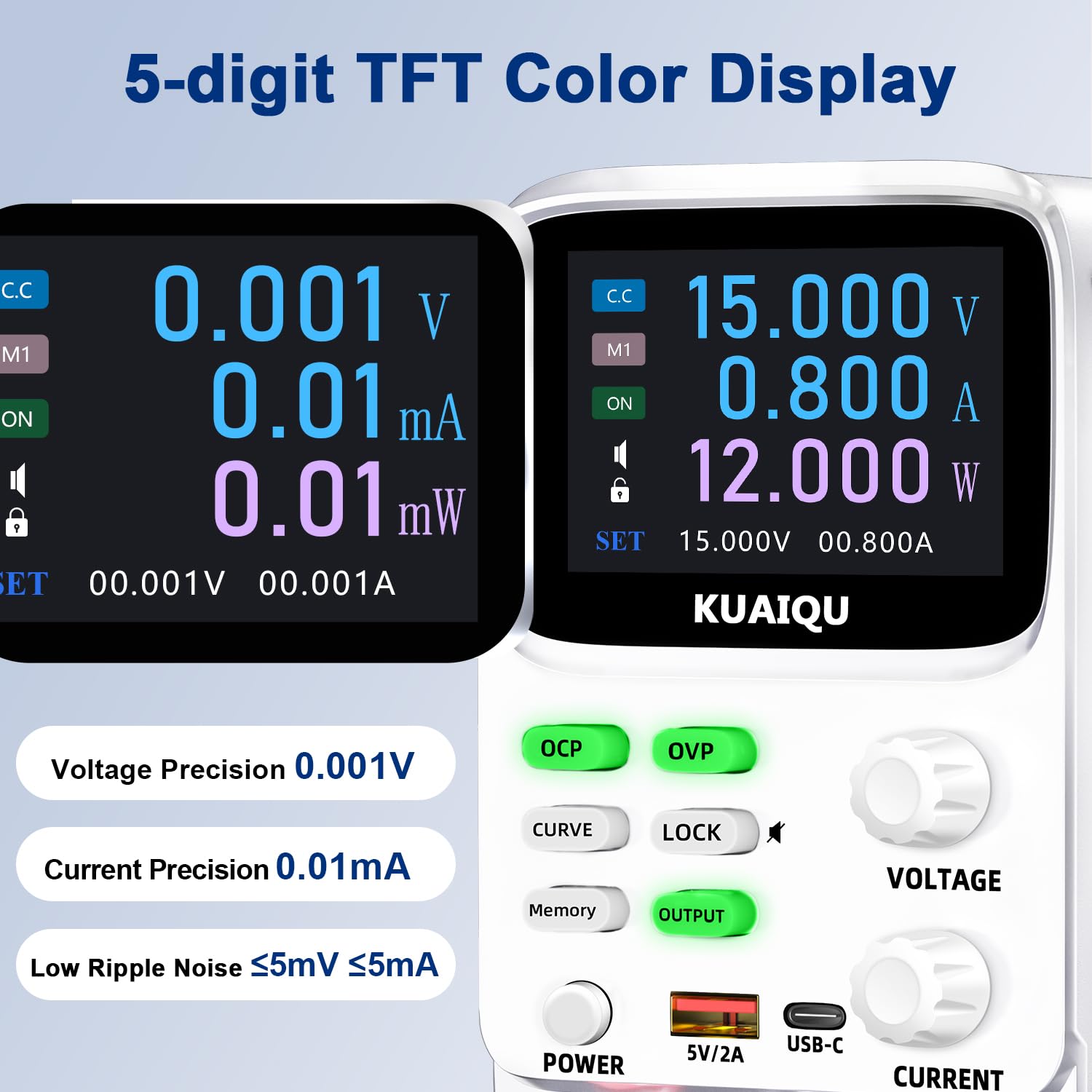
Figure 1.2: The 5-digit TFT color display provides high-precision readings, including 0.001V voltage precision and 0.01mA current precision.
2. Аюулгүй ажиллагааны заавар
To ensure safe operation and prolong the lifespan of your device, please read and adhere to the following safety guidelines:
- Цахилгаан тэжээлийг газардуулсан цахилгааны залгуурт байнга холбоно.
- Төхөөрөмжийг нойтон газар ажиллуулж болохгүй damp нөхцөл.
- Хэт халалтаас сэргийлэхийн тулд төхөөрөмжийн эргэн тойронд агааржуулалтыг зөв хий. Агааржуулалтын нүхийг бүү бөглө.
- Боть хэрэглэхээс зайлсхийtage or current exceeding the specified maximum ratings.
- Before making any connections or disconnections, ensure the output is turned off and the power supply is disconnected from the main power source.
- c-г нээж болохгүйasinцахилгаан хангамжийн g. Дотор нь хэрэглэгчийн засвар үйлчилгээ хийх хэсэг байхгүй. Бүх үйлчилгээг мэргэшсэн боловсон хүчинд шилжүүлээрэй.
- Keep the device away from flammable materials and explosive gases.
- Use only the provided power cable and output cables.
3. Бүтээгдэхүүний бүрэлдэхүүн хэсгүүд
Familiarize yourself with the various components and controls of your KUAIQU SPPS-K3010 DC Power Supply.

Зураг 3.1: Урд самбар дээшview. This image displays the front panel of the power supply, highlighting the TFT display, control buttons (OCP, OVP, CURVE, LOCK, Memory, OUTPUT), rotary encoder knobs for Voltage and Current, Power button, USB-A and USB-C charging ports, and output terminals (+, -, GND).
3.1 Урд самбарын удирдлага ба үзүүлэлтүүд
- TFT өнгөт дэлгэц: Үзүүлэх ботьtage, current, power, and curve displays.
- OCP товч: Over-Current Protection setting and activation.
- OVP Button: Хэт ботьtage Protection setting and activation.
- CURVE Button: Toggles the real-time voltage and current curve display.
- LOCK товчлуур: Санамсаргүй өөрчлөлтөөс сэргийлэхийн тулд хяналтын самбарыг түгжих/түгжээг тайлах.
- Санах ойн товчлуур: Accesses and saves preset voltage/current values (M1-M4).
- OUTPUT Button: Цахилгаан гаралтыг идэвхжүүлдэг эсвэл идэвхгүй болгодог.
- БОТЬTAGE товчлуур: Rotary encoder for adjusting output voltage. Press to switch digit selection.
- ОДООГИЙН ХЯНАЛТ: Rotary encoder for adjusting output current. Press to switch digit selection.
- Асаах товч: Төхөөрөмжийн үндсэн цахилгаан унтраалга.
- USB-A / USB-C Ports: For charging external electronic devices.
- Output Terminals (+, -, GND): Connect positive, negative, and ground leads to the load.
3.2 Арын самбар
The rear panel typically includes the AC power input socket, a fuse holder, and the cooling fan exhaust.
4. Тохиргоо
4.1 Савлах, шалгах
- Сав баглаа боодолоос цахилгаан хангамж болон бүх дагалдах хэрэгслийг болгоомжтой авч хая.
- Verify that all items listed in the "What's in the Box" section are present: 1x DC power supply, 1x output power cord, 1x power cord, 1x user manual.
- Inspect the unit for any signs of physical damage. If damage is found, contact your supplier immediately.
4.2 Эрчим хүчний холболт
- Ensure the power supply's main power switch is in the OFF position.
- Connect the provided AC power cord to the power input socket on the rear panel of the power supply.
- Plug the other end of the AC power cord into a grounded electrical outlet (110V AC).
4.3 Ачааллыг холбох
- Ensure the power supply's output is OFF (the OUTPUT button LED should be off).
- Connect the red output cable to the positive (+) terminal and the black output cable to the negative (-) terminal on the front panel.
- Connect the other ends of the output cables to your load device, ensuring correct polarity. For safety, connect the green ground (GND) terminal to the chassis of your load if required.
5. Ашиглалтын заавар
5.1 Асаах, унтраах
- Асаахын тулд товчийг дарна уу ХҮЧ товч. Дэлгэц гэрэлтэх болно.
- Унтраахын тулд товчийг дарна уу ХҮЧ дахин товчлуур.
5.2 Боть тохируулахtage ба одоогийн

Figure 5.1: Precision adjustment using encoder knobs. This image illustrates how to use the rotary encoder knobs for precise voltage and current adjustments, showing the process of pressing the knob to select digits and rotating to change values.
- Параметр сонгох: -г эргүүл БОТЬTAGE or ОДОО knob to highlight the desired parameter on the display.
- Цифр сонгох: дээр дарна уу БОТЬTAGE or ОДОО knob to move the cursor to the digit you wish to adjust. Repeated presses cycle through the digits.
- Утга тохируулах: Rotate the knob to increase or decrease the value of the selected digit.
- Баталгаажуулах: Once the desired value is set, stop rotating. The value will be applied.
5.3 Enabling/Disabling Output
Хүссэн хэмжээг тохируулсны дарааtage ба гүйдэлтэй бол дээр дарна уу ГАРЦ button to enable the power output to your load. The LED on the button will illuminate. Press it again to disable the output.
5.4 Memory Function (4 Groups of Storage)

Figure 5.2: Intelligent 4-group data storage. This image details the steps for using the memory function to store and recall up to four sets of voltage and current parameters (M1-M4).
- Тохиргоог оруулна уу: дээр дарна уу Санах ой товч.
- Select Memory Slot: -г эргүүл БОТЬTAGE knob to select a memory slot (M1-M4).
- Тохируулсан утгууд: дээр удаан дар БОТЬTAGE Тохиргооны горимд орохын тулд товчлуурыг товч дараад эргүүлнэ үү. БОТЬTAGE/ОДОО knobs to set the desired voltage and current values for the selected slot.
- Тохиргоог хадгалах: дээр удаан дар БОТЬTAGE knob again to save the settings to the chosen memory slot.
- Сэргээх тохиргоо: To use a saved setting, rotate and short press the БОТЬTAGE knob to select the desired memory group (M1-M4) and then short press it again to apply.
5.5 Curve Display and Battery Simulation

Figure 5.3: Curve display and battery simulation. This image shows the real-time voltage and current curve display, useful for observing output stability and for applications like battery simulation and testing standby power consumption.
дээр дарна уу Муруй button to toggle the real-time voltage and current curve display. This feature allows for visual monitoring of output stability and transient behavior, which is particularly useful for tasks such as battery simulation and testing standby power consumption.
5.6 Intelligent A/mA Conversion
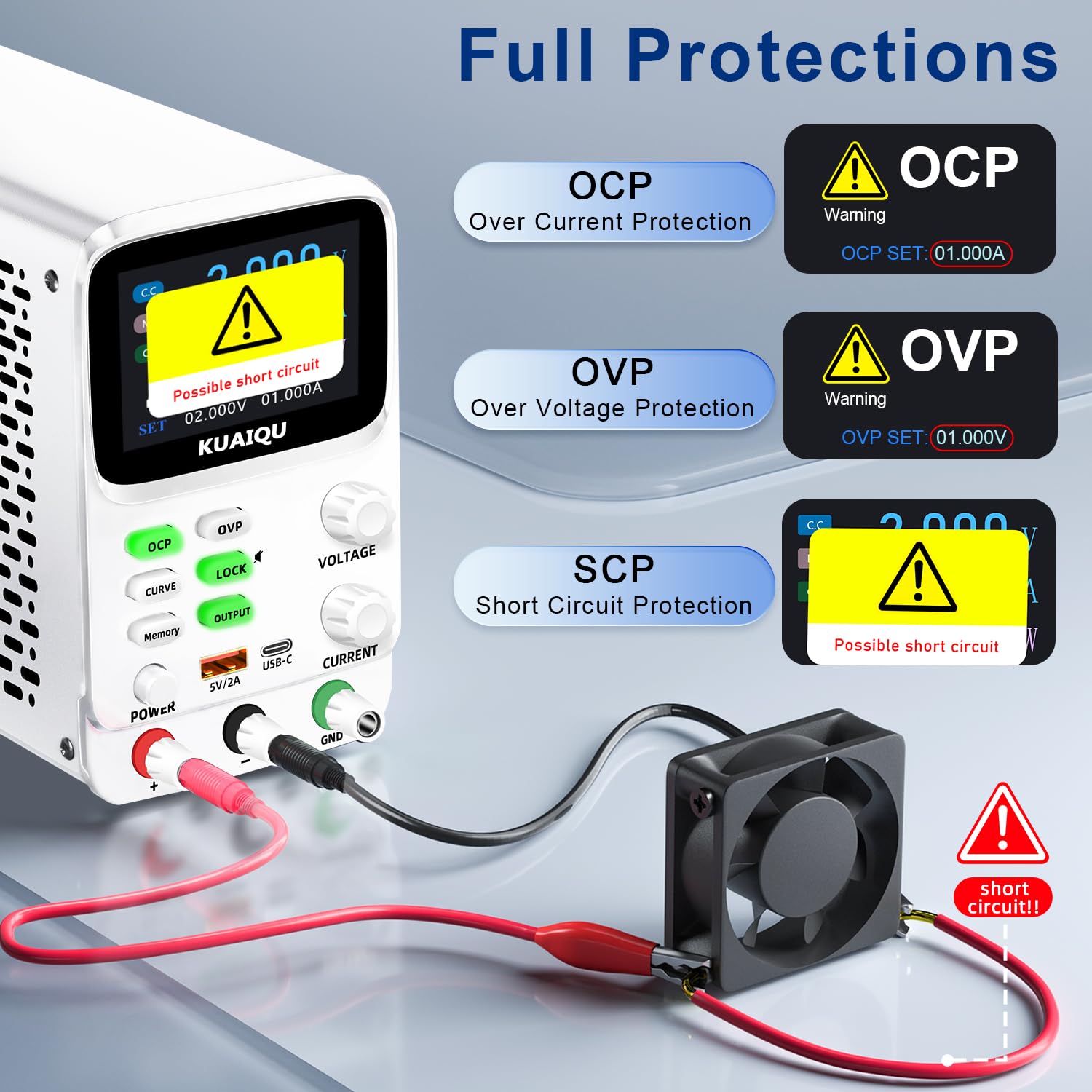
Figure 5.4: Intelligent A/mA Conversion. The display automatically switches to milliampere (mA) readings when the current value drops below 0.1A, providing enhanced precision for low-current applications.
The power supply automatically switches its current display from Amperes (A) to milliamperes (mA) when the output current drops below 0.1A. This intelligent conversion ensures optimal readability and precision for microampere-level measurements.
5.7 Protection Functions (OVP, OCP, SCP)
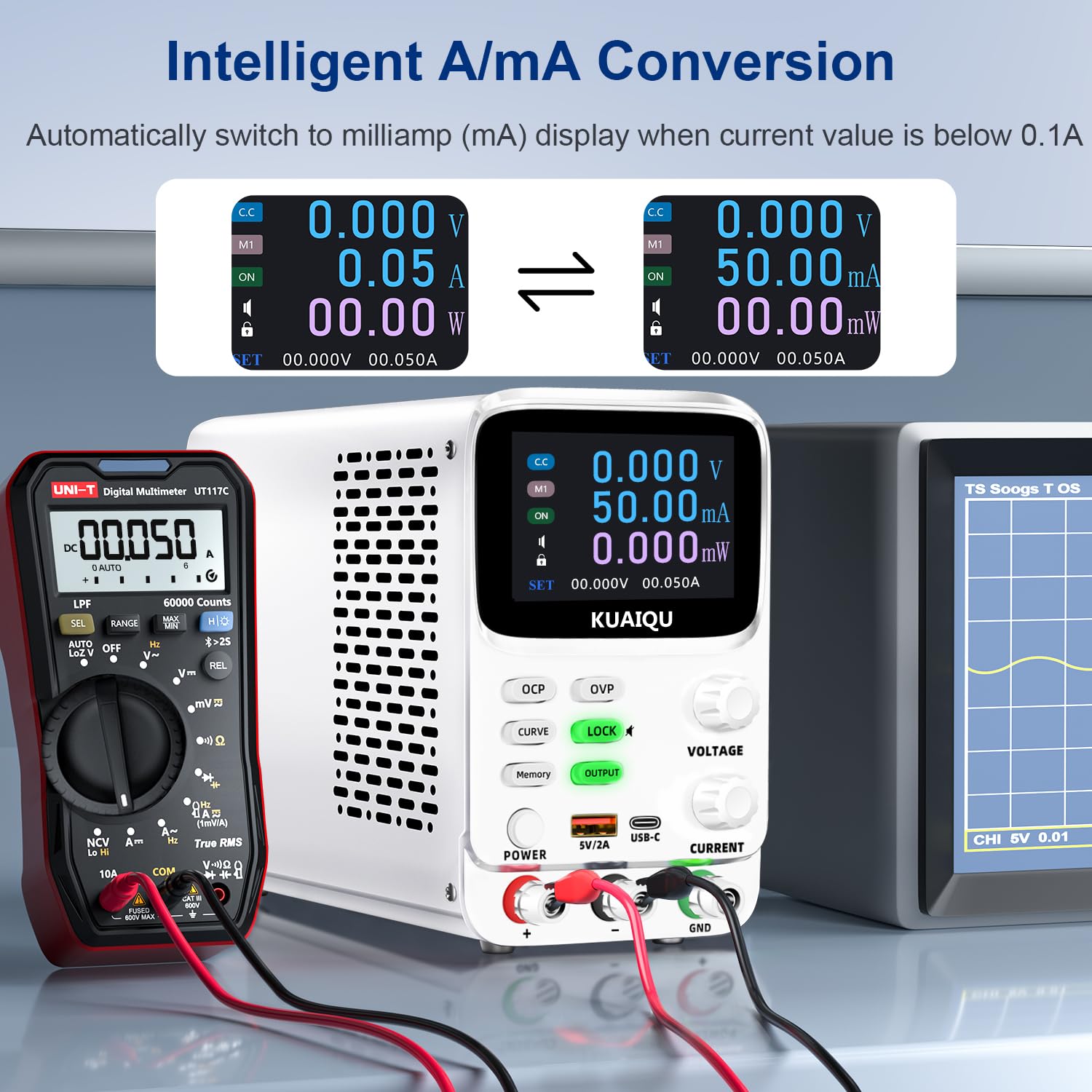
Figure 5.5: Full protection alarms. This image illustrates the Over-Current Protection (OCP), Over-Voltage Protection (OVP), and Short-Circuit Protection (SCP) features, showing how the device alerts and cuts off power when limits are exceeded or a short circuit is detected.
The power supply includes built-in protection mechanisms:
- Хэт ботьtage Хамгаалалт (OVP): Гаралтын хэмжээг саатуулдагtagурьдчилан тогтоосон хязгаараас хэтэрсэнээс.
- Over-Current Protection (OCP): Гаралтын гүйдэл урьдчилан тогтоосон хязгаараас хэтрэхээс сэргийлдэг.
- Short-Circuit Protection (SCP): Богино холболтын үед гаралтыг автоматаар тасалдаг.
To set OVP/OCP limits:
- дээр удаан дар OVP or OCP товчлуурыг дарж тохиргооны горимд орно.
- -г ашиглана уу БОТЬTAGE or ОДОО knob to adjust the protection limit.
- товчийг дарна уу OVP or OCP тохиргоог хадгалахын тулд дахин дарна уу.
If a protection is triggered, the output will be cut off, and an alarm will be displayed (e.g., "OVP", "OCP", or "Possible short circuit"). Address the issue and then press the ГАРЦ button to re-enable output.
5.8 Түгжих функц
дээр дарна уу TOCK button to lock the control panel, preventing accidental changes to settings. The lock icon will appear on the display. Press it again to unlock. Long pressing the TOCK button will toggle the encoder knob adjustment beeping sound.
5.9 USB цэнэглэгч порт
The front panel includes USB-A and USB-C ports (5V/2A) for convenient charging of compatible electronic devices. These ports operate independently of the main power output settings.
6. Засвар үйлчилгээ
6.1 Цэвэрлэгээ
- Before cleaning, ensure the power supply is turned off and disconnected from the main power source.
- Төхөөрөмжийн гадна талыг зөөлөн, хуурай даавуугаар арчина.
- Зүлгүүрийн цэвэрлэгч, уусгагч, химийн хатуу бодис хэрэглэж болохгүй.
- Periodically check the ventilation openings for dust accumulation and clean gently with a soft brush or compressed air.
6.2 Хадгалалт
- Цахилгаан хангамжийг сэрүүн, хуурай орчинд, нарны шууд тусгал болон хэт өндөр температураас хол хадгална уу.
- Үүнийг тоос шороо, чийгнээс хол байлга.
- If storing for an extended period, it is recommended to place it back in its original packaging.
7. Алдаа засах
Энэ хэсэгт танд тулгарч болох нийтлэг асуудлуудыг авч үзэх болно. Хэрэв асуудал хэвээр байвал хэрэглэгчийн тусламжтай холбогдоно уу.
7.1 No Power / Display Off
- Цахилгааны кабелийг шалгах: Хувьсах гүйдлийн цахилгааны кабель нь цахилгаан хангамж болон ханын залгуурт найдвартай холбогдсон эсэхийг шалгаарай.
- Check Wall Outlet: Өөр төхөөрөмжийг залгаж, ханын залгуур ажиллаж байгаа эсэхийг шалгана уу.
- Цахилгаан унтраалга шалгах: Ensure the main ХҮЧ button on the front panel is pressed.
- Гал хамгаалагчийг шалгах: The fuse located on the rear panel might be blown. Replace it with a fuse of the same type and rating (refer to specifications).
7.2 No Output Voltagд/Одоогийн
- Check OUTPUT Button: -ийг баталгаажуулах ГАРЦ button is pressed and its LED is illuminated.
- Холболтуудыг шалгах: Verify that the output cables are correctly and securely connected to both the power supply and the load.
- Check OVP/OCP: If OVP or OCP is triggered, the output will be disabled. Check the display for "OVP" or "OCP" warnings. Adjust the voltage/current settings or protection limits as needed, then press ГАРЦ to re-enable.
- Check Short Circuit: If "Possible short circuit" is displayed, disconnect the load and check for any short circuits in your circuit.
- Ботьtage/Одоогийн тохиргоо: Тогтоосон хэмжээг баталгаажуулна ууtage and current values are not zero.
7.3 Дэлгэцийн асуудал
- Дэлгэц байхгүй: Refer to "No Power / Display Off" section.
- Буруу уншилтууд: Ensure proper connections and calibration. If readings are consistently inaccurate, contact support.
8. Техникийн үзүүлэлтүүд
| Онцлог | Тодорхойлолт |
|---|---|
| Загварын нэр | SPPS-K3010 |
| Брэнд | KUAIQU |
| Гаралтын ботьtage Хамрах хүрээ | 0-30 В |
| Гаралтын гүйдлийн хүрээ | 0-10A |
| Гаралтын ватtage | 300 ватт |
| Ботьtage Шийдвэрлэх | 0.001V (1мВ) |
| Одоогийн тогтоол | 0.01мА (10µA) |
| Дэлгэц | 2.8-inch TFT Color LCD (5-digit) |
| Хамгаалалтын онцлог | OVP (Илүү ботьtage Protection), OCP (Over-Current Protection), SCP (Short-Circuit Protection) |
| Санах ойн сан | 4 groups of editable parameters |
| USB цэнэглэх портууд | USB-A, USB-C (5V/2A) |
| Хөргөх арга | Ухаалаг температурын хяналттай хөргөлтийн сэнс |
| Бүтээгдэхүүний хэмжээ (L x W x H) | 7.6 x 3.4 x 5.5 инч |
| Зүйлийн жин | 2.5 фунт |
| UPC | 768351108799 |
9. Баталгаат хугацаа ба хэрэглэгчийн дэмжлэг
KUAIQU is committed to providing high-quality products and excellent customer service. This product undergoes thorough inspection before shipment to ensure its quality.
- Чанарын баталгаа: All KUAIQU lab power supplies and accessories are inspected to ensure good quality upon receipt.
- Техникийн дэмжлэг: If you have any questions regarding the operation, troubleshooting, or any other aspect of your KUAIQU SPPS-K3010 DC Power Supply, please do not hesitate to contact our customer service team.
- Холбоо барих мэдээлэл: Refer to the contact details provided with your purchase or visit the official KUAIQU webдэмжлэг үзүүлэх сайт.


