1. Танилцуулга
This manual provides detailed instructions for the setup, operation, maintenance, and troubleshooting of your DOYO Gaming Steering Wheel with Pedals and Shifter. This product is designed to enhance your racing game experience across multiple platforms.

Image: The DOYO Gaming Steering Wheel is compatible with PC, PS3, PS4, Xbox One, Xbox Series X|S, and Nintendo Switch.
2. Бүтээгдэхүүний онцлог
- Олон платформын нийцтэй байдал: Seamlessly works with PC (Windows), PS3, PlayStation 4, Xbox One, Xbox Series X|S, and Nintendo Switch. PC platform supports both X-input and D-input modes.
- 1080 градусын эргэлт: Offers up to three full rotations for precise steering control, mimicking a real car's steering.
- 6-Speed Manual Shifter & Paddle Shifters: Features an "H" pattern gearbox with a push-down reverse and high/low gear switching. Additionally, paddle shifters are integrated for quick gear changes.
- Customizable Hall Pedals: Pressure-sensitive metal brake pedals with Hall effect sensors provide accurate feedback. Includes two adjustable strength springs for personalized feel.
- Immersive Design: Includes console buttons, LED indicator lights, built-in dual motors for vibration feedback, a storage box for USB cables, and colored LED ambient lights.
- Аюулгүй суурилуулалт: Equipped with clamp fixing suitable for racing rigs, circuits, or flat surfaces, with an adjustable clampоруулах хүрээ.

Image: The steering wheel features an ergonomic design with a 10-inch (25.4 cm) diameter and supports 180 to 1080 degrees of rotation.

Image: Built-in dual vibration motors provide realistic force feedback based on in-game events.
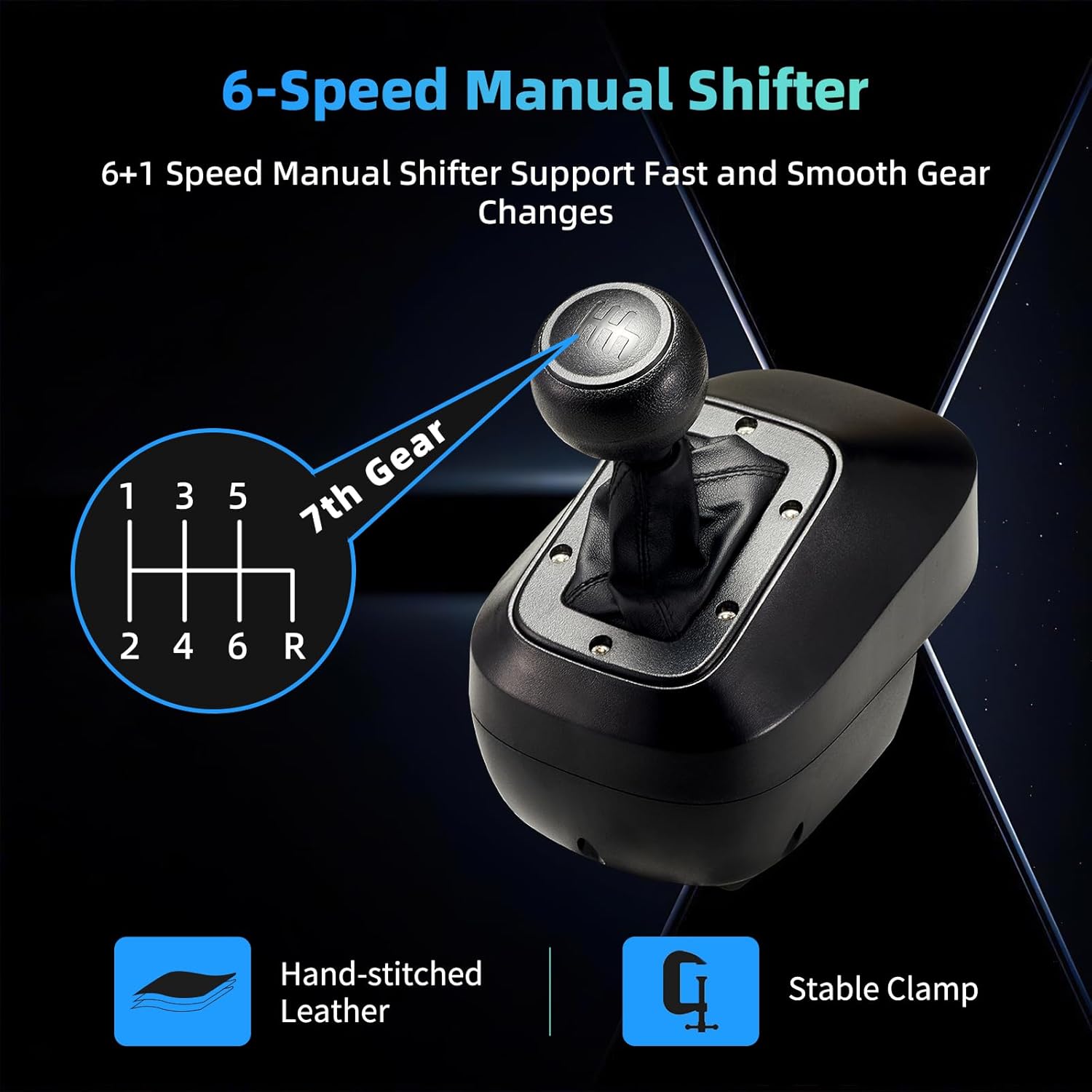
Image: The 6-speed manual shifter features an 'H' pattern gearbox, hand-stitched leather, and a stable clamp.

Image: Responsive Hall effect pedals with metal construction and adjustable spring strength for precise control.
3. Тохируулах заавар
3.1 Connecting the Steering Wheel
Connect the steering wheel to your gaming platform using the provided USB cable. Ensure all connections are secure.
- PC (Windows): Connect the USB cable to your PC. The wheel defaults to D-input mode. To switch to X-input mode, press and hold the PS button for 2 seconds.
- PS3: Connect the USB cable to your PS3 console.
- PS4 & Xbox One/Series X|S: Connect the USB cable to your console. Note: When used with PS4 and Xbox One/Series X|S consoles, the original controller needs to be connected to the steering wheel for authentication.
- Nintendo Switch: Connect the USB cable to your Switch dock or console (with appropriate adapter if needed).
3.2 Жолооны хүрдийг суурилуулах
The steering wheel can be securely mounted to a desk or racing rig using the integrated clamps.
- Жолооны хүрдийг тогтвортой, хавтгай гадаргуу дээр байрлуул.
- cl-ийг тохируулна ууamps on the underside of the wheel to fit the thickness of your surface (0.3 to 2.2 inches).
- cl-ийг чангалamps until the steering wheel is firmly secured and does not wobble.

Image: The innovative clamp design allows for secure mounting on surfaces between 0.3 and 2.2 inches thick.
4. Ашиглалтын заавар
4.1 Жолооны хүрдний удирдлага
Familiarize yourself with the buttons and controls on the steering wheel for optimal gameplay.

Image: Key controls include steel paddle shifters, indicator light, PS Key, Reset Function, and Angle Function.
- Сэлүүр солигч: Use the steel paddle shifters located behind the wheel for quick upshifts and downshifts.
- PS Key: Functions as the PlayStation button or Xbox Guide button, depending on the platform.
- Дахин тохируулах функц: Resets certain settings or calibrations. Refer to specific game instructions.
- Angle Function: Adjusts the steering wheel's rotation angle.
4.2 Shifter and Pedals
The external shifter and pedal unit provide realistic control for acceleration, braking, and gear changes.
- 6-Speed Manual Shifter: Use the "H" pattern shifter for manual gear selection. Push down for reverse.
- Дөрөө: The Hall effect pedals accurately sense pressure for precise acceleration and braking. You can swap out the included strength springs to customize the pedal feel.
4.3 Adjusting Steering Sensitivity and Rotation
The steering wheel offers adjustable rotation angles and sensitivity to match different game types and personal preferences.
- Эргэлтийн өнцөг: The wheel supports angle adjustments from 180 to 1080 degrees. Use the Angle Function button or a dedicated knob (if present) to switch between competitive racing (180/270 degrees) and simulation (900/1080 degrees) modes.
- Мэдрэмжийн тохируулга: A built-in sensitivity adjustment knob allows for 6 levels of precision control, enabling synchronized steering control in various games.
4.4 Видео үзүүлэх
Video: This demonstration showcases the DOYO Gaming Steering Wheel's features, including steering, shifting, and pedal operation during gameplay, highlighting its realistic force feedback and adjustable settings.
5. Засвар үйлчилгээ
Proper maintenance ensures the longevity and performance of your gaming steering wheel.
- Цэвэрлэгээ: Use a soft, dry cloth to wipe down the steering wheel, pedals, and shifter. Avoid using abrasive cleaners or solvents.
- Хадгалах: When not in use, store the steering wheel in a clean, dry place. The USB cable can be stored in the integrated storage box at the back of the wheel base.
- Кабель арчилгаа: Гэмтлээс урьдчилан сэргийлэхийн тулд кабелийг хурц гулзайлгах, нугалахаас зайлсхий.
6. Алдаа засах
If you encounter issues with your DOYO Gaming Steering Wheel, refer to the following common solutions:
- Эрчим хүч/Үйл ажиллагаа байхгүй: Ensure all cables are securely connected to the steering wheel, pedals, shifter, and console/PC. Try a different USB port.
- Хүчгүй санал хүсэлт/чичиргээ: Verify that the game supports force feedback and that the feature is enabled in the game's settings. Check for updated drivers on PC.
- Incorrect Platform Detection (PC): If on PC, remember to press and hold the PS button for 2 seconds to switch between D-input and X-input modes if needed for game compatibility.
- PS4/Xbox One Connection Issues: Confirm that the original console controller is connected to the steering wheel for authentication.
- Steering/Pedal Calibration: Some games may require manual calibration of the steering wheel and pedals. Refer to your game's specific settings.
If problems persist, please contact customer service for further assistance.
7. Техникийн үзүүлэлтүүд
| Онцлог | Дэлгэрэнгүй |
|---|---|
| Загвар | B0DXBK7LZP |
| Брэнд | ДОЁО |
| Тохиромжтой байдал | PC (Windows), PS3, PS4, Xbox One, Xbox Series X|S, Nintendo Switch |
| Жолооны эргэлт | 180 ° -аас 1080 ° хүртэл |
| Дугуйны диаметр | 10 инч (25.4 см) |
| Шилжүүлэгч | 6-speed manual with reverse, Paddle Shifters |
| Дөрөө | 3-pedal unit (Accelerator, Brake, Clutch) with Hall effect sensors, adjustable spring strength |
| Чичиргээний санал хүсэлт | Dual built-in motors |
| Суурилуулалт | Clamp fixing (0.3-2.2 inch surface thickness) |
| Зүйлийн жин | 15.42 фунт |
| Багцын хэмжээ | 15.5 x 15 x 11 инч |
| Steering Wheel Dimensions | Approx. 29.8cm/11.7in (H), 27.1cm/10.7in (W), 31.0cm/12.2in (D) |
| Pedal Unit Dimensions | Approx. 34.0cm/13.4in (W), 38.5cm/15.2in (D), 21.1cm/8.3in (H) |
| Shifter Dimensions | Approx. 11.1cm/4.4in (W), 18.6cm/7.3in (H) |
8. Баталгаат хугацаа ба дэмжлэг
DOYO provides a satisfaction guarantee for its gaming racing wheels. For any product-related inquiries, technical support, or warranty claims, please refer to the customer service information provided at the point of purchase or on the official DOYO webсайт.
Ensure compatibility before purchase. Refunds and satisfaction guarantees are provided for gaming racing wheels, offering peace of mind to customers.


