Танилцуулга
The VTech Dora Got Your Back Learning Backpack is an interactive bilingual toy designed to engage children aged 3 years and up in educational activities. This manual provides essential information for setting up, operating, maintaining, and troubleshooting your learning backpack. It features 12 interactive games and quizzes in both English and Spanish, focusing on key learning milestones such as letter writing, shape drawing, emotions, numbers, and words.
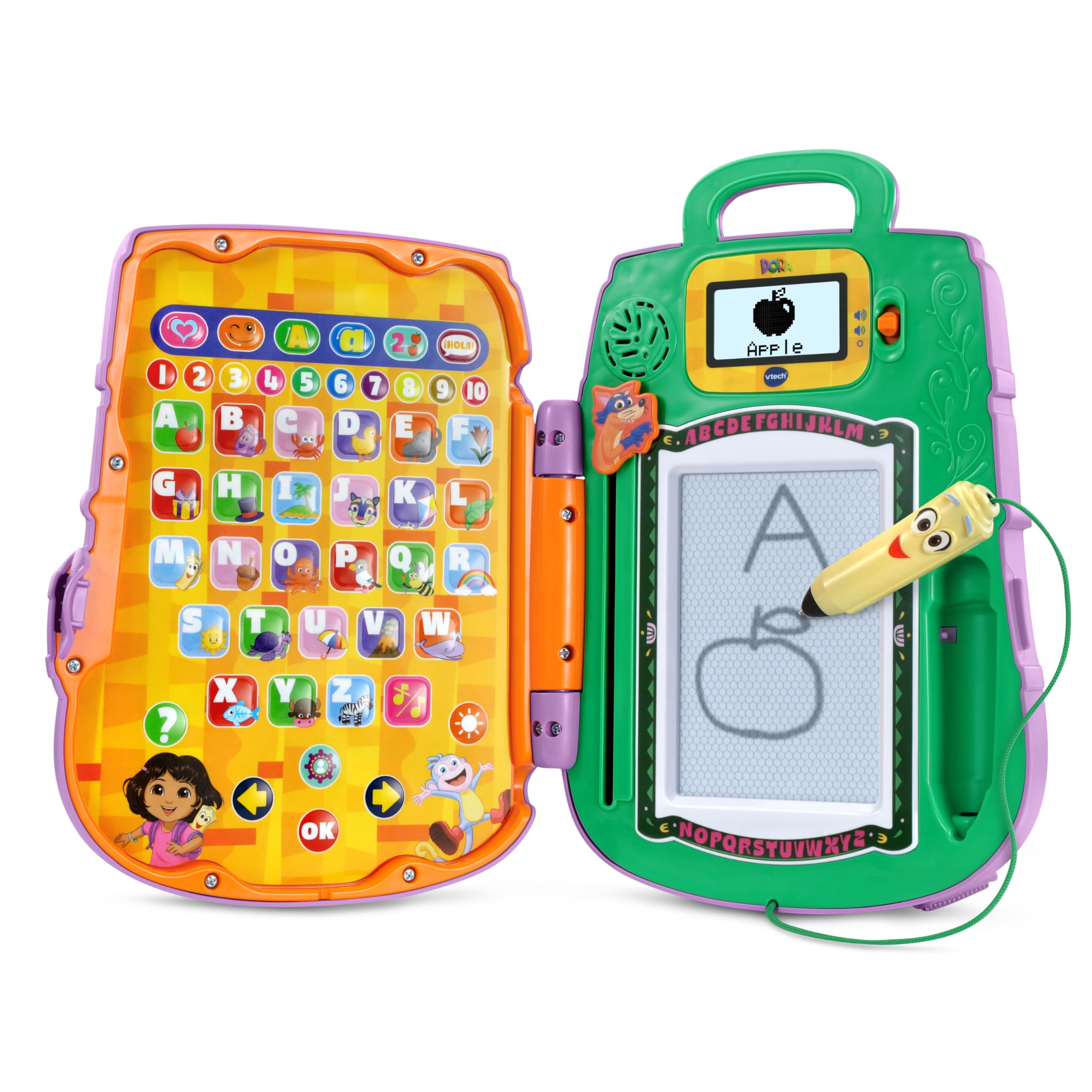
Image: The VTech Dora Got Your Back Learning Backpack in its closed, backpack form.
Юу багтсан бэ
Багцыг нээхэд бүх бүрэлдэхүүн хэсгүүд байгаа эсэхийг шалгаарай:
- 1 x Dora Got Your Back Learning Backpack
- 1 x хурдан эхлүүлэх гарын авлага

Image: The learning backpack opened, showing the interactive button panel on the left and the drawing board with screen on the right.
Тохиргоо
- Батерей суурилуулах: The toy requires 2 AA batteries. Batteries are included for demonstration purposes only. For regular use, new batteries are recommended. To install, locate the battery compartment on the back of the unit, open it with a screwdriver, insert the batteries according to the polarity markings, and close the compartment securely.
- Оосор бэхлэх: The backpack straps are typically included separately in the packaging. Attach them to the designated loops on the top and bottom of the backpack to enable wearing the toy.
- Анхны асаалт: Төхөөрөмжийг асаахын тулд цахилгаан товчийг дарна уу.
- Хувийн тохиргоо: The toy allows for personalization. Follow the on-screen prompts or refer to the Quick Start Guide to enter a child's name. This enables personalized greetings from Dora's friends during play.

Image: The toy's screen displaying a prompt to enter a name for personalization.
Ашиглалтын заавар
The Dora Got Your Back Learning Backpack features two main interactive areas when opened: a button panel on the left and a drawing board with a small screen on the right.
- Асаах/унтраах: Press the orange power button located on the right side of the unit to turn the toy on or off.
- Дууны хяналт: Use the volume buttons (usually located near the screen) to adjust the sound level.
- Хэлний сонголт: The toy supports both English and Spanish. Look for a dedicated language button or follow initial setup prompts to select your preferred language.
- Үйл ажиллагааны сонголт: The left panel contains various buttons representing different games and learning activities. Press a button to select an activity.
- Stylus Usage: The Map-shaped stylus is attached to the unit by a string. Use it to interact with the drawing board for writing and drawing activities.
- Swiper Eraser: To clear the drawing board, slide the Swiper character down the designated slot.

Image: A child actively engaging with the open learning backpack, pressing buttons on the left panel and using the stylus on the right drawing board.
Games and Activities
The learning backpack offers 12 interactive games and quizzes designed to promote early learning skills:
- Захидал бичих: Follow step-by-step animations on the screen to practice writing uppercase and lowercase letters using the stylus.
- Shape Drawing: Learn to draw various shapes by tracing guided animations.
- Тоо таних: Identify and learn numbers through interactive games.
- Object Identification: Match objects with their corresponding letters or words.
- Emotion Exploration: Learn about different emotions through engaging activities.
- Bilingual Quizzes: Participate in quizzes that reinforce learning in both English and Spanish.

Image: A child using the stylus to draw on the learning backpack's screen, following animated instructions.

Image: A child operating the Swiper slider to clear the drawing board, preparing for a new activity.
Video: An official VTech video demonstrating the features and interactive play of the Dora Got Your Back Learning Backpack.
Засвар үйлчилгээ
- Цэвэрлэгээ: Тоглоомыг бага зэрэг d-ээр арчинаamp даавуу. Усанд дүрж, хатуу цэвэрлэгээний бодис хэрэглэж болохгүй.
- Хадгалах: Тоглоомыг ашиглаагүй үед нарны шууд тусгалаас хол, сэрүүн, хуурай газар хадгална.
- Батерейны арчилгаа: Тоглоом гоожихоос урьдчилан сэргийлэхийн тулд удаан хугацаагаар ашиглахгүй бол зайгаа салга.
Алдааг олж засварлах
| Асуудал | Шийдэл |
|---|---|
| Тоглоом асахгүй байна. | Зайны суурилуулалтыг шалгана уу. Батерейг шинэ, зөв оруулсан эсэхийг шалгаарай. |
| Дуу нь ажиллахгүй эсвэл хэт сул байна. | Adjust the volume using the volume buttons. Replace batteries if sound remains low or absent. |
| Drawing board is not clearing. | Ensure the Swiper eraser is slid completely across the board. |
| Stylus is not making marks. | Ensure the stylus tip is making firm contact with the drawing surface. The drawing board is magnetic, not electronic. |
Үзүүлэлтүүд
- Бүтээгдэхүүний хэмжээ: 11.02 x 8.27 x 2.8 инч
- Барааны жин: 1.7 фунт
- Загварын дугаар: 80-573300
- Үйлдвэрлэгчээс санал болгосон нас: 3 жил ба түүнээс дээш
- Батерей: 2 AA батерей шаардлагатай (үзүүлэнгийн зорилгоор багтсан)
- Үйлдвэрлэгч: VTech
- Гарсан огноо: 5 оны зургадугаар сарын 2025
Баталгаат болон дэмжлэг
Баталгаат хугацаа, бүтээгдэхүүний дэмжлэг эсвэл сэлбэг хэрэгсэл худалдан авах талаар мэдээлэл авахыг хүсвэл албан ёсны VTech вэбсайтад зочилно уу website or contact their customer service department. Details can typically be found in the Quick Start Guide or on the VTech product page.


