Masajoy Wireless Headset User Manual
Загвар: Spark 06
Танилцуулга
The Masajoy Wireless Headset with Mic for Work (Model: Spark 06) is designed to provide clear and reliable audio communication for various professional and personal uses. Featuring multiple connection modes, AI noise cancellation, and a comfortable design, this headset is ideal for business video conferencing, online courses, and call center environments.

Figure 1: Masajoy Wireless Headset and included accessories.
Хайрцагт юу байна
Бүх бүрэлдэхүүн хэсгүүд багцад байгаа эсэхийг шалгана уу:
- Wireless Headset with Mic for Work
- USB A / C донгл
- USB C to 3.5MM Cable
- C төрлийн цэнэглэгч кабель
- Хэрэглэгчийн гарын авлага
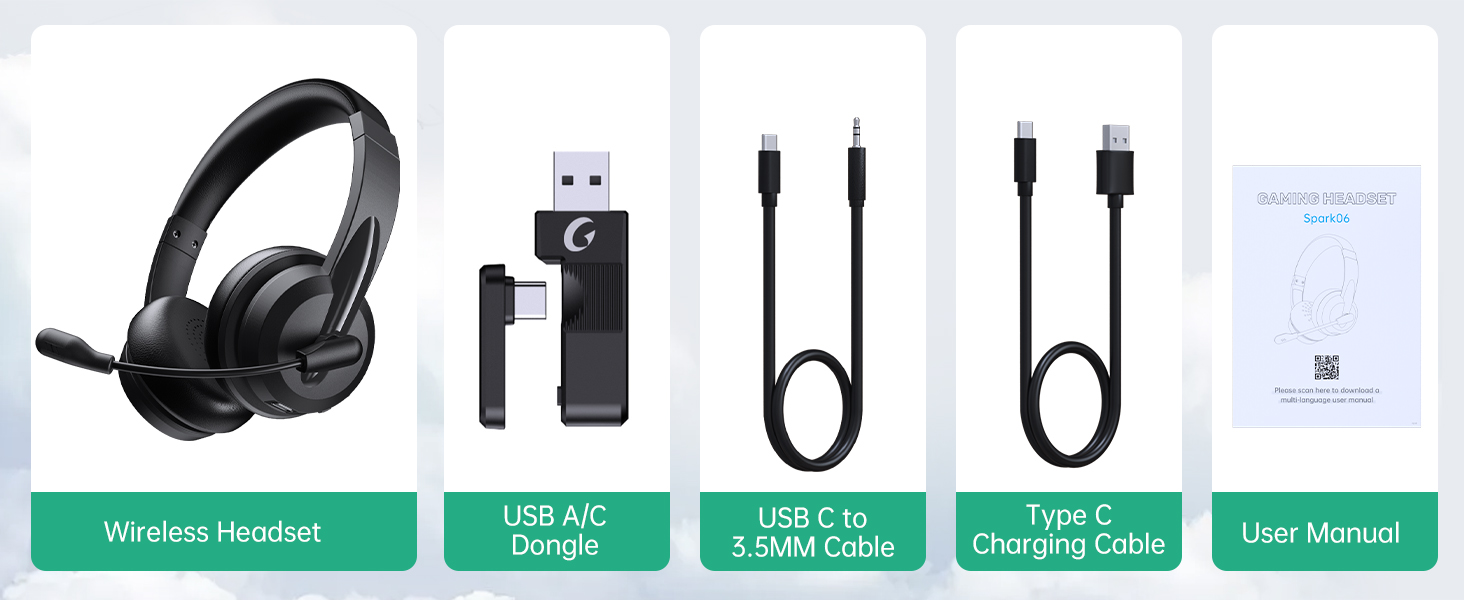
Зураг 2: Багцын агуулга.
Тохиргоо
Чихэвчийг цэнэглэж байна
Before first use, fully charge the headset. Connect the Type C Charging Cable to the headset's charging port and the other end to a USB power source (e.g., computer USB port, wall adapter). The charging indicator light will show the charging status.
- Бүрэн цэнэглэх хугацаа: Ойролцоогоор 2.5 цаг
- Ярилцах хугацаа: 30 цаг хүртэл
- Хөгжим тоглуулах хугацаа: 25 цаг хүртэл

Figure 3: Long Battery Life for Extended Use.
Холболтын горимууд
The Masajoy headset supports three connection modes:
-
Bluetooth V5.3 Connection:
For wireless connection to Bluetooth-enabled devices (e.g., smartphones, laptops). Ensure the headset is in pairing mode (refer to operating instructions for details). хайх "Spark 06" in your device's Bluetooth settings and connect.
-
2.4G Wireless (USB A/C Dongle):
For wireless connection to computers without Bluetooth or for a dedicated connection. Plug the USB A or USB C dongle into an available USB port on your computer. The headset will automatically connect to the dongle.
-
Wired 3.5mm Audio Cable:
For a wired connection to devices with a 3.5mm audio jack. Connect one end of the USB C to 3.5MM Cable to the headset's USB-C port and the other end to your device's 3.5mm audio jack. This mode is useful when battery is low or for devices that do not support wireless connections.

Figure 4: Dual Connection Options (Bluetooth & 2.4G Wireless).
NOTE: This headset does not support dual device connection simultaneously.
Ашиглалтын заавар
Асаах/унтраах
- To Power On: Press and hold the Power button until you hear a voice prompt.
- To Power Off: Press and hold the Power button until you hear a voice prompt.
Дууны хяналт
Use the volume control buttons located on the headset to adjust the listening volume.
Хиймэл оюун ухаант дуу чимээг бууруулах микрофон
The headset features advanced AI noise cancellation to reduce background noise during calls. This feature enhances clarity for the listener.
NOTE: This AI Noise Cancelling feature is only available when connected via Bluetooth.

Figure 5: AI Noise Cancelling in action.
Микрофоныг хаах функц
To mute the microphone, simply rotate the microphone boom to the upright position. A voice prompt will confirm "MIC mute". To unmute, rotate the microphone boom back down.

Figure 6: Microphone Mute Control by Rotation.
Тав тухтай байдал ба дизайн
The headset is designed for all-day wear with protein memory foam ear cups that are soft and breathable, preventing overheating. The adjustable and expandable headband ensures a comfortable fit for most head shapes.

Figure 7: Comfortable and Breathable Design.
Үзүүлэлтүүд
| Онцлог | Дэлгэрэнгүй |
|---|---|
| Загварын нэр | Spark 06 |
| Холболтын технологи | Wireless (Bluetooth V5.3, 2.4G), Wired (3.5mm) |
| Дуу чимээний хяналт | AI Noise Cancellation (Bluetooth mode only), Passive Noise Cancellation |
| Батерейны хугацаа (Ярилцах хугацаа) | 30 цаг хүртэл |
| Батерейны хугацаа (Хөгжим тоглуулах) | 25 цаг хүртэл |
| Цэнэглэх хугацаа | Ойролцоогоор 2.5 цаг |
| Утасгүй сүлжээ | Up to 36 feet (11 meters) for Bluetooth |
| Аудио драйверын хэмжээ | 40 миллиметр |
| Микрофоны мэдрэмж | 43 дБ |
| Чихэвчний үүр | USB-C (for charging/wired audio) |
| Тохиромжтой төхөөрөмжүүд | PC, Mac, Laptop, Chromebook, tablet, smartphones, MP3 players, PS5, PS4, Xbox one, gaming systems with an aux port |
| Материал | Faux Leather, Polycarbonate (PC), Metal, Acrylonitrile Butadiene Styrene (ABS) |
| Зүйлийн жин | 10.2 унц |
| Өнгө | Хар |
Засвар үйлчилгээ
- Цэвэрлэгээ: Чихэвчийг цэвэрлэхийн тулд зөөлөн, хуурай даавуу ашиглана уу. Зүлгүүрийн цэвэрлэгч, уусгагчийг бүү ашигла.
- Хадгалах: Чихэвчийг нарны шууд тусгал, хэт температураас хол, сэрүүн, хуурай газар хадгална.
- Батерейны арчилгаа: Батерейны ашиглалтын хугацааг уртасгахын тулд чихэвчийг байнга цэнэглэхээс зайлсхий. Удаан хугацаагаар ашиглаагүй байсан ч тогтмол цэнэглээрэй.
- Харьцуулах: Avoid dropping the headset or subjecting it to strong impacts. Do not twist or bend the microphone boom excessively beyond its intended rotation.
Алдааг олж засварлах
| Асуудал | Боломжит шалтгаан | Шийдэл |
|---|---|---|
| Чихэвч асахгүй байна. | Батерей бага. | Charge the headset fully using the provided Type C charging cable. |
| Bluetooth-ээр холбогдож чадахгүй байна. | Headset not in pairing mode; device Bluetooth off; out of range. | Ensure headset is in pairing mode. Turn Bluetooth on your device. Move headset closer to the device (within 36 feet). |
| Чихэвчнээс дуу гарахгүй. | Volume too low; incorrect audio output selected on device; headset not connected. | Increase headset volume. Check device's audio output settings. Re-establish connection. |
| Микрофон ажиллахгүй байна. | Microphone muted; incorrect input device selected; AI Noise Cancellation issue. | Ensure microphone boom is not in the upright (muted) position. Check device's microphone input settings. Note that AI Noise Cancellation is only active in Bluetooth mode. |
| Poor sound quality / static. | Interference; out of range; low battery. | Move away from other wireless devices. Move closer to the connected device. Charge the headset. |
Баталгаат болон дэмжлэг
Masajoy products are designed for reliability and performance. For warranty information and technical support, please refer to the official Masajoy website or contact customer service using the details provided in the original product packaging or purchase receipt.
Та мөн зочилж болно Masajoy Store on Amazon бүтээгдэхүүний талаарх дэлгэрэнгүй мэдээлэл, дэмжлэгийн эх сурвалжийг авна уу.


