1. Танилцуулга
This manual provides detailed instructions for the installation, operation, and maintenance of your NKPU 48-inch White Low Profile Ceiling Fan with Light. Please read this manual thoroughly before installation and use to ensure proper function and safety. Keep this manual for future reference.

Зураг 1.1: Дууслааview of the NKPU 48-inch White Low Profile Ceiling Fan, including the remote control and mobile app interface.
2. Аюулгүй байдлын чухал мэдээлэл
Гал түймэр, цахилгаан цочрол, хувийн гэмтлийн эрсдлийг бууруулахын тулд энэ төхөөрөмжийг суурилуулж, ажиллуулахдаа үндсэн аюулгүй байдлын урьдчилан сэргийлэх арга хэмжээг үргэлж дагаж мөрдөөрэй.
- Суулгахаасаа өмнө бүх зааврыг анхааралтай уншина уу.
- Суурилуулалт, засвар үйлчилгээ хийхээс өмнө таслагчийн хүчийг унтраасан эсэхийг шалгаарай.
- Бүх утаснууд нь үндэсний болон орон нутгийн цахилгааны дүрэмд нийцсэн байх ёстой. Хэрэв та утаснуудын талаар сайн мэдэхгүй бол мэргэшсэн цахилгаанчинтай зөвлөлдөх хэрэгтэй.
- The fan must be mounted with a minimum of 7 feet (2.1 meters) clearance from the floor to the blade trailing edge.
- Do not connect the fan to a dimmer switch or a fan's gear switch. Use only conventional wall switches for ON/OFF control.
- Сэнсний ирний замд объект оруулахыг хориглоно.
- Суурилуулах бүтэц нь сэнсний жинг тэсвэрлэх чадвартай эсэхийг шалгаарай.
3. Багцын агуулга
Суулгацыг үргэлжлүүлэхийн өмнө бүх бүрэлдэхүүн хэсгүүд байгаа бөгөөд гэмтэлгүй эсэхийг шалгаарай.
- 1 x Ceiling Fan with Lights Kit
- 1 х хэрэглэгчийн гарын авлага
- 1 x Алсын удирдлага

Image 3.1: The NKPU ceiling fan with its remote control and a smartphone displaying the control app, illustrating the various features like dimmable light, app control, remote control, 6 fan speeds, reversible motor, low profile, low noise, and 3 color temperatures.
4. Тохиргоо & Суурилуулалт
Detailed installation instructions and videos are available on the product page. This section provides an overview суурилуулах гол анхаарах зүйлсийн талаар.
4.1 Суурилуулах сонголтууд
This ceiling fan is designed for Шатах уул installation, suitable for average to large rooms (110 sq.ft - 170 sq.ft). Angle mount is not supported.
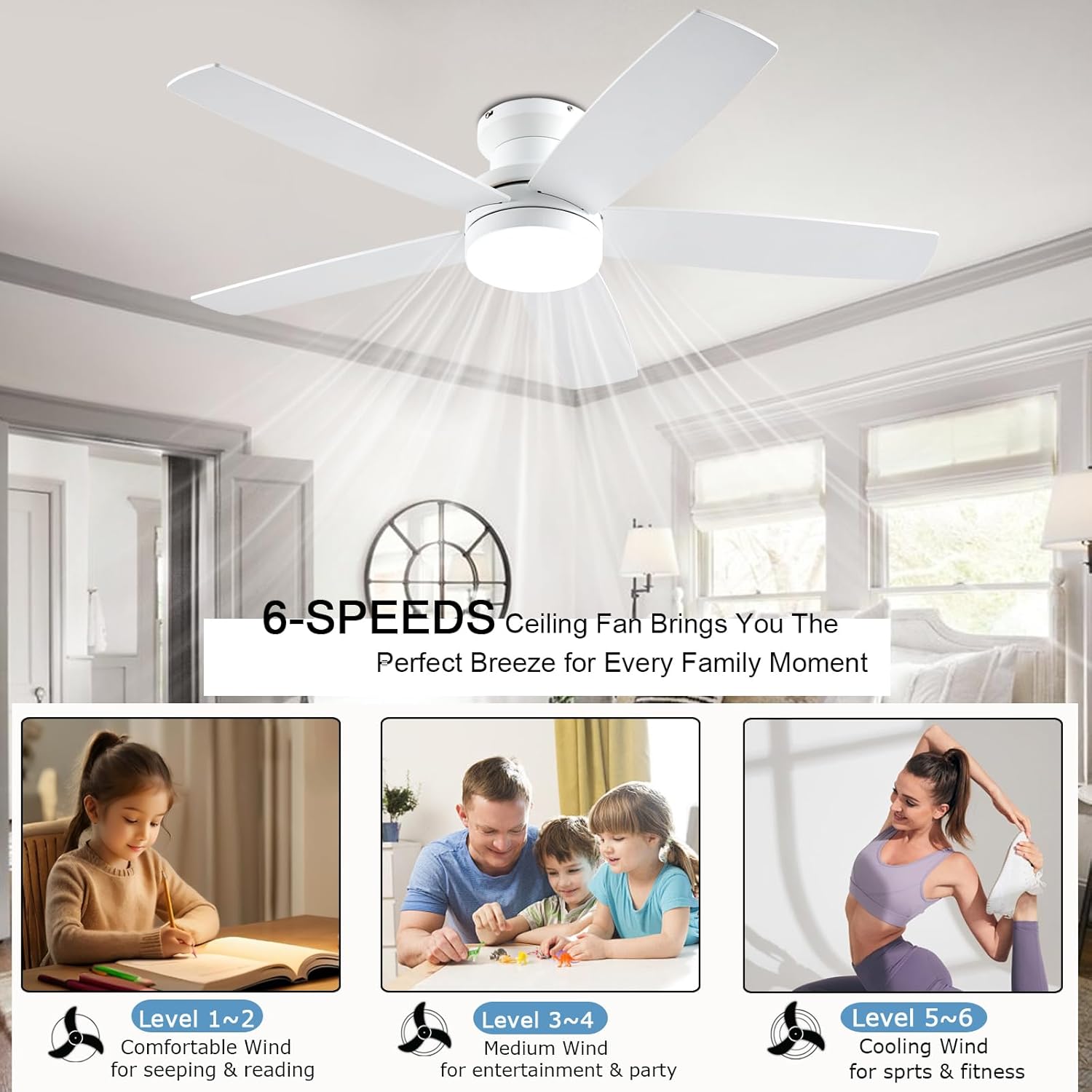
Image 4.1: Diagram showing the 48-inch ceiling fan dimensions (48"D x 48"W x 12.9"H) and illustrating the flush mount option as suitable, while an angle mount is not. Recommended room size is 110-170 sq.ft.
4.2 Ир суурилуулах
The fan comes with dual-sided blades, offering two aesthetic options: one side in white and the other in wood grain. Choose the side that best matches your interior decor during installation.

Зураг 4.2: Ойролцоогоор view of the dual-sided fan blades, showing one side in white (A-side) and the other in white wood grain (B-side), allowing for customizable aesthetics.
4.3 Wall Switch Compatibility
The fan is suitable for conventional wall switches to control the fan and light ON/OFF functions. Do not connect the fan to a dimmer switch or a fan's gear switch, as this can damage the unit.

Image 4.3: Illustration demonstrating that the fan is compatible with conventional wall switches for ON/OFF control, but explicitly warns against connecting it to dimmer switches or fan gear switches.
5. Ашиглалтын заавар
Your NKPU ceiling fan can be controlled via the included remote control or a dedicated mobile application.
5.1 Алсын удирдлагын функцууд
The remote control allows for comprehensive management of the fan and light settings.
- Нийт ON/OFF: Powers the entire unit on or off.
- Гэрэл асаах/унтраах: Гэрлийг бие даан удирддаг.
- Гэрлийн горим солих товчлуур: Cycles through 3 color temperatures (3000K Warm White, 4000K Natural White, 6000K Cool White).
- Light Brightness Increase/Decrease: Adjusts light intensity from 10% to 100%.
- Fan Gear (Speed): Selects one of 6 fan speeds.
- Fan Timing: Sets a timer for 1, 2, or 4 hours.
- Fan Forward and Reverse: Changes the direction of blade rotation for summer or winter modes.
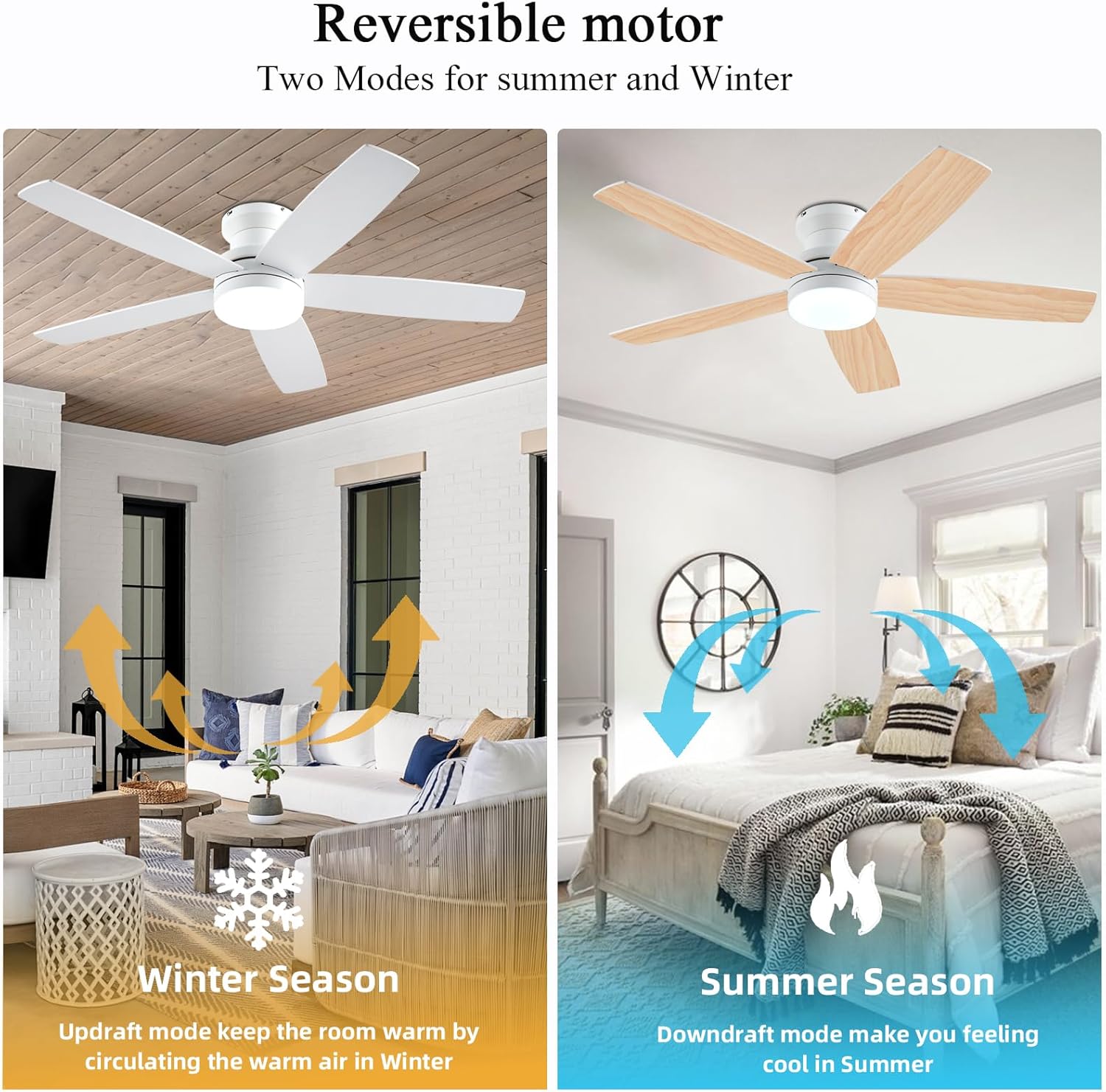
Image 5.1: The remote control and a smartphone displaying the 'Fan Lamp Pro' app, illustrating the various control options for the fan and light, including speed, brightness, color temperature, and timer settings.

Image 5.2: Detailed diagram of the remote control buttons and their functions, alongside visual representations of the three adjustable color temperatures (6000K Cool Light, 4500K Natural Light, 3000K Warm Light) and the 10-100% dimmable range.
5.2 Гар утасны програмын хяналт
For enhanced control, download the "Fan Lamp Pro" app. Scan the QR code provided in the image below or visit http://www.jasonghost.com/fanlamppro/ програмыг татаж авах.
- Scan the QR code to download the "Fan Lamp Pro" app.
- Төхөөрөмж нэмэх.
- Choose Light Fan.
- Click to Pair: Click the "+" button to set the name of your fan light. Then, click the pair button 1-2 times within 3 seconds after the fan is powered on.

Image 5.3: Instructions for setting up app control, including a QR code to download the "Fan Lamp Pro" app, steps for adding a device, and pairing the fan with the app.
5.3 Эргэдэг тогтмол гүйдлийн мотор
The fan features a reversible DC motor, allowing for two modes of operation to suit different seasons:
- Summer Season (Downdraft Mode): Blades rotate counter-clockwise, creating a direct breeze to make you feel cool.
- Winter Season (Updraft Mode): Blades rotate clockwise, circulating warm air trapped near the ceiling downwards, helping to keep the room warm.

Image 5.4: Visual representation of the reversible motor's two modes: updraft for winter to circulate warm air, and downdraft for summer to create a cooling breeze.
5.4 3CCT Dimmable LED Light
The integrated LED light offers three color temperatures and dimming capabilities from 10% to 100%.
- 3000K Халуун цагаан: Ideal for a cozy and relaxing ambiance.
- 4000К байгалийн цагаан: Ерөнхий гэрэлтүүлэг болон өдөр тутмын үйл ажиллагаанд тохиромжтой.
- 6000К хүйтэн цагаан: Provides bright, crisp lighting for tasks or a modern feel.

Image 5.5: Display of the three color temperature options for the LED light: 3000K Warm White, 4500K Natural Light, and 6000K Cool Light, along with a dimming scale from 10% to 100%.
5.5 6-Speed Settings
The fan offers 6 distinct speed settings to provide the desired airflow for any occasion.
- Түвшин 1-2 (Бага): Comfortable wind for sleeping or reading.
- Level 3-4 (Medium): Natural wind for entertainment or parties.
- Түвшин 5-6 (Өндөр): Cooling wind for sports or fitness activities.

Image 5.6: Illustration of the 6-speed settings, categorized into Low (1-2 for comfort), Medium (3-4 for natural wind), and High (5-6 for cooling), with suggested activities for each level.
5.6 Чимээгүй ажиллагаа
The fan is equipped with a silent DC motor, ensuring a peaceful environment with a noise level below 30 dB, comparable to a library whisper.

Image 5.7: A graph comparing the fan's noise level (30 dB) to common sounds like normal conversation (50 dB), library whisper (35 dB), and feather drops (20 dB), highlighting its quiet operation.
6. Засвар үйлчилгээ
Тогтмол засвар үйлчилгээ нь таазны сэнсний урт наслалт, оновчтой ажиллагааг баталгаажуулдаг.
- Цэвэрлэгээ: Сэнсийг цэвэрлэхийн тулд зөөлөн арчиж, damp даавуу. Зүлгүүрийн цэвэрлэгч, уусгагчийг бүү ашигла. Цэвэрлэхийн өмнө цахилгааныг унтраасан эсэхийг шалгаарай.
- Хутганы үзлэг: Periodically check the fan blades for any dust buildup and clean them to maintain efficient airflow.
- Битүүмжлэл: Check all screws and connections periodically to ensure they are secure.

Image 6.1: Close-up of the fan blades, emphasizing their durable and stylish solid wood construction, which is UV resistant, damp resistant, and features premium textures.
7. Алдаа засах
Хэрэв та таазны сэнстэй холбоотой асуудалтай тулгарвал дараах нийтлэг асуудал болон шийдлүүдийг үзнэ үү.
| Асуудал | Боломжит шалтгаан | Шийдэл |
|---|---|---|
| Сэнс эхлэхгүй байна | Сэнсний цахилгаан байхгүй; Сул утас холболт; Алсын удирдлагын зай бага. | Хэлхээ таслагчийг шалгах; Бүх холболтууд найдвартай байгаа эсэхийг шалгах; Алсын удирдлагын батерейг солих. |
| Гэрэл ажиллахгүй байна | Сул утас холболт; LED драйверын асуудал. | Check light wiring; Contact customer support if LED driver is suspected. |
| Алсын удирдлага хариу өгөхгүй байна | Batteries are dead; Remote not paired; Obstruction between remote and receiver. | Replace batteries; Re-pair the remote control (refer to app pairing instructions); Remove obstructions. |
| Хэт их дуу чимээ | Суларсан бэхэлгээний эрэг; Тэнцвэргүй ир. | Tighten all mounting screws; Ensure blades are properly installed and balanced. |
Эдгээр шийдлүүдийг туршиж үзсэний дараа асуудал хэвээр байвал хэрэглэгчийн дэмжлэгтэй холбоо барина уу.
8. Бүтээгдэхүүний техникийн үзүүлэлтүүд
| Онцлог | Дэлгэрэнгүй |
|---|---|
| Брэнд | NKPU |
| Загварын нэр | BR-SY69 / SY69-WHITE |
| Өнгө | Цагаан |
| Бүтээгдэхүүний хэмжээс | 48"D x 48"W x 12.9"H |
| Зүйлийн жин | 10.27 фунт |
| Цахилгаан сэнсний дизайн | Таазны сэнс |
| Эрчим хүчний эх үүсвэр | DC |
| Загвар | Орчин үеийн |
| Өрөөний төрөл | Унтлагын өрөө, хүүхдийн өрөө, зочны өрөө, үржүүлгийн газар, тоглоомын өрөө |
| Онцлог шинж чанар | Adjustable Height, Adjustable Tilt, App Operable, LED Light, Remote Controlled |
| Зөвлөмж болгож буй хэрэглээ | Air Circulation, Cooling, Lighting |
| Дуу чимээний түвшин | 30 дБ |
| Ватtage | 60 ватт |
| Төгсгөлийн төрөл | Цагаан |
| Хутганы тоо | 5 |
| Хурд | 6 RPM (6 Power Levels) |
| Ботьtage | 110 вольт |
| Шилжүүлэгчийн төрөл | Товчлуур |
| Оруулсан бүрэлдэхүүн хэсгүүд | 1 x Ceiling Fan with Lights Kits, 1 x User Manual, Remote |
| Дотор/гадаа ашиглах | Дотор, гадаа |
| Хяналтын арга | Апп, Алсын удирдлага |
| Үр ашиг | High Efficiency (up to 80% reduction in power loss compared to traditional fans) |
| Батерей шаардлагатай юу? | Тийм (алсын удирдлагад) |
9. Баталгаат хугацаа ба дэмжлэг
Your NKPU ceiling fan comes with a Санаа зоволтгүй 24 сарын баталгаа. We are committed to providing excellent customer service.
If you encounter any issues during the installation or use of the fan, please do not hesitate to contact us. Our Борлуулалтын дараах 24 цагийн дэмжлэг баг танд туслахад бэлэн байна.
For warranty claims or technical assistance, please refer to the contact information provided with your purchase or on the official NKPU webсайт.


