1. Танилцуулга
This manual provides detailed instructions for the safe and effective use of your TOTAL TMT57026 Laser Distance Meter. Please read this manual thoroughly before operating the device and keep it for future reference. This device is designed for accurate distance measurements up to 70 meters, suitable for various professional and DIY applications.
2. Аюулгүй ажиллагааны заавар
- Лазер туяа: This device emits Class 2 laser radiation. Do not stare into the laser beam or direct it at other people or animals.
- Нүд хамгаалах: Нүдний лазер туяанд шууд өртөхөөс зайлсхий.
- Үйл ажиллагааны орчин: Төхөөрөмжийг тэсрэх аюултай орчин эсвэл шатамхай материалын ойролцоо ажиллуулж болохгүй.
- Усны эсэргүүцэл: Энэ төхөөрөмж нь усанд тэсвэртэй биш. Ус эсвэл өндөр чийгшилд өртөхөөс зайлсхий.
- Засвар үйлчилгээ: Only qualified personnel should repair the device.
- Батерей: Use only specified AAA batteries. Do not mix old and new batteries or different types of batteries.
3. Бүтээгдэхүүн дууссанview
Familiarize yourself with the components of your TOTAL TMT57026 Laser Distance Meter.
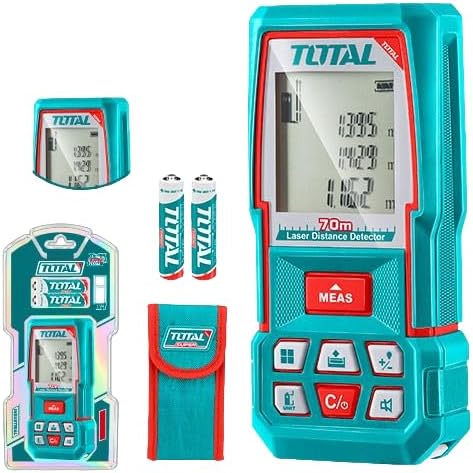
Figure 1: The TOTAL TMT57026 Laser Distance Meter, showing the device itself, two AAA batteries, a carrying pouch, and retail packaging. The device features a digital display and multiple function buttons.
Гол бүрэлдэхүүн хэсгүүд:
- Лазер ялгаруулагч/хүлээн авагч: Төхөөрөмжийн дээд хэсэгт байрладаг.
- Дэлгэц: Shows measurements, units, and mode indicators.
- MEAS товч: Initiates single or continuous measurement.
- UNIT товчлуур: Changes measurement units (e.g., meters, feet, inches).
- C/O Button: Clears the last measurement or turns the device off.
- Функцийн товчлуурууд: For area, volume, addition, subtraction, and other calculations.
- Зайны тасалгаа: Төхөөрөмжийн ар талд байрладаг.
4. Тохиргоо
4.1 Батерей суурилуулах
- Төхөөрөмжийн арын хэсэгт зайны тасалгааны тагийг олоорой.
- Нээх бол тагийг нь гулсуулж эсвэл тайл.
- Insert two (2) AAA 1.5V disposable batteries, ensuring correct polarity (+/-). The device includes two AAA batteries.
- Зайны тасалгааны тагийг сайтар хаа.
4.2 Асаах/унтраах
- Асаахын тулд: дээр дарна уу MEAS button briefly. The display will light up.
- Унтраахын тулд: -г удаан дар C/O button for approximately 3 seconds. The device will also automatically power off after a period of inactivity to conserve battery life.
5. Ашиглалтын заавар
5.1 Зайны үндсэн хэмжилт
- Төхөөрөмж асаалттай байгаа эсэхийг шалгаарай.
- Лазер туяаг зорилтот гадаргуу руу чиглүүл.
- дээр дарна уу MEAS button once. The laser will activate, and the measurement will appear on the display.
- The measurement will be held on the screen until a new measurement is taken or the device is turned off.
5.2 Тасралтгүй хэмжилт (хяналт)
- -г удаан дар MEAS товчийг ойролцоогоор 2 секунд дарна уу.
- The device will enter continuous measurement mode, displaying real-time distance as you move the device.
- дээр дарна уу MEAS button again to stop continuous measurement and hold the last value.
5.3 Хэмжилтийн нэгжийг өөрчлөх
- дээр дарна уу НЭГЖ button repeatedly to cycle through available units: meters (m), feet (ft), and inches (in).
- Сонгосон нэгжийг дэлгэц дээр харуулах болно.
5.4 Талбай ба эзэлхүүний хэмжилт
The device supports calculation of area and volume. Refer to the icons on the function buttons for specific modes.
- Press the appropriate function button (e.g., the button with the square icon for area, or cube icon for volume).
- Follow the on-screen prompts to take the required measurements (e.g., length, width for area; length, width, height for volume).
- Тооцоолсон үр дүнг харуулах болно.
5.5 Нэмэх, хасах үйлдэл
-г ашиглана уу +/- button to add or subtract measurements.
- Take the first measurement.
- дээр дарна уу +/- button to select addition or subtraction mode.
- Take the second measurement. The device will automatically perform the calculation and display the result.
6. Засвар үйлчилгээ
6.1 Цэвэрлэгээ
- Төхөөрөмжийг зөөлөн арчиж, damp даавуу. Зүлгүүрийн цэвэрлэгч, уусгагчийг бүү ашигла.
- Лазер линзийг камерын линзийг цэвэрлэхтэй адил зөөлөн, хөвөнгүй даавуугаар сайтар цэвэрлэ.
6.2 Хадгалалт
- Төхөөрөмжийг нарны шууд тусгал, хэт температураас хол, хуурай, сэрүүн газар хадгална.
- Хэрэв удаан хугацаагаар хадгалах юм бол гоожихоос сэргийлж батерейг салга.
6.3 Батерейг солих
- When the battery indicator on the display shows low power, replace both AAA batteries following the instructions in Section 4.1.
7. Алдаа засах
| Асуудал | Боломжит шалтгаан | Шийдэл |
|---|---|---|
| Төхөөрөмж асахгүй байна. | Батерей нь дуусчихсан эсвэл буруу суурилуулсан. | Батерейны туйлшралыг шалгах эсвэл шинэ AAA батерейгаар солино уу. |
| Буруу хэмжилт. | Laser lens is dirty; target surface is too reflective/non-reflective; device is unstable. | Clean the laser lens. Measure against a suitable, stable surface. Ensure device is held steady. |
| Лазер туяа харагдахгүй байна. | Bright ambient light; laser is off. | Operate in lower light conditions. Ensure device is powered on and MEAS button is pressed. |
| Дэлгэц нь алдааны кодыг харуулж байна. | Хэмжилт нь хязгаараас хэтэрсэн; дотоод алдаа. | Ensure target is within 0.05m to 70m range. Try restarting the device. If error persists, contact support. |
8. Техникийн үзүүлэлтүүд
- Загвар: TMT57026
- Брэнд: НИЙТ
- Хэмжих хүрээ: 0.05-70 метр
- Хэмжих нэгжүүд: Метр (м), Фут (фут), Инч (инч)
- Лазер ангилал: 2-р анги
- Батерей: 2 x AAA, 1.5V (included)
- Зайны төрөл: Нэг удаагийн
- Automatic Laser Shut-off: Yes (after inactivity)
- Automatic Device Shut-off: Yes (after inactivity)
- Бүтээгдэхүүний хэмжээ: Ойролцоогоор 17 x 5 x 0.1 см
- Барааны жин: Approximately 160 g (0.16 Kilograms)
- Материал: Хуванцар
- Өнгө: оюу
- Усны эсэргүүцлийн түвшин: Усанд тэсвэртэй биш
- Үйлдвэрлэгч: Нийт
- Гарал үүслийн улс: Хятад
9. Баталгаат хугацаа ба дэмжлэг
For warranty information and technical support, please contact TOTAL customer service. Keep your purchase receipt as proof of purchase.
For further assistance, please refer to the official TOTAL webсайт эсвэл орон нутгийн дистрибьютертэй холбогдоно уу.


