1. Танилцуулга
Thank you for choosing the suevery AMD Ryzen5 5600GT Gaming PC. This high-performance desktop computer is designed to provide a seamless experience for gaming, e-learning, video and audio streaming, home entertainment, business office tasks, video conferencing, photo and video editing, and daily trading. This manual provides essential information for setting up, operating, maintaining, and troubleshooting your new PC to ensure optimal performance and longevity.

Зураг 1: Урд view of the suevery AMD Ryzen5 5600GT Gaming PC, showcasing түүний ил тод хажуугийн самбар болон эрч хүчтэй RGB фенүүд.
2. Аюулгүй байдлын мэдээлэл
Please read and follow these safety guidelines carefully to prevent damage to your PC and ensure personal safety:
- Эрчим хүчний хангамж: Use only the power supply unit provided with your PC. Ensure the power outlet is properly grounded.
- Агааржуулалт: Do not block any ventilation openings. Maintain adequate space around the PC for proper airflow to prevent overheating.
- Шингэн ба чийг: Keep the PC away from liquids, moisture, and extreme temperatures. Do not operate the PC with wet hands.
- Байршил: Place the PC on a stable, flat surface. Avoid placing it near heat sources or in direct sunlight.
- Үйлчилгээ: Do not attempt to service the PC yourself. Refer all servicing to qualified service personnel. Opening the PC case may void your warranty.
- Цэвэрлэгээ: Цэвэрлэхийн өмнө цахилгааны утсыг салга. Зөөлөн, хуурай даавуу хэрэглээрэй. Шингэн болон аэрозол цэвэрлэгч хэрэглэж болохгүй.
3. Багцын агуулга
Савыг задлахдаа дараах бүх зүйл багтсан эсэхийг шалгана уу.
- suevery AMD Ryzen5 5600GT Gaming PC (Model: SUSU-V900W)
- Цахилгаан кабель
- Баримт бичиг (хурдан эхлүүлэх гарын авлага, баталгаат карт)
- RGB Lighting (Integrated feature)
If any items are missing or damaged, please contact your retailer or suevery customer support immediately.
4. Тохируулах гарын авлага
Follow these steps to set up your suevery Gaming PC:
- Компьютерийг задлах: Carefully remove the PC from its packaging. Retain all packaging materials for future transport or servicing.
- Дагалдах төхөөрөмжүүдийг холбох:
- Монитор: Connect your monitor to the PC using an HDMI or VGA cable. The PC features one HDMI port and one VGA port.
- Гар ба хулгана: Connect your keyboard and mouse to the available USB ports. The PC has 4 USB 2.0 ports and 2 USB 3.0 ports.
- Бусад төхөөрөмжүүд: Чанга яригч, чихэвч эсвэл гадаад хөтчүүд гэх мэт бусад нэмэлт хэрэгслийг холбоно уу.
- Цахилгаанд холбогдох: Plug the power cable into the PC's power input and then into a grounded electrical outlet.
- Сүлжээний холболт: The PC supports Wi-Fi 802.11ax for wireless internet connectivity. An Ethernet port is also available for a wired connection.

Image 2: Rear panel of the PC, illustrating the available USB, HDMI, VGA, and audio ports for connecting peripherals.

Image 3: Diagram detailing the PC's dimensions and the location of front and rear USB ports, along with signal interfaces.
5. Ашиглалтын заавар
This section outlines the basic operation of your suevery Gaming PC.
5.1 Асаах/унтраах
- Асаахын тулд: Press the power button located on the front of the PC. The system will boot up, and the operating system (Windows) will load.
- Унтраахын тулд: It is recommended to shut down the PC through the operating system's shutdown procedure (Start Menu > Power > Shut down). Avoid direct power disconnection unless absolutely necessary.
5.2 Системийн онцлог
- Процессор: Equipped with an AMD Ryzen5-5600GT 6-core, 12-thread processor (3.6GHz base, up to 4.6GHz Turbo) for efficient multitasking and gaming.
- Санах ой: 16GB of high-speed DDR4 RAM at 3200MHz ensures smooth performance across multiple applications and demanding games.
- Хадгалах: A 512GB NVMe SSD provides ultra-fast boot times, rapid application loading, and ampтаны хадгалах сан fileс ба тоглоомууд.
- График: Integrated AMD Radeon RX Vega7 Graphics (1.9G) supports popular games and provides clear visuals for 1080P gaming and 4K content streaming.
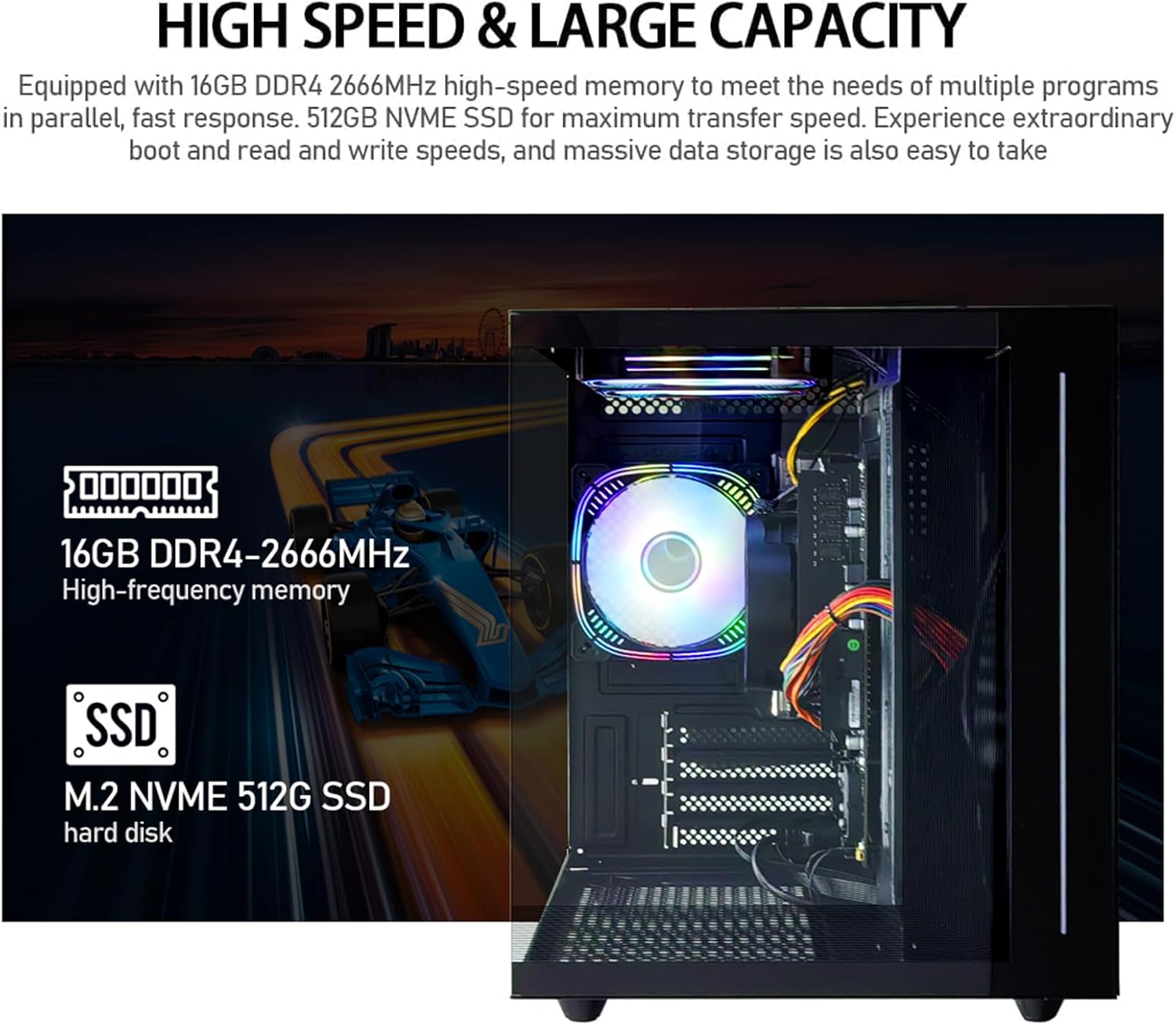
Зураг 4: Дотоод view of the PC, emphasizing the 16GB DDR4 high-frequency memory and the M.2 NVMe 512GB SSD for high-speed data transfer.

Image 5: Visual representation of the AMD Radeon Vega Graphics 7 capabilities, suitable for esports games, video clips, graphic design, and corporate office tasks.
6. Засвар үйлчилгээ
Proper maintenance ensures the longevity and performance of your PC.
6.1 Цэвэрлэгээ
- Гадна: Use a soft, lint-free cloth to wipe the exterior surfaces. For stubborn marks, slightly dampдаавуугаар усаар.
- Агааржуулалт: Regularly check and clean the ventilation grilles to prevent dust buildup, which can impede airflow and cause overheating. Use compressed air to gently clear dust from fan blades and vents.
6.2 Ventilation and Cooling
The PC is equipped with three built-in 120mm chassis fans for rapid heat dissipation and cooling, ensuring stable performance during intensive use. Ensure these fans are not obstructed.

Image 6: Illustration of the PC's cooling system, highlighting the RGB-enabled fans designed for rapid and silent heat dissipation.
6.3 Програм хангамжийн шинэчлэлтүүд
Keep your operating system, drivers, and applications updated to ensure security, stability, and optimal performance. Windows updates are managed through the operating system settings.
7. Алдаа засах
Энэ хэсэг нь танд тулгарч болох нийтлэг асуудлуудын шийдлүүдийг өгдөг.
- Эрчим хүчгүй:
- Цахилгааны кабелийг компьютер болон цахилгааны залгуурт найдвартай холбосон эсэхийг шалгаарай.
- Өөр төхөөрөмжийг залгах замаар цахилгааны залгуур ажиллаж байгаа эсэхийг шалгана уу.
- Check the power switch on the back of the PC (if present) is in the 'On' position.
- Дэлгэц дээр дэлгэц байхгүй:
- Confirm the monitor is powered on and correctly connected to the PC's HDMI or VGA port.
- Дэлгэц дээрээ зөв оролтын эх үүсвэр сонгогдсон эсэхийг шалгаарай.
- Try connecting the monitor to a different port if available, or test with another monitor.
- System is Slow or Unresponsive:
- Ар талд ажиллаж байгаа шаардлагагүй програмуудыг хаа.
- Check for sufficient free space on your SSD.
- Хортой програм байгаа эсэхийг шалгахын тулд вирусын хайлтыг ажиллуул.
- Үйлдлийн систем болон драйверууд тань шинэчлэгдсэн эсэхийг шалгаарай.
- Интернет холболт байхгүй:
- Wi-Fi-ийн хувьд Wi-Fi адаптер идэвхжсэн бөгөөд зөв нууц үгээр зөв сүлжээнд холбогдсон эсэхээ шалгаарай.
- For wired connection, ensure the Ethernet cable is securely connected to both the PC and the router/modem.
- Чиглүүлэгч/модемоо дахин эхлүүлнэ үү.
If you encounter issues not covered here, or if the problem persists, please contact suevery customer support.
8. Техникийн үзүүлэлтүүд
| Бүрэлдэхүүн хэсэг | Тодорхойлолт |
|---|---|
| Загварын дугаар | SUSU-V900W |
| Процессор | AMD Ryzen5-5600GT (6 Cores, 12 Threads, 3.6GHz up to 4.6GHz Turbo) |
| Процессорын залгуур | AM4 залгуур |
| RAM | 16GB DDR4 3200MHz (Max. 32GB) |
| Хадгалах | 512GB NVMe SSD (PCIE x 4 interface) |
| График | Integrated AMD Radeon RX Vega 7 Graphics (1.9G) |
| Үйлдлийн систем | Windows |
| Утасгүй холболт | Wi-Fi 802.11ax |
| USB 2.0 портууд | 4 |
| USB 3.0 портууд | 2 |
| HDMI портууд | 1 |
| VGA портууд | 1 |
| Chassis Fans | 3 x 120mm (Built-in) |
| Хэмжээ (L x W x H) | 39.62 x 35.81 x 33.27 см |
| Жин | 6.89 кг |
9. Баталгаат хугацаа ба дэмжлэг
Your suevery AMD Ryzen5 5600GT Gaming PC comes with a standard manufacturer's warranty. Please refer to the warranty card included in your package for specific terms and conditions, including warranty duration and coverage details.
For technical support, service inquiries, or to report any issues, please contact suevery customer support through the contact information provided on your warranty card or the official suevery website. Please have your model number (SUSU-V900W) and purchase details ready when contacting support.
