1. Танилцуулга
This manual provides essential instructions for the installation, operation, and maintenance of your Lockly Smart Lock Secure Pro with Knob. Please read this manual thoroughly before installation and retain it for future reference. This smart lock offers multiple access methods including fingerprint, PIN Genie keypad, smartphone app, and traditional physical keys, along with built-in Wi-Fi connectivity.
2. Аюулгүй байдлын мэдээлэл
- Do not attempt to disassemble or repair the lock yourself. This may void the warranty and cause damage.
- Use only the specified battery type (AA alkaline batteries). Do not mix old and new batteries or different types of batteries.
- Ensure all components are securely fastened during installation to prevent malfunction.
- Keep physical keys in a secure location away from the lock.
- Protect the keypad from direct sunlight and extreme weather conditions to prolong its lifespan.
3. Бүтээгдэхүүн дууссанview
The Lockly Smart Lock Secure Pro with Knob integrates advanced security features into a convenient door locking solution. It features a biometric fingerprint sensor, a patented PIN Genie keypad, and Wi-Fi for remote access.

Image: Lockly Smart Lock Secure Pro with Knob illustrating its various unlocking methods: fingerprint, PIN Genie keypad, physical key, and smartphone app control.
4. Door Preparation & Compatibility
Before installation, verify your door's dimensions meet the requirements for the Lockly Smart Lock Secure Pro with Knob. Proper door preparation is crucial for correct functionality.

Image: Diagram showing required door measurements for Lockly Smart Lock installation, including door thickness (1 3/8" - 2") and backset (2 3/8" or 2 3/4").

Зураг: Урд view diagram detailing standard door bore hole (2 inch / 50mm) and backset (2.8 inch / 71mm) dimensions for knob installation.
Ensure your door thickness is between 1 3/8 inches and 2 inches. The backset should be either 2 3/8 inches or 2 3/4 inches. The bore hole diameter for the knob should be 2 inches (50mm).
5. Суулгах заавар
Энэ хэсэгт ерөнхий мэдээлэл өгдөгview of the installation process. For detailed step-by-step instructions, refer to the dedicated installation guide included with your product packaging.
5.1 Механик суурилуулалт
- Хаалгыг бэлтгэх: Ensure the door is properly drilled according to the compatibility requirements.
- Түгжээг суулгах: Түгжээг хаалганы ирмэг рүү оруулаад эрэг шургаар бэхлэнэ.
- Гадна угсралтыг суурилуулах: Place the exterior lock assembly onto the door, ensuring the spindle passes through the latch.
- Дотоод бэхэлгээний хавтанг суурилуулах: Өгөгдсөн эрэг ашиглан дотоод угсралтын хавтанг гадна талын угсралтад бэхлэнэ.
5.2 Electronic Installation
- Кабель холбох: Carefully connect the cable from the exterior assembly to the interior assembly.
- Дотоод угсралтыг суурилуулах: Дотор угсралтыг бэхэлгээний хавтан дээр суурилуулж, бэхлэнэ.
- Батерейг оруулах: Open the battery cover on the interior assembly and insert four (4) AA alkaline batteries.
- Perform Handing Process: Follow the on-screen or app instructions to calibrate the lock for your door's handing (left or right).
6. Initial Setup & App Pairing
After physical installation, download the Lockly App from your device's app store to complete the setup and connect your smart lock to Wi-Fi.
- Download Lockly App: хайх "Lockly" in the App Store or Google Play Store.
- Бүртгэл үүсгэх: Open the app and follow the prompts to create a new user account.
- Шинэ төхөөрөмж нэмэх: Select "Add New Device" and choose your Lockly Smart Lock model.
- Pair Lock: Follow the in-app instructions to pair your lock via Bluetooth and connect it to your home Wi-Fi network. This enables remote control and monitoring.
7. Operating Your Lockly Smart Lock
7.1 Хурууны хээгээр түгжээг тайлах
The Lockly Smart Lock features AI Biometric Fingerprint Technology for quick access.

Image: A finger placed on the Lockly Smart Lock's biometric sensor, demonstrating its 0.2-second recognition speed and capacity for up to 99 unique fingerprints.
- Хурууны хээ бүртгүүлэх: Use the Lockly App to register up to 99 unique fingerprints.
- Place Finger: Gently place your registered finger on the fingerprint sensor.
- Түгжээг тайлах: The lock will unlock in approximately 0.2 seconds if the fingerprint is recognized.
7.2 Unlocking with PIN Genie Keypad
The patented PIN Genie keypad prevents code guessing by dynamically shuffling numbers.

Зураг: Ойролцоогоор view of the Lockly Smart Lock's PIN Genie keypad, illustrating how the digit locations dynamically shuffle after each use to prevent password guessing.
- Activate Keypad: Товчлуурыг идэвхжүүлэхийн тулд дэлгэцэн дээр хүрнэ үү.
- ПИН оруулна уу: Enter your 6-8 digit PIN code. The numbers will shuffle after each digit entry.
- Баталгаажуулах: Press the Lockly button (bottom center) to confirm.
7.3 Unlocking with Lockly App
Control your lock remotely using the Lockly App via built-in Wi-Fi.
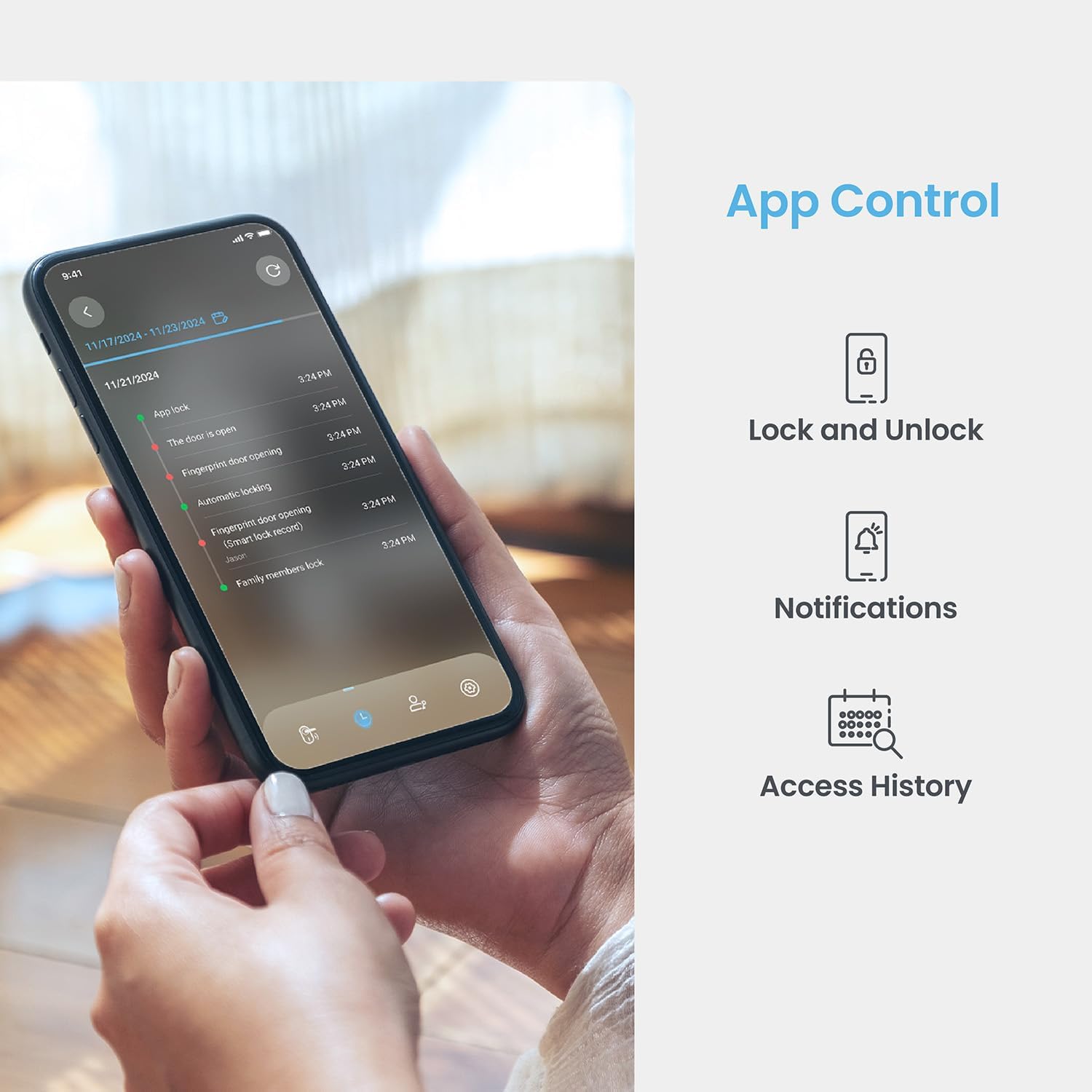
Image: A smartphone displaying the Lockly App, showing options for remote lock/unlock, notifications, and access history logs.
- Нээлттэй програм: Launch the Lockly App on your smartphone.
- Select Lock: Choose the desired lock from your device list.
- Түгжих/тайлах: Tap the lock/unlock icon to control the deadbolt.
7.4 Түгжээг физик түлхүүрээр тайлах
Two physical backup keys are provided for manual unlocking.
- Түлхүүр оруулах: Insert the physical key into the keyhole located on the exterior assembly.
- Түлхүүр эргүүлэх: Түгжээг тайлахын тулд түлхүүрийг эргүүлнэ үү.
7.5 Автоматаар түгжих функц
The programmable auto-lock feature ensures your door is always secured.
- Идэвхжүүлэх/Идэвхгүй болгох: Configure auto-lock settings via the Lockly App.
- Саатал тохируулах: Customize the delay time before the lock automatically engages after being closed.
7.6 Дуут хяналтын интеграци
Integrate your Lockly Smart Lock with smart home assistants.
- Connect to Alexa/Google Assistant: Follow the instructions in the Lockly App to link your lock with Amazon Alexa or Google Assistant.
- Дуут тушаалууд: Use voice commands to lock or unlock your door (e.g., "Alexa, lock the front door").
8. Хэрэглэгчийн удирдлага
Manage access for multiple users through the Lockly App.
- Хэрэглэгч нэмэх/хасах: Create or delete user profiles, assigning unique fingerprints or PIN codes.
- eKeys/eBadges: Grant temporary or permanent access to guests via eKeys or eBadges, which can be sent directly from your smartphone.
- Offline Access Codes: Generate time-sensitive or single-use access codes that do not require internet connectivity for the recipient.
- Activity Logs: Review a detailed history of lock activity, including who accessed the door and when.
9. Засвар үйлчилгээ
9.1 Батерейг солих
The lock operates on 4 AA alkaline batteries, providing approximately 8 months of battery life. Replace batteries when the low battery indicator appears on the lock or in the app.
- Батерейны тасалгаанд нэвтрэх: Дотор угсралтын зайны тагийг ав.
- Батерейг солих: Remove old batteries and insert four new AA alkaline batteries, ensuring correct polarity.
- Хавтасыг хаах: Зайны тагийг солих.
9.2 Цэвэрлэгээ
Цоожны гадна талыг зөөлөн, damp даавуу. Өнгөлгөө болон электрон эд ангиудыг гэмтээж болох зүлгүүрийн цэвэрлэгч, уусгагчаас зайлсхий.
10. Алдаа засах
- Түгжээ хариу өгөхгүй байна: Check battery levels. Replace batteries if low. Ensure cables are securely connected.
- Keypad Not Activating: Ensure the screen is clean and free of debris. Try touching different areas of the screen.
- Хурууны хээ танигдаагүй: Хуруугаа цэвэр, хуурай эсэхийг шалгаарай. Асуудал хэвээр байвал хурууны хээгээ дахин бүртгүүлнэ үү.
- Апп холболтын асуудал: Verify your home Wi-Fi network is active and the lock is within range. Restart the lock and your router if necessary.
- Auto-Lock Malfunction: Check auto-lock settings in the Lockly App. Ensure the door sensor is not obstructed.
11. Техникийн үзүүлэлтүүд
| Онцлог | Дэлгэрэнгүй |
|---|---|
| Загвар | Secure Pro with Knob |
| ASIN | B0DZXB86LZ |
| Түгжээг тайлах аргууд | Fingerprint, PIN Genie Keypad, Lockly App, Physical Key |
| Хурууны хээ таних | 0.2 seconds, up to 99 fingerprints |
| Keypad Technology | Patented PIN Genie (dynamic number shuffling) |
| Холболт | Баригдсан Wi-Fi, Bluetooth |
| Эрчим хүчний эх үүсвэр | 4 х АА шүлтлэг зай |
| Зайны ашиглалт | Ойролцоогоор 8 сар |
| Хаалганы зузаанын нийцтэй байдал | 1 3/8" - 2" |
| Backset-ийн нийцтэй байдал | 2 3/8" эсвэл 2 3/4" |
| Дуут удирдлага | Alexa, Google Assistant compatible |
| Стандарт | Built-to ANSI Standard |
12. Баталгаат хугацаа ба дэмжлэг
For warranty information, technical support, or to register your product, please visit the official Lockly website or contact Lockly customer service. Keep your purchase receipt as proof of purchase.
Онлайн дэмжлэг: www.lockly.com/support


