Танилцуулга
Thank you for choosing the Pro Breeze 25L Smart Dehumidifier. This appliance is designed to efficiently remove excess moisture from your indoor environment, helping to prevent mold, mildew, and dampness. Featuring smart Wi-Fi connectivity, a digital display, and multiple operating modes, this dehumidifier offers advanced control and convenience. Please read this manual thoroughly before operation to ensure safe and optimal performance.
Аюулгүй байдлын чухал заавар
Гал түймэр, цахилгаанд цохиулах, гэмтэх эрсдлийг бууруулахын тулд цахилгаан хэрэгсэл ашиглахдаа аюулгүй байдлын үндсэн арга хэмжээг үргэлж дагаж мөрдөөрэй.
- Цахилгаан хангамж нь ботьтой таарч байгаа эсэхийг шалгаарайtagүнэлгээний шошгон дээр заасан e.
- Гэмтсэн утас эсвэл залгууртай чийгшүүлэгчийг ажиллуулж болохгүй.
- Keep the appliance at least 20 cm (8 inches) away from walls and other objects to ensure proper airflow.
- Төхөөрөмж, цахилгааны утас, залгуурыг ус болон бусад шингэнд дүрж болохгүй.
- Unplug the dehumidifier before cleaning, maintenance, or when not in use.
- Энэ хэрэгсэл нь зөвхөн дотор ашиглах зориулалттай.
- Агаарын оролт, гаралтыг хаах хэрэггүй.
- Хүүхдийг хараа хяналтандаа байлгаж, тэднийг төхөөрөмжтэй тоглохгүй байхыг анхаараарай.
- Төхөөрөмжийг өөрөө засах, өөрчлөх гэж бүү оролдоорой. Мэргэшсэн үйлчилгээний ажилтантай холбоо барина уу.
Бүтээгдэхүүний онцлог

Image: The Pro Breeze 25L Smart Dehumidifier, showcasing its compact design and highlighting features such as Wi-Fi compatibility, 25L extraction rate, energy efficiency, and laundry mode. Dimensions are also indicated.
- Хүчтэй чийгшүүлэгч: Extracts up to 25 liters of moisture per day, effectively combating persistent humidity, mold, and condensation in large rooms.
- Том усны сав: Features a 5.5-liter water tank with automatic shut-off when full. A drainage hose is included for continuous operation.
- Эрчим хүчний хэмнэлттэй: Utilizes a high-performance compressor, 24-hour timer, and automatic stop system to reduce energy consumption.
- Чимээгүй ажиллагаа: Designed with silent technology, making it suitable for use in bedrooms, living rooms, offices, and other quiet environments.
- Аппликешнээр дамжуулан ухаалаг удирдлага: Manage all functions remotely using the free Pro Breeze app or voice commands with Alexa and Google Home (compatible with iPhone and Android).
- Digital Display & Humidity Sensor: An intuitive LED screen allows selection of fan speed and humidity levels between 30% and 80%. The smart sensor displays real-time humidity and automatically stops the dehumidifier once the target is reached.
- Олон үйлдлийн горимууд: Includes a 24-hour timer and 4 operating modes, including a dedicated Угаалгын хатаах горим. Also features a Хүүхдийн түгжээ, Automatic Defrost Mode, ба Шөнийн дэлгэц.

Image: The Pro Breeze dehumidifier positioned next to a large 25-liter water bottle, visually representing its daily moisture extraction capacity and the benefit of fewer tank emptying cycles.
Багцын агуулга
Дараах зүйлсийн нүдийг шалгана уу.
- Pro Breeze 25L Smart Dehumidifier Unit
- Тасралтгүй ус зайлуулах хоолой
- Хэрэглэгчийн гарын авлага
Тохиргоо
- Савлах: Чийгшүүлэгчийг сав баглаа боодолоос нь болгоомжтой авч хая. Сав баглаа боодлыг ирээдүйд хадгалах, тээвэрлэх зорилгоор хадгална уу.
- Байршил: Place the dehumidifier on a firm, level surface. Ensure there is at least 20 cm (8 inches) of clear space around the air inlet and outlet to allow for efficient airflow. Avoid placing it near heat sources or in direct sunlight.
- Эрчим хүчний холболт: Цахилгааны утсыг газардуулсан цахилгааны залгуурт холбоно уу. Боть байгаа эсэхийг баталгаажуулна ууtage нь тухайн нэгжийн шаардлагад нийцдэг.
- Усны сав суурилуулах: Ensure the water tank is correctly inserted into the unit. The dehumidifier will not operate if the tank is not properly seated or is full.
- Тасралтгүй ус зайлуулах (заавал биш): For continuous operation without emptying the tank, connect the provided drainage hose to the continuous drainage port on the back of the unit. Route the hose to a suitable drain, ensuring it is sloped downwards to allow water to flow freely.
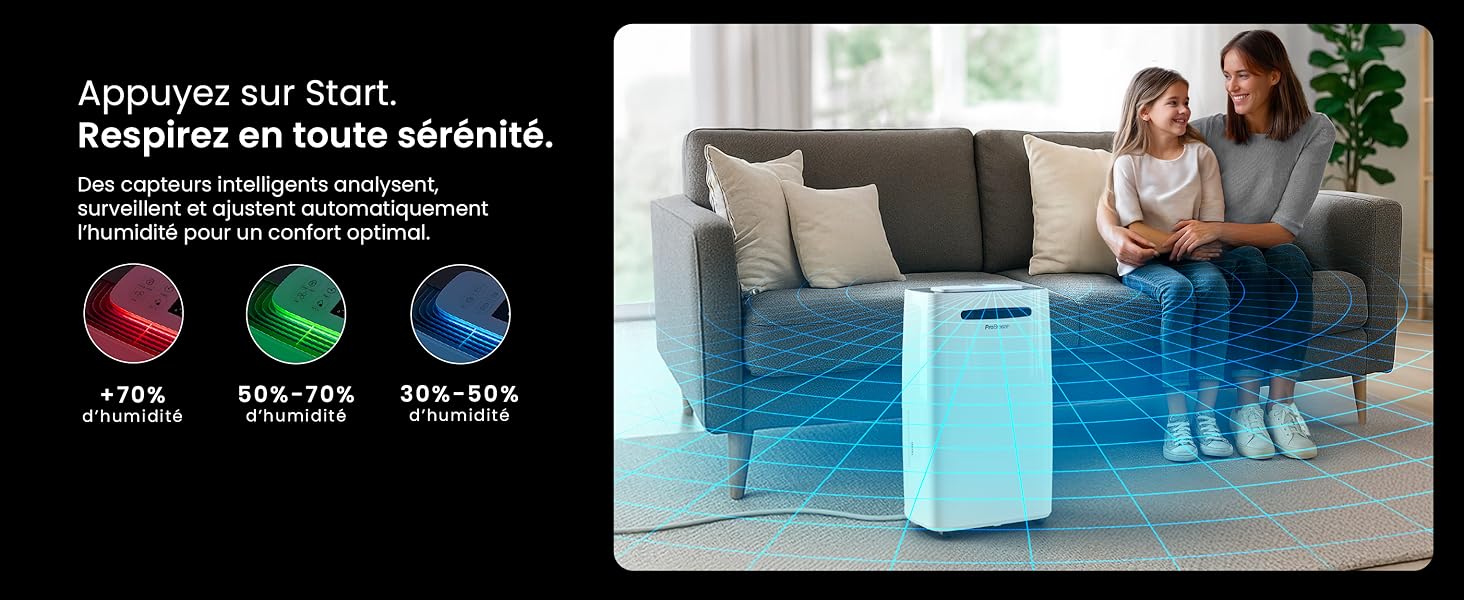
Image: The dehumidifier shown in different environments such as a garage, home office, and laundry room, illustrating its versatility and suitability for various spaces. Icons for continuous drainage and automatic defrost are also present.
Ашиглалтын заавар
Хяналтын самбар дууссанview

Зураг: Нарийвчилсан view of the dehumidifier's illuminated digital control panel, showing buttons for power, mode, fan speed, timer, child lock, and humidity settings, along with the LED display.
The intuitive LED display and touch controls allow for easy operation.
- Цахилгаан товч: Төхөөрөмжийг асаах эсвэл унтраахын тулд дарна уу.
- Горимын товчлуур: Cycle through available operating modes: Ердийн, Laundry Drying, ба Шөнийн горим.
- Сэнсний хурдны товчлуур: Adjust the fan speed between Бага болон Өндөр.
- Humidity Setting (SET %): Use the up/down arrows to set your desired humidity level (30% - 80%). The unit will operate until this level is reached.
- Цаг хэмжигч товчлуур: Set a 24-hour timer for automatic power ON or OFF.
- Хүүхдийн түгжээний товчлуур: Хүүхдийн түгжээг идэвхжүүлэх/идэвхгүй болгохын тулд удаан дарж, тохиргоонд санамсаргүй өөрчлөлт орохоос сэргийлнэ үү.
- Дэлгэцийн товчлуур: Turn the LED display lights ON or OFF, useful for night mode.
Wi-Fi болон аппликейшн хяналт

Image: A user interacting with the Pro Breeze mobile application on a smartphone, demonstrating remote control capabilities for the dehumidifier. The app shows current humidity and temperature settings.
The Pro Breeze 25L Smart Dehumidifier can be controlled remotely via the Pro Breeze app. Download the app from your smartphone's app store and follow the in-app instructions to connect your device to your home Wi-Fi network. Once connected, you can control all functions, set schedules, and monitor humidity levels from anywhere.
The unit is also compatible with Amazon Alexa and Google Home for voice control. Refer to the app's help section for detailed instructions on integrating with these smart home platforms.
Засвар үйлчилгээ
Усны савыг хоослох
When the water tank is full, the dehumidifier will automatically shut off and an indicator light will illuminate. Carefully remove the water tank from the unit, empty the collected water, and reinsert the tank securely. The unit will resume operation.
Агаар шүүгчийг цэвэрлэх
A clogged filter can reduce efficiency. It is recommended to clean the air filter every two weeks or more frequently depending on usage and air quality.
- Чийгшүүлэгчийг унтрааж, цахилгааны залгуураас салга.
- Locate and remove the air filter (usually on the back or side of the unit).
- Шүүлтүүрийг тоос сорогчоор цэвэрлэж эсвэл бүлээн, савантай усаар зөөлөн угаана.
- Шүүлтүүрийг төхөөрөмжид буцааж оруулахаасаа өмнө сайтар зайлж, агаарт бүрэн хатаана.
Гадна талын цэвэрлэгээ
Чийгшүүлэгчийн гадна талыг зөөлөн, damp даавуу. Гадаргууг гэмтээж болзошгүй тул химийн хатуу бодис, зүлгүүрийн цэвэрлэгч, уусгагчийг бүү ашигла.
Хадгалах
If storing the unit for an extended period, ensure the water tank is empty and clean, and the filter is clean and dry. Store the dehumidifier in a cool, dry place, preferably in its original packaging.
Алдааг олж засварлах
| Асуудал | Боломжит шалтгаан | Шийдэл |
|---|---|---|
| Чийгшүүлэгч асахгүй байна. | No power; water tank full or incorrectly inserted; ambient temperature too low. | Check power connection; empty and reinsert water tank; ensure room temperature is above 5°C (41°F). |
| Төхөөрөмж ажиллаж байгаа боловч ус хуримтлагдахгүй байна. | Humidity level too low; air filter clogged; room temperature too low; unit size too small for space. | Adjust desired humidity setting lower; clean air filter; ensure room temperature is adequate; consider if unit is appropriate for room size. |
| Нэгж дуу чимээтэй байна. | Төхөөрөмж тэгш гадаргуу дээр биш; агаарын шүүлтүүр бөглөрсөн; дотоод эд ангиуд чичирч байна. | Place on a flat, stable surface; clean air filter; if noise persists, contact support. |
| Wi-Fi холболтын асуудал. | Incorrect Wi-Fi password; unit too far from router; router issues; app issues. | Verify Wi-Fi password; move unit closer to router; restart router; reinstall Pro Breeze app. |
| Ороомог дээр хяруу гарч ирдэг. | Орчны бага температур. | The unit has an automatic defrost function. If frost persists, increase room temperature. |
Үзүүлэлтүүд
| Тодорхойлолт | Дэлгэрэнгүй |
|---|---|
| Загварын дугаар | PB-D-37W-W-EU |
| Брэнд | Pro Breeze |
| Чийг шингээх хүчин чадал | Өдөрт 25 литр |
| Усны савны багтаамж | 5.5 литр |
| Хэмжээ (L x W x H) | 38.6 см х 26 см х 50 см |
| Жин | 15.1 кг |
| Сэнсний хурд | 2 |
| Онцлог шинж чанарууд | Adjustable Humidity Control, Night Mode, Continuous Drainage, Wi-Fi Connectivity, Digital Display, 24h Timer, Laundry Drying Mode, Child Lock, Automatic Defrost |
| Санал болгож буй шалны талбай | 322 кв фут (30 м²) хүртэл |

Image: The Pro Breeze dehumidifier highlighting its elegant and discreet design, along with its dimensions (50cm H, 38.6cm L, 26cm P) and four easy-to-move caster wheels.
Баталгаат болон дэмжлэг
Pro Breeze products are manufactured to the highest standards. This product comes with a standard manufacturer's warranty. For specific warranty details, please refer to the warranty card included in your package or visit the official Pro Breeze webсайт.
If you encounter any issues or have questions regarding your dehumidifier, please contact Pro Breeze customer support. Contact information can typically be found on the Pro Breeze webсайт эсвэл бүтээгдэхүүний сав баглаа боодол дээр.


