1. Танилцуулга
The Waveshare ESP32-S3 2.1inch Capacitive Touch Round Display Development Board is a versatile microcontroller development board designed for a wide range of applications, including Human-Machine Interface (HMI) and IoT projects. It integrates a powerful ESP32-S3 chip with a high-resolution round capacitive touch display, offering robust processing capabilities and extensive connectivity options.
This manual provides essential information for setting up, operating, and understanding the features of your development board. Please read it thoroughly to ensure proper usage and to maximize the board's potential.
2. Багцын агуулга
Доор жагсаасан бүх зүйл таны багцад байгаа эсэхийг шалгаарай.
- ESP32-S3-Touch-LCD-2.1B Development Board x1
- SH1.0 12PIN cable ~100mm x1
- SH1.0 4PIN cable ~100mm (2pcs) x1

Image: The package contents include the ESP32-S3-Touch-LCD-2.1B board, one 12-pin SH1.0 cable, and two 4-pin SH1.0 cables.
3. Үндсэн шинж чанарууд
- Процессор: High-performance Xtensa 32-bit LX7 dual-core processor, operating at up to 240MHz.
- Холболт: Integrated 2.4GHz Wi-Fi (802.11 b/g/n) and Bluetooth BLE 5 support with an onboard antenna.
- Санах ой: 512KB SRAM, 384KB ROM, 16MB Flash, and 8MB PSRAM.
- Дэлгэц: 2.1-inch round IPS capacitive touch display with 480x480 resolution and 262K colors.
- Мэдрэгчтэй удирдлага: Capacitive touch via I2C interface with interrupt support.
- Дагалдах төхөөрөмжүүд: Multiple interfaces including UART, I2C, USB, TF card slot, and various GPIO pins.
- Мэдрэгч: QMI8658 6-axis sensor (IMU) and PCF85063 RTC sensor.
- Эрчим хүчний менежмент: Battery management module with low power modes for efficient energy use.

Зураг: Бүтэнview of the ESP32-S3-Touch-LCD-2.1 features, highlighting the LX7 Dual-core Processor, 2.4 GHz Wi-Fi, BLE 5, Onboard Antenna, 2.1" display, Capacitive Touch, 480x480 Pixels, 262K Color, TF Card Slot, PCF85063 RTC, QMI8658 6-Axis IMU, and Multiple Interfaces.
4. Setup and Hardware Overview
4.1 Техник хангамжийн бүрэлдэхүүн хэсгүүд
The board features various components and connectors for development and integration. Refer to the diagram below for a detailed layout.

Зураг: Нарийвчилсан view of the ESP32-S3-Touch-LCD-2.1 board with numbered labels indicating components such as the ESP32-S3R8, QST attitude sensor, TCA9554PWR, FSUSB42UMX, CH343P, 16MB Flash, RTC chip, Battery recharge manager, ME6217C33M5G, USB Type-C port, MX1.25 battery header, 12PIN multi-functional pin header, IPEX1 connector, TF card slot, RTC battery header, I2C header, UART header, USB TO UART Type-C port, Buzzer, Power indicator, Charge indicator, Battery power supply control button, RESET button, and BOOT button.
4.2 Захын холболтууд
The board supports expansion via GPIO, UART, and I2C interfaces. The following diagram illustrates common peripheral connections.
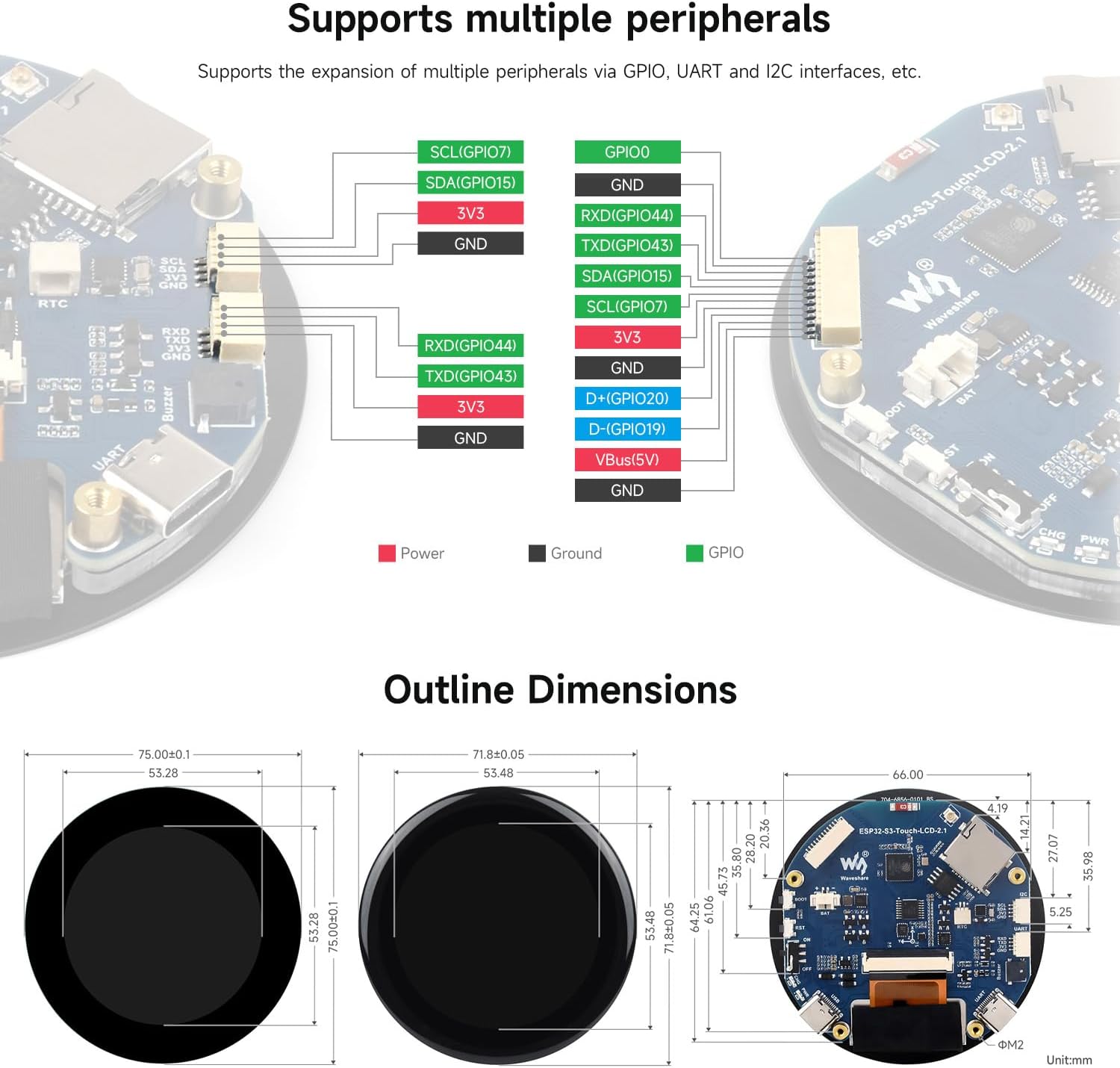
Image: Diagram showing how to connect various peripherals using GPIO, UART, and I2C interfaces, with color-coded lines for Power (red), Ground (black), and GPIO (green).
4.3 Анхдагч асаалт
To power the board, connect a 5V power source to the USB Type-C port. The power indicator LED will illuminate. If a battery is connected, the charge indicator will show its status.
5. Ашиглалтын заавар
5.1 Хөгжлийн орчин
The ESP32-S3-Touch-LCD-2.1B supports popular development environments such as ESP-IDF and Arduino IDE. These platforms provide comprehensive SDKs, development resources, and tutorials to facilitate project development.
- ESP-IDF: A free, open-source development framework for ESP32 series chips. It supports various IDEs like Eclipse and VSCode.
- Arduino IDE: A user-friendly electronic prototyping platform, suitable for quick development.

Image: This image illustrates application scenarios like Human-Machine Interface and LVGL GUI Development, alongside supported development environments such as ESP-IDF and Arduino IDE.
5.2 Programming and Firmware Upload
Detailed instructions for programming and uploading firmware can be found in the official Waveshare Wiki. Typically, this involves:
- Installing the necessary drivers for the USB-to-UART bridge (e.g., CH343P).
- Setting up your chosen development environment (ESP-IDF or Arduino IDE).
- Connecting the board to your computer via the USB Type-C port.
- Selecting the correct board and port in your IDE.
- Compiling and uploading your code.
5.3 Touch Display Interaction
The 2.1-inch display features capacitive touch functionality. Interaction is similar to modern smartphone screens. Ensure your application code properly initializes and handles touch input via the I2C interface.
6. Хэрэглээний хувилбарууд
The Waveshare ESP32-S3-Touch-LCD-2.1B is suitable for various applications, including:
- Хүний машин интерфэйс (HMI): Creating intuitive graphical user interfaces for control systems and smart devices.
- IoT төхөөрөмжүүд: Developing connected devices with interactive displays for data visualization and control.
- Wearable Technology: Due to its compact, round form factor.
- Smart Home Control Panels: Interactive displays for managing smart home ecosystems.
- Аж үйлдвэрийн хяналт: Small-scale control panels requiring touch input.
7. Техникийн үзүүлэлтүүд
Detailed technical specifications for the ESP32-S3-Touch-LCD-2.1B:
| Онцлог | Дэлгэрэнгүй |
|---|---|
| Загварын нэр | ESP32-S3-Touch-LCD-2.1B |
| Процессор | Xtensa 32-bit LX7 Dual-core, up to 240MHz |
| Wi-Fi | 2.4GHz (802.11 b/g/n) |
| Bluetooth | BLE 5 |
| SRAM | 512KB |
| ROM | 384KB |
| Флэш | 16 МБ |
| PSRAM | 8 МБ |
| Дэлгэцийн төрөл | IPS LCD |
| Дэлгэцийн хэмжээ | 2.1 inch (Round) |
| Шийдвэр | 480 x 480 пиксел |
| Дэлгэцийн өнгө | 262 мянга |
| Төрөл дээр хүрнэ үү | Capacitive, Single-point |
| Мэдрэгч интерфейс | I2C |
| IMU мэдрэгч | QMI8658 (6-axis) |
| RTC Chip | PCF85063 |
| USB порт | USB Type-C (Full-speed) |
| Батерейны холбогч | MX1.25 2PIN for 3.7V Lithium battery |
| Хэмжээ | 75.00 x 75.00 mm (overall), 66.00 mm (PCB diameter) |
| Зүйлийн жин | 2.46 унц |
8. Тойм хэмжээсүүд
The following diagrams provide the physical dimensions of the development board.

Зураг: дээрээс доош view of the board's outline dimensions, showing a diameter of 75.00mm for the display module and 71.80mm for the PCB.

Зураг: хажуу тал view and detailed PCB dimensions, indicating various measurements in millimeters for components and connectors.
9. Алдаа засах
- Самбар асаалтгүй байна: Ensure the USB Type-C cable is securely connected to a 5V power source. Check the power indicator LED.
- Firmware upload issues: Verify that the correct drivers are installed and the board is selected in your IDE. Try pressing the BOOT button while connecting the USB cable, then RESET.
- Display not showing anything: Confirm that the display ribbon cable is properly seated. Check your code for display initialization errors.
- Touch input not responding: Ensure the I2C interface for the touch controller is correctly initialized in your software. Check for any physical damage to the touch panel.
- Wi-Fi/Bluetooth connectivity problems: Verify antenna connection (if external) and check software configuration for network settings.
10. Засвар үйлчилгээ
- Цэвэрлэгээ: Use a soft, dry cloth to clean the display and board. Avoid abrasive materials or harsh chemicals.
- Хадгалах: Ашиглаагүй үедээ самбарыг хуурай, антистатик орчинд хадгална уу.
- Програм хангамжийн шинэчлэлтүүд: Regularly check the official Waveshare Wiki for firmware updates and new examples to ensure optimal performance and access to the latest features.
11. Баталгаат хугацаа ба дэмжлэг
For detailed warranty information, please refer to the official Waveshare website or contact your point of purchase. For technical support, extensive documentation, and community forums, visit the official Waveshare Wiki:
The Wiki provides tutorials, example code, datasheets, and troubleshooting guides specific to the ESP32-S3-Touch-LCD-2.1B development board.


