1. Бүтээгдэхүүн дууссанview
The TABWEE T20 is a versatile 10-inch Android tablet designed for both productivity and entertainment. It features a high-resolution Incell display, a powerful Octa-Core processor, and ample memory and storage, making it suitable for a wide range of applications from content creation to multimedia consumption.
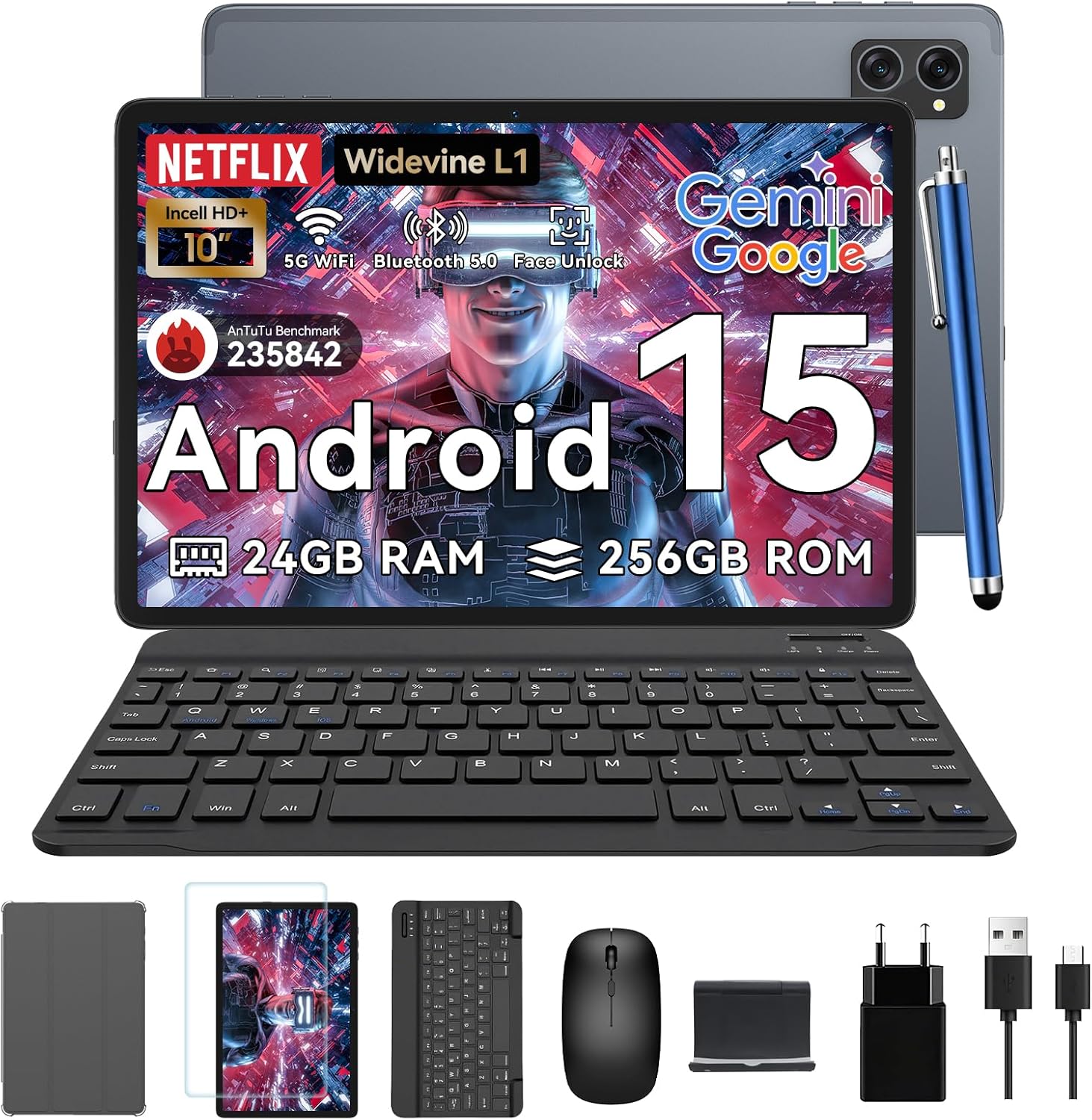
Figure 1.1: TABWEE T20 Tablet and its complete accessory package, including a Bluetooth keyboard, mouse, stylus, protective case, screen protector, charger, and USB cable.
Хайрцагт юу байна
Upon unboxing your TABWEE T20 Tablet, verify that all components are present:

Figure 1.2: Contents of the TABWEE T20 Tablet retail package.
- 1x TABWEE T20 Tablet
- 1x Bluetooth гар
- 1х хулгана
- 1x Stylus
- 1х Хамгаалалтын хайрцаг
- 1x Дэлгэц хамгаалагч
- 1x Tablet Stand
- 1х цэнэглэгч
- 1x USB кабель
2. Тохиргоо ба анхны хэрэглээ
Таблетыг цэнэглэж байна
Before first use, fully charge the tablet using the provided charger and USB cable. Connect the charger to a power outlet and the USB cable to the tablet's charging port. The charging indicator will illuminate.
Асаах/унтраах
- Асаахын тулд: Дэлгэц дээр TABWEE лого гарч ирэх хүртэл Power товчийг дараад барина уу.
- Унтраахын тулд: Цахилгааны сонголтын цэс гарч иртэл Асаах товчийг дараад барина уу. "Унтраах" гэснийг сонгоод баталгаажуулна уу.
- Дахин эхлүүлэхийн тулд: Цахилгааны сонголтуудын цэснээс "Дахин эхлүүлэх" гэснийг сонгоод баталгаажуулна уу.
Анхны тохиргооны мастер
Анх удаа асаахад таблет нь таныг анхны тохиргооны шидтэнгээр дамжуулан удирдах болно. Дэлгэц дээрх зааврыг дагана уу:
- Хэлээ сонгоно уу.
- Wi-Fi сүлжээнд холбогдоно уу.
- Google бүртгэлээрээ нэвтэрч эсвэл шинээр үүсгэнэ үү.
- Дэлгэцийн түгжээг (ПИН, хээ, нууц үг эсвэл Царайгаар тайлах) тохируулна уу.
- Review мөн нөхцөл, болзлыг хүлээн зөвшөөр.
Дагалдах хэрэгслийг холбож байна
The TABWEE T20 comes with a Bluetooth keyboard and mouse for enhanced productivity.
- Bluetooth гар:
- Гар цэнэглэгдэж, асаалттай байгаа эсэхийг шалгаарай.
- Таблет дээр очно уу Тохиргоо > Холбогдсон төхөөрөмжүүд > Bluetooth.
- Turn on Bluetooth and tap "Pair new device".
- Select the keyboard from the list of available devices and follow pairing instructions.
- Bluetooth хулгана:
- Хулгана асаалттай, хослуулах горимд байгаа эсэхийг шалгаарай.
- Таблет дээр очно уу Тохиргоо > Холбогдсон төхөөрөмжүүд > Bluetooth.
- Tap "Pair new device" and select the mouse from the list.
- Зүү: The included stylus can be used directly on the screen for navigation, drawing, and note-taking. It features palm-rejection precision.
3. Таблетыг ажиллуулах
Android 15 үйлдлийн систем
The TABWEE T20 runs on Android 15, offering enhanced privacy controls, seamless cross-device collaboration, and improved multitasking capabilities.

Figure 3.1: Key features of the Android 15 operating system.
Gemini AI Integration
The tablet integrates Google Gemini AI, which intelligently optimizes tasks, from photo editing to document formatting, while prioritizing security with a dedicated encrypted privacy space.

Зураг 3.2: Илүүview of Gemini AI capabilities on the tablet.
Display and Multimedia
The 10.1-inch Incell HD+ display (1280x800 resolution) provides vivid colors and crisp details. With Widevine L1 certification, you can enjoy 1080P streaming on platforms like Netflix, Disney+, and Hulu.

Figure 3.3: Display features and eye-friendly modes.
The tablet also features Dual Smart-K Box Speakers for an immersive audio experience.

Figure 3.4: Dual Smart-K Box Speakers for enhanced audio.
Камерын онцлог
Equipped with an 8MP rear camera and a 5MP front camera, the tablet supports Google Lens integration for smart scanning and object recognition. Face Unlock is also supported for convenient security.

Figure 3.5: Camera specifications and features.

Figure 3.6: Smart Google Lens functionalities.
Холболт
The TABWEE T20 supports dual-band 5G WiFi and Bluetooth 5.0 for fast and stable connections.
- Wi-Fi: Connect to 2.4GHz or 5GHz networks for seamless streaming and quick downloads.
- Bluetooth 5.0: Pair with wireless earbuds, speakers, or other Bluetooth-enabled devices with 20% faster data transfer speed.
- OTG дэмжлэг: Allows for easy transfer of files to and from external storage devices.

Figure 3.7: Advanced Bluetooth 5.0 connectivity.

Figure 3.8: Lightning Fast WiFi 5 Technology.
4. Засвар үйлчилгээ, арчилгаа
Proper maintenance ensures the longevity and optimal performance of your TABWEE T20 Tablet.
Батерейны удирдлага
The 5000mAh battery provides extended usage times. To maximize battery life:
- Хэт их температураас зайлсхий.
- Use the provided charger.
- Enable smart power-saving modes in settings.
- Ар талд ажиллаж байгаа ашиглагдаагүй програмуудыг хаа.

Figure 4.1: 5000mAh Mega Battery performance metrics.
Таблетыг цэвэрлэх
- Дэлгэц болон их биеийг цэвэрлэхийн тулд зөөлөн, хөвөнгүй даавуу ашиглана уу.
- Зөрүүд толбоны хувьд бага зэрэг dampдаавуунд ус эсвэл дэлгэц цэвэрлэгчээр .
- Химийн хатуу бодис, зүлгүүрийн материал ашиглахаас зайлсхий.
Хадгалах ба санах ойн менежмент
The tablet comes with 256GB of internal storage and supports up to 2TB TF card expansion. It also features 24GB RAM (8GB physical + 16GB virtual) for smooth multitasking.

Figure 4.2: Storage and RAM expansion capabilities.
To optimize performance and storage:
- Regularly clear cache and temporary files.
- Ашиглагдаагүй програмуудыг устгана уу.
- Utilize the 2TB TF card slot for large files like 4K videos and design documents.
5. Алдаа засах
This section addresses common issues you might encounter with your TABWEE T20 Tablet.
| Асуудал | Боломжит шалтгаан | Шийдэл |
|---|
| Таблет асахгүй байна. | Батерей бага; системийн эвдрэл. | Таблетыг дор хаяж 30 минут цэнэглээрэй. Хэрэв хариу өгөхгүй хэвээр байвал дахин асаахын тулд Асаах товчийг 10-15 секундын турш дарна уу. |
| Wi-Fi холболтын асуудал. | Буруу нууц үг; чиглүүлэгчийн асуудал; хамрах хүрээнээс гарсан. | Verify Wi-Fi password. Restart your router. Ensure tablet is within Wi-Fi range. Forget the network and reconnect. |
| Bluetooth accessories not pairing. | Accessory not in pairing mode; Bluetooth off on tablet. | Ensure accessory is in pairing mode. Turn Bluetooth off and on again on the tablet. Restart both devices. |
| Гүйцэтгэл удаашрал эсвэл програм гацсан. | Хэт олон апп ажиллаж байна; багтаамж бага; програм хангамж хуучирсан. | Close background apps. Clear app caches. Free up storage space. Check for system updates in Тохиргоо > Систем > Системийн шинэчлэл. |
| Дэлгэц хариу өгөхгүй байна. | Програм хангамжийн түр зуурын алдаа. | Force restart the tablet by holding the Power button for 10-15 seconds. |
Хэрэв эдгээр шийдлүүдийг туршиж үзсэний дараа асуудал арилахгүй бол хэрэглэгчийн дэмжлэгтэй холбогдоно уу.
7. Баталгаат хугацаа ба дэмжлэг
TABWEE is committed to providing excellent customer service and support for your T20 Tablet.
Баталгаат хугацааны мэдээлэл
Your TABWEE T20 Tablet is covered by a 2 жилийн баталгаат хугацаа from the date of purchase. This warranty covers manufacturing defects and ensures risk-free ownership.
Хэрэглэгчийн дэмжлэг
For any technical assistance, troubleshooting, or warranty claims, please contact our support team:
- Имэйл тусламж: serviceplus.linda@gmail.com
- Online Call Support: Available 24/7 for US/CA customers.
- Repair Support: 2-Year Repair Support is provided.

Figure 7.1: TABWEE Customer Support Services.
Please have your purchase details and tablet model number ready when contacting support to expedite the process.


