Танилцуулга
This manual provides detailed instructions for the safe and efficient operation of your HAYEAR 8MP Digital Microscope Camera, Model HY-6700. This high-performance camera is equipped with an 8MP sensor, capable of capturing images and videos in 4K Ultra HD and 1080P resolutions. It supports simultaneous USB and HDMI output, making it suitable for various applications including industrial inspection, laboratory research, quality control, and detailed observation with image and video recording capabilities. Please read this manual thoroughly before use and retain it for future reference.
Бүтээгдэхүүн дууссанview
Гол онцлогууд
- Өндөр нягтрал: 8MP sensor for 4K Ultra HD and 1080P image and video capture.
- Хос гаралт: Simultaneous USB and HDMI output for connection to PCs, monitors, or TVs.
- Олон талт хэрэглүүрүүд: Ideal for industrial inspection, laboratory observation, quality control, and educational purposes.
- Image & Video Recording: Features still image capture and video recording functions for detailed documentation.
- Системийн нийцтэй байдал: USB connection compatible with Windows, Mac OS, and Linux systems.
Багцын агуулга
Доор жагсаасан бүх зүйл таны багцад байгаа эсэхийг шалгаарай.
- 1 x HAYEAR Digital Microscope Camera (Model HY-6700)
- 1 x HDMI кабель
- 1 x USB кабель
- 1 x Зааварчилгааны гарын авлага

Зураг 1: Package contents including the camera, HDMI cable, USB cable, and instruction manual.
Тохиргоо
Camera Interface and Buttons
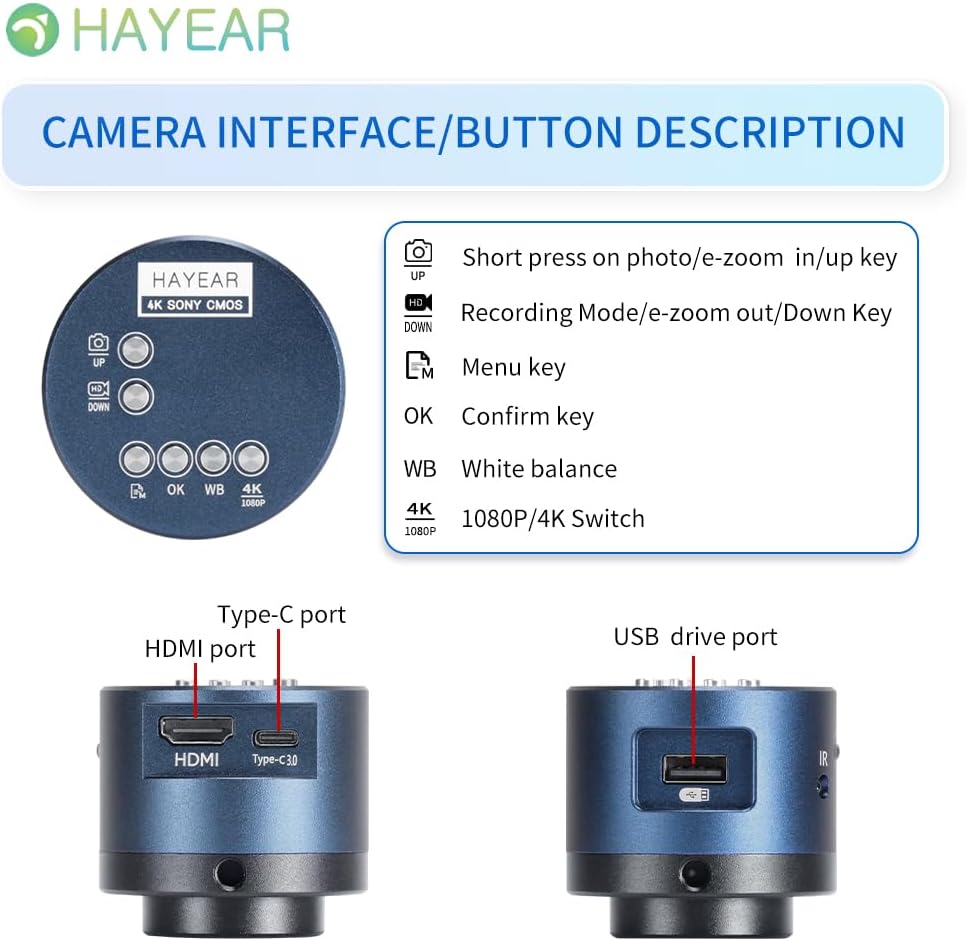
Зураг 2: Дууслааview of the camera's control buttons and ports.
- Photo/E-Zoom In/Up Key: Short press to take a photo or zoom in. Use for navigation (Up).
- Recording Mode/E-Zoom Out/Down Key: Short press to switch to recording mode or zoom out. Use for navigation (Down).
- Цэсийн түлхүүр: Access the camera's settings menu.
- OK Түлхүүр: Сонголт эсвэл үйлдлийг баталгаажуулна уу.
- WB (White Balance) Key: Adjust white balance settings.
- 4K/1080P Switch: Toggle between 4K and 1080P resolution output.
- HDMI порт: Connect to an HDMI display (monitor, TV).
- Төрөл-C порт: Эрчим хүчний оролт ба өгөгдөл дамжуулах.
- USB дискний порт: Connect to a computer for data transfer or use as a webкамер.
Дэлгэцтэй холбогдож байна
The camera supports simultaneous HDMI and USB output. Choose the connection method suitable for your application.
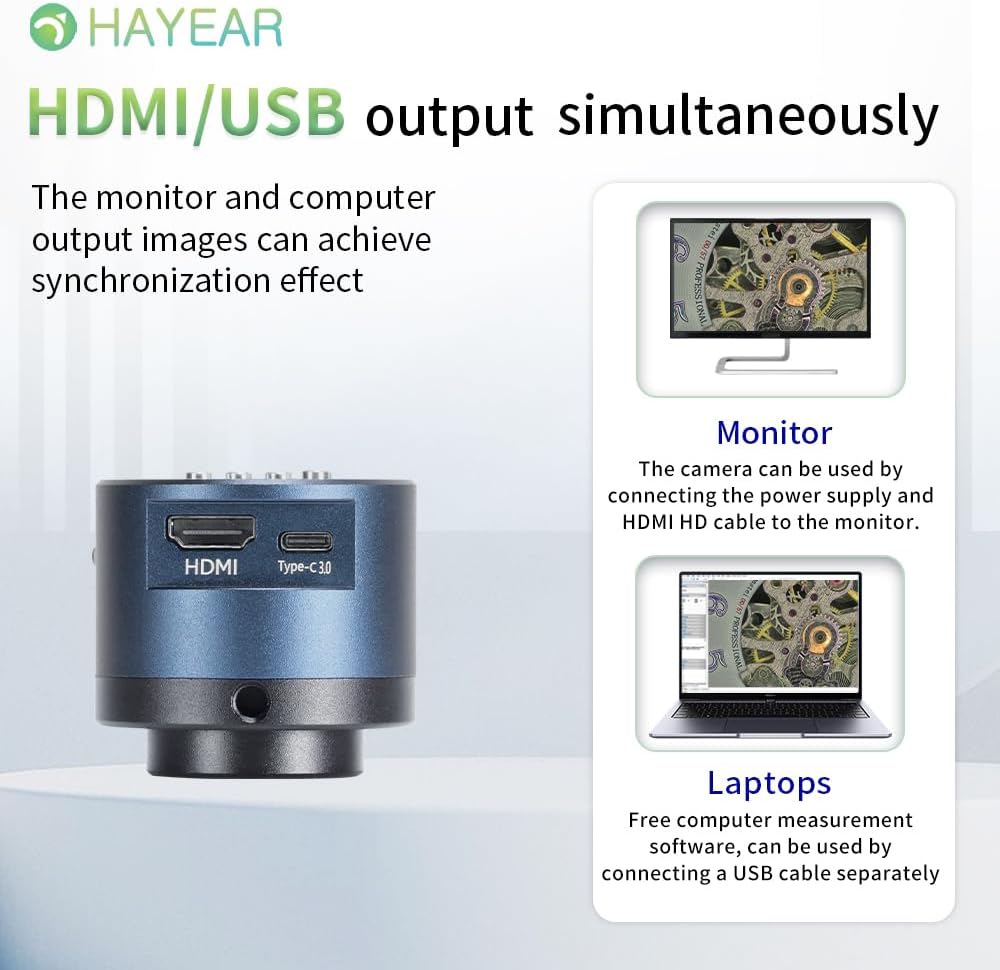
Зураг 3: Illustrates simultaneous HDMI and USB output capabilities.
- HDMI холболт: Connect the camera to an HDMI monitor or TV using the provided HDMI cable. Ensure the camera is powered via the Type-C port. This allows for direct display of the microscope's output.
- USB холболт: Connect the camera to a computer (Windows, Mac, or Linux) using the provided USB cable. The camera can function as a webcam or be used with dedicated measurement software.
Асаах/унтраах
The product powers on automatically when connected to a power source via the Type-C port. To turn off the device, disconnect the power plug from the camera or the power outlet.
Ашиглалтын заавар
Үндсэн үйл ажиллагаа
- Зураг авах: Short press the "Photo/E-Zoom In/Up" key to capture a still image.
- Видео бичлэг хийх: Short press the "Recording Mode/E-Zoom Out/Down" key to switch to video recording mode, then press again to start/stop recording.
- Томруулах функц: Use the "Photo/E-Zoom In/Up" key to zoom in and the "Recording Mode/E-Zoom Out/Down" key to zoom out.
- Resolution Switch: Press the "4K/1080P" key to toggle between 4K and 1080P output resolutions.
Цагаан өнгийн тэнцвэрийн тохируулга
To achieve accurate color representation, adjust the white balance using the WB key. For one-touch white balance adjustment:
- If the image appears with a blue tint, open the camera's one-touch white balance function.
- Place a white paper under the light source.
- Adjust the light source from its darkest setting gradually to its brightest.
- The camera will automatically adjust the blue tint to a normal white balance state.
Цэсийн навигаци
Press the "Menu" key to access the camera's settings. Use the "Up" and "Down" keys to navigate through options and the "OK" key to select or confirm.
Засвар үйлчилгээ
- Цэвэрлэгээ: Камерын их биеийг цэвэрлэхийн тулд зөөлөн, хуурай даавуу ашиглаарай. Линзний хувьд тусгай линз цэвэрлэгч даавуу болон уусмал ашиглаарай. Зүлгүүрийн материал эсвэл хүчтэй химийн бодисоос зайлсхий.
- Хадгалах: Store the camera in a dry, dust-free environment when not in use. Protect it from extreme temperatures and humidity.
- Харьцуулах: Handle the camera with care to prevent physical damage. Avoid dropping or subjecting it to strong impacts.
Алдааг олж засварлах
Хэрэв танд асуудал тулгарвал дараах нийтлэг асуудал, шийдлүүдийг үзнэ үү.
- Дэлгэц дээр зураг алга:
- Камераа зөв асааж, цахилгаан кабель найдвартай холбогдсон эсэхийг шалгаарай.
- Check the HDMI or USB cable connection to both the camera and the display/computer.
- Verify that the display input source is correctly selected (e.g., HDMI 1, USB).
- Image Appears Blue/Incorrect Colors:
- Perform a one-touch white balance adjustment as described in the "Operating Instructions" section.
- Ensure the lighting conditions are stable and appropriate for observation.
- Cannot Record Images/Videos:
- Ensure a compatible TF memory card (up to 128GB) is inserted correctly into the camera.
- Санах ойн картанд хангалттай зай байгаа эсэхийг шалгана уу.
- Verify that you are in the correct recording mode.
- Camera Not Recognized by PC (USB):
- USB кабель найдвартай холбогдсон эсэхийг шалгаарай.
- Компьютер дээрээ өөр USB порт руу холбогдож үзнэ үү.
- Restart your computer and the camera.
- Ensure your operating system (Windows/Mac/Linux) has the necessary drivers installed (usually plug-and-play).
Нэмэлт тусламж авахыг хүсвэл техникийн дэмжлэгтэй холбогдоно уу.
Үзүүлэлтүүд
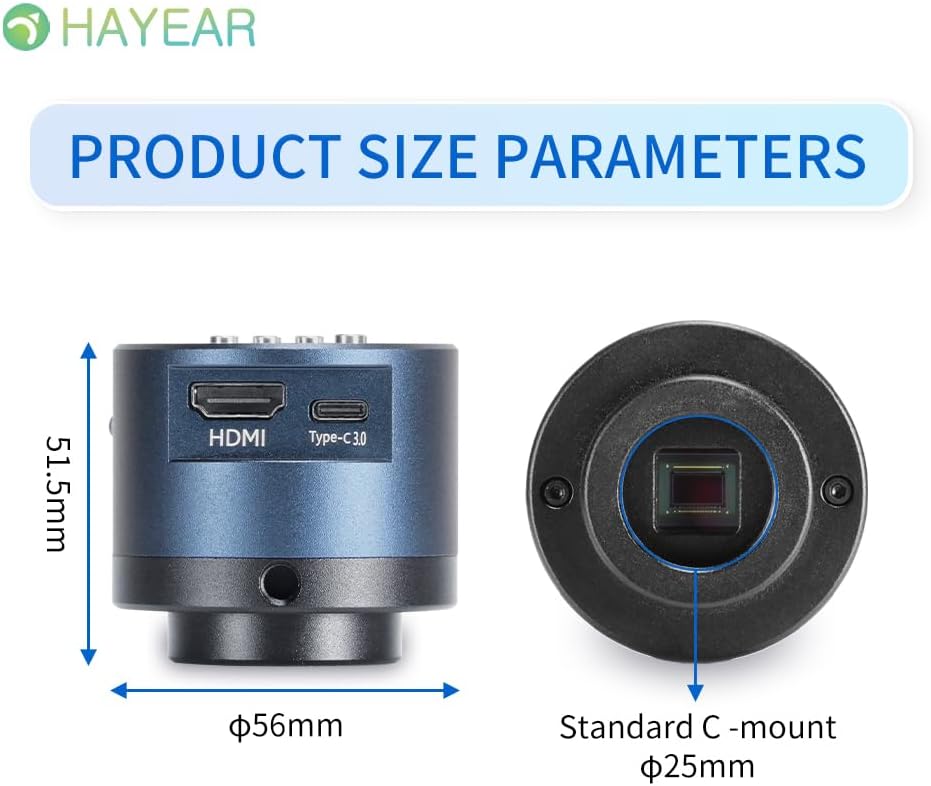
Зураг 4: Dimensions of the HAYEAR Digital Microscope Camera.
| Онцлог | Тодорхойлолт |
|---|---|
| Загвар | HY-6700 |
| Мэдрэгч | 8 мегапиксел |
| Видео гаралт | 4K/2K/1080P (HDMI Output) |
| Мэдрэгчийн хэмжээ | 1/2.8 инч |
| Пикселийн хэмжээ | 2.0 x 2.0 мкм |
| Шийдвэр | 3840x2160@30FPS (4K); 1920x1080P@30FPS |
| Видео бичлэг | Supports 4K video recording |
| USB гаралт | 1920x1080P@30FPS; 1280x720P@30FPS |
| Долгионы урт | 400нм ~ 1000нм |
| Гаралтын интерфейс | HDMI / USB (Simultaneous Support) |
| Цагаан баланс | One-touch / Auto / Manual |
| Линзний төрөл | Standard C/CS Interface |
| Хадгалах | TF Memory Card, up to 128GB |
| Компьютерийн дэмжлэг | Windows / Mac / Linux Systems |
| Зургийг томруулах | 7x Optical Zoom / Digital Zoom |
| Хэмжээ | 15 x 15 x 8 см (Бүтээгдэхүүний хэмжээ) |
| Жин | 500 гр |
| Эрчим хүчний оролт | 5 вольт |
Баталгаат болон дэмжлэг
Баталгаат хугацааны мэдээлэл
- All products undergo a thorough inspection before shipment to ensure quality.
- Customers are advised to inspect the package upon receipt.
- A one-year free warranty is provided for all machines. This warranty does not cover damage caused by human error or misuse.
Техникийн дэмжлэг
Free technical support is always available. If you encounter any issues not covered in this manual or require further assistance, please contact HAYEAR customer service. Refer to the product packaging or official webхолбоо барих мэдээллийг авах сайт.


