1. Танилцуулга
This manual provides instructions for the proper use and maintenance of your ttec SoundFlow OWS Wireless Bluetooth Earphones, model KM156. Please read this manual thoroughly before using the product to ensure optimal performance and longevity.
The ttec SoundFlow OWS earphones feature an open-ear design for situational awareness, dynamic acoustic system for clear sound, and Bluetooth 5.4 for stable wireless connectivity.
2. Багцын агуулга
Таны бүтээгдэхүүний багцад бүх зүйл байгаа эсэхийг шалгана уу:
- ttec SoundFlow OWS Wireless Bluetooth Earphones (Left and Right)
- Цэнэглэх хайрцаг
- USB-C цэнэглэгч кабель
- Хэрэглэгчийн гарын авлага
3. Бүтээгдэхүүн дууссанview
Familiarize yourself with the components of your ttec SoundFlow OWS earphones.

Image 3.1: ttec SoundFlow OWS Earphones and Charging Case. The image displays the two black earphones with ear hooks, positioned above their open black charging case.
Чихэвчний бүрэлдэхүүн хэсгүүд:
- Чихний дэгээ: Чихэн дээр найдвартай, тохь тухтай суух боломжийг олгоно.
- Чанга яригч: Аудио гаралтыг өгдөг.
- Микрофон: Дуудлага болон дуут командын хувьд.
- Touch Sensor Area: For controlling music, calls, and other functions.
- Цэнэглэх харилцагчид: Цахилгаан цэнэглэх хайрцагтай холбогдоно.

Image 3.2: Close-up of an earbud highlighting the touch sensor area. The image shows a detailed view of the earbud's outer surface, indicating the touch-sensitive zone for controls.
Цэнэглэх хайрцагны бүрэлдэхүүн хэсгүүд:
- Чихэвчний үүр: Чихэвчийг найдвартай барьж цэнэглэнэ.
- USB-C цэнэглэх порт: Хэргийг цэнэглэхийн тулд.
- LED үзүүлэлт: Цэнэглэх байдал болон батерейны түвшинг харуулна.
4. Тохиргоо
4.1 Чихэвч болон гэрийг цэнэглэх
Анх хэрэглэхийн өмнө чихэвч болон цэнэглэгчийг бүрэн цэнэглэ.
- Чихэвчийг цэнэглэх хайрцагт хийнэ. Цэнэглэх контактуудыг тэгшлэх хэрэгтэй.
- USB-C цэнэглэгч кабелийг хайрцаг дээрх цэнэглэгч порт руу, нөгөө үзүүрийг тэжээлийн эх үүсвэрт (жишээлбэл, USB ханын адаптер, компьютерийн USB порт) холбоно.
- The LED indicator on the case will show the charging status. Once fully charged, the indicator will change or turn off.
A full charge provides up to 6 hours of earphone use, and the charging case provides up to 30 hours of additional battery life. The Charge&Go feature allows 2.5 hours of use from a 15-minute charge.
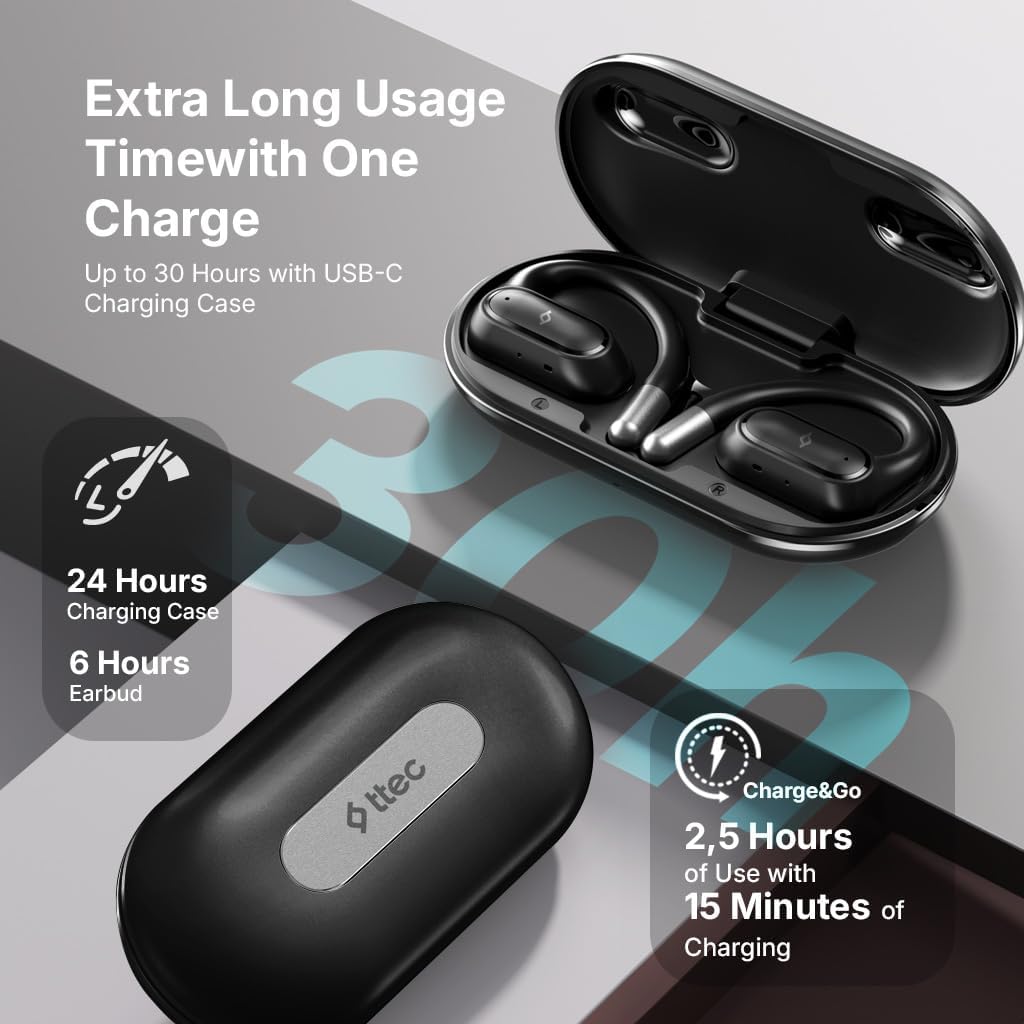
Image 4.1: Charging case displaying battery life. The image illustrates the charging case with text indicating 24 hours from the charging case, 6 hours from earbuds, and 2.5 hours of use from 15 minutes of charging.
4.2 Bluetooth төхөөрөмжтэй хослуулах
To connect your earphones to a smartphone or other Bluetooth-enabled device:
- Чихэвчийг цэнэглэж, цэнэглэх хайрцагт байрлуулсан эсэхийг шалгаарай.
- Цэнэглэх хайрцгийг нээнэ үү. Чихэвч автоматаар хослох горимд орох ба тэдгээрийн LED үзүүлэлтүүд анивчина.
- Төхөөрөмж дээрээ Bluetooth-г идэвхжүүлж, боломжтой төхөөрөмжүүдийг хайж олоорой.
- Select "ttec SoundFlow" from the list of found devices.
- Once connected, the earphone LED indicators will stop flashing or turn off, and you will hear a confirmation tone.
The earphones will automatically reconnect to the last paired device when removed from the case, if Bluetooth is enabled on the device.
5. Ашиглалтын заавар
5.1 Чихэвч зүүх
Gently place the ear hook over your ear and position the speaker unit comfortably in front of your ear canal. The open-ear design allows you to remain aware of your surroundings.

Image 5.1: A person cycling while wearing the ttec SoundFlow OWS earphones. The image highlights the open-ear design, allowing the user to stay connected to their surroundings.

Image 5.2: A woman wearing a ttec SoundFlow earbud, demonstrating the comfortable and secure fit. The image also indicates the lightweight design: 8.2g per earbud and 52g for the charging case.
5.2 Мэдрэгчийн удирдлага
The earphones feature touch sensors for easy control of various functions:
| Үйлдэл | Чиг үүрэг |
|---|---|
| Нэг товшилт (Л/Б) | Хөгжим тоглуулах/түр зогсоох, дуудлагад хариулах |
| Давхар товшилт (L) | Өмнөх зам |
| Давхар товшилт (R) | Дараагийн дуу |
| Гурвалсан товшилт (Л/З) | Дуут туслахыг идэвхжүүлнэ үү |
| Урт дарах (L/R) | Reject Call, End Call |
5.3 Тоглоомын горим
The earphones feature a low-latency game mode for an enhanced gaming and video experience. This mode reduces audio delay to 50ms.
- To activate Game Mode: Refer to the specific instructions in the quick start guide or product packaging for the exact touch gesture to enable/disable game mode. (Typically a specific tap sequence or long press).
- When Game Mode is active, you may notice a slight change in audio profile, optimized for lower latency.

Image 5.3: ttec SoundFlow earphones and charging case, surrounded by gaming console symbols, highlighting the 50ms low latency feature for an optimized gaming and video experience.
6. Засвар үйлчилгээ
6.1 Цэвэрлэгээ
- Чихэвч болон цэнэглэгч хайрцгийг зөөлөн, хуурай, хөвөнгүй даавуугаар арчина.
- Зүлгүүрийн цэвэрлэгч, архи, химийн уусгагчийг бүү ашигла.
- Цэнэглэхтэй холбоотой асуудлуудаас зайлсхийхийн тулд цэнэглэгч контактууд цэвэр, хуурай байгаа эсэхийг шалгаарай.
6.2 Ус болон хөлсний эсэргүүцэл
The ttec SoundFlow OWS earphones are IPX6 rated, meaning they are resistant to high-pressure water jets from any direction. This makes them suitable for use during workouts and in light rain.
- Чихэвчийг усанд дүрж болохгүй.
- Ensure the earphones are dry before placing them back into the charging case to prevent damage.

Image 6.1: A man running outdoors, illustrating the sweat and water-resistant design of the ttec SoundFlow earphones, which are IPX6 rated.
6.3 Хадгалалт
Чихэвчийг ашиглаагүй үед цэнэглэгч хайрцагт нь хийж хамгаалж, цэнэглэж байхаар хадгална уу. Хэт өндөр температураас хол, сэрүүн, хуурай газар хадгална уу.
7. Алдаа засах
Хэрэв та чихэвчтэй холбоотой асуудалтай тулгарвал дараах нийтлэг шийдлүүдийг үзнэ үү.
| Асуудал | Шийдэл |
|---|---|
| Чихэвчийг хослуулахгүй байна | Ensure earphones are charged. Turn off and on Bluetooth on your device. Forget the device in your Bluetooth settings and re-pair. |
| Ганц чихэвч ажиллаж байна | Place both earphones back in the case, close the lid, then open again. Ensure both are charged. |
| Дуу алга | Check device volume. Ensure earphones are connected. Try playing different audio. |
| Цэнэглэх асуудал | Ensure charging cable is securely connected. Clean charging contacts on earphones and case. Try a different USB-C cable or power source. |
Хэрэв асуудал хэвээр байвал хэрэглэгчийн тусламжтай холбогдоно уу.
8. Техникийн үзүүлэлтүүд
| Онцлог | Дэлгэрэнгүй |
|---|---|
| Загварын нэр | SoundFlow |
| Загварын дугаар | KM156 |
| Холболтын технологи | Утасгүй (Bluetooth 5.4) |
| Form Factor | Жинхэнэ утасгүй, нээлттэй чих |
| Чихний жин | 8.2 грамм (тус бүр) |
| Цэнэглэх хайрцагны жин | 52 грамм |
| Чихэвчний батерейны ашиглалтын хугацаа | 6 цаг хүртэл (нэг цэнэглэлт) |
| Батерейны нийт ашиглалтын хугацаа (бүргийн хамт) | 30 цаг хүртэл |
| Хурдан цэнэглэх | 15 min charge for 2.5 hours use (Charge&Go) |
| Усны эсэргүүцэл | IPX6 Rated (Sweat and Water Resistant) |
| Хоцролт бага | 50мс (Тоглоомын горим) |
| Үйлдвэрлэгч | ttec |
9. Баталгаат хугацаа ба дэмжлэг
Your ttec SoundFlow OWS Wireless Bluetooth Earphones are covered by a manufacturer's warranty. For detailed warranty information, please refer to the warranty card included in your product packaging or visit the official ttec webсайт.
For technical support, troubleshooting assistance, or to inquire about replacement parts, please contact ttec customer service through their official channels. Contact information can typically be found on the product packaging or the official ttec webсайт.


