1. Бүтээгдэхүүн дууссанview
The MAHANCRIS PSHR170E01 Plant Stand is an 8-tiered indoor plant shelf designed to display various potted plants and small gardening items. It features a vertical, S-shaped design suitable for corners and includes integrated grow lights to support healthy plant growth.
- Хэмжээ: 19.7 инч (L) x 11.8 инч (W) x 59.8 инч (H)
- Хүчин чадал: 6 top shelves for plants, 1 hanging ring, 2 lower layers for storage.
- Өсөн нэмэгдэж буй гэрэл: 3-head sunlight LED strip with USB adapter, 9 brightness levels, 3 timer modes (3/9/12H) with memory function.
- Барилга: Premium particleboard and reinforced metal frame with EVA pads for stability.
- Аюулгүй байдал: Equipped with an anti-tip mechanism.

Figure 1: Assembled MAHANCRIS PSHR170E01 Plant Stand with plants.
2. Тохиргоо ба угсралт
Assembly of the MAHANCRIS PSHR170E01 Plant Stand is designed to be straightforward. All parts are labeled, and a detailed, illustrated guide is included in the packaging. No specialized tools are required beyond those provided.
2.1 Савлах, эд ангиудыг таних
Carefully unpack all components and verify against the parts list in your included manual. Ensure all pieces are present and undamaged before proceeding.
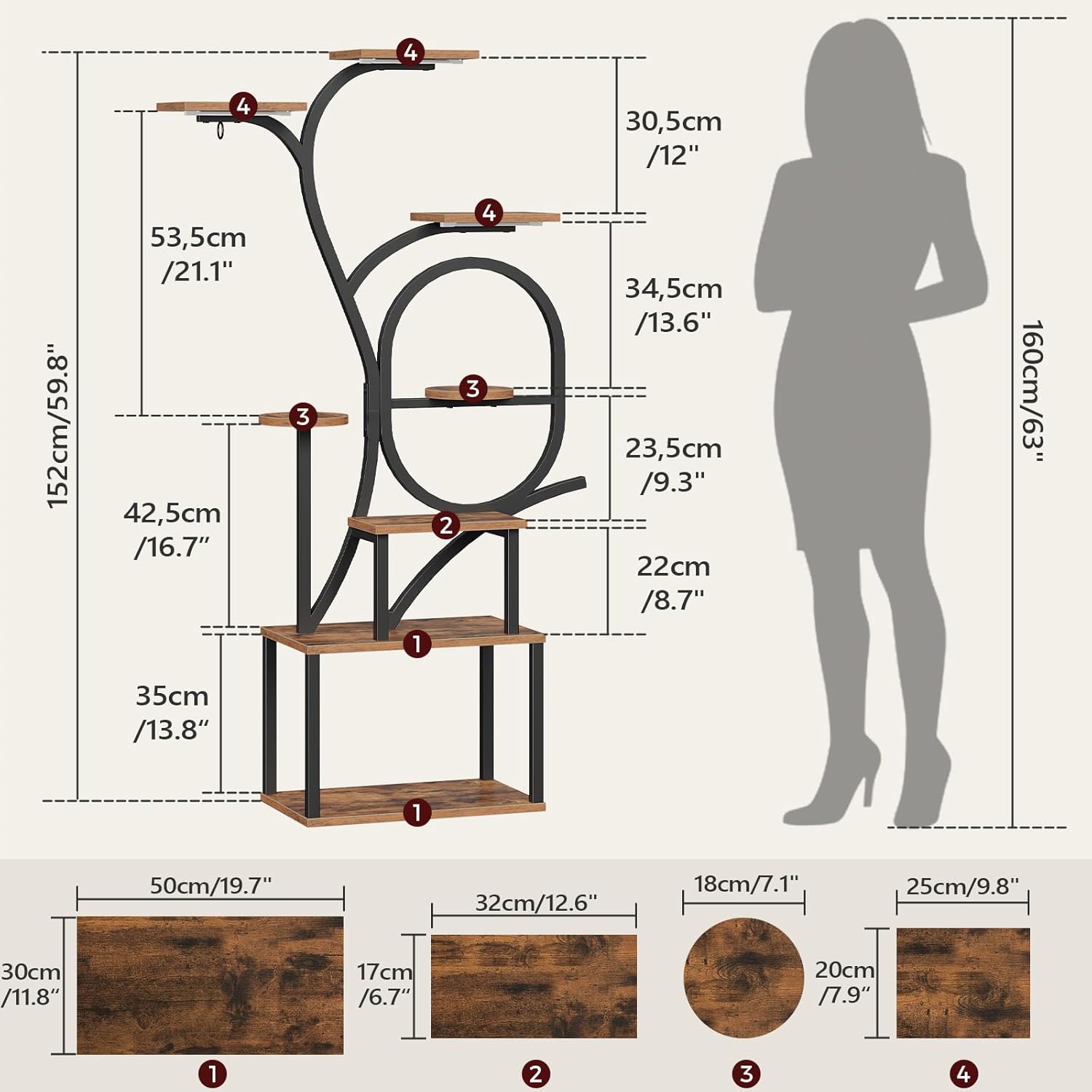
Figure 2: Product dimensions and labeled components for assembly.
2.2 Угсрах үе шатууд
- Follow the step-by-step instructions provided in the included assembly manual. Each part is labeled to correspond with the diagrams.
- Ensure all screws and fasteners are tightened securely, but do not overtighten to avoid damaging the materials.
- Attach the EVA pads to the base of the stand for added stability and floor protection.
- Install the anti-tip mechanism to a wall for enhanced safety, especially in households with children or pets.

Figure 3: Anti-tip device installation for safety.
2.3 Grow Light Installation
The plant stand includes a 3-head LED grow light strip. Install the light strips to the underside of the designated shelves using the provided adhesive or screws. Connect the USB adapter to a suitable power source.

Figure 4: Grow light strip and USB adapter connection.
3. Ашиглалтын заавар (Гроу гэрэл)
The integrated grow lights are designed to provide optimal lighting conditions for your indoor plants. The control unit allows for brightness adjustment and timer settings.
3.1 Асаах/унтраах
- USB адаптерийг тэжээлийн эх үүсвэрт холбоно уу.
- Press the power button on the control unit to turn the lights on or off.
3.2 Гэрэлт байдлын тохируулга
The grow lights offer 9 brightness levels. Use the '+' and '-' buttons on the control unit to increase or decrease the light intensity.
3.3 Таймер функц
Select from three timer modes: 3 hours, 9 hours, or 12 hours. Once a timer is set, the lights will automatically turn off after the selected duration and turn back on at the same time the next day, thanks to the memory function.

Figure 5: Grow light control unit with timer and brightness options.

Figure 6: Close-up of the grow light controller.
4. Засвар үйлчилгээ
Proper maintenance will ensure the longevity and appearance of your plant stand.
- Цэвэрлэгээ: Wipe the engineered wood shelves and metal frame with a soft, damp даавуу. Өнгөлгөөг гэмтээж болох зүлгүүрийн цэвэрлэгч эсвэл хүчтэй химийн бодисоос зайлсхий.
- Асгаралт: Promptly clean any water spills from plants to prevent water damage to the wood surfaces.
- Тогтвортой байдлын шалгалт: Бүх эрэг ба холболтыг нягт байлгахын тулд үе үе шалгаж байгаарай. Шаардлагатай бол дахин чангална.
- Өсөн нэмэгдэж буй гэрэл: Keep the LED light strips free from dust and debris to maintain optimal light output.

Figure 7: Cleaning the engineered wood panels.
5. Алдаа засах
If you encounter issues with your plant stand or grow lights, refer to the following common solutions:
| Асуудал | Боломжит шалтгаан | Шийдэл |
|---|---|---|
| Plant stand is wobbly or unstable. | Loose connections; uneven floor; uneven weight distribution. | Ensure all screws are tightened. Place on a level surface. Distribute plant weight evenly across shelves. Install the anti-tip device. |
| Grow lights do not turn on. | No power; loose USB connection; faulty light strip. | Check if the USB adapter is properly plugged into a working power outlet. Ensure the USB cable is securely connected to the light strip controller. If issues persist, contact customer support. |
| Grow lights flicker or only some heads work. | Loose connection; damaged light strip. | Verify all connections are secure. If flickering or partial failure continues, the light strip may be damaged. Contact customer support for assistance. |
| Таймер функц зөв ажиллахгүй байна. | Incorrect setting; power interruption. | Re-set the timer according to the operating instructions. Ensure continuous power supply to maintain the memory function. |
6. Техникийн үзүүлэлтүүд
| Онцлог | Дэлгэрэнгүй |
|---|---|
| Загварын дугаар | PSHR170E01 |
| Брэнд | МАХАНКРИС |
| Бүтээгдэхүүний хэмжээ (L x W x H) | 19.7 x 11.8 x 59.8 инч (50 x 30 x 152 см) |
| Зүйлийн жин | 21.4 фунт (9.7 кг) |
| Материал | Инженерийн мод, металл |
| Өнгө | Растик бор, хар |
| Угсрах шаардлагатай | Тиймээ |
| Үндсэн төрөл | Тавиур |
| Grow Light Type | 3-head Sunlight LED Strip |
| Гэрлийн өсөлтийн онцлогууд | 9 Brightness Levels, 3/9/12H Timer with Memory Function |
| Эрчим хүчний эх үүсвэр | USB Adapter (No Batteries Required) |
7. Баталгаат хугацаа ба дэмжлэг
For any questions, concerns, or issues not covered in this manual, please contact MAHANCRIS customer support. Please have your model number (PSHR170E01) and purchase information ready when contacting support.
While specific warranty details are not provided in this document, MAHANCRIS is committed to customer satisfaction. Refer to your purchase documentation or the MAHANCRIS official webбаталгаат мэдээлэл авах сайт.
Үйлдвэрлэгч: МАХАНКРИС
Холбоо барих: Please visit the MAHANCRIS store on Amazon or their official webхолбоо барих мэдээлэл авах сайт.


