Танилцуулга
Welcome to the Macally family. Thank you for purchasing the ACEBTKEY series keyboard. Our mission is to provide visually appealing, high-quality, and affordable peripherals and accessories to satisfy our customers. To achieve this, we create innovative and practical products, prioritizing ease of use above all else.
This manual provides comprehensive instructions for setting up, operating, and maintaining your new Macally BTZKEYA Bluetooth Wireless Keyboard. Please read it thoroughly to ensure optimal performance and longevity of your device.
Багцын агуулга
- Macally BTZKEYA Bluetooth Wireless Keyboard
- USB-C-ээс USB-A цэнэглэх кабель
- Хэрэглэгчийн гарын авлага
Системийн шаардлага
- Bluetooth-enabled computer, laptop, smartphone, or tablet.
- Mac OS X or later.
- A USB-A port on your laptop or desktop PC for charging the keyboard.
- If your laptop or desktop PC only has USB-C ports, a USB-C to USB-A hub or adapter is required for charging.
Бүтээгдэхүүн дууссанview
The Macally BTZKEYA keyboard is designed for efficiency and comfort, featuring a full-size layout with a numeric keypad and dedicated macOS shortcut keys. Its slim profile and scissor-switch keys provide a quiet and responsive typing experience.

Зураг 1: The Macally BTZKEYA keyboard's slim profile and integrated kickstand. The keyboard is only 0.8 inches (approx. 2cm) thick.

Зураг 2: The keyboard features 111 scissor-switch keys and 14 dedicated shortcut keys for macOS, enhancing productivity.

Зураг 3: Scissor-switch keycaps provide a smooth, tactile, and quiet typing experience.

Зураг 4: The keyboard supports multi-sync Bluetooth, allowing pairing with up to three devices like MacBook, iMac, iPad, and iPhone, with a wireless range of 30 feet.
Тохиргоо
Гарыг цэнэглэж байна
Before initial use, ensure the keyboard is fully charged. The built-in rechargeable battery provides extended usage.
- Connect the USB-A end of the included cable to a USB-A port on your computer, laptop, or a USB-compatible AC adapter.
- Connect the USB-C end to the USB-C charging port located on the side of the keyboard.
- Жич: This cable is for charging only. The keyboard will not function as a wired device when connected via this cable.
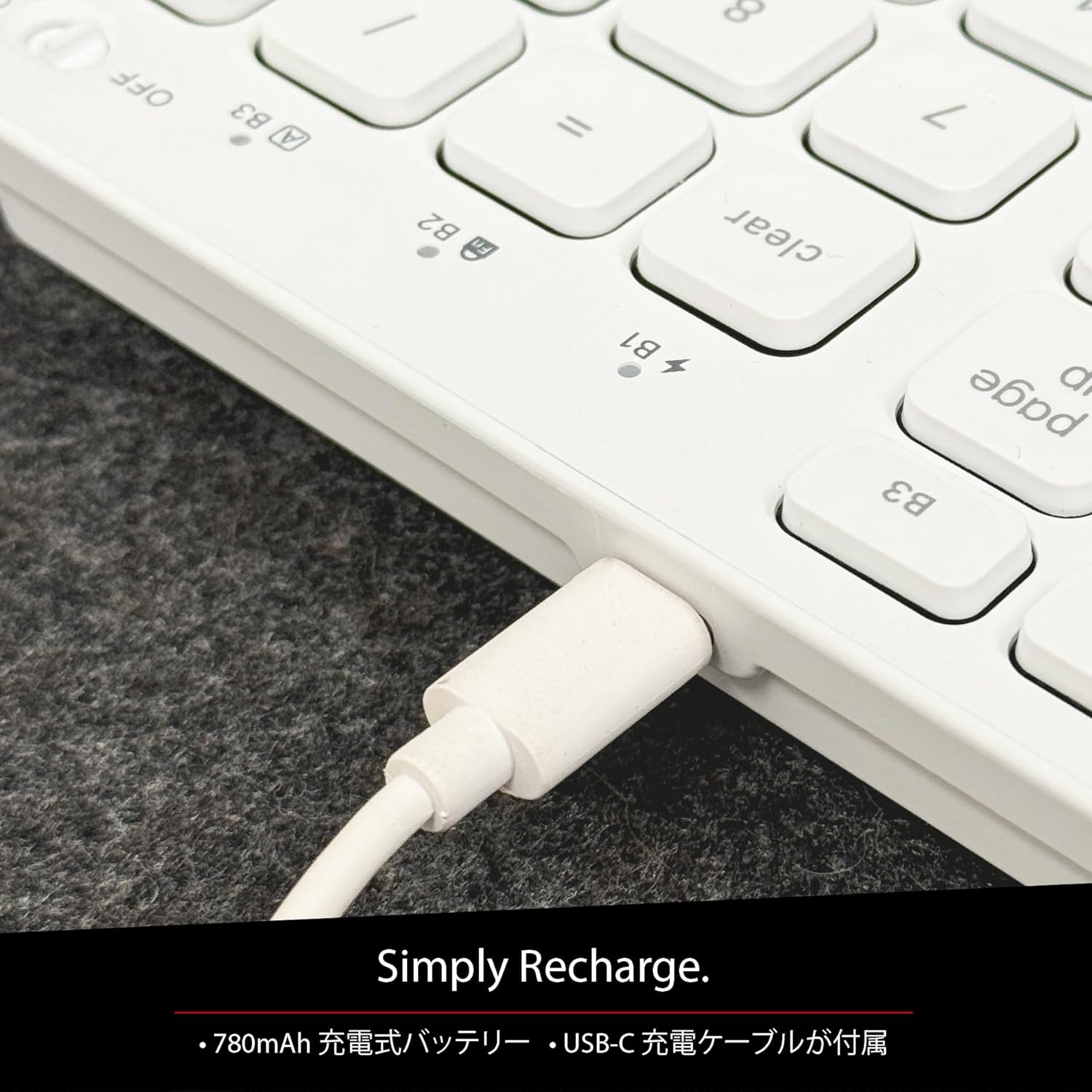
Зураг 5: The USB-C charging port for easy recharging. The keyboard includes a 780mAh rechargeable battery.
Цэнэглэх LED үзүүлэлтүүд:
- Улаан LED: Цэнэглэж байна.
- Ногоон LED: Бүрэн цэнэглэгдсэн.
- All Bluetooth Channel LEDs flashing: Батерей бага байна.
Bluetooth -ийг хослуулах журам
The keyboard can be paired with up to three Bluetooth-enabled devices. The number keys 1, 2, and 3 on the top row (not the numeric keypad) are labeled B1, B2, and B3, representing the Bluetooth channels.
Ensure the keyboard is powered on and sufficiently charged before starting the pairing process. The power switch is a slide button located on the side of the keyboard (Red for Off, Green for On).
Steps to Pair (using Bluetooth Channel 1 (B1) as an exampле):
- On the device you wish to connect (laptop, desktop, tablet, smartphone, etc.), open the Bluetooth settings screen.
- Гар дээр дарж барина уу fn товчийг дараад товчийг дарна уу 1 key (B1) to select Bluetooth Channel 1.
- Next, press and hold the fn key and simultaneously press the P key. This will put the keyboard into pairing mode, and the B1 LED will flash rapidly.
- On your device's Bluetooth settings screen, click or tap the device name "ACEBTKEY" to initiate pairing.
- Once pairing is complete, the B1 LED on the keyboard will remain steadily lit in blue.
To connect to a second or third device, follow the same procedure using B2 (fn+2) or B3 (fn+3).
Keyboard Setup Assistant (For Mac Users)
If your Bluetooth keyboard is not immediately recognized by macOS, the Keyboard Setup Assistant will automatically launch, prompting you to specify the keyboard type. Follow the on-screen instructions.
- When prompted, press the Z түлхүүр.
- Дараа нь товчийг дарна уу ? түлхүүр.
- Confirm that "ANSI" is selected as the keyboard type and click "Done".
If keys do not respond or different characters are entered than printed, you may need to manually launch the Keyboard Setup Assistant:
- Open "System Settings" or "System Preferences".
- Select "Keyboard" and click "Change Keyboard Type".
- When the "Keyboard Setup Assistant" window appears, click "Continue" and follow the on-screen instructions.
Ашиглалтын заавар
Switching Between Multiple Devices
After pairing all your devices with the keyboard, you can easily switch between them:
- -г удаан дар fn түлхүүр.
- Барьж байхдаа fn, press the desired Bluetooth channel key (B1, B2, эсвэл B3).
- Release both keys. The keyboard will switch to the selected device.
Shortcut and Function Keys
The F-row (function key row) at the top of the keyboard defaults to shortcut mode. These keys perform functions indicated by the small white icons or text printed on them (e.g., play, pause, cut, copy).
To use standard function keys (F1, F2, etc.), press the desired function key while holding down the fn түлхүүр.
You can toggle between shortcut mode and standard F1-F12 function keys at any time by pressing fn + Esc. After switching, if you wish to use a shortcut function, press the desired shortcut key while holding down the fn түлхүүр. Дарж байна fn + Esc again will return the keyboard to shortcut mode.
F-Key Functions:
| Чиг үүрэг | Mac OSX | Windows | iOS | Android |
|---|---|---|---|---|
| fn+esc (Toggle F-row mode) | ✓ | ✓ | ✓ | ✓ |
| Дэлгэцийн гэрэлтүүлгийг бууруулах | ✓ | ✓ | ||
| Дэлгэцийн гэрэлтүүлгийг нэмэгдүүлэх | ✓ | ✓ | ||
| Таслах | ✓ | ✓ | ✓ | ✓ |
| Хуулбарлах | ✓ | ✓ | ✓ | ✓ |
| Буулгах | ✓ | ✓ | ✓ | ✓ |
| Өмнөх зам | ✓ | ✓ | ✓ | ✓ |
| Тоглуулах/түр зогсоох | ✓ | ✓ | ✓ | ✓ |
| Дараагийн дуу | ✓ | ✓ | ✓ | ✓ |
| Дууг хаах | ✓ | ✓ | ✓ | ✓ |
| Дууг багасгах | ✓ | ✓ | ✓ | ✓ |
| Дууны хэмжээг нэмэгдүүлэх | ✓ | ✓ | ✓ | ✓ |
| Хэвлэх | ✓ | |||
| Mac: Eject Mac / Windows: Media Eject | ✓ | ✓ | ||
| Area Capture (Screenshot) | ✓ | |||
| Дэлгэц дээрх гар | ✓ | |||
| хайх | ✓ | ✓ | ✓ | ✓ |
| Нүүр хуудас товч | ✓ | ✓ | ||
| Цэс | ✓ | |||
| Түгжих | ✓ | ✓ | ✓ | ✓ |
Чухал тэмдэглэл: Standard function keys (F1-F12) may have special functions assigned by the connected operating system or currently running programs.
Эрчим хүч хэмнэх горим
The keyboard is designed with power-saving features. Based on an average of 3 hours of daily use, the built-in rechargeable battery can last up to 3 months on a single charge.
Засвар үйлчилгээ
To ensure the longevity and optimal performance of your Macally BTZKEYA keyboard, please follow these maintenance guidelines:
- Keep the device away from liquids, moisture, and water.
- Use the device only within the specified temperature range of 0°C (32°F) to 40°C (104°F).
- Clean the keyboard regularly with a soft, dry cloth. Avoid using harsh chemicals or abrasive materials.
- Do not disassemble the device. Disassembly will void the warranty.
- When disposing of the product, do not treat it as general waste. Take it to your nearest recycling center for proper disposal.
Алдааг олж засварлах
Хослуулах асуудал:
- If pairing fails, delete all existing pairing records for the keyboard on your device and attempt to reconnect.
- Ensure the keyboard is fully charged and powered on.
- Төхөөрөмжийнхөө Bluetooth асаалттай бөгөөд илрүүлэгдэх боломжтой эсэхийг шалгаарай.
Key Response Issues:
- If keys do not respond or different characters are entered than printed, manually launch the Keyboard Setup Assistant on your Mac (refer to the "Keyboard Setup Assistant" section under Setup).
- Ensure the keyboard is within the 30-foot wireless range of your device.
Ерөнхий нийцтэй байдал:
- While designed for Mac, this keyboard is also compatible with Windows PCs. However, some functions may behave differently depending on the operating system or running programs.
Үзүүлэлтүүд
| Онцлог | Дэлгэрэнгүй |
|---|---|
| Брэнд | Макалли |
| Загварын дугаар | BTZKEYA |
| Түлхүүрүүдийн тоо | 111 keys (Mac layout) |
| Түлхүүр солих төрөл | Хайч унтраалга |
| Холболтын технологи | Bluetooth |
| Олон төхөөрөмжийн дэмжлэг | 3 хүртэл төхөөрөмж |
| Зайны багтаамж | 780 мАч (цэнэглэдэг) |
| Цэнэглэх порт | USB-C |
| Бүтээгдэхүүний хэмжээс | 42 x 14 x 2 см |
| Бүтээгдэхүүний жин | 650 гр |
| Зөвлөмж болгож буй хэрэглээ | Multimedia, Everyday Use, Personal, Education, Student, Business |
Баталгаат хугацааны мэдээлэл
Macally Peripherals warrants this product against defects in title, materials, and workmanship for a period of one year from the date of purchase. If a defect is found in the product, Macally's sole obligation and your sole remedy will be to repair or replace the product.
This is a limited warranty applicable only to the product accompanied by this user guide. This warranty does not apply in the following cases:
- Abuse or misuse of the product.
- Exposure to abnormal electrical or environmental conditions.
- Use under conditions not considered normal use.
- Disassembly of the device.
Macally Peripherals' liability arising from this warranty and sale is limited to a refund of the purchase price. Macally is not responsible for the cost of procuring substitute products or services, lost profits, or any other consequential, incidental, direct, or indirect damages. These limitations apply even if the limited remedies fail of their essential purpose.
Техникийн дэмжлэг
For technical assistance, please contact Macally support during the following hours:
- Үйл ажиллагааны цаг: Monday to Friday, 9 AM to 5 PM (Pacific Standard Time)
- Имэйл: techsupport@macally.com
When contacting support, please have your product model number (BTZKEYA) and purchase information ready.
FCC нийцлийн мэдэгдэл
Энэ төхөөрөмж нь FCC дүрмийн 15-р хэсэгт нийцдэг. Ашиглалт нь дараах хоёр нөхцлийн дагуу явагдана: (1) Энэ төхөөрөмж нь хортой хөндлөнгийн оролцоо үүсгэхгүй, (2) энэ төхөөрөмж нь хүсээгүй ажиллагааг үүсгэж болзошгүй хөндлөнгийн оролцоо зэрэг хүлээн авсан аливаа хөндлөнгийн оролцоог хүлээн авах ёстой.
Дагаж мөрдөх үүрэгтэй этгээдийн шууд зөвшөөрөөгүй өөрчлөлт, өөрчлөлт нь хэрэглэгчийн төхөөрөмжийг ажиллуулах эрхийг хүчингүй болгож болзошгүй.
Энэ төхөөрөмжийг шалгаж үзээд FCC дүрмийн 15-р хэсгийн дагуу В ангиллын дижитал төхөөрөмжийн хязгаарт нийцэж байгаа нь тогтоогдсон. Эдгээр хязгаарлалтууд нь орон сууцны суурилуулалтанд хортой хөндлөнгийн оролцооноос зохих хамгаалалтыг хангах зорилготой юм. Энэхүү төхөөрөмж нь радио давтамжийн энерги үүсгэж, ашиглаж, цацруулж чаддаг бөгөөд зааврын дагуу суурилуулж, ашиглаагүй тохиолдолд радио холбоонд хортой хөндлөнгийн оролцоо үүсгэж болзошгүй. Гэсэн хэдий ч тодорхой суурилуулалтанд хөндлөнгийн оролцоо гарахгүй гэсэн баталгаа байхгүй. Хэрэв энэ төхөөрөмж нь радио, телевизийн хүлээн авалтад хортой хөндлөнгийн нөлөөлөл үүсгэж байгаа бөгөөд үүнийг төхөөрөмжийг унтрааж, асаах замаар тодорхойлох боломжтой бол хэрэглэгч дараахь арга хэмжээнүүдийн нэг буюу хэд хэдэн аргаар хөндлөнгийн нөлөөллийг арилгахыг оролдохыг зөвлөж байна.
- Хүлээн авах антенны чиглэлийг өөрчлөх эсвэл өөр газар шилжүүлэх.
- Тоног төхөөрөмж болон хүлээн авагчийн хоорондох зайг нэмэгдүүлэх.
- Тоног төхөөрөмжийг хүлээн авагч холбогдсоноос өөр хэлхээний залгуурт холбоно.
- Дилер эсвэл туршлагатай радио/телевизийн техникчээс тусламж авна уу.
Энэ төхөөрөмжийг RF-ийн өртөлтийн ерөнхий шаардлагад нийцүүлэн үнэлэв. Төхөөрөмжийг зөөврийн өртөлтийн нөхцөлд хязгаарлалтгүйгээр ашиглах боломжтой.
Бүтээгдэхүүний видео
Macally BTZKEYA Bluetooth Keyboard Overview
Энэ видео нь ерөнхий мэдээллийг өгдөгview of the Macally BTZKEYA Bluetooth keyboard, highlighting its features and design.
Macally Mac Bluetooth Keyboard - Premium Multi-Device
A detailed look at the Macally Bluetooth keyboard for Mac, emphasizing its premium build and multi-device capabilities.
Macally SLIMKEYPROA Keyboard Features
This video showcases the features of the Macally SLIMKEYPROA keyboard, which shares similar design and functionality with the BTZKEYA model.
Macally BLSlimkeyproA Keyboard Demonstration
A demonstration of the Macally BLSlimkeyproA keyboard, highlighting its compact design and key features.
Macally ACEBTKEYSGCB Keyboard Overview
Энэ видео нь дуусгах боломжийг олгодогview of the Macally ACEBTKEYSGCB keyboard, showcasing түүний дизайн, функциональ байдал.
Macally SLIMKEYPRO Manual Guide
A visual guide to the Macally SLIMKEYPRO, offering insights into its usage and features.