1. Танилцуулга
Худалдан авалт хийсэнд баярлалааasing the MONODEAL T23 3-Speed Turntable. This manual provides essential information for the safe and correct operation of your device. Please read it thoroughly before use and retain it for future reference.
2. Аюулгүй байдлын мэдээлэл
- Гал болон цахилгаан цочролоос сэргийлэхийн тулд төхөөрөмжийг бороо, чийгэнд бүү тавь.
- Шүүгээгээ бүү нээ. Зөвхөн мэргэшсэн боловсон хүчинд үйлчилгээ үзүүлээрэй.
- Цахилгаан адаптер нь таны орон нутгийн цахилгаан хангамжтай тохирч байгаа эсэхийг шалгаарай.
- Place the unit on a stable, level surface away from direct sunlight, heat sources, and excessive dust or vibration.
- Хүүхдийн гар хүрэхгүй газар хадгална.
3. Багцын агуулга
Бүх зүйл багцад байгаа эсэхийг шалгана уу:
- 1 x MONODEAL T23 Record Player
- 1 x 5V 1.5A Power Cord
- 1 х хэрэглэгчийн гарын авлага (энэ баримт бичиг)
4. Бүтээгдэхүүн дууссанview
Familiarize yourself with the various parts and controls of your MONODEAL T23 Turntable.

Зураг 4.1: Дээд ба хойд View of the MONODEAL T23 Turntable with labeled components including Power Switch, Headphone Jack, Mode button, LED Light, USB Port, Power Adapter Input, RCA Output Jacks, 45 RPM Fixator, Tone Arm Raise Lever, Auto Stop Switch, LP Speed Switch, and Stylus.
- Цахилгаан унтраалга/Дууны түвшний товчлуур: Төхөөрөмжийг асааж/унтрааж, дууны түвшинг тохируулна.
- Чихэвчний Жак: Чихэвчээр хувийн сонсох зориулалттай.
- Горимын товчлуур: Switches between different input modes (e.g., Phono, Bluetooth, USB).
- LED гэрэл: Indicates power and mode status.
- USB порт: USB тоглуулах зориулалттай.
- Цахилгаан адаптерийн оролт: Connects to the provided 5V 1.5A power cord.
- RCA Output Jacks (L/R): Гадаад сүлжээнд холбогддог ampөргөгч эсвэл цахилгаан чанга яригч.
- 45 RPM Fixator: Adapter for 7-inch records with large center holes.
- Tone Arm Raise Lever: Lifts and lowers the tone arm gently.
- Автомат зогсоох унтраалга: Enables or disables the auto-stop function.
- LP Speed Switch: Selects playback speed (33, 45, or 78 RPM).
- Зүү: The needle that reads the grooves of the record.
5. Тохиргоо
- Савлах: Эргэдэг тавиурыг сав баглаа боодолоос нь болгоомжтой авч хая. Сав баглаа боодлыг ирээдүйд тээвэрлэх эсвэл хадгалахад зориулж хадгална уу.
- Байршил: Place the turntable on a stable, level surface. Ensure there is adequate ventilation around the unit.
- Эрчим хүчний холболт: Connect the provided 5V 1.5A power cord to the DC IN port on the back of the turntable and then plug it into a wall outlet.
- Тоосны бүрхэвч: The transparent dust cover can be opened or closed to protect the platter and stylus when not in use.
6. Ашиглалтын заавар
6.1 Винил пянз тоглуулах
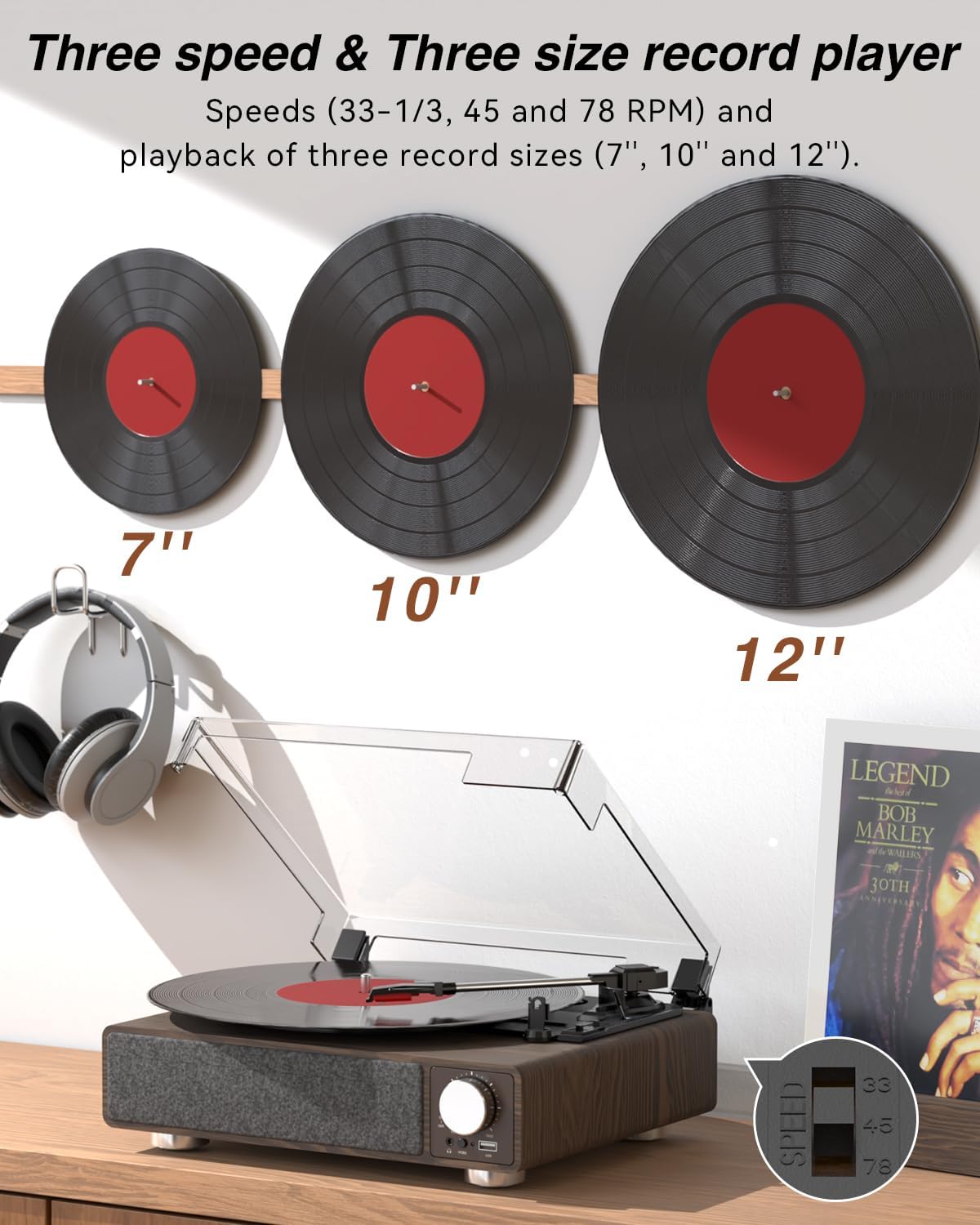
Зураг 6.1: The MONODEAL T23 Turntable supports 3 speeds and 3 record sizes.
- Turn the Power Switch/Volume Knob clockwise to turn on the unit.
- Тоосны тагийг өргө.
- Place a vinyl record on the turntable platter. If playing a 7-inch record with a large center hole, place the 45 RPM fixator on the spindle first.
- Select the appropriate speed (33, 45, or 78 RPM) using the LP Speed Switch, matching the record you are playing.
- Push the Tone Arm Raise Lever up to lift the tone arm.
- Manually move the tone arm over the desired starting track of the record.
- Push the Tone Arm Raise Lever down to gently lower the tone arm onto the record. Playback will begin.
- Adjust the volume using the Power Switch/Volume Knob.
- Автомат зогсоох функц: If the Auto Stop Switch is set to ON, the turntable will automatically stop rotating when the record finishes playing. If set to OFF, it will continue to rotate.
- To stop playback, lift the tone arm using the lever and return it to the tone arm rest. Turn the Power Switch/Volume Knob counter-clockwise to turn off the unit.
6.2 Bluetooth Transmission (BT OUT)
This feature allows you to stream audio from the turntable to external Bluetooth speakers or headphones.

Зураг 6.2: Bluetooth transmission from the turntable to external devices.
- Ensure the turntable is powered on and in Phono mode (playing a record).
- Press and hold the Mode button until the LED indicator flashes blue, indicating Bluetooth transmission pairing mode.
- Place your Bluetooth speaker or headphones in pairing mode.
- The turntable will automatically search for and connect to the nearest Bluetooth device. Once connected, the LED indicator will turn solid blue.
- Audio from the record will now play through your connected Bluetooth device.
6.3 Bluetooth Reception (BT IN)
This feature allows you to stream audio from your mobile device (phone, tablet) to the turntable's built-in speakers.
Зураг 6.3: Bluetooth reception by the turntable from a smartphone.
- Эргэдэг ширээг асаана уу.
- Press the Mode button repeatedly until the LED indicator flashes blue, indicating Bluetooth reception pairing mode.
- On your mobile device, enable Bluetooth and search for available devices. Select "MONODEAL T23" from the list.
- Холбогдсоны дараа LED индикатор нь цэнхэр өнгөтэй болно.
- Play audio on your mobile device, and it will sound through the turntable's speakers. Adjust volume using the turntable's volume knob or your mobile device.
6.4 USB тоглуулах
The turntable supports playing audio fileUSB флаш дискнээс.
- Insert a USB flash drive into the USB port on the front of the turntable.
- Press the Mode button to switch to USB mode. The LED indicator will change to reflect USB mode.
- The turntable will automatically begin playing audio files from the USB drive. Use the control buttons (if available, or refer to the specific model's USB control instructions) to navigate tracks.
6.5 RCA гаралт
Connect the turntable to an external ampДууг сайжруулахын тулд чанга яригч эсвэл цахилгаан чанга яригч ашиглана уу.

Зураг 6.4: RCA output for external speakers and headphone jack for private listening.
- Ensure the turntable and your external audio system are turned off.
- Connect an RCA cable (not included) to the RCA Output Jacks (L/R) on the back of the turntable.
- Connect the other end of the RCA cable to the corresponding audio input on your ampөргөгч эсвэл цахилгаан чанга яригч.
- Turn on both the turntable and your external audio system.
- Play a record as described in Section 6.1. Audio will be routed through your external system. Adjust volume on both devices as needed.
6.6 Чихэвчний залгуур
For private listening, connect headphones to the 3.5mm headphone jack on the front of the unit.
- Plug your 3.5mm headphones into the Headphone Jack.
- Adjust the volume using the Power Switch/Volume Knob.
7. Засвар үйлчилгээ
7.1 Эргэдэг ширээг цэвэрлэх
- Төхөөрөмжийн гадна талыг зөөлөн, хуурай даавуугаар арчина. Зүлгүүрийн цэвэрлэгч, уусгагчийг бүү ашигла.
- Ашиглаагүй үед тоосны тагийг хааж, тоос хуримтлагдахаас сэргийлнэ.
7.2 Зүүг арчилгаа
- Handle the stylus with extreme care. Avoid touching the stylus tip with your fingers.
- Зүүг үе үе зөөлөн сойз ашиглан ар талаас нь урагшаа зөөлөн арчиж цэвэрлэ.
- A worn stylus can damage records and degrade sound quality. Replace the stylus when signs of wear appear (e.g., distorted sound, skipping).
7.3 Бичлэгийн арчилгаа
- Always hold records by their edges or center label.
- Бичлэгүүдийг ханцуйндаа нь босоо байдлаар сэрүүн, хуурай газар хадгална.
- Тоос болон статик цэнэг арилгахын тулд зориулалтын пянз цэвэрлэгч сойз эсвэл уусмалаар пянзыг тогтмол цэвэрлэж байгаарай.
8. Алдаа засах
| Асуудал | Боломжит шалтгаан | Шийдэл |
|---|---|---|
| Хүч чадалгүй | Power cord not connected; Power outlet not working; Unit not turned on. | Ensure power cord is securely connected; Try a different outlet; Turn the Power Switch/Volume Knob clockwise. |
| Суулгасан чанга яригчаас дуу гарахгүй | Volume too low; RCA output connected; Bluetooth transmission active. | Increase volume; Disconnect RCA cables if not using external speakers; Ensure Bluetooth transmission is off if you want sound from built-in speakers. |
| Дуу гажуудсан эсвэл алгасаж байна | Record dirty or damaged; Stylus dirty or worn; Turntable not level; Excessive vibration. | Clean record; Clean or replace stylus; Place turntable on a stable, level surface; Ensure turntable is away from sources of vibration. |
| Bluetooth холболт амжилтгүй боллоо | Device too far; Device not in pairing mode; Interference. | Move devices closer; Ensure both devices are in pairing mode; Turn off other Bluetooth devices nearby. |
| Auto stop not working | Auto Stop Switch is OFF. | Set the Auto Stop Switch to ON. Note: Some records may stop prematurely or not at all due to variations in groove patterns. |
9. Техникийн үзүүлэлтүүд
| Онцлог | Тодорхойлолт |
|---|---|
| Загварын нэр | T23 |
| Брэнд | MONODEAL |
| Бүтээгдэхүүний хэмжээс | 11.81 x 9.84 x 4.31 инч (30 x 25 x 11 см) |
| Зүйлийн жин | 5.77 фунт (2.62 кг) |
| Материал | Мод |
| Тоглуулах хурд | 33-1/3, 45, 78 RPM |
| Дэмжигдсэн бичлэгийн хэмжээ | 7", 10", 12" |
| Холболт | Bluetooth (Reception & Transmission), USB, RCA Output, Headphone Jack |
| Эрчим хүчний эх үүсвэр | Утастай цахилгаан (5V 1.5A) |
| Онцлог шинж чанарууд | Built-in Stereo Speakers, Auto Stop, Belt-Drive System |
10. Баталгаат хугацаа ба дэмжлэг
MONODEAL products are designed and manufactured to the highest quality standards. For warranty information and technical support, please refer to the warranty card included with your purchase or visit the official MONODEAL website. Please have your model number (T23) and purchase date available when contacting support.


