1. Танилцуулга
This manual provides detailed instructions for the setup, operation, and maintenance of your THOMSON Bluetooth Sound Bar (Model B210-black). Please read this manual thoroughly before using the product to ensure proper functionality and to maximize your audio experience.
2. Бүтээгдэхүүн дууссанview
2.1. Үндсэн шинж чанарууд
- Immersive 3D Sound & Deep Bass: 100W sound bar with 4 full-range speakers and 2 bass diaphragms for room-filling 3D surround sound.
- Bluetooth 5.3 холболт: Stable wireless streaming for audio from phones, tablets, and TVs.
- Олон талт холболтын аргууд: Supports Bluetooth, USB, AUX, Optical, and ARC inputs.
- Personalized Audio Modes: Three EQ modes (Music, Movie, Game) to optimize listening experience.
- Хос хяналтын сонголтууд: Operate via the included remote control or the integrated touch screen on the sound bar.
2.2. Багцын агуулга
Бүх зүйл багцад байгаа эсэхийг шалгаарай:
- THOMSON Bluetooth Sound Bar (Model B210-black)
- Алсын удирдлага
- Эрчим хүчний адаптер
- Хэрэглэгчийн гарын авлага (энэ баримт бичиг)
- Audio Cables (e.g., Optical, AUX, HDMI ARC - check packaging for specific types)
Note: Specific cable types included may vary. Please check your packaging.

Image: THOMSON Bluetooth Sound Bar with its remote control and a smartphone connected via Bluetooth.
3. Тохиргоо
3.1. Байрлуулах
Place the sound bar on a stable, flat surface in front of your TV or mount it on a wall. Ensure there are no obstructions in front of the speakers for optimal sound delivery.

Image: Proper placement of the sound bar below a television, demonstrating remote control usage.
3.2. Цахилгаан тэжээлд холбогдох
- Connect the power adapter to the DC IN port on the back of the sound bar.
- Цахилгаан адаптерийн нөгөө үзүүрийг ханын залгуурт холбоно уу.
3.3. Аудио холболт
The sound bar supports multiple audio input options. Choose the connection method that best suits your device.

Image: Rear panel connections of the sound bar, highlighting AUX, Optical, HDMI ARC, USB, and power input ports.

Image: The sound bar's compatibility with various devices such as projectors, PCs, game consoles, and smartphones.
- HDMI ARC: For optimal audio quality and control with your TV. Connect an HDMI cable from the sound bar's ARC port to your TV's HDMI ARC port. This allows you to control the sound bar volume with your TV remote.
- Оптик: Connect an optical cable from the sound bar's OPTICAL port to your TV's optical output.
- AUX: Connect a 3.5mm audio cable from the sound bar's AUX port to your device's audio output.
- USB: Аудио тоглуулахын тулд USB драйвыг USB порт руу оруулна уу fileшууд.
- Bluetooth: For wireless connection to Bluetooth-enabled devices. (See Section 4.1 for details).
4. Ашиглалтын заавар
4.1. Bluetooth холболт
- Дууны самбарыг асаана уу.
- Press the "MODE" button on the remote or the touch panel until "BT" (Bluetooth) mode is selected.
- On your device (smartphone, tablet, TV), enable Bluetooth and search for available devices.
- Select "THOMSON Sound Bar" from the list.
- Once paired, the sound bar will indicate a successful connection.

Image: Demonstrating Bluetooth connectivity for streaming audio from a smartphone to the sound bar.
4.2. Selecting Input Modes
Press the "MODE" button on the remote control or the touch panel on the sound bar to cycle through available input modes: Bluetooth, USB, AUX, Optical, and ARC.
4.3. Audio Equalizer (EQ) Modes
The sound bar features three preset EQ modes to optimize your listening experience:
- Хөгжмийн горим: Хөгжмийн тод байдал болон бассыг сайжруулдаг.
- Киноны горим: Optimizes dialogue and special effects for cinematic immersion.
- Тоглоомын горим: Provides dynamic sound for gaming.
Press the "EQ" button on the remote control to switch between these modes.

Image: Visual representation of the sound bar's Music, Movie, and News (or Game) EQ modes.
4.4. Дууны түвшний хяналт
- Use the Volume Up (+) and Volume Down (-) buttons on the remote control or the touch panel.
- In ARC mode, you may be able to control the sound bar volume using your TV's remote control.
- To mute the sound instantly, press the Mute button on the remote control.
5. Засвар үйлчилгээ
- Цэвэрлэгээ: Дууны барын гадаргууг зөөлөн, хуурай даавуугаар цэвэрлэ. Шингэн цэвэрлэгч болон зүлгүүрийн материалыг бүү ашигла.
- Хадгалах: Хэрэв дууны барыг удаан хугацаагаар хадгалах бол цахилгаанаас нь салгаад сэрүүн, хуурай газар хадгална уу.
- Чийгнээс зайлсхийх: Дууны самбарыг ус, өндөр чийгшилээс хол байлга.
6. Алдаа засах
| Асуудал | Боломжит шалтгаан | Шийдэл |
|---|---|---|
| Хүч чадалгүй | Цахилгаан кабель холбогдоогүй; Цахилгаан залгуур идэвхжээгүй байна. | Цахилгааны кабель найдвартай холбогдсон эсэхийг шалгаарай. Өөр цахилгаан залгуураар оролдоно уу. |
| Дуу алга | Incorrect input mode selected; Volume too low; Audio cable not connected properly. | Select the correct input mode (e.g., ARC, Optical, Bluetooth). Increase volume. Check audio cable connections. |
| Bluetooth холболт амжилтгүй боллоо | Sound bar not in pairing mode; Device too far; Interference. | Ensure sound bar is in Bluetooth mode. Move device closer. Restart both devices. |
| Алсын удирдлага ажиллахгүй байна | Batteries depleted; Obstruction between remote and sound bar. | Replace remote control batteries. Ensure clear line of sight to the sound bar's sensor. |
7. Техникийн үзүүлэлтүүд
| Онцлог | Дэлгэрэнгүй |
|---|---|
| Загварын нэр | TV Sound Bar (B210-black) |
| Брэнд | Томсон |
| Чанга яригчийн төрөл | Sound Bar with 3D audio capabilities |
| Чанга яригчийн тохиргоо | 4 Full-Range Speakers, 2 Bass Diaphragms |
| Чанга яригчийн хамгийн их гаралтын чадал | 100W (Total System Power) / 50 Watts (Individual Speaker Output) |
| Холболтын технологи | Bluetooth 5.3, HDMI ARC, Optical, AUX, USB |
| Бүтээгдэхүүний хэмжээ (L x W x H) | 36.5"D x 4.7"W x 2.9"H (ойролцоогоор 92.7см x 11.8см x 7.3см) |
| Зүйлийн жин | 11 фунт |
| Суурилуулах төрөл | Ханын тавиур, ширээний тавцан |
| Оруулсан бүрэлдэхүүн хэсгүүд | Алсын удирдлага |
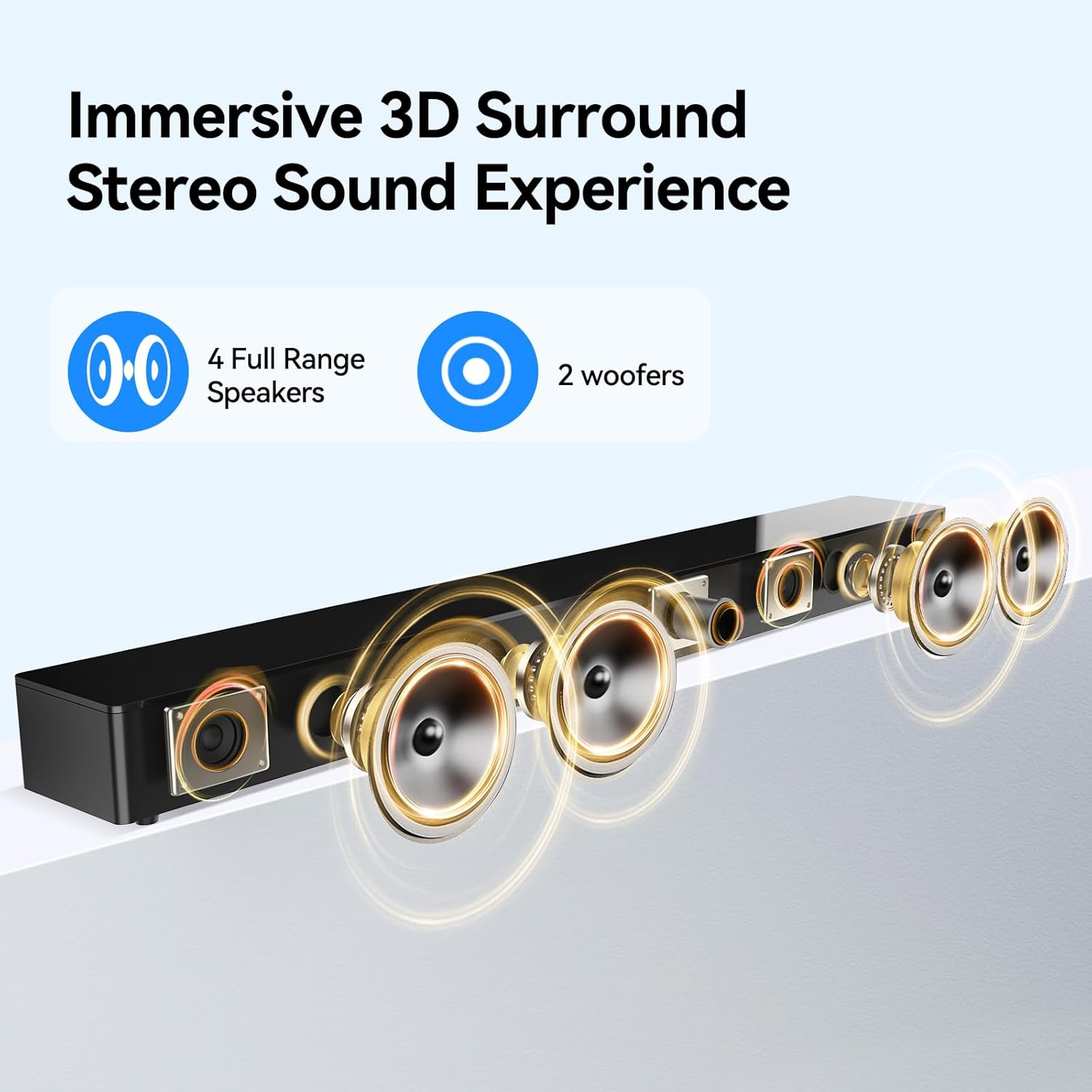
Image: Internal speaker configuration with 4 full-range speakers and 2 woofers.
8. Баталгаат хугацаа ба дэмжлэг
For warranty information and technical support, please refer to the warranty card included with your product or contact THOMSON customer service. Keep your purchase receipt for warranty claims.
Manufacturer: Maxtalent Manufacturer for THOMSON


