Танилцуулга
Thank you for choosing LETMY Solar Spot Lights. This manual provides detailed instructions for the installation, operation, and maintenance of your new outdoor solar lights. Designed for durability and efficiency, these lights feature advanced solar panels, two brightness modes, and a waterproof design, making them ideal for illuminating gardens, pathways, and yards.

Бүтээгдэхүүний бүрэлдэхүүн хэсгүүд
Багц бүр нь дараахь зүйлийг агуулна.
- Solar Spot Lights (6 units)
- Газрын гадас (6 нэгж)
- Хэрэглэгчийн гарын авлага (1 нэгж)
- Mounting Screws and Wall Plugs (for wall installation, quantity sufficient for 6 units)
Онцлогууд
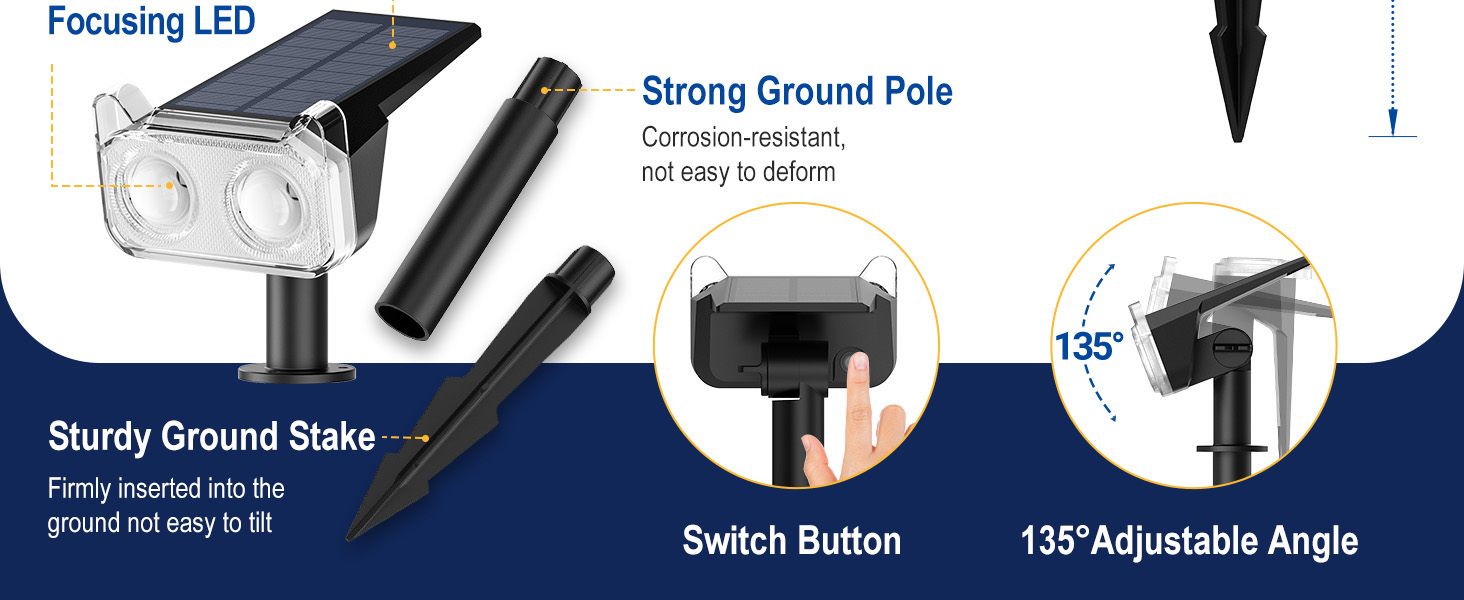
- Brighter Focusing LED: Equipped with two high-power LEDs and upgraded optical convex lenses for concentrated, brighter light.
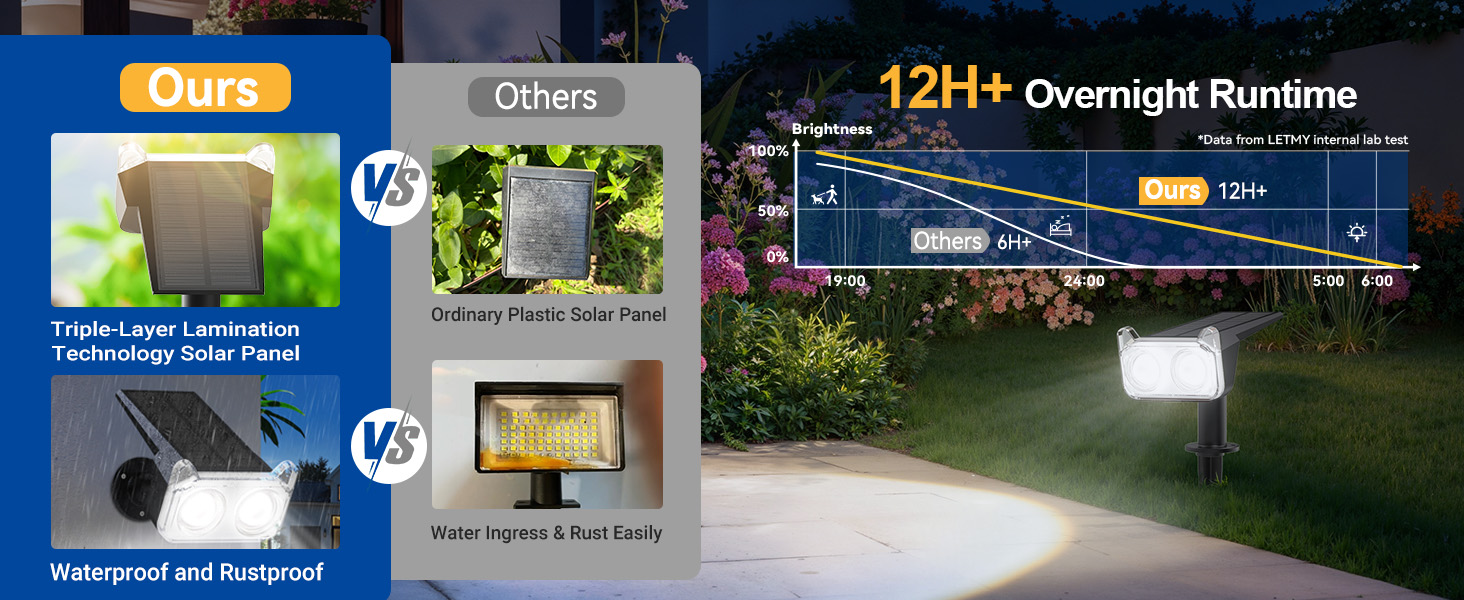
- Урт хугацааны гүйцэтгэл: Features a 1200mAh high-capacity battery, providing up to 12 hours of illumination in high light mode and 20 hours in low light mode.
- High Efficiency Solar Panel: Advanced laminated solar panel with up to 30% conversion rate for superior charging efficiency.
- Автомат ажиллагаа: Lights automatically charge during the day and illuminate at night.
- Хоёр гэрэлтүүлгийн горим: Select between high light (10-12 hours) and low light (18-20 hours) settings.
- 135° Тохируулах өнцөг: The light head can be rotated to direct illumination precisely where needed.
- IP65 Усны хамгаалалттай үнэлгээ: Designed to withstand various weather conditions, including rain, heat, and frost, with a working temperature range of -20°C to 60°C.
- 2-in-1 суурилуулалт: Can be installed using ground stakes or wall-mounted with included hardware.
Тохиргоо
Анхны цэнэглэлт
Before first use, ensure the solar lights are placed in direct sunlight for 6-8 hours to allow the battery to fully charge. The lights will automatically begin charging when exposed to sunlight.
Суулгах сонголтууд
Your LETMY Solar Spot Lights offer two installation methods:
- Газар оруулсан:
- Turn on the light by pressing the switch button and select your desired mode (High or Low).
- Assemble the ground stake to the light unit.
- Insert the assembled light firmly into soft ground in a location that receives ampнарны шууд тусгал.
- Adjust the light angle (up to 135°) to illuminate your desired area.
- Хананд суурилуулсан:
- Turn on the light by pressing the switch button and select your desired mode.
- Mark the desired mounting location on a wall. Drill holes and insert the provided wall anchors.
- Attach the light unit to the wall using the provided screws, ensuring the solar panel faces an area with direct sunlight.
- Adjust the light angle (up to 135°) to illuminate your desired area.

Ашиглалтын заавар
Асаах/унтраах ба горимын сонголт
Locate the power button on the back of the light unit. Press the button to cycle through the operating modes:
- Эхний хэвлэл: Activates High Light Mode (10-12 hours illumination).
- Хоёр дахь хэвлэл: Activates Low Light Mode (18-20 hours illumination).
- Гурав дахь хэвлэл: Гэрлийг унтраадаг.
Автомат ажиллагаа
Once a mode is selected, the lights will automatically turn on at dusk and turn off at dawn, provided they have received sufficient sunlight for charging during the day.
Гэрлийн өнцгийг тохируулах
The light head can be manually adjusted up to 135 degrees. Gently pivot the light head to direct the beam to your desired area, such as a tree, wall, or pathway.


Засвар үйлчилгээ
To ensure optimal performance and longevity of your solar spot lights, follow these maintenance guidelines:
- Цэвэр нарны хавтангууд: Тогтмол зөөлөн арчиж нарны зай хураагуур, damp тоос, шороо, навч, цасыг арилгах даавуу. Цэвэр хавтан нь нарны гэрлийг дээд зэргээр шингээж, цэнэглэх үр ашгийг баталгаажуулдаг.
- Хамгийн оновчтой байршил: Periodically check that the lights are still positioned in an area that receives at least 6-8 hours of direct sunlight daily. Obstructions like growing foliage or new structures can reduce charging effectiveness.
- Гэмтлийг шалгах: Occasionally inspect the light units and stakes for any physical damage. While designed to be IP65 waterproof, extreme weather or impacts can affect integrity.
- Батерейны ашиглалтын хугацаа: The integrated battery is designed for long-term use. If you notice a significant decrease in illumination time after several years, it may indicate the battery is nearing the end of its lifespan.
Алдааг олж засварлах
If your LETMY Solar Spot Lights are not functioning as expected, please refer to the following common issues and solutions:
| Асуудал | Боломжит шалтгаан | Шийдэл |
|---|---|---|
| Шөнийн цагаар гэрэл асдаггүй. | 1. Цахилгаан унтраалга унтарсан байна. 2. Цэнэглэхэд хангалтгүй нарны гэрэл. 3. Solar panel is dirty or obstructed. | 1. Press the power button to select a light mode (High or Low). 2. Relocate the light to an area with 6-8 hours of direct sunlight. 3. Clean the solar panel surface. |
| Light illuminates for a short duration. | 1. Insufficient charging. 2. Battery capacity reduced due to age or extreme temperatures. | 1. Ensure optimal solar panel exposure. Allow for a full day's charge. 2. Consider replacing the unit if it's significantly old and performance has degraded. |
| Light appears dim. | 1. Нарны хавтан бохир байна. 2. Light is in Low Light Mode. 3. Зай бүрэн цэнэглэгдээгүй байна. | 1. Нарны хавтанг цэвэрлэх. 2. Press the power button to switch to High Light Mode. 3. Ensure the light receives adequate direct sunlight for charging. |
Үзүүлэлтүүд
| Онцлог | Дэлгэрэнгүй |
|---|---|
| Брэнд | ЛЕТМИ |
| Загварын нэр | STL003 |
| Цайвар өнгө | Халуун цагаан |
| Материал | Хуванцар |
| Эрчим хүчний эх үүсвэр | Нарны эрчим хүчээр ажилладаг |
| Зайны багтаамж | 1200mAh (High-capacity) |
| Нарны хавтангийн үр ашиг | 30% хүртэл хөрвүүлэх хувь |
| Гэрэлтүүлгийн горимууд | High Light (10-12 hours), Low Light (18-20 hours) |
| Тохируулах өнцөг | 135° |
| Усны эсэргүүцлийн түвшин | IP65 Усны хамгаалалттай |
| Ажлын температур | -20 хэмээс 60 хэм хүртэл |
| Суурилуулалтын төрөл | Wall Mount, Ground Stake |
| Бүтээгдэхүүний хэмжээс | 3.94"L x 5.12"W x 13.77"H |
| Зүйлийн жин | Ойролцоогоор 3.19 фунт (6 ширхэгтэй) |

Баталгаат хугацааны мэдээлэл
LETMY provides a limited warranty for this product. Please retain your proof of purchase for any warranty claims. For specific details regarding the warranty period and coverage, refer to the documentation included with your purchase or contact customer support.
Хэрэглэгчийн дэмжлэг
Should you encounter any issues not covered in this manual or require further assistance, please contact LETMY customer support through the retailer's platform or the official brand website. Our support team is available to help with product inquiries, technical assistance, and warranty services.