1. Танилцуулга
Thank you for choosing the AURIOL Color Display Weather Station. This device provides comprehensive weather information, including indoor and outdoor temperature and humidity, animated weather forecasts, moon phase, and a clock with alarm functions. Please read this manual carefully before use to ensure proper operation and to maximize the lifespan of your product.
2. Аюулгүй байдлын мэдээлэл
- Төхөөрөмжийг хэт өндөр температур, нарны шууд тусгал, хүчтэй чичиргээ болон цохилтоос хол байлга.
- The main unit is designed for indoor use only. The outdoor sensor is splash-proof (IPX4) but should not be submerged in water.
- Төхөөрөмжийг өөрөө нээх, засах гэж бүү оролдоорой. Бүх үйлчилгээг мэргэшсэн боловсон хүчинд шилжүүлээрэй.
- Батерейг хүүхдэд хүрэхгүй газар хадгал. Ашигласан батерейг орон нутгийн дүрэм журмын дагуу устгана уу.
- Use only the provided power adapter for the main unit.
3. Багцын агуулга
Дараах зүйлсийн багцад байгаа эсэхийг шалгана уу.
- AURIOL Color Display Weather Station (Main Unit)
- Wireless Outdoor Sensor (IPX4 splash-proof)
- Үндсэн төхөөрөмжийн цахилгаан адаптер
- 4 x Alkaline Batteries (2 x 1.5 V AA for sensor, 2 x 1.5 V AAA for main unit backup)
- Хэрэглэгчийн гарын авлага (энэ баримт бичиг)
4. Бүтээгдэхүүн дууссанview
Familiarize yourself with the main components of your weather station.

Зураг 4.1: Main unit (right) displaying time, date, indoor/outdoor temperature, humidity, and weather forecast. Wireless outdoor sensor (left) showing its own temperature and humidity.

Зураг 4.2: Close-up of the main unit's color display, highlighting the animated weather forecast symbols, moon phase indicator, and alarm icons (AL1, AL2).
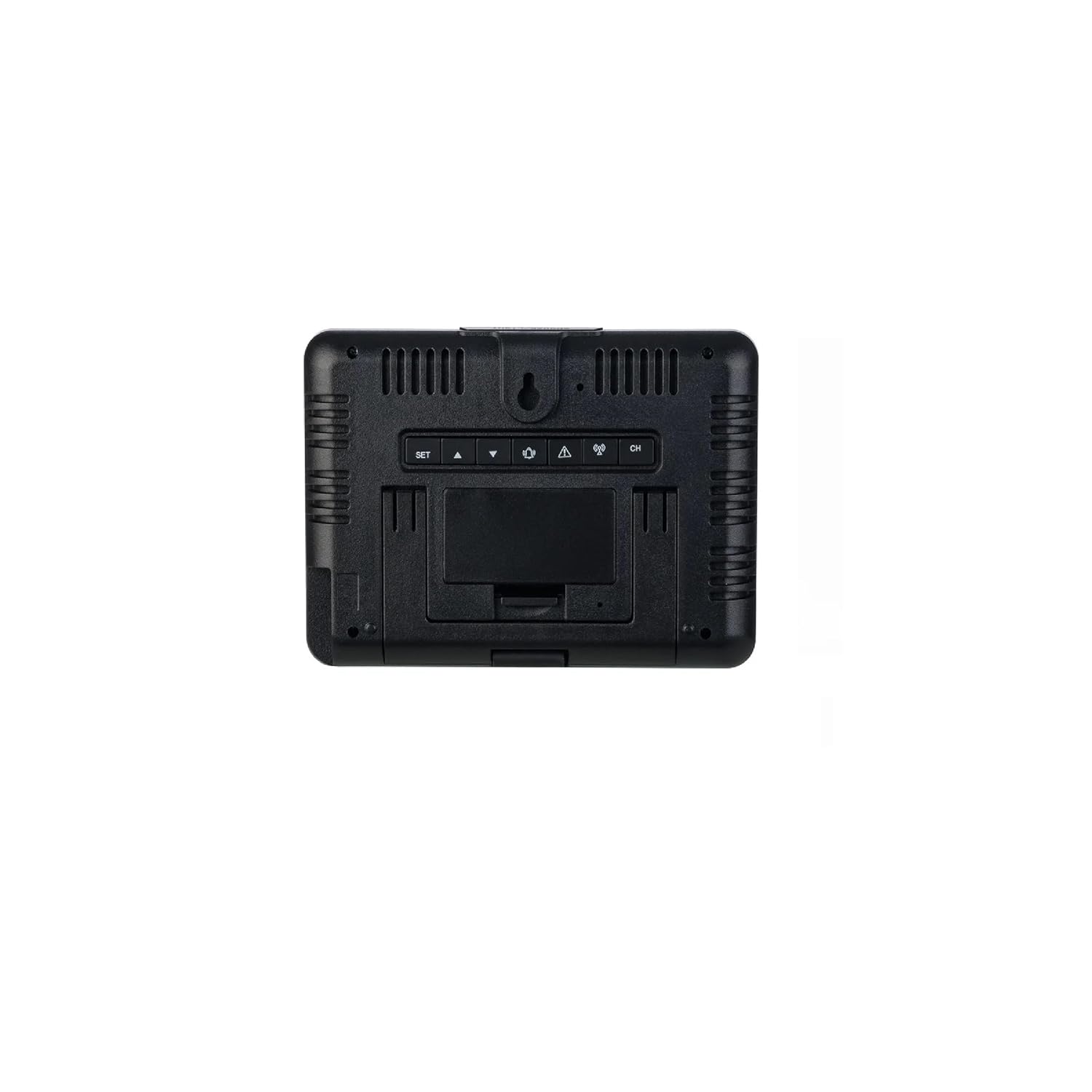
Зураг 4.3: Арын view of the main unit. Visible are the control buttons (SET, UP, DOWN, ALARM, CH) and the battery compartment cover. The unit can be placed on a flat surface or wall-mounted.
5. Тохиргоо
5.1. Зай суурилуулах
- Гадна мэдрэгч: Open the battery compartment on the back of the wireless outdoor sensor. Insert 2 x 1.5 V AA alkaline batteries, observing the correct polarity (+/-). Close the compartment securely.
- Main Unit (Backup): Open the battery compartment on the back of the main unit (refer to Figure 4.3). Insert 2 x 1.5 V AAA alkaline batteries, observing the correct polarity (+/-). These batteries serve as a backup in case of power outage. Close the compartment.
5.2. Powering On the Main Unit
Connect the provided power adapter to the DC input port on the back of the main unit and then plug it into a wall outlet. The display will light up permanently. The backup batteries will ensure settings are retained if the power adapter is disconnected.
5.3. Sensor Synchronization
Once both the sensor and main unit are powered, the main unit will automatically attempt to connect with the outdoor sensor. This process may take a few minutes. The outdoor temperature and humidity readings will appear on the main unit's display once connected. If synchronization fails, press and hold the "CH" button on the main unit to initiate a manual search for the sensor.
5.4. Мэдрэгчийн байршил
Place the outdoor sensor in a shaded, dry location, protected from direct sunlight and rain, but within the 100m wireless range of the main unit. Avoid placing it near large metal objects or electrical appliances that could interfere with the signal. The sensor can be placed on a flat surface or mounted to a wall using the integrated hanging hole.
6. Ашиглалтын заавар
6.1. Дэлгэц Overview
The color display is divided into several sections:
- Зүүн дээд: Animated Weather Forecast symbols.
- Баруун дээд: Outdoor Temperature and Humidity.
- Зүүн дунд: Сарны үе шат.
- Дунд баруун талд: Indoor Temperature and Humidity.
- Доод талд: Time, Date, Day of the Week, Alarm Indicators (AL1, AL2).
6.2. Setting Time, Date, and Day of the Week
- Press and hold the "SET" button (refer to Figure 4.3) for 3 seconds to enter time setting mode. The hour digit will flash.
- Use the "UP" or "DOWN" buttons to adjust the value.
- Press "SET" again to confirm and move to the next setting (minutes, 12/24-hour format, year, month, day, day of week language).
- Repeat steps 2 and 3 until all settings are configured. Press "SET" one last time to exit.
6.3. Сэрүүлгийн тохиргоо
The weather station features two separate alarms (AL1, AL2).
- Press the "ALARM" button repeatedly to cycle through AL1, AL2, and alarm off.
- To set an alarm, press and hold the "ALARM" button for 3 seconds when the desired alarm (AL1 or AL2) is displayed. The hour digit will flash.
- Use "UP" or "DOWN" to adjust the hour, then press "ALARM" to confirm and move to minutes.
- Adjust minutes with "UP" or "DOWN", then press "ALARM" to confirm and exit.
- When an alarm sounds, press any button (except "SNOOZE") to stop it. Press "SNOOZE" for a temporary pause.
6.4. Температур ба чийгшлийн дэлгэц
- The main unit displays both indoor and outdoor temperature and humidity.
- Press the "UP" button to switch between Celsius (°C) and Fahrenheit (°F) temperature units.
- The display also shows minimum and maximum recorded temperatures and humidity for both indoor and outdoor. These values reset automatically every 24 hours or can be manually reset by pressing and holding the "DOWN" button.
6.5. Цаг агаарын урьдчилсан мэдээ
The weather station predicts weather conditions for the next 12-24 hours based on atmospheric pressure changes. The animated symbols (e.g., sunny, partly cloudy, cloudy, rainy, snowy) indicate the forecast. This is a prediction and may not always be 100% accurate.
6.6. Сарны фазын харагдац
The moon phase icon on the display changes to reflect the current lunar phase.
6.7. Temperature/Freeze Alarm
The device features a temperature alarm and a freeze alarm. When the outdoor temperature drops to a certain threshold (typically near freezing point), a special icon or sound may activate to warn of potential frost conditions. Refer to the specific settings menu (usually accessed via "SET" or "ALARM" button in conjunction with "UP"/"DOWN") to configure these thresholds.
6.8. Зайны төлөвийн үзүүлэлт
Battery icons on the display will indicate the battery status for both the main unit (backup) and the outdoor sensor. Replace batteries promptly when the low battery indicator appears to ensure continuous operation.
7. Засвар үйлчилгээ
- Цэвэрлэгээ: Төхөөрөмжийг зөөлөн арчиж, damp даавуу. Зүлгүүрийн цэвэрлэгч, уусгагчийг бүү ашигла.
- Зай солих: Replace batteries in both the main unit (backup) and the outdoor sensor when the low battery indicator appears. Ensure correct polarity.
- Хадгалах: Хэрэв төхөөрөмжийг удаан хугацаагаар хадгалах юм бол гоожихоос сэргийлж бүх батерейг салга.
8. Алдаа засах
| Асуудал | Боломжит шалтгаан | Шийдэл |
|---|---|---|
| Үндсэн төхөөрөмж дээр дэлгэц байхгүй. | Power adapter not connected or faulty; backup batteries depleted or incorrectly inserted. | Ensure power adapter is securely connected. Check and replace backup batteries if necessary, verifying polarity. |
| Гаднах заалтыг харуулаагүй эсвэл алдаатай байна. | Мэдрэгч ажиллах хүрээнээс гарсан; мэдрэгчийн батерей дууссан; хөндлөнгийн оролцоо; мэдрэгч синхрончлогдоогүй байна. | Move sensor closer to the main unit. Replace sensor batteries. Relocate sensor away from interference sources. Press and hold "CH" button on main unit to re-synchronize. |
| Цаг агаарын урьдчилсан мэдээ буруу байх шиг байна. | Forecast is a prediction based on atmospheric pressure and may not always match actual conditions. | This is normal. The forecast is an estimation. Ensure the unit has been operating for at least 24 hours for initial pressure calibration. |
| Сэрүүлэг дуугарахгүй байна. | Сэрүүлгийг идэвхжүүлээгүй эсвэл буруу тохируулсан. | Verify that the alarm (AL1 or AL2) is enabled and the time is set correctly. |
9. Техникийн үзүүлэлтүүд
- Загвар: 456364
- Брэнд: Ауриол
- Холболтын технологи: 433 МГц, 868 МГц (Утасгүй)
- Гаднах мэдрэгчийн хүрээ: 100 м хүртэл (нээлттэй талбай)
- Цахилгаан эх үүсвэр (Үндсэн нэгж): Power Adapter (included), 2 x 1.5 V AAA Alkaline Batteries (backup, included)
- Цахилгаан эх үүсвэр (Гадна мэдрэгч): 2 x 1.5 V AA Alkaline Batteries (included)
- Онцлог шинж чанар: Color Display, Min/Max Temperature/Humidity, Animated Weather Forecast, Moon Phase, Dual Alarms, Temperature/Freeze Alarm
- Материал: Хуванцар
- Өнгө: Хар
- Гадна мэдрэгчийн хамгаалалт: IPX4 (ус цацахаас хамгаалсан)
- Зөвлөмж болгож буй хэрэглээ: Гэр
- Тусгай хэрэглээ: Температурын хяналт
10. Баталгаат хугацаа ба дэмжлэг
This AURIOL product comes with a standard manufacturer's warranty. For detailed warranty terms and conditions, please refer to the warranty card included in your package or contact your retailer. For technical support, troubleshooting assistance, or to inquire about replacement parts, please contact AURIOL customer service through their official webсайт эсвэл таны худалдан авалтын баримт бичигт өгөгдсөн холбоо барих мэдээлэл.


