Танилцуулга
Худалдан авалт хийсэнд баярлалааasing the QFX RETRO-1937 Vintage Bluetooth Rechargeable Radio. This device combines classic aesthetics with modern functionality, offering AM/FM/SW radio reception, Bluetooth wireless streaming, and media playback from USB drives and TF/microSD cards. It also features a built-in LED flashlight and a convenient rechargeable battery for portability. This manual provides essential information for the safe and efficient operation of your radio.
Багцын агуулга
Дараах зүйлсийн багцад байгаа эсэхийг шалгана уу.
- QFX RETRO-1937 Radio
- USB цэнэглэгч кабель
- Хэрэглэгчийн гарын авлага (энэ баримт бичиг)
Бүтээгдэхүүн дууссанview
Familiarize yourself with the various parts and controls of your QFX RETRO-1937 radio.

Зураг 1: Урд View Өргөтгөсөн антеннтай
This image shows the front of the radio, highlighting the speaker grille, frequency display, control buttons, and the fully extended telescoping antenna for optimal reception.

Зураг 2: Дээд удирдлага
The top panel features the Volume knob on the left and the Tuning knob on the right, both designed for easy adjustment.

Зураг 3: Хажуугийн хавтангийн холболтууд
This side of the radio includes the AUX input, USB port, TF/microSD card slot, DC 5V charging port, and the main Power ON/OFF switch.

Зураг 4: Суурилуулсан LED гар чийдэн
The opposite side of the radio features a powerful LED flashlight for illumination.

Зураг 5: Урд View Антенн нь татагдсан
A general front view of the radio with the telescoping antenna in its retracted position.

Зураг 6: Өнцөгтэй тал View
Энэ зураг нь өнцгийг харуулж байна view, showing both the front controls and the side panel connections.
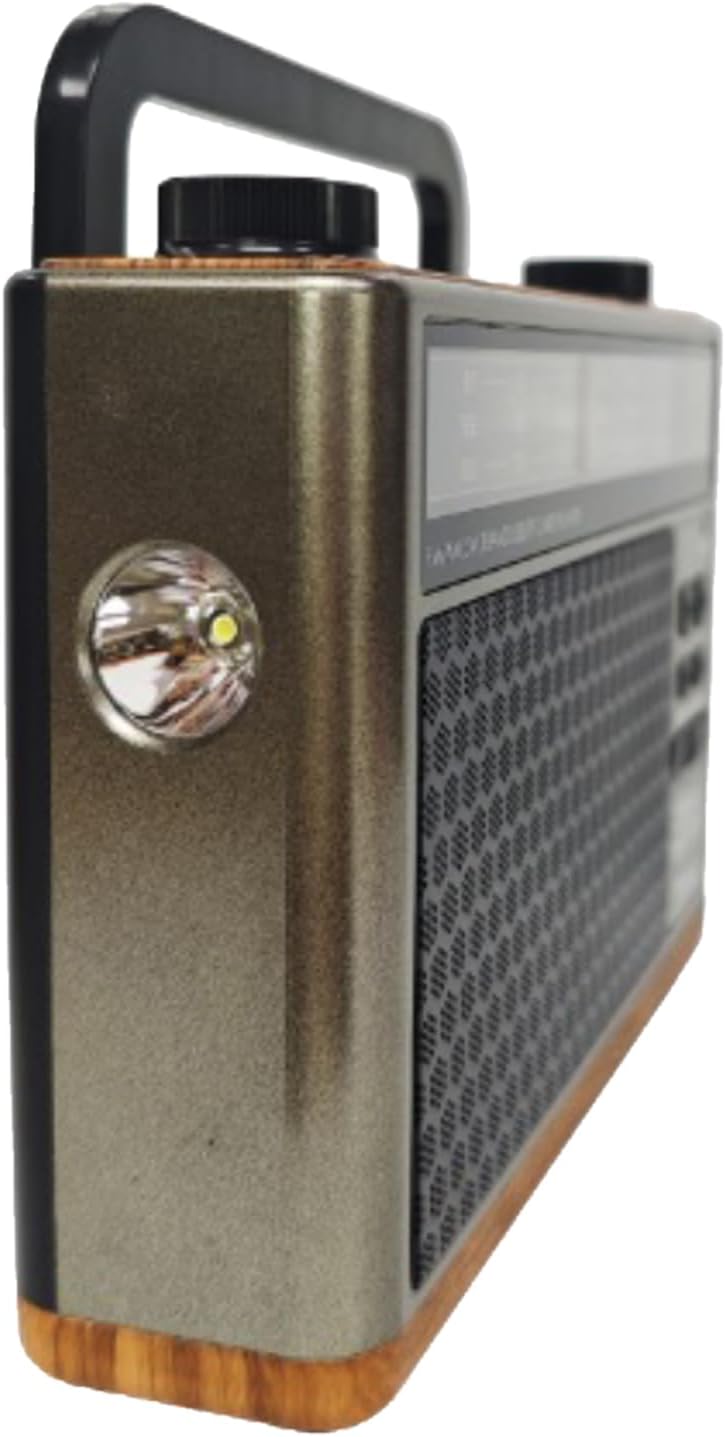
Зураг 7: Өнцөг View гар чийдэнтэй
Өнцөг view highlighting the built-in LED flashlight on the side of the unit.
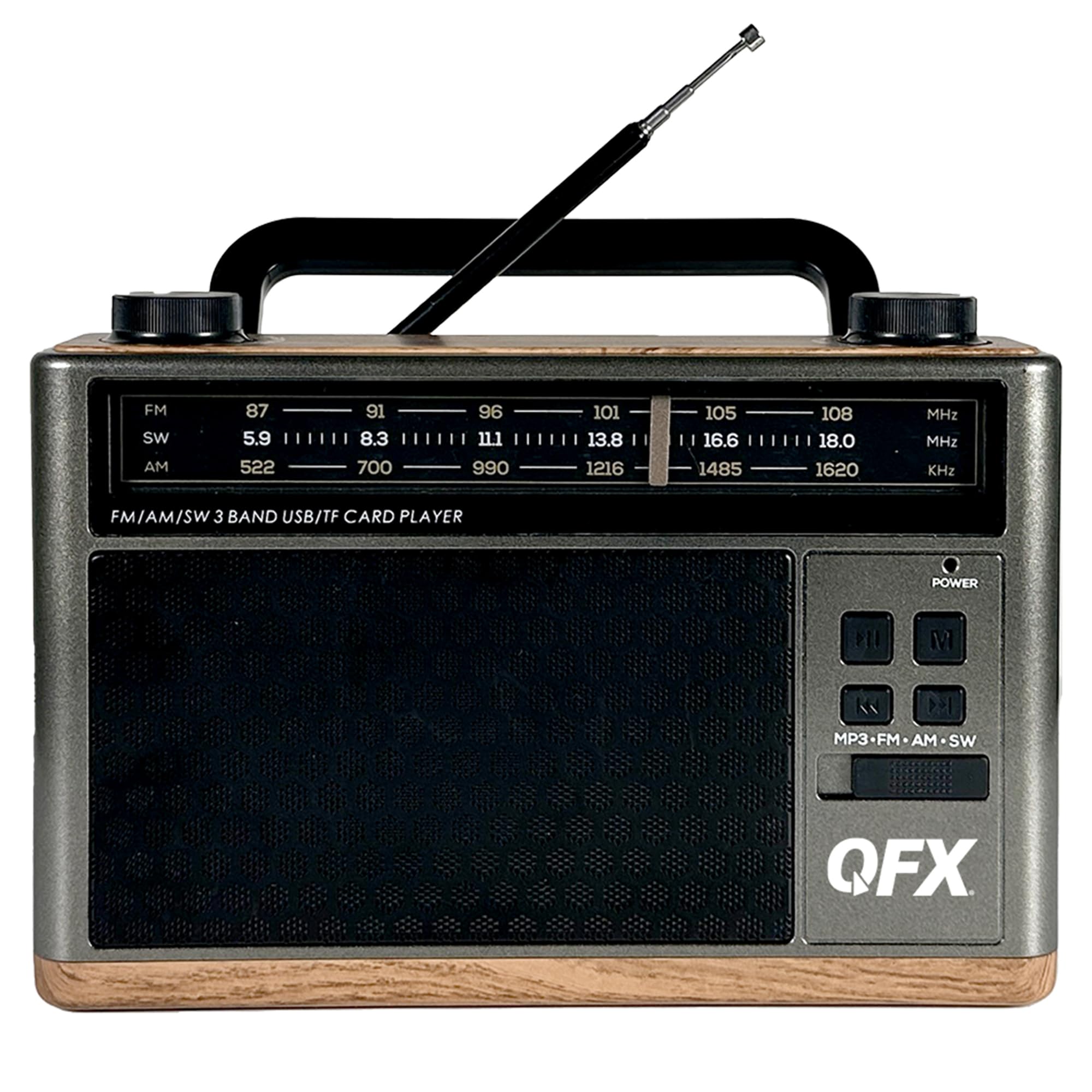
Зураг 8: Ар талд View
The rear panel shows the battery compartment cover and the base of the telescoping antenna.
Хяналт ба портууд:
- Эрчим хүч солих: Located on the side, slides to turn the unit ON or OFF.
- Эзлэхүүний товчлуур: Аудио гаралтын түвшинг тохируулахын тулд эргүүлнэ.
- Тохируулах товчлуур: Rotates to select radio frequencies.
- Mode Button (MP3-FM-AM-SW): Cycles through different operating modes (MP3/Bluetooth, FM, AM, SW).
- Тоглуулах/түр зогсоох товчлуур: Controls playback for MP3/Bluetooth modes.
- Өмнөх/Дараах товчлуурууд: Skips tracks in MP3/Bluetooth modes.
- USB порт: MP3 тоглуулахын тулд USB флаш диск холбох зориулалттай.
- TF/microSD Card Slot: For inserting TF/microSD cards for MP3 playback.
- AUX оролт: Гадны аудио төхөөрөмжийг холбох 3.5 мм үүр.
- DC 5V цэнэглэх порт: Дотоод батерейг цэнэглэх зориулалттай микро USB порт.
- Телескопын антен: Радио хүлээн авалтыг сайжруулахын тулд өргөтгөл хийдэг.
- LED гар чийдэн: Integrated light on the side of the unit.
- Зайны тасалгаа: Located on the rear for the removable rechargeable battery.
Тохиргоо
Батерейг суурилуулах, цэнэглэх
- Анхны төлбөр: Before first use, ensure the radio's internal rechargeable battery is fully charged. Connect the supplied USB charging cable to the DC 5V port on the side of the radio and the other end to a standard USB power adapter (not included) or a computer's USB port.
- The charging indicator light (if present) will illuminate during charging and turn off or change color when fully charged. A full charge typically takes approximately 8 hours.
- Батерейг солих (хэрэв байгаа бол): If replacing the battery, open the battery compartment on the rear of the unit. Insert the new nonstandard rechargeable battery, ensuring correct polarity. Close the compartment securely.
Асаах/унтраах
- To turn the radio ON, slide the Power switch on the side of the unit to the 'ON' position.
- To turn the radio OFF, slide the Power switch to the 'OFF' position.
Ашиглалтын заавар
Радио ажиллагаа (AM/FM/SW)
- Slide the Power switch to 'ON'.
- Press the Mode button repeatedly until you reach the desired radio band (FM, AM, or SW).
- For FM and SW reception, extend the telescoping antenna fully and adjust its position for the best signal. For AM reception, the internal antenna is generally sufficient, but rotating the unit may improve reception.
- Rotate the Tuning knob to scan for radio stations.
- Дууны түвшний товчлуурыг өөрийн хүссэн сонсох түвшинд тохируулна уу.
Bluetooth ажиллагаа
- Slide the Power switch to 'ON'.
- Press the Mode button repeatedly until the unit enters Bluetooth mode. You will hear an audible prompt indicating it is ready for pairing.
- Гар утасны төхөөрөмж дээрээ (ухаалаг утас, таблет гэх мэт) Bluetooth-г идэвхжүүлж, боломжтой төхөөрөмжүүдийг хайгаарай.
- Select "QFX RETRO-1937" (or similar name) from the list of found devices to pair.
- Once paired, you will hear a confirmation tone. You can now stream audio wirelessly from your device to the radio.
- Use the Play/Pause and Previous/Next buttons on the radio or your connected device to control playback.
USB/TF карт тоглуулах
- Slide the Power switch to 'ON'.
- Insert a USB flash drive into the USB port or a TF/microSD card into the TF card slot. Ensure the card is inserted correctly.
- The radio should automatically switch to MP3 playback mode and begin playing audio files. If not, press the Mode button to select MP3 mode.
- Use the Play/Pause and Previous/Next buttons to control playback.
AUX оролтын ажиллагаа
- Slide the Power switch to 'ON'.
- Connect one end of a 3.5mm audio cable (not included) to the AUX input port on the radio and the other end to the headphone jack or audio output of your external audio device (e.g., MP3 player, CD player).
- Press the Mode button to select AUX mode.
- Control playback and volume from your external audio device. Adjust the radio's volume as needed.
Гар чийдэнгийн ажиллагаа
- The LED flashlight is typically activated by a separate switch or button, often located near the flashlight itself. Refer to the physical unit for the exact control.
- Ensure the radio is powered on for the flashlight to function.
Засвар үйлчилгээ
- Цэвэрлэгээ: Радиогийн гадна талыг зөөлөн, хуурай даавуугаар цэвэрлэ. Зүлгүүрийн цэвэрлэгч, лав, уусгагчийг бүү ашигла.
- Хадгалах: Радиог удаан хугацаагаар ашиглахгүй бол сэрүүн, хуурай газар, нарны шууд тусгал болон хэт өндөр температураас хол хадгална уу.
- Батерейны арчилгаа: To prolong battery life, avoid fully discharging the battery frequently. Recharge the battery regularly, even if the unit is not in active use.
- Антен: Handle the telescoping antenna carefully to prevent bending or breakage. Retract it when not in use.
Алдааг олж засварлах
| Асуудал | Боломжит шалтгаан | Шийдэл |
|---|---|---|
| Цахилгаан байхгүй/нэгж асахгүй байна. | Батерей цэнэггүй болсон. Цахилгаан унтраалга УНТРААЛТТАЙ байна. | Charge the battery using the USB cable. Ensure the Power switch is in the 'ON' position. |
| Радио хүлээн авалт муу. | Антенн сунгаагүй. Дохионы хэсэг сул. Интерференц. | Extend the telescoping antenna fully and adjust its direction. Try moving the radio to a different location. Avoid sources of electronic interference. |
| Bluetooth төхөөрөмж хослохгүй байна. | Radio not in Bluetooth mode. Device too far. Bluetooth not enabled on device. | Ensure the radio is in Bluetooth mode. Keep devices within 30 feet (10 meters). Enable Bluetooth on your mobile device and rescan. |
| USB/TF карт тоглохгүй байна. | Incorrect mode selected. Incompatible file format. Corrupted media. | Press the Mode button to select MP3 mode. Ensure fileфайлууд нь MP3 форматтай байна. Өөр USB диск эсвэл TF карт ашиглаж үзнэ үү. |
| AUX оролтоос дуу гарахгүй байна. | Incorrect mode selected. Cable not fully inserted. Volume too low. | Select AUX mode. Ensure the 3.5mm cable is securely connected. Increase volume on both the radio and the external device. |
Үзүүлэлтүүд
- Загвар: RETRO-1937
- Бүтээгдэхүүний хэмжээ: 8 x 2.28 x 5.43 инч (20.32 x 5.79 x 13.79 см)
- Барааны жин: 1.12 фунт (0.51 кг)
- Радио хамтлагууд: AM, FM, SW (Shortwave)
- Холболт: Bluetooth, USB, TF/microSD, AUX Input
- Эрчим хүчний эх үүсвэр: Rechargeable Battery (included), DC 5V via USB cable
- Онцлог шинж чанарууд: Built-in LED Flashlight, Folding Carry Handle, Telescoping Antenna
- Зайны төрөл: 1 стандарт бус батерей (дагсан)
- Цэнэглэх хугацаа: Ойролцоогоор 8 цаг
Баталгаат болон дэмжлэг
QFX бүтээгдэхүүнүүд нь найдвартай, гүйцэтгэлд зориулагдсан. Тодорхой баталгаат мэдээллийг авахын тулд худалдан авалтад дагалдаж буй баталгаат картаас эсвэл албан ёсны QFX-д зочилно уу website. If you encounter any issues or require technical assistance, please contact QFX customer support through their official channels.
Онлайн дэмжлэг: www.qfxusa.com


