1. Танилцуулга
Худалдан авалт хийсэнд баярлалааasing the iFFALCON 40S55T 40-inch Full HD Google TV. This manual provides essential information for the safe and efficient use of your television. Please read it thoroughly before operating the device and retain it for future reference.
The iFFALCON 40S55T is a tunerless smart TV designed for streaming content, offering a Full HD display, Google TV operating system, Chromecast built-in, and Dolby Audio for an immersive entertainment experience.
2. Аюулгүй байдлын мэдээлэл
Гал түймэр, цахилгаанд цохиулах, гэмтэх эрсдэлийг бууруулахын тулд энэ телевизорыг ашиглахдаа аюулгүй байдлын үндсэн арга хэмжээг үргэлж дагаж мөрдөөрэй.
- Зурагтыг бороо, чийгэнд бүү тавь.
- ТВ-ээ бүү нээ casing; бүх үйлчилгээг мэргэшсэн боловсон хүчинд шилжүүлэх.
- ТВ-ийн эргэн тойронд агааржуулалт сайтай байх ёстой.
- Зурагтыг нарны шууд тусгал, дулааны эх үүсвэр, хүчтэй соронзон орон зэргээс хол байлга.
- Use only the power cord and accessories supplied by the manufacturer.
- Аянга шуургатай үед эсвэл удаан хугацаагаар ашиглаагүй үед ТВ-ээ салга.
3. Багцын агуулга
Бүх зүйл хайрцагт байгаа эсэхийг шалгана уу:
- iFFALCON 40S55T 40-inch Full HD Google TV
- Алсын удирдлага
- ТВ тавиур (2 ширхэг)
- Телевизийн тавиурын шураг
- Цахилгаан кабель
- Баталгаат карт
- Хэрэглэх заавар (энэ баримт бичиг)
4. Тохиргоо
4.1 Телевизийн тавиурыг бэхлэх
- Дэлгэцийг гэмтээхгүйн тулд зурагтыг зөөлөн, тэгш гадаргуу дээр доош харуулан болгоомжтой байрлуул.
- Тавиурын хэсэг бүрийг ТВ-ийн доод талд байгаа харгалзах үүртэй зэрэгцүүлнэ.
- Өгөгдсөн эрэг ашиглан тулгууруудыг бэхлэнэ. Тэдгээрийг сайтар чангалж байгаа эсэхийг шалгаарай.
4.2 Цахилгааныг холбох
Цахилгааны кабелийг ТВ-ийн тэжээлийн оролттой холбож, дараа нь ханын залгуурт холбоно. ТВ нь зогсолтын горимд орно.
4.3 Initial Setup (Google TV & Network)
Анх асаахад ТВ нь Google TV-ийн анхны тохиргооны процессыг танд чиглүүлэх болно. Үүнд дараахь зүйлс орно:
- Хэлний сонголт.
- Wi-Fi сүлжээнд холбогдож байна.
- Signing in with your Google account to access personalized content and apps.
- Нөхцөл, нөхцлийг хүлээн зөвшөөрч байна.
4.4 Холболт
The iFFALCON 40S55T offers various connection options for external devices.

Зураг: Дууслааview of the TV's connectivity options, including HDMI, USB, Bluetooth, and Wi-Fi.
- HDMI портууд: Connect external devices like gaming consoles, Blu-ray players, or set-top boxes.
- USB порт: Медиа тоглуулахын тулд USB санах ойн төхөөрөмжүүдийг холбоход зориулагдсан files.
- Wi-Fi: For wireless internet connection to access streaming services and online features.
- Bluetooth: For connecting wireless headphones, speakers, or other Bluetooth-enabled accessories.
4.5 Tunerless Operation
This TV is designed as a tunerless model, meaning it does not have a built-in tuner for terrestrial (over-the-air) broadcasts. To watch terrestrial, BS, or CS broadcasts, an external tuner is required and must be purchased separately.

Image: The iFFALCON 40S55T TV showcasing its smart features, highlighting its tunerless design and ability to enjoy internet video content without an antenna connection.
5. ТВ ажиллуулах
5.1 Алсын удирдлагатайview
The remote control provides access to all TV functions, including power, volume, channel navigation, and smart TV features. It also supports voice search via 'Hey Google'.

Image: The TV remote control, featuring quick access buttons for popular streaming services and a dedicated microphone button for voice commands.
- Цахилгаан товч: ТВ-г асаах эсвэл унтраана.
- Навигацийн товчлуурууд: Цэсийг үзэхийн тулд заагч самбар болон OK товчийг ашиглана уу.
- Дууны түвшин/Сувгийн товчлуурууд: Adjust volume and change channels (if an external tuner is connected).
- Програмын товчлолын товчлуурууд: Direct access to popular streaming services like Netflix, YouTube, etc.
- Микрофоны товчлуур: Press and hold to activate 'Hey Google' voice search.
5.2 Google TV-ийн онцлогууд
Your iFFALCON TV runs on Google TV, providing a personalized and integrated entertainment experience.
- Агуулга нэгтгэх: Google TV organizes movies, shows, and live TV from all your apps and subscriptions into one place.
- Хувь хүний зөвлөмжүүд: Таны дээр үндэслэн viewing history and preferences, Google AI suggests content you might enjoy.
- Дуут хайлт: Use the 'Hey Google' feature on your remote to quickly find content, get information, or control smart home devices.
- Chromecast суурилуулсан: Easily cast content from your smartphone, tablet, or computer directly to your TV screen.

Image: A smartphone screen mirroring content to the iFFALCON TV, demonstrating the Chromecast built-in feature for enjoying mobile content on a larger display.
5.3 Зургийн тохиргоо
The TV incorporates advanced image processing technologies to deliver a superior viewтуршлага.
- AI PQ Processor: TCL's proprietary AiPQ Processor intelligently adjusts image quality at the pixel level, enhancing clarity, color, and contrast for a vivid and realistic picture.
- Full HD (FHD): Experience sharp and detailed images with Full High Definition resolution, offering 200% more detail than standard HD screens.

Image: A visual comparison illustrating the enhanced detail and clarity provided by Full HD resolution compared to standard HD.
- HDR10/HLG Support: Enjoy a wider range of colors and contrast with HDR10 and HLG compatibility, revealing stunning detail in both bright and dark scenes.

Image: The TV screen showcasing the vibrant and detailed picture quality achieved with HDR10/HLG technology.
- Микро бүдэгрүүлэх: This technology analyzes the image in hundreds of separate zones to adjust brightness and darkness independently, enhancing contrast and picture quality.

Image: A visual representation of Micro Dimming technology, illustrating how it enhances contrast and picture depth by adjusting brightness in specific areas of the screen.
5.4 Sound Settings (Dolby Audio)
The TV features Dolby Audio for clear, rich, and immersive sound.
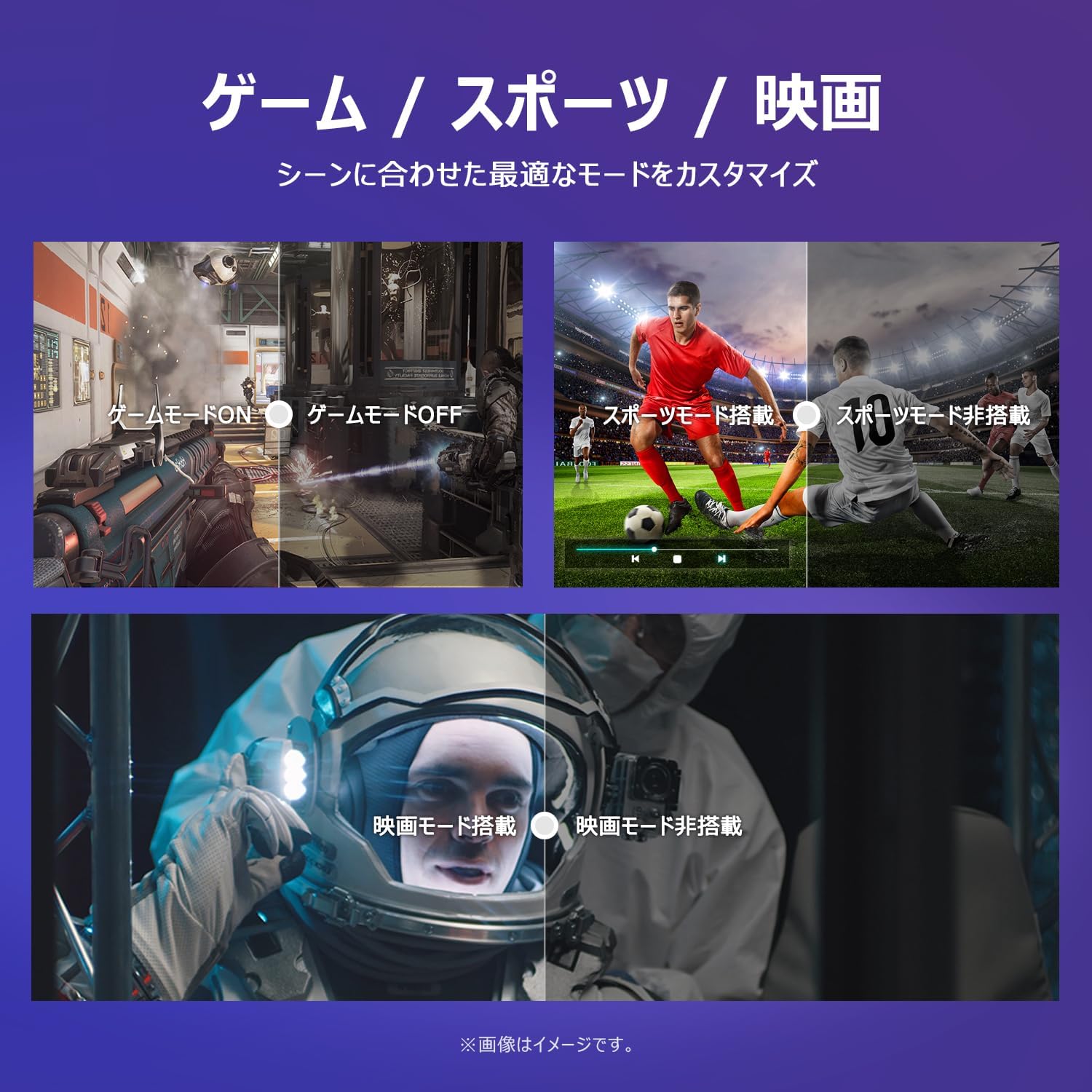
Image: The TV screen with a visual representation of sound, highlighting the immersive audio experience provided by Dolby Audio.
Access the sound settings menu to adjust modes like Standard, Music, Movie, or Custom to suit your preferences.
5.5 Тоглоомын горим
Activate Game Mode for an optimized gaming experience with reduced input lag.
Image: Visual comparisons demonstrating the optimized settings for Game Mode, Sports Mode, and Movie Mode, adapting the TV's performance to different content types.
The TV also offers dedicated Sports Mode and Movie Mode to enhance viewing for specific content types.
5.6 Системийн тохиргоо
The quick settings menu allows you to customize frequently used system settings and rearrange their order for intuitive and convenient access.

Зураг: А view of the TV's quick system settings interface, illustrating how users can easily access and customize various functions like brightness, picture mode, and network settings.
6. Засвар үйлчилгээ
Зөв арчилгаа, арчилгаа нь таны телевизийн ашиглалтын хугацааг уртасгах болно.
- Дэлгэц цэвэрлэх: Зөөлөн, хөвөнгүй даавуугаар дэлгэцийг зөөлөн арчина. Зөрүүд тэмдгүүдийн хувьд зурагтуудад зориулагдсан дэлгэц цэвэрлэгчийг шууд дэлгэцэн дээр биш харин даавуунд түрхээрэй.
- C цэвэрлэхasing: Зурагтыг зөөлөн хуурай даавуугаар арчих casing. Зүлгүүрийн цэвэрлэгч, уусгагчийг бүү ашигла.
- Агааржуулалт: Хэт халалтаас сэргийлэхийн тулд ТВ-ийн арын хэсэгт байрлах агааржуулалтын нүхийг хаагаагүй эсэхийг шалгаарай.
- Цахилгааны утас: Цахилгааны утсанд гэмтэл байгаа эсэхийг тогтмол шалгана уу. Хэрэв эвдэрсэн бол солихын тулд хэрэглэгчийн дэмжлэгтэй холбоо барина уу.
7. Алдаа засах
If you encounter issues with your TV, refer to the following common problems and solutions. If the problem persists, contact customer support.
| Асуудал | Боломжит шалтгаан | Шийдэл |
|---|---|---|
| Хүч чадалгүй | Цахилгаан кабель холбогдоогүй; Цахилгаан залгуур ажиллахгүй байна | Ensure power cable is securely plugged in; Test outlet with another device |
| Зураг байхгүй ч дуу чимээ байна | Буруу оролтын эх үүсвэр; Гадаад төхөөрөмжийн асуудал | Press the 'Input' button on the remote to select the correct source; Check external device connections |
| Дуу алга, гэхдээ зураг байна | Дууны түвшин хаагдсан эсвэл хэт бага байна; Гадаад аудио системийн асуудал | Unmute or increase volume; Check audio cable connections to external sound system |
| Алсын удирдлага ажиллахгүй байна | Батерей дууссан; Алсын удирдлага болон ТВ-ийн хоорондох саад тотгор | Replace batteries; Remove any obstructions; Ensure remote is pointed at the TV's IR sensor |
| Wi-Fi-д холбогдох боломжгүй байна | Нууц үг буруу; Чиглүүлэгчийн асуудал; ТВ чиглүүлэгчээс хэт хол байна | Verify Wi-Fi password; Restart router; Move TV closer to router or use a Wi-Fi extender |
8. Техникийн үзүүлэлтүүд
Detailed technical specifications for the iFFALCON 40S55T TV:

Image: Dimensional drawing of the iFFALCON 40S55T TV, indicating its physical measurements.
| Онцлог | Тодорхойлолт |
|---|---|
| Дэлгэцийн хэмжээ | 40 инч |
| Дэлгэцийн төрөл | VA Liquid Crystal |
| Шийдвэр | Бүтэн HD (1920 x 1080) |
| Сэргээх хурд | 60 Гц |
| Харьцаа | 16:9 |
| Ялгаатай харьцаа | 1000:1 |
| Үйлдлийн систем | Google TV |
| Аудио гаралт | 20 Watts (2.1 channels) |
| HDMI портууд | 2 |
| USB портууд | 1 |
| Утасгүй холболт | Wi-Fi, Bluetooth |
| Бүтээгдэхүүний хэмжээ (W x H x D) | 89.2 x 55.8 x 18.4 см (тастангийн хамт) |
| Бүтээгдэхүүний жин | 4.63 кг |
| Хананд холбоход тохиромжтой | Тиймээ |
| Дагалдах хэрэгсэлд багтсан | Stand, Remote Control, Warranty Card, Power Cable |
9. Баталгаат хугацаа ба дэмжлэг
Your iFFALCON 40S55T TV comes with a manufacturer's warranty. Please refer to the included warranty card for specific terms, conditions, and duration of coverage.
For technical support, troubleshooting assistance beyond this manual, or warranty claims, please contact iFFALCON customer service. Contact information can typically be found on the warranty card or the official iFFALCON webсайт.
Please have your model number (40S55T) and purchase date ready when contacting support.