1. Танилцуулга
This manual provides essential information for the safe and effective operation of your Thermal Master Handheld Thermal Camera THOR 002. Please read this manual thoroughly before using the device and retain it for future reference. This thermal imager is designed for professionals in electrical, HVAC, mechanical, and building inspections, offering advanced thermal imaging capabilities for detailed diagnostics.
2. Аюулгүй байдлын мэдээлэл
Always operate the device in accordance with the instructions provided. Do not attempt to disassemble or modify the camera, as this may void the warranty and cause damage. Avoid direct exposure of the lens to strong light sources. Ensure the device is charged using the provided cable and a compatible power source. Keep the device away from extreme temperatures and corrosive environments. The laser positioning feature should be used with caution; avoid direct eye exposure.
3. Багцын агуулга
Upon unboxing, please verify that all items listed below are present and in good condition.
- Thor002 Thermal Camera ×1
- Explosion-Proof Case ×1
- 100cm USB Data Cable ×1
- 32GB Memory Card (pre-installed)

Figure 3.1: Contents of the Thermal Master THOR 002 package, showing the thermal camera, explosion-proof case, and USB data cable.
4. Бүтээгдэхүүн дууссанview
The Thermal Master THOR 002 is a robust handheld thermal camera designed for professional use. It features an ergonomic body with an alloy base for durability.

Зураг 4.1: Урд ба хажуу view of the THOR 002, highlighting the 3.5" IPS screen, laser targeting, LED light, thermal camera, visible light camera, flash shield, noise-reducing mic, and alloy base.
Гол онцлогууд:
- Дэлгэц: 3.5'' 640×480 IPS screen with 60Hz refresh rate.
- Thermal Resolution: 512×384 X³ IR Resolution (upgraded from 256×192).
- Харааны камер: 2MP visible light camera.
- Температурын хүрээ: -4 ° F - 1022 ° F (-20 ° C-550 ° C).
- Нарийвчлал: ±3.6°F (±2°C) or ±2% of the reading.
- Мэдрэмж: Ultra-fine 40mK.
- Линз: 4.3mm lens, 4X digital zoom.
- Холболт: USB for PC, WiFi for smartphones/tablets.
- Хадгалах: 8GB RAM, 32GB internal storage.
- Зай: 5000mAh lithium battery, up to 10.5 hours runtime, 18W fast charging.
- Бат бөх чанар: IP54 protection, 2-meter drop resistance.
5. Тохиргоо
5.1 Анхны цэнэглэлт
Before first use, fully charge the thermal camera. Connect the provided USB data cable to the camera's USB-C port and plug the other end into a compatible 18W fast charger or a PC USB port. The battery indicator on the screen will show charging status.

Figure 5.1: The THOR 002 features a 5000mAh battery for up to 10.5 hours runtime and supports 18W fast charging.
5.2 Асаах/унтраах
- Асаах: Press and hold the power button (usually located below the screen) for a few seconds until the Thermal Master logo appears.
- Унтраах: Press and hold the power button until the shutdown prompt appears, then confirm.
6. Ашиглалтын заавар
6.1 Үндсэн навигаци
Use the directional buttons and the central selection button to navigate through the camera's menu and settings on the 3.5" IPS screen.
6.2 Хэмжилтийн горимууд
The camera offers precise temperature measurement with multiple spot analysis options.
- Standard Points: Measure center, hottest, and coldest spots automatically.
- Custom Points: Define up to three additional measurement spots for specific areas of interest.

Figure 6.1: The camera display showing options for minimum, maximum, center, and three custom temperature points.
Зургийн 6.3 горим
Switch between different imaging modes to best suit your inspection needs.
- Хэт улаан туяа (IR): Displays only the thermal image.
- Харагдах гэрэл: Displays only the visual image from the 2MP camera.
- Fusion горим: Blends the thermal and visual images for enhanced detail.
- Зураг доторх зураг (PIP): Overlays a smaller thermal image onto the visible light image.
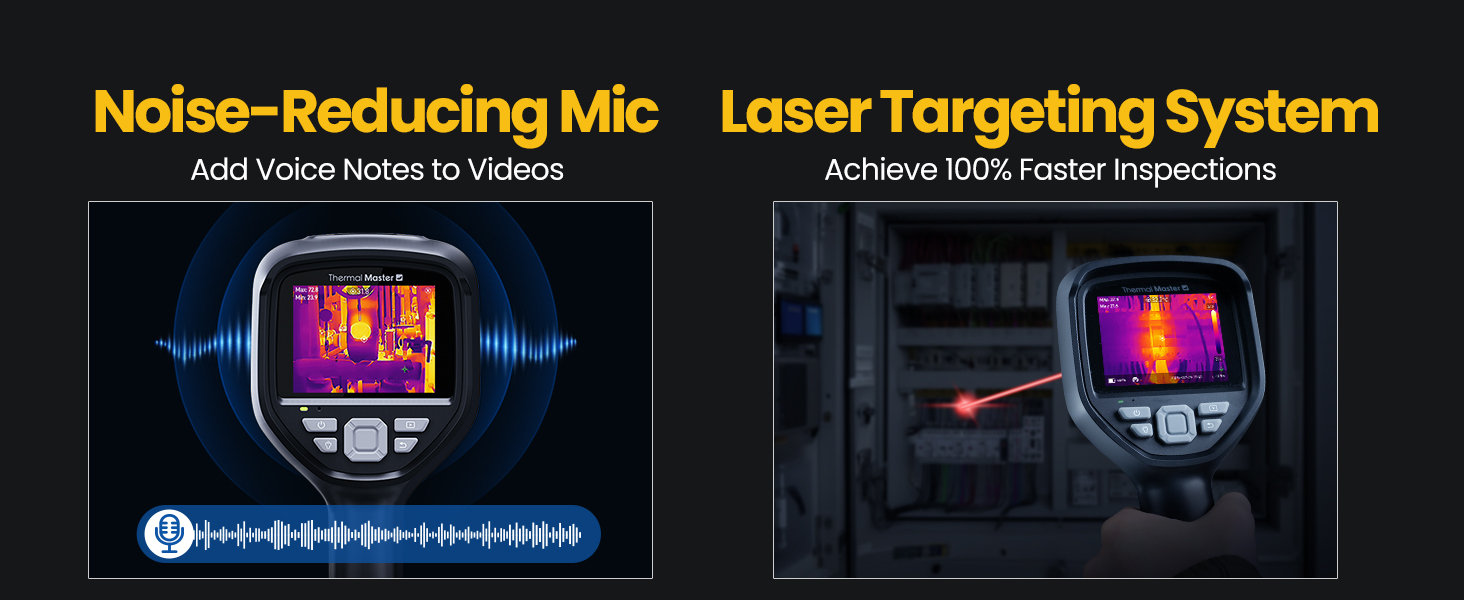
Figure 6.2: Comparison of Fusion Imaging and Picture-in-Picture modes for combining thermal and visual data.
6.4 Холболт
The THOR 002 supports both wired and wireless connectivity for data transfer and real-time analysis.
- USB холболт: Connect to a PC via the USB cable for real-time thermal analysis and data transfer.
- WiFi холболт: Pair with smartphones and iPads using the 'Thermal Smart' app for flexible operation and remote viewing.

Figure 6.3: The camera connected wirelessly to a smartphone and wired to a laptop for thermal reporting.
6.5 Бичлэг хийх
Capture and store inspection data directly on the device.
- Зураг авах: Press the trigger button once to take a photo.
- Видео бичлэг: Press and hold the trigger button to start recording video. Press again to stop.
- Дуут тэмдэглэл: Add voice annotations to videos for detailed on-site documentation.
- QR Code Management: Use QR codes for simplified file management and reporting.

Figure 6.4: The camera features a noise-reducing microphone for voice notes and a laser targeting system for precise aiming.
6.6 Zoom & Focus
-ийг тохируулна уу view for detailed inspections.
- Дижитал томруулах: Utilize the 4X digital zoom (1x, 2x, and 4x magnification) for closer inspection of targets.
- Линз: The 4.3mm lens extends the detection range by 34.4%.
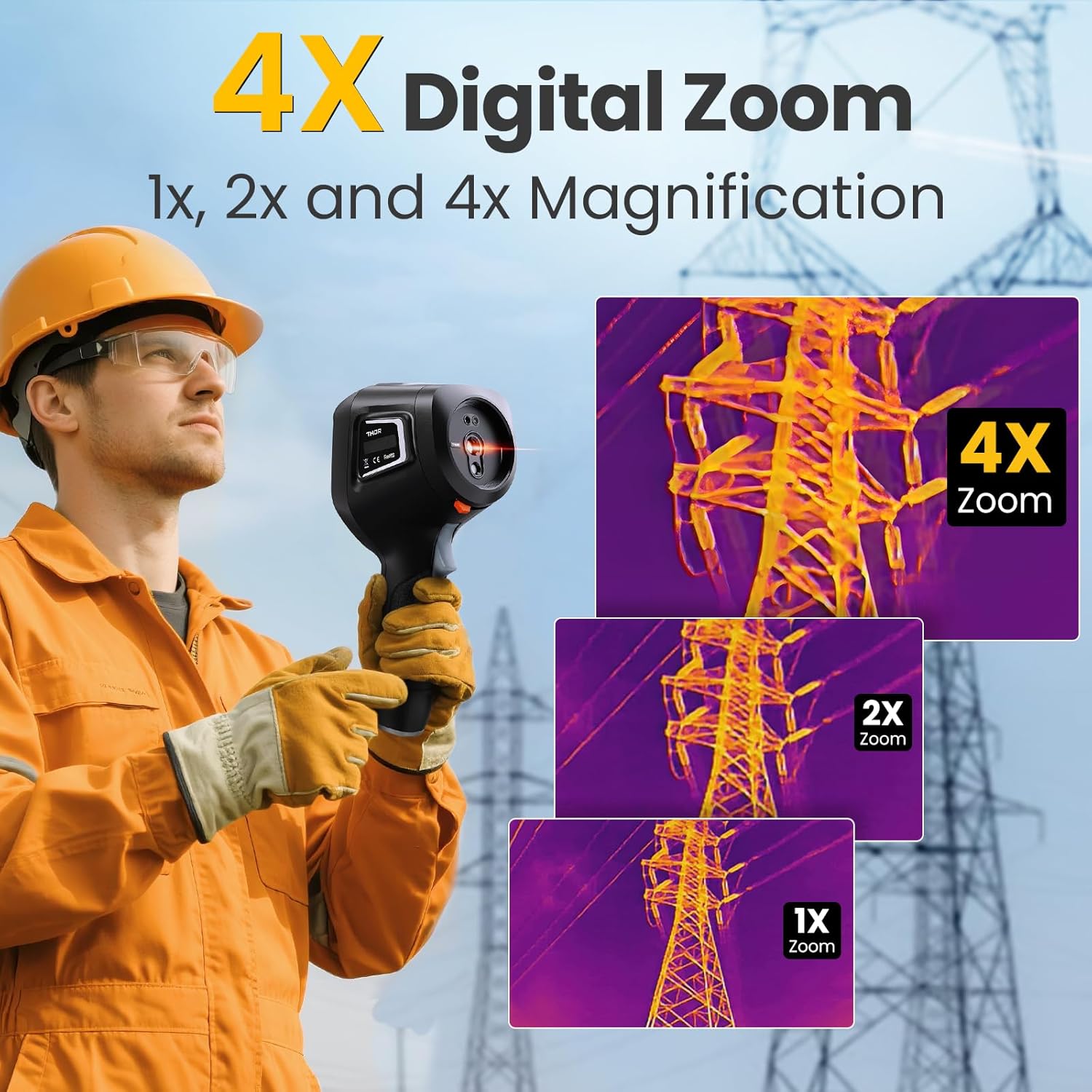
Figure 6.5: The camera's 4X digital zoom function, illustrating 1x, 2x, and 4x magnification levels.
6.7 Ялгаруулалтын тохируулга
For accurate temperature readings, adjust the emissivity setting based on the surface material being inspected.

Figure 6.6: Emissivity settings menu, allowing adjustment for various materials like polished aluminum, light aluminum oxide, brass mirror, and brass oxide.
7. Засвар үйлчилгээ
To ensure the longevity and optimal performance of your Thermal Master THOR 002, follow these maintenance guidelines:
- Цэвэрлэгээ: Use a soft, dry cloth to clean the camera body. For the lens, use a lens cleaning cloth and solution.
- Хадгалах: Store the camera in its explosion-proof case when not in use to protect it from dust, moisture, and impact.
- Батерейны арчилгаа: Avoid fully discharging the battery frequently. Charge the battery regularly, even if the camera is not in active use, to maintain battery health.
- Програм хангамжийн шинэчлэлтүүд: Periodically check the Thermal Master official website for any available firmware or software updates for your device.
8. Алдаа засах
If you encounter any issues with your Thermal Master THOR 002, refer to the common problems and solutions below. If the problem persists, contact customer support.
| Асуудал | Боломжит шалтгаан | Шийдэл |
|---|---|---|
| Камер асахгүй байна | Батерей бага эсвэл дууссан | Батерейг бүрэн цэнэглэ. |
| Зураг бүдгэрсэн эсвэл тодорхойгүй байна | Lens is dirty; Incorrect focus/zoom settings | Clean the lens. Adjust digital zoom. |
| Температурын буруу заалт | Incorrect emissivity setting; Distance to target too far | Adjust emissivity for the material. Ensure appropriate distance. |
| Cannot connect via WiFi | Incorrect WiFi password; Device not in hotspot mode | Verify password and network name. Ensure WLAN hotspot is enabled on camera. |
| PC software not working | Software not installed correctly; Compatibility issues | Download the latest software from the official website. Ensure PC meets system requirements. |
9. Техникийн үзүүлэлтүүд
Detailed technical specifications for the Thermal Master THOR 002.
| Онцлог | Тодорхойлолт |
|---|---|
| Бүтээгдэхүүний хэмжээс | 10.24 x 4.33 x 4.13 инч; 4.59 фунт |
| Загварын дугаар | Тор 002 |
| Батерей | 1 литийн ион зай шаардлагатай (дагсан) |
| Үйлдвэрлэгч | Дулааны мастер |
| Дулааны нягтрал | 512×384 X³IR |
| Visual камер | 2 МП |
| Дэлгэцийг харуулах | 3.5" 640×480 IPS |
| Сэргээх хурд | 60 Гц |
| Дулааны мэдрэмж (NETD) | 40мкв |
| Температурын хүрээ | -4°F - 1022°F (-20°C - 550°C) |
| Температурын нарийвчлал | ±3.6°F (±2°C) or ±2% of the reading |
| Дижитал томруулах | 4X |
| Хадгалах | 8 ГБ RAM, 32 ГБ дотоод санах ой |
| Зайны багтаамж | 5000 мАч |
| Зайны ажиллах хугацаа | 10.5 цаг хүртэл |
| Цэнэглэж байна | 18 Вт хурдан цэнэглэх |
| Хамгаалалтын үнэлгээ | IP54 |
| Уналтын эсэргүүцэл | 2 метр хүртэл |
10. Баталгаат хугацаа ба дэмжлэг
Thermal Master is committed to providing high-quality products and customer satisfaction.
- Баталгаат хугацаа: The Thermal Master THOR 002 comes with a 2-Year Warranty. Replacements are provided only under warranty conditions.
- Техникийн дэмжлэг: Lifetime technical support is available. For assistance, please contact Thermal Master customer service.
Figure 10.1: The camera display showing options for minimum, maximum, center, and three custom temperature points.


