1. гаруйview
The VAIO SX-R Laptop is a high-performance portable computer designed for productivity and creative tasks. It features an Intel Core Ultra 7 processor, a vibrant 14-inch WQXGA touch display, ample memory, and fast storage, all running on Windows 11 Pro.

Figure 1: VAIO SX-R Laptop, open view.
2. Бүтээгдэхүүний онцлог
- Intel Core Ultra 7 Processor: Equipped with 16 cores and AI-enhanced performance for speed and intelligent task management.
- 14" WQXGA Touch Display (2560x1600): High-resolution screen with wide color gamut and touch capability.
- 32 ГБ LPDDR5 RAM: Provides superior multitasking capabilities with instant responsiveness.
- 1TB PCIe NVMe SSD: Offers massive storage with ultra-fast read/write speeds.
- Windows 11 Pro: Includes enterprise-grade security and productivity features.
- IR Camera & Fingerprint Reader: Enhanced security and convenient login options.
- Carbon Fiber Chassis: Хөнгөн, удаан эдэлгээтэй барилга.
- Water Resistant Keyboard: Designed to withstand accidental spills.

Figure 2: Key features of the VAIO SX-R Laptop.
3. Физик хэтэрсэнview
3.1 Порт ба холбогч
The VAIO SX-R Laptop is equipped with a variety of ports for connectivity. Refer to the diagram below for port locations and types.
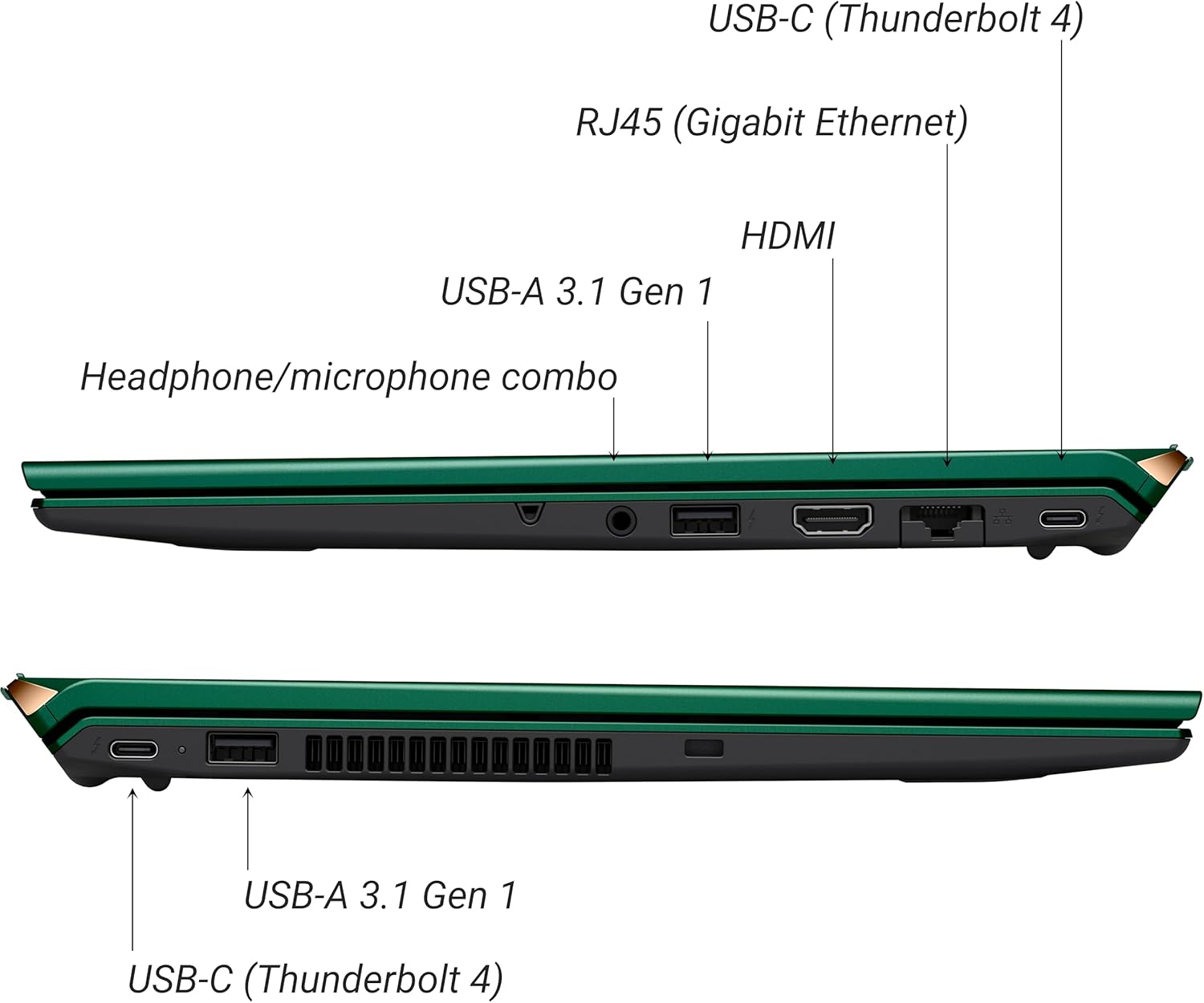
Зураг 3: Хажуу тал view of VAIO SX-R Laptop ports.
- USB-C (Thunderbolt 4): High-speed data transfer, video output, and power delivery.
- RJ45 (Гигабит Этернет): Утастай сүлжээний холболтод зориулагдсан.
- HDMI: Гадаад дэлгэцтэй холбогдоход зориулагдсан.
- USB-A 3.1 Gen 1: USB төхөөрөмжүүдийг холбоход зориулагдсан.
- Чихэвч/микрофон нийлмэл залгуур: Аудио оролт, гаралтын хувьд.
3.2 Гар ба мэдрэгчтэй самбар
The laptop features a full-sized keyboard and a responsive touchpad for navigation and input.

Зураг 4: Гар болон мэдрэгчтэй самбарын зохион байгуулалт.
4. Тохиргоо
4.1 Анхдагч асаалттай
- Unpack the VAIO SX-R laptop and all accessories.
- Цахилгаан адаптерийг зөөврийн компьютерын цэнэглэх порт руу, дараа нь цахилгаан залгуурт холбоно уу.
- Open the laptop lid. The system may power on automatically or you may need to press the power button located on the top right of the keyboard.
- Хэл, бүс нутаг, сүлжээний холболт, хэрэглэгчийн бүртгэл үүсгэх зэрэг Windows 11 Pro тохиргоог дуусгахын тулд дэлгэц дээрх зааврыг дагана уу.
4.2 Сүлжээнд холбогдох
- Wi-Fi: During initial setup or via Windows settings, select your preferred Wi-Fi network and enter the password. The VAIO SX-R supports Wi-Fi 7 for fast and stable wireless connectivity.
- Утастай (Ethernet): Connect an Ethernet cable from your router or modem to the RJ45 port on the laptop.
5. Ашиглалтын заавар
5.1 Power On/Off and Sleep
- Асаах: Open the lid or press the power button.
- Унтраах: Эхлэх товчийг дараад Асаах > Унтраах гэснийг товшино уу.
- Унтах: Тагийг хаах эсвэл Эхлүүлэх товчийг дараад Асаах > Унтах горимыг сонгоно уу.
5.2 Using the Touch Display
The 14-inch WQXGA display supports touch input. You can interact with the screen using gestures similar to a tablet or smartphone.
5.3 IR Camera and Fingerprint Reader
For enhanced security and convenience, the laptop includes an IR camera for Windows Hello face recognition and a fingerprint reader.
- Windows Hello Face Recognition: Configure this feature in Windows Settings > Accounts > Sign-in options. The IR camera will recognize your face to unlock the device.
- Хурууны хээ уншигч: Set up your fingerprint in Windows Settings > Accounts > Sign-in options for quick and secure access.
6. Засвар үйлчилгээ
6.1 Ерөнхий арчилгаа
- Зөөврийн компьютерээ цэвэр, хуурай орчинд байлга.
- Зөөврийн компьютерээ хэт өндөр температур эсвэл нарны шууд тусгалд оруулахаас зайлсхий.
- Зөөврийн компьютер дээр хүнд зүйл бүү тавь.
6.2 Цэвэрлэгээ
- Дэлгэц болон гадна талыг цэвэрлэхийн тулд зөөлөн, хөвөнгүй даавуу ашиглана уу.
- Зөрүүд толбоны хувьд бага зэрэг dampдаавууг ус эсвэл дэлгэц цэвэрлэх уусмалаар хийнэ.
- Цэвэрлэгч бодисыг зөөврийн компьютер руу шууд цацаж болохгүй.
6.3 Батерейны арчилгаа
- Зайны ашиглалтын хугацааг уртасгахын тулд зайгаа ойр ойрхон бүрэн цэнэггүй болгохоос зайлсхий.
- Хэрэв зөөврийн компьютерийг удаан хугацаагаар ашиглаагүй бол хэсэгчилсэн цэнэглэлттэй (ойролцоогоор 50%) хадгална уу.
7. Алдаа засах
7.1 Эрчим хүчний асуудал
- Зөөврийн компьютер асахгүй байна: Цахилгаан адаптер найдвартай холбогдсон, залгуур нь ажиллаж байгаа эсэхийг шалгаарай. Өөр залгуураар оролдоно уу.
- Зай цэнэглэгдэхгүй байна: Цахилгаан адаптер болон кабельд гэмтэл байгаа эсэхийг шалгана уу. Цэнэглэх порт цэвэр байгаа эсэхийг шалгаарай.
7.2 Дэлгэцийн асуудал
- Дэлгэц байхгүй: Асуудал нь зөөврийн компьютерын дотоод дэлгэцтэй холбоотой эсэхийг шалгахын тулд гадаад монитор холбоно уу.
- Мэдрэгчтэй дэлгэц хариу өгөхгүй байна: Зөөврийн компьютерээ дахин асаана уу. Дэлгэцийн драйверууд шинэчлэгдсэн эсэхийг шалгаарай.
7.3 Холболтын асуудал
- Wi-Fi холболт байхгүй: Check if Wi-Fi is enabled in Windows settings. Restart your router. Update wireless drivers.
- Bluetooth ажиллахгүй байна: Ensure Bluetooth is enabled and your device is discoverable.
8. Техникийн үзүүлэлтүүд
| Онцлог | Дэлгэрэнгүй |
|---|---|
| Загварын нэр | VAIO SX-R (VJS4R1X0811G) |
| Процессор | Intel Core Ultra 7 (16-Core, AI-Boosted) |
| Үйлдлийн систем | Windows 11 Pro |
| Дэлгэц | 14 Inches WQXGA Touch (2560x1600) |
| RAM | 32 ГБ LPDDR5 |
| Хадгалах | 1TB PCIe NVMe SSD |
| График | Нэгдсэн Intel Arc график |
| Утасгүй холболт | 802.11ax (Wi-Fi 7), Bluetooth |
| Портууд | USB-C (Thunderbolt 4) x2, USB-A 3.1 Gen 1 x3, HDMI x1, RJ45 (Gigabit Ethernet) x1, Headphone/microphone combo x1 |
| Камер | IR Camera (Windows Hello compatible) |
| Аюулгүй байдлын онцлог | Fingerprint Reader, IR Camera |
| Зайны ашиглалт | 10 цаг хүртэл (дунджаар) |
| Жин | 3.1 фунт |
| Хэмжээ (LxWxH) | 14.2 x 15 x 3.3 инч |
9. Durability and Testing
VAIO laptops are engineered with Japanese precision and undergo rigorous quality control to ensure reliability and performance. This includes various tests to withstand daily use.
9.1 Manufacturing and Quality Assurance
Video 1: VAIO Manufacturing and Durability Testing. This video demonstrates the quality control processes and durability tests performed on VAIO laptops, including keystroke testing, dust testing, LCD screen pressure testing, and opening/closure testing.
9.2 Key Durability Features
- Water Resistant Keyboard: The keyboard is designed to resist damage from accidental liquid spills.
- Screen Durability: The display undergoes pressure testing to ensure resilience.
- Тарих тест: The laptop is tested to withstand drops from up to 3 feet.

Figure 5: Water resistant keyboard testing.

Figure 6: Screen durability test in progress.

Figure 7: 3-foot drop test for VAIO laptops.
10. Баталгаат хугацаа ба дэмжлэг
Your VAIO SX-R Laptop comes with a standard manufacturer's warranty. For specific warranty terms and conditions, please refer to the documentation included with your product or visit the official VAIO support webсайт.
For technical support, troubleshooting assistance, or service requests, please contact VAIO customer support. Information regarding support channels can be found on the VAIO webсайт эсвэл бүтээгдэхүүнийхээ савлагаанд.
Protection plans are available for purchase to extend coverage beyond the standard warranty. Options include 2-Year and 4-Year Protection Plans, as well as a Complete Protect + Norton 360 monthly plan.


