Танилцуулга
Welcome to the user manual for your new VAIO SX-R Laptop. This document provides essential information to help you set up, operate, maintain, and troubleshoot your device. Please read this manual thoroughly to ensure optimal performance and longevity of your laptop.
Бүтээгдэхүүн дууссанview
The VAIO SX-R is a high-performance laptop designed for productivity and creative tasks. It features an Intel Core Ultra 7 processor, a vibrant 14-inch WQXGA Touch Display, ample memory, and fast storage.
Гол онцлогууд
- Процессор: Intel Core Ultra 7 (16-Core, AI-Boosted) for enhanced speed and responsiveness.
- Дэлгэц: 14-inch WQXGA Touch Display (2560x1600) offering high resolution and wide color gamut.
- Санах ой: 32GB LPDDR5 RAM for superior multitasking.
- Хадгалах: 1TB PCIe NVMe SSD for fast data access and ampхадгалах газар.
- Үйлдлийн систем: Windows 11 Pro with enterprise-grade security and productivity features.
- Аюулгүй байдал: Integrated IR Camera and Fingerprint Reader for secure login.
- Явах анги: Durable Carbon Fiber construction.
Laptop Components and Ports

Figure 1: VAIO SX-R Laptop, illustrating the overall design.
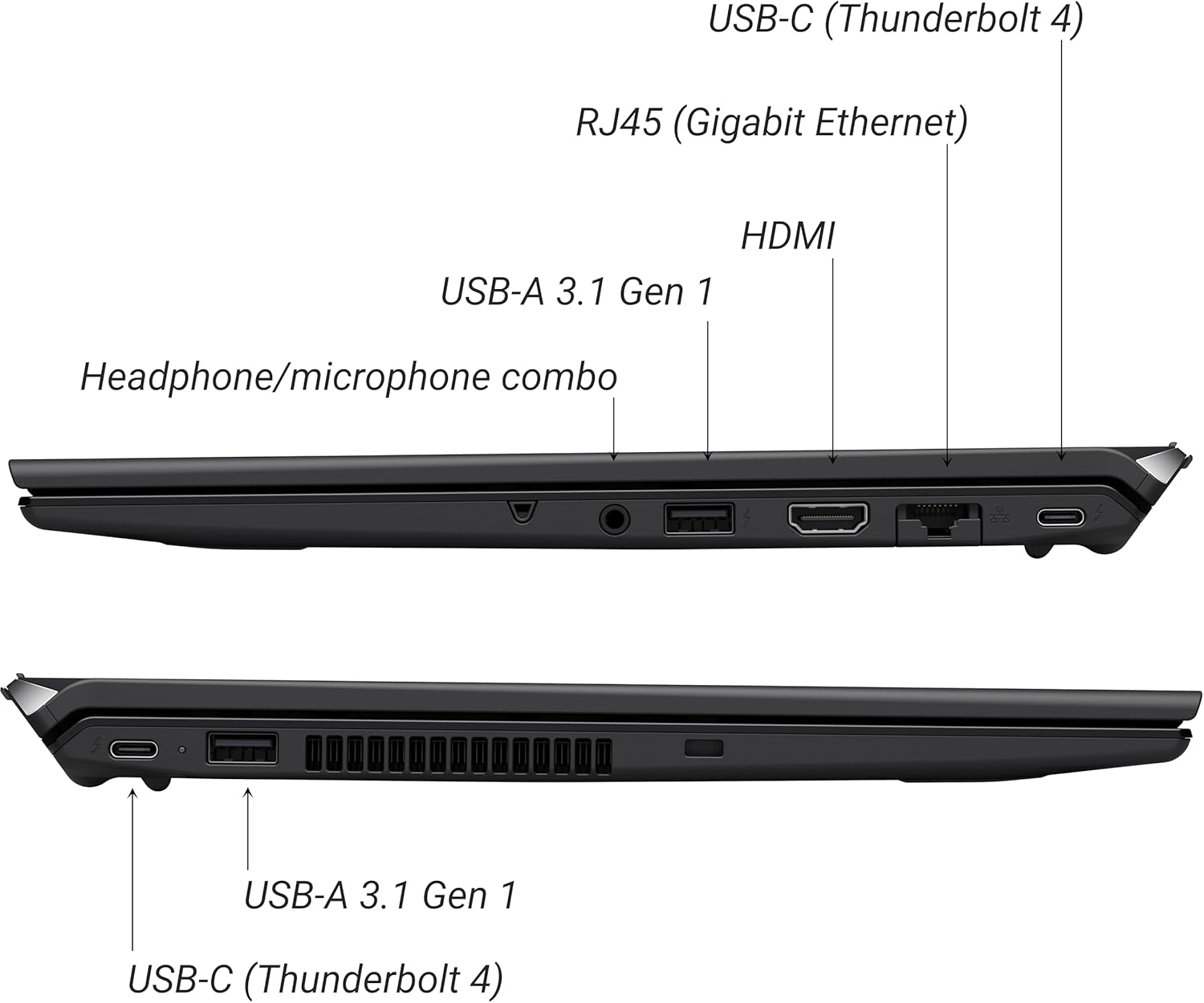
Figure 2: Port layout of the VAIO SX-R Laptop. The left side includes a headphone/microphone combo jack, USB-A 3.1 Gen 1, HDMI, RJ45 (Gigabit Ethernet), and USB-C (Thunderbolt 4). The right side features another USB-C (Thunderbolt 4) and USB-A 3.1 Gen 1 port.
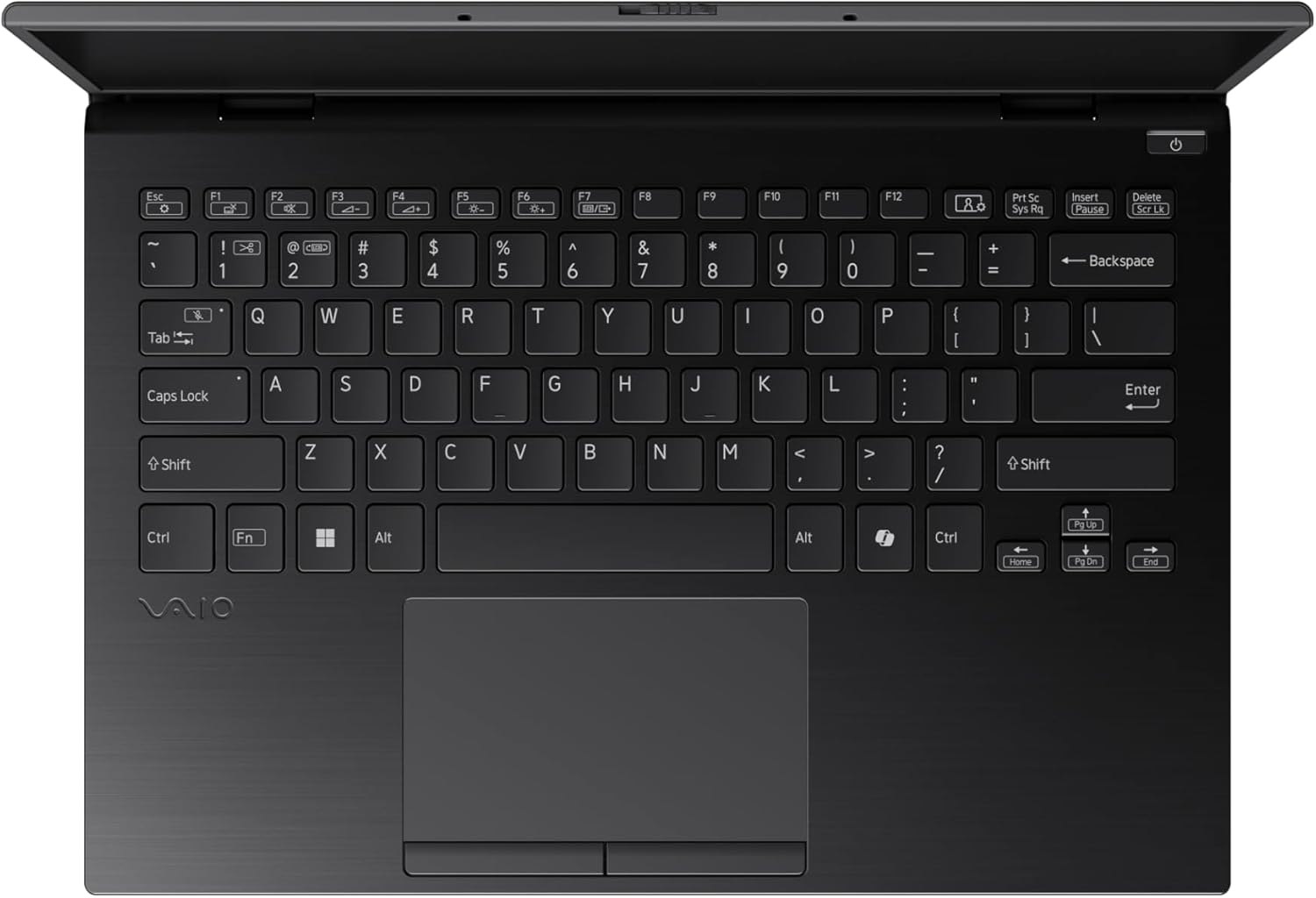
Figure 3: The VAIO SX-R Laptop keyboard and touchpad, featuring a backlit keyboard and integrated fingerprint sensor.
Тохиргоо
1. Анхдагч асаалттай
- Эрчим хүчийг холбох: АС адаптерийг зөөврийн компьютерын тэжээлийн порт руу, дараа нь ханын залгуурт залгаарай.
- Зөөврийн компьютер нээх: Зөөврийн компьютерын тагийг болгоомжтой нээнэ үү.
- Асаах: Press the power button, typically located on the top right of the keyboard deck. The power indicator light will illuminate.
2. Windows 11 Pro Setup
Follow the on-screen instructions to complete the initial Windows 11 Pro setup. This includes:
- Бүс нутаг болон гарын байрлалаа сонгох.
- Wi-Fi сүлжээнд холбогдож байна.
- Лицензийн гэрээг хүлээн зөвшөөрч байна.
- Creating or logging in with a Microsoft account.
- Setting up your PIN, fingerprint, or facial recognition (IR Camera).
3. Захын төхөөрөмжүүдийг холбох
You can connect external devices such as mice, keyboards, external monitors, and USB drives to the available ports as shown in Figure 2.
Ажиллаж байна
1. Үндсэн хэрэглээ
- Гар: Use the integrated backlit keyboard for typing. Function keys (F1-F12) often have secondary functions accessible via the 'Fn' key.
- Мэдрэгч самбар: Нарийвчлалтай мэдрэгч самбар нь навигацийн олон мэдрэгчтэй дохио зангааг дэмждэг.
- Мэдрэгчтэй дэлгэц: Interact directly with the 14-inch WQXGA display using touch gestures.
2. Хамгаалалтын онцлогууд
- Хурууны хээ уншигч: Enroll your fingerprints through Windows Settings > Accounts > Sign-in options for quick and secure login.
- IR камер: Utilize Windows Hello facial recognition for convenient and secure access. Set this up in Windows Settings > Accounts > Sign-in options.
3. Эрчим хүчний менежмент
- Унтах горим: Close the lid or press the power button briefly to put the laptop to sleep.
- Унтраах: Go to Start > Power > Shut down to turn off the laptop completely.
- Дахин эхлүүлэх: Go to Start > Power > Restart to reboot the system.
Засвар үйлчилгээ
1. Цэвэрлэгээ
- Дэлгэц: Зөөлөн, хөвөнгүй даавууг бага зэрэг хэрэглээрэй dampусаар эсвэл дэлгэц цэвэрлэгчээр дүүргэнэ. Химийн хүчтэй бодисоос зайлсхий.
- Гар болон явах эд анги: Зөөлөн даавуу хэрэглээрэй. Зөрүүд шороонд бага зэрэг damp Зөөлөн савантай даавуу хэрэглэж болох бөгөөд ингэснээр шингэн нүхэнд орохгүй байх боломжтой.
- Портууд: Боомтуудын тоосыг зөөлөн цэвэрлэхийн тулд шахсан агаар ашиглана.

Figure 4: The VAIO SX-R features a water-resistant keyboard, designed to withstand minor spills.
2. Програм хангамжийн шинэчлэлтүүд
Regularly update your Windows operating system and device drivers to ensure optimal performance, security, and compatibility. Access updates via Windows Settings > Windows Update.
3. Зайны арчилгаа
- Хэт их температураас зайлсхий.
- Зайг ойр ойрхон бүрэн цэнэглэж болохгүй.
- Удаан хугацааны хадгалалтын хувьд батерейг ойролцоогоор 50-60% хүртэл цэнэглээрэй.
Алдааг олж засварлах
Энэ хэсэгт танд тулгарч болох нийтлэг асуудлуудыг авч үзэх болно.
1. Зөөврийн компьютер асахгүй байна
- Хувьсах гүйдлийн адаптер нь зөөврийн компьютер болон ажиллаж байгаа цахилгааны залгуурт найдвартай холбогдсон эсэхийг шалгаарай.
- Цахилгаан залгуур ажиллаж байгаа эсэхийг өөр төхөөрөмжид залгаж шалгана уу.
- Хэрэв батерей бүрэн дууссан бол асаахаасаа өмнө дор хаяж 30 минутын турш цэнэглэхийг зөвшөөрнө үү.
2. Дэлгэцийн асуудлууд
- Дэлгэц байхгүй: Асуудал нь зөөврийн компьютерын дотоод дэлгэцтэй холбоотой эсэхийг шалгахын тулд гадаад дэлгэцийг HDMI порт руу холбоно уу.
- Flickering/Distorted Display: Update your graphics drivers. Adjust display resolution and refresh rate in Windows Settings > System > Display.
3. Wi-Fi холболтын асуудлууд
- Ensure Wi-Fi is enabled in Windows Settings > Network & internet > Wi-Fi.
- Чиглүүлэгч болон модемоо дахин эхлүүлнэ үү.
- Windows сүлжээний алдааг олж засварлагчийг ажиллуулна уу.
4. Удаан гүйцэтгэл
- Ар талд ажиллаж байгаа шаардлагагүй програмуудыг хаа.
- Check Task Manager (Ctrl+Shift+Esc) for resource-intensive processes.
- Ensure your system is up to date and free from malware.
Үзүүлэлтүүд
Below are the detailed specifications for the VAIO SX-R Laptop (Model: VJS4R1X0511B).
| Онцлог | Тодорхойлолт |
|---|---|
| Брэнд | VAIO |
| Загварын нэр | VAIO SX-R |
| Загварын дугаар | VJS4R1X0511B |
| Үйлдлийн систем | Windows 11 Pro |
| Процессор | Intel Core Ultra 7 (1.4 GHz) |
| RAM санах ой | 32 ГБ LPDDR5 |
| Хатуу диск | 1 TB PCIe NVMe SSD |
| Дэлгэцийн хэмжээ | 14 инч |
| Дэлгэцийн нягтрал | 2560 x 1600 пиксел (WQXGA) |
| График карт | Нэгдсэн Intel график |
| Утасгүй төрөл | 802.11bgn |
| USB 3.0 портууд | 3 |
| Батерейны дундаж хугацаа | 10 цаг |
| Зүйлийн жин | 3.1 фунт |
| Бүтээгдэхүүний хэмжээс | 14.2 x 15 x 3.3 инч |
| Онцлог шинж чанарууд | Backlit Keyboard, Fingerprint Reader, HD Audio, Memory Card Slot, Webкамер |
Баталгаат болон дэмжлэг
1. Баталгаат хугацааны мэдээлэл
Your VAIO SX-R Laptop is covered by a manufacturer's warranty. Please refer to the warranty card included with your product packaging for specific terms, conditions, and duration. Keep your proof of purchase for warranty claims.
2. Техникийн дэмжлэг
For technical assistance, troubleshooting beyond this manual, or service inquiries, please contact VAIO customer support. You can typically find contact information on the official VAIO webсайт эсвэл зөөврийн компьютертэй хамт өгсөн баримт бичигт байгаа болно.
- Онлайн дэмжлэг: Visit the official VAIO support webТүгээмэл асуултууд, драйвер татаж авах болон холбоо барих сонголтуудын сайт.
- Утасны дэмжлэг: Бүс нутгийн дэмжлэг үзүүлэх утасны дугаарыг бүтээгдэхүүнийхээ баримт бичгээс харна уу.


