1. Танилцуулга
The OMBAR N1 is a high-performance rear view mirror dash camera system designed to enhance driving safety and provide comprehensive video recording. It features dual cameras for front 4K and rear 2.5K recording, advanced driver-assistance systems (ADAS), blind spot detection (BSD), lane change assist (LCA), GPS tracking, parking monitoring, and Wi-Fi connectivity for easy file удирдлага.

Image 1.1: OMBAR N1 Mirror Dash Cam and companion mobile application interface.
2. Багцын агуулга
Доор жагсаасан бүх зүйл таны багцад байгаа эсэхийг шалгана уу. Хэрэв ямар нэгэн зүйл дутуу эсвэл эвдэрсэн бол хэрэглэгчийн дэмжлэгтэй холбоо барина уу.

Image 2.1: All components included in the OMBAR N1 Mirror Dash Cam package.
- 1 x OMBAR N1 4K Mirror Dash Cam
- 1 x 2.5K Rear Camera with Screws and Adhesive Mount
- 1 x 12ft Type-C Power Cable with Car Charger
- 1 x 20 фут арын камерын кабель
- 1 x гадаад GPS антен
- 1 x 64 ГБ MicroSD карт
- 1 x Anti-Glare Protective Film
- 1 x OMBAR User Manual
- 5 х кабелийн хавчаар
- 4 х оосор
- 1 x Pry хэрэгсэл
- 1 x Cleaning Wipes
3. Тохиргоо ба суурилуулалт
3.1. Зураасны камерыг суурилуулах
- Attach to Rear View Толин тусгал: Secure the N1 Mirror Dash Cam over your existing rear view mirror using the provided straps. Ensure it is firmly attached and centered for optimal viewing.
- Adjust Front Camera Lens: The front camera lens can be adjusted to capture the desired field of view.
3.2. Арын камер суурилуулах
- Суулгах байршлыг сонгоно уу: Install the rear camera on the rear windshield or near the license plate. Ensure the view саадгүй байна.
- Connect Rear Camera Cable: Route the 20ft rear camera cable from the main dash cam unit to the rear camera. Connect the cable securely.
- Арын камерыг тохируулна уу View: The rear camera display can be adjusted for mirror flip and vertical flip settings to match your installation orientation.

Image 3.1: Adjustable rear camera display options for mirror and vertical flipping.
3.3. Connecting Power and GPS
- MicroSD карт оруулах: Insert the provided 64GB MicroSD card into the designated slot on the dash cam.
- GPS антенн холбох: Plug the external GPS antenna into the dash cam and mount it on the dashboard or windshield where it has a clear view тэнгэрийн.
- Эрчим хүчний холболт: Connect the Type-C power cable to the dash cam and plug the car charger into your vehicle's 12V power outlet.
3.4. Applying Anti-Glare Protective Film
The anti-glare protective film helps minimize reflections and enhances contrast for improved visibility. Carefully apply the film to the dash cam screen, ensuring no air bubbles.

Image 3.2: The anti-glare protective film reduces reflections and improves screen clarity.
4. Ашиглалтын заавар
4.1. Үндсэн үйл ажиллагаа
- Асаах/унтраах: The dash cam will automatically power on and begin recording when the vehicle starts, and power off when the ignition is turned off.
- Дэлгэцийн дэлгэц: The 12-inch IPS display provides a wide field of view. Brightness, lens angle, and field of view can be adjusted via the touchscreen interface.

Image 4.1: Adjustable screen settings for optimal viewтуршлага.
4.2. Бичлэг хийх горимууд
- Давталтын бичлэг: The dash cam records video in segments (1, 3, or 5 minutes). When the MicroSD card is full, the oldest unlocked recordings are automatically overwritten.
- Яаралтай тусламжийн бичлэг: In case of a collision, the built-in G-sensor automatically locks the current video segment to prevent it from being overwritten. This can also be triggered manually or via voice command.

Image 4.2: Emergency recording methods ensure critical footage хадгалагдсан.
4.3. Зогсоолын хяналт
The 24-hour parking monitor provides surveillance when your vehicle is parked. This feature requires a hardwire kit (sold separately, ASIN: B0DQK1QW7ZM) for continuous power.

Image 4.3: The 24-hour parking monitor provides security for your vehicle.
4.4. Дуут удирдлага
The dash cam supports various voice commands for hands-free operation. Examples include "Take photo," "Start recording," "Turn on WiFi," "Turn off display," and "Show rear camera."

Image 4.4: Voice control allows for hands-free operation of the dash cam.
4.5. Wi-Fi болон аппликейшн хяналт
Connect the dash cam to your smartphone via 5.8GHz Wi-Fi using the OMBAR app. This allows for live viewing, downloading, and sharing of recorded footage. The Wi-Fi range is approximately 25ft (about 1.5 parking spaces) and does not support remote live view.

Image 4.5: The OMBAR app facilitates video management via 5.8GHz Wi-Fi.
5. Нарийвчилсан шинж чанарууд
5.1. ADAS (Advanced Driver Assistance System)
The ADAS feature provides real-time alerts to help prevent accidents. This includes:
- Урд талын мөргөлдөөний анхааруулга: Alerts when approaching a vehicle too quickly.
- Замаас гарах сэрэмжлүүлэг: Notifies if the vehicle drifts out of its lane.
- Pedestrian Collision Warning: Detects pedestrians in the vehicle's path.
- Forward Vehicle Start Warning: Alerts when traffic ahead begins to move.
- Close Range Warning: Warns of objects in close proximity.
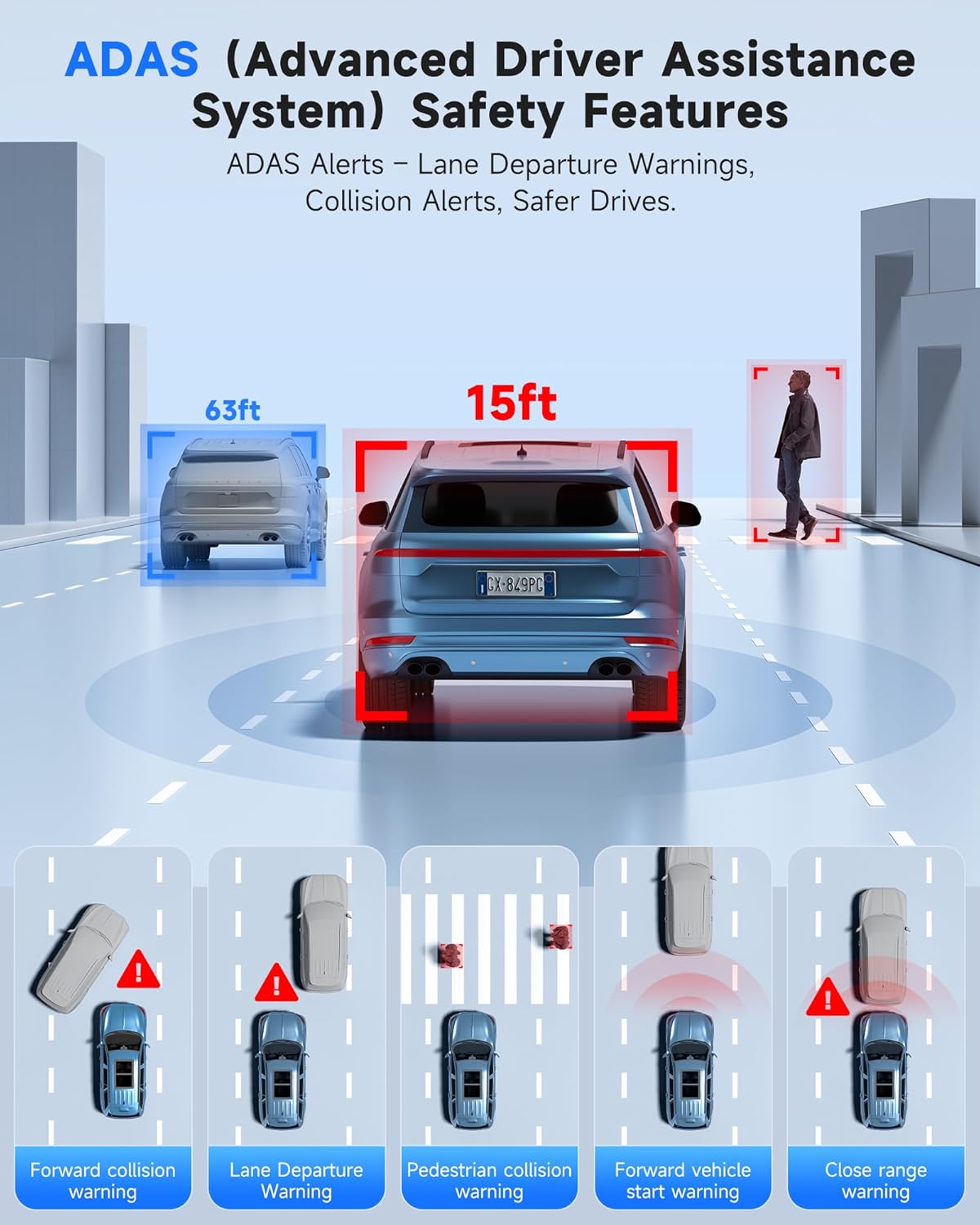
Image 5.1: ADAS provides multiple safety alerts for a safer driving experience.
5.2. BSD (Blind Spot Detection) & LCA (Lane Change Assist)
These features provide 360° protection by monitoring your vehicle's sides and rear for approaching vehicles.
- Blind Spot Detection: Alerts to vehicles in your blind spots.
- Lane Change Assist: Warns if a lane change is unsafe due to approaching vehicles.

Image 5.2: BSD and LCA provide warnings for vehicles in blind spots and during lane changes.
5.3. Суурилуулсан GPS болон Маршрут Хяналт
The integrated GPS module records your driving route, speed, and location data, which can be reviewed via the OMBAR app or dedicated PC software.

Image 5.3: GPS tracking records route and speed data for review.
5.4. Шөнийн хараа
Advanced HDR technology and sensor capabilities ensure clear video recording even in low-light conditions, capturing details like license plates at night.

Image 5.4: Night vision capabilities provide clear footage гэрэл багатай орчинд.
6. Засвар үйлчилгээ
- Цэвэрлэгээ: Use a soft, dry cloth to clean the dash cam screen and lenses. Avoid abrasive cleaners.
- MicroSD картын арчилгаа: Format the MicroSD card regularly (e.g., once a month) to ensure optimal performance and prevent data corruption. Use only high-quality MicroSD cards.
- Програм хангамжийн шинэчлэлтүүд: Check the OMBAR website or app periodically for firmware updates to ensure your dash cam has the latest features and improvements.
7. Алдаа засах
| Асуудал | Боломжит шалтгаан | Шийдэл |
|---|---|---|
| Зураасан камер асахгүй байна. | No power supply; faulty cable. | Check power cable connection to car charger and dash cam. Ensure car's 12V outlet is functional. |
| Бичлэг зогсох эсвэл гацах. | MicroSD card full or corrupted; low-quality MicroSD card. | Format the MicroSD card. Replace with a high-speed, high-endurance MicroSD card if issues persist. |
| GPS дохио олдсонгүй. | GPS antenna obstructed or disconnected. | Ensure GPS antenna is mounted with a clear view of the sky and securely connected. |
| Wi-Fi холболтын асуудал. | Incorrect password; out of range. | Verify Wi-Fi password. Ensure device is within 25ft of the dash cam. |
| Screen is too dark/bright. | Brightness settings. | Adjust screen brightness via the touchscreen settings. |
8. Техникийн үзүүлэлтүүд
| Онцлог | Дэлгэрэнгүй |
|---|---|
| Загварын нэр | N1 |
| Урд камерын нягтрал | 4K (3840x2160) @ 30fps |
| Арын камерын нягтрал | 2.5K (2560x1440) @ 30fps |
| Дэлгэц | 12 инчийн IPS мэдрэгчтэй дэлгэц |
| Холболт | 5.8GHz Wi-Fi, USB, Memory SD Card |
| Онцлог шинж чанарууд | Built-In WiFi, Built-In GPS, G-Sensor, ADAS, Blind Spot Detection, Lane Change Assist, Parking Monitor, Reverse Assist, Touch Screen, App Control, Voice Control, Loop Recording, Built-In Microphone, Built-In Speaker, Built-In Supercapacitor, HDR, Night Vision |
| Хадгалах | MicroSD картыг дэмждэг (64GB багтаасан) |
| Ашиглалтын температур | -20°F - 176°F (-28°C - 80°C) |
| Бүтээгдэхүүний хэмжээс | 0.1 x 0.5 x 0.5 инч |
| Зүйлийн жин | 2.38 фунт |
| Суурилуулах төрөл | Арынview Толин тусгал суурилуулах |
| Тээврийн хэрэгслийн үйлчилгээний төрөл | Автобус, Машин, Минивэн, Ачааны машин |

Image 8.1: The dash cam is designed for reliable operation in extreme temperatures.
9. Баталгаат хугацаа ба дэмжлэг
- Баталгаат хугацаа: The OMBAR N1 Mirror Dash Cam comes with a 1-year manufacturer's warranty.
- Буцаах бодлого: A 30-day return policy is applicable from the date of purchase.
- Хэрэглэгчийн дэмжлэг: For technical assistance or warranty claims, please contact OMBAR customer support at support@ombars.com. Support is typically available within 24 hours.


