1. Танилцуулга
This manual provides essential information for setting up, operating, and maintaining your DOOGEE Tab A9 Pro Android 15 Tablet. Please read it thoroughly to ensure proper usage and to maximize your device's capabilities.
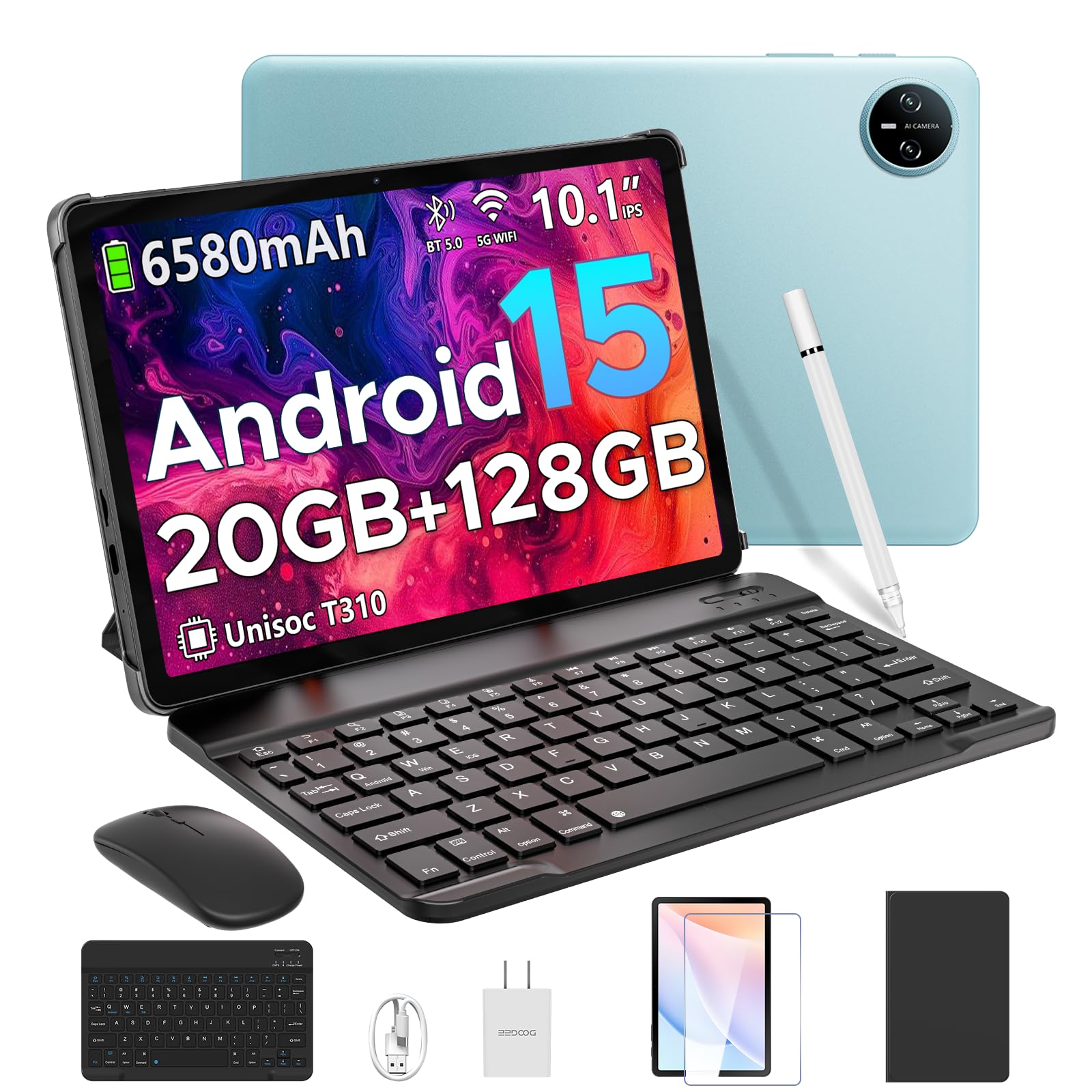
Image 1.1: The DOOGEE Tab A9 Pro Tablet.
2. Хайрцагт юу байна
Your DOOGEE Tab A9 Pro package includes the following items:
- DOOGEE Tab A9 Pro Tablet (x1)
- С хэлбэрийн USB кабель (x1)
- Цэнэглэгч (x1)
- Гарын авлага (x1)
- Баталгаат карт (x1)
- Bluetooth Keyboard (VIP Edition)
- Bluetooth Mouse (VIP Edition)
- Stylus (VIP Edition)
- Leather Protective Cover (VIP Edition)
- Tempered Film (VIP Edition)

Image 2.1: All items included in the DOOGEE Tab A9 Pro package.
3. Бүтээгдэхүүн дууссанview
The DOOGEE Tab A9 Pro features a sleek design with essential components for user interaction and connectivity.
3.1 Физик шинж чанарууд
- Дэлгэц: 10.1-inch IPS HD Ultra-Clear Display.
- Камерууд: 8MP Main Camera (rear) and 5MP Front Camera.
- Аудио: High-Quality Dual Speakers and a 3.5mm Audio Jack.
- Портууд: Type-C USB port for charging and data transfer.
- Товчлуур: Power button and volume controls located on the side.

Зураг 3.1: Ар талд view of the DOOGEE Tab A9 Pro, highlighting the camera module.

Зураг 3.2: Хажуу тал view of the tablet, illustrating the power button, volume controls, and ports.
Видео 3.1: Богино видео шоуasing the ultra-thin body and design of the DOOGEE Tab A9 Pro.
4. Тохиргоо
4.1 Анхны цэнэглэлт
Before first use, fully charge your tablet using the provided Type-C USB cable and charger. The battery indicator on the screen will show charging progress.
4.2 Асаах/унтраах
- Асаахын тулд: Press and hold the power button until the DOOGEE logo appears.
- Унтраахын тулд: Press and hold the power button, then select 'Power off' from the options that appear on the screen.
4.3 Анхны тохиргооны шидтэн
Upon first power-on, follow the on-screen instructions to complete the initial setup, including language selection, Wi-Fi connection, and Google account login.
5. Operating System (Android 15)
The DOOGEE Tab A9 Pro runs on the Android 15 operating system, offering a smart, fluid, and secure user experience with enhanced privacy features.

Image 5.1: Visual representation of the Android 15 system interface.
Видео 5.1: Дууслааview of the DOOGEE Tab A9 Pro running Android 15.
6. Performance & Storage
The tablet is designed for smooth operation and ampхадгалах багтаамж.
6.1 Процессор
Powered by the energy-efficient Unisoc T310 octa-core processor, the tablet ensures seamless performance for various tasks.

Image 6.1: Diagram illustrating the Unisoc T310 Quad-Core Processor.
6.2 RAM and Storage
The tablet features 20GB of RAM (4GB physical + 16GB virtual) and 128GB of internal storage. Storage can be expanded up to 2TB using a microSD card (sold separately).

Image 6.2: Visual representation of the tablet's RAM and ROM configuration.
7. Display & Audio
Experience vibrant visuals and clear sound with your tablet.
7.1 Дэлгэц
The 10.1-inch IPS HD display offers wide viewing angles and a resolution of 1280x800 for an immersive visual experience.

Image 7.1: The 10.1-inch IPS HD display with key specifications.
7.2 Аудио
Built-in dual speakers deliver clear and dynamic sound for movies, music, and video calls.

Image 7.2: Illustration of the tablet's dual speaker system.
8. Камер
Capture moments and conduct video calls with the integrated cameras.
8.1 Main Camera
The 8MP main camera allows you to take sharp photos.

Image 8.1: Close-up of the 8MP main camera on the tablet's rear.
8.2 урд камер
The 5MP front camera is suitable for selfies and video calls.

Image 8.2: The 5MP front camera in use for a video call.
9. Холболт
Stay connected with various wireless options.
9.1 WiFi
Supports 2.4G/5G dual-band Wi-Fi for smooth, high-speed internet access.

Image 9.1: Features of WiFi 5 connectivity on the tablet.
9.2 Блютүүт
Equipped with Bluetooth 5.0 for connecting wireless accessories.
9.3 GPS
Built-in GPS provides accurate navigation for travel and outdoor activities.
10. Дагалдах хэрэгсэл
The DOOGEE Tab A9 Pro comes with a suite of accessories to enhance its functionality.
10.1 Bluetooth гар
Connect the Bluetooth keyboard for a desktop-like typing experience, ideal for productivity tasks.

Image 10.1: The tablet connected to its Bluetooth keyboard for efficient typing.
10.2 Mouse and Stylus
The included mouse and stylus further enhance navigation and interaction, especially for note-taking and creative tasks.

Image 10.2: The tablet shown with its accompanying keyboard and mouse.

Image 10.3: The tablet being used with the stylus for precise input.
10.3 Хамгаалалтын хайрцаг
The protective case shields your tablet from drops and scratches and can also function as a stand.

Image 10.4: The tablet securely placed within its protective case.
11. Зайны удирдлага
The tablet is equipped with a high-capacity battery for extended use.
11.1 Зайны хүчин чадал
Features a long-lasting 6580mAh battery, providing hours of power for various activities without frequent recharging.

Image 11.1: Diagram showing the 6580mAh battery inside the tablet.
Video 11.1: A video highlighting the large battery capacity of the DOOGEE Tab A9 Pro.
12. Хамгаалалтын онцлогууд
Protect your device and data with built-in security options.
12.1 Царайгаар түгжээ тайлах
Effortlessly unlock your tablet using facial recognition technology.

Image 12.1: Illustration of the facial recognition unlock feature.
12.2 Fortified Privacy Shield
Android 15 provides enhanced privacy controls, robust data encryption, timely security patches, and proactive app screening for unbreakable security.

Зураг 12.2: Дууслааview of Android 15's privacy features.
13. Multitasking & Productivity
Optimize your workflow and entertainment with these features.
13.1 Дэлгэц хуваах олон үйлдэлт горим
Run two applications simultaneously side-by-side for enhanced productivity.

Image 13.1: The tablet displaying two apps in split-screen mode.
13.2 Built-in WPS Office
The tablet comes with WPS Office pre-installed, providing PC-level productivity for documents, spreadsheets, and presentations (Note: WPS Office feature may be unavailable in certain regions).

Image 13.2: The tablet showcasing WPS Office applications.
Video 13.1: A video demonstrating the DOOGEE Tab A9 Pro's capabilities for learning and work.
14. Засвар үйлчилгээ
14.1 Цэвэрлэгээ
Таблетын дэлгэц болон их биеийг цэвэрлэхийн тулд зөөлөн, хөвөнгүй даавуу ашиглана уу. Химийн хатуу бодис, зүлгүүрийн материал ашиглахаас зайлсхий.
14.2 Програм хангамжийн шинэчлэлтүүд
Regularly check for and install system updates to ensure optimal performance, security, and access to new features. Navigate to Тохиргоо > Систем > Системийн шинэчлэл шинэчлэлтүүдийг шалгахын тулд.
15. Алдаа засах
Энэ хэсэгт таны таблеттай холбоотой нийтлэг асуудлуудыг авч үзэх болно.
15.1 Таблет асахгүй байна
- Таблет хангалттай цэнэглэгдсэн эсэхийг шалгаарай. Үүнийг цэнэглэгчтэй дор хаяж 30 минут холбоно уу.
- Албадан дахин асаахын тулд асаах товчийг 10-15 секундын турш дарна уу.
15.2 Удаан гүйцэтгэл
- Шаардлагагүй дэвсгэр програмуудыг хаа.
- Байнга ашиглагддаг програмуудын кэшийн өгөгдлийг арилгах.
- Ensure sufficient storage space is available. Delete old files or transfer them to external storage.
- Таблетаа дахин эхлүүлнэ үү.
15.3 Wi-Fi холболтын асуудал
- Wi-Fi чиглүүлэгч болон таблетаа дахин эхлүүлнэ үү.
- Wi-Fi сүлжээгээ мартаад дахин холбогдоно уу.
- Та Wi-Fi дохионы хүрээнд байгаа эсэхээ шалгаарай.
15.4 Accessories Not Connecting
- Ensure Bluetooth is enabled on the tablet and the accessory.
- Check if the accessory is charged and in pairing mode.
- Refer to the accessory's individual manual for specific pairing instructions.
16. Техникийн үзүүлэлтүүд
| Онцлог | Тодорхойлолт |
|---|---|
| Брэнд | DOOGEE |
| Загварын нэр | TABA9PRO |
| Загварын дугаар | Таб A9 Pro |
| Үйлдлийн систем | Android 15 |
| Байнгын дэлгэцийн хэмжээ | 10.1 инч |
| Дэлгэцийн нягтрал | 1280*800 HD |
| Хамгийн их дэлгэцийн нягтрал | 1280*800 пиксел |
| Процессорын брэнд | Unisoc |
| График процессор | Мали-G52 1-цөмт-2EE |
| Санах ойн хадгалах багтаамж | 128 ГБ (microSD-ээр 2 ТБ хүртэл өргөтгөх боломжтой) |
| RAM | 20GB (4GB физик + 16GB виртуал) |
| Утасгүй төрөл | 802.11ac, 802.11n (2.4G/5G Dual-band WiFi) |
| Bluetooth | 5.0 |
| Зайны багтаамж | 6580 мАч лити полимер (оруулсан) |
| Батерейны дундаж хугацаа | Up to 2 years (estimated lifespan) |
| Зүйлийн жин | 1.05 фунт |
| Бүтээгдэхүүний хэмжээс | 9.55 x 6.33 x 0.31 инч |
| Өнгө | Blue (other colors available) |
| Эхний боломжтой огноо | 23 оны дөрөвдүгээр сарын 2025 |
17. Баталгаат хугацаа ба дэмжлэг
17.1 Баталгаат хугацааны мэдээлэл
Your DOOGEE Tab A9 Pro comes with a 2-Year Limited Warranty. Please refer to the included Warranty Card for detailed terms and conditions.
17.2 Хэрэглэгчийн дэмжлэг
For any questions or technical assistance, please contact our support team. We aim to respond within 24 hours.
- Онлайн дэмжлэг: 24/7 ашиглах боломжтой.
- Буцах: 30-day money-back guarantee and free returns.


