AULA WIN60 HE PRO 60% Mechanical Gaming Keyboard User Manual
Model: WIN60 HE PRO | Brand: AULA
1. Танилцуулга
This manual provides detailed instructions for the AULA WIN60 HE PRO 60% Mechanical Gaming Keyboard. Designed for high-performance gaming, this keyboard features Hall Effect magnetic switches, rapid trigger mode, an 8000Hz polling rate, and customizable RGB lighting. Please read this manual thoroughly to ensure proper setup, operation, and maintenance of your keyboard.
Figure 1: AULA WIN60 HE PRO 60% Mechanical Gaming Keyboard with highlighted features.
The AULA WIN60 HE PRO features advanced Hall Effect magnetic switches, which detect key presses using magnetic fields rather than physical contact. This design provides:
Тохируулж болох үйлдлүүд: Customize the actuation point of each key to your preference for faster response or more deliberate presses.
Rapid Trigger Mode: Allows keys to activate and deactivate based on movement rather than a fixed actuation point, enabling ultra-fast repeated inputs and precise control, especially beneficial for FPS games. The ultra-low RT step distance is 0.02mm.
Бат бөх чанар: Absence of physical contact reduces wear and tear.
Figure 3: Rapid Trigger technology for enhanced gaming performance.
Video 2: Demonstrating the hot-swappable magnetic switches, including Gray Wood Magnetic Switch and Wing Chun Magnetic Switch variants.
3.2 8000Гц-ийн санал өгөх хурд
The keyboard features an 8000Hz polling rate, meaning it reports key presses to your computer 8000 times per second. This results in:
Ultra-Fast Response Times: Minimizes input lag for immediate in-game actions.
Нарийвчлалын хяналт: Ensures every keystroke is registered accurately and without delay.
Figure 4: 8000Hz Hyper-Polling Technology for minimal latency.
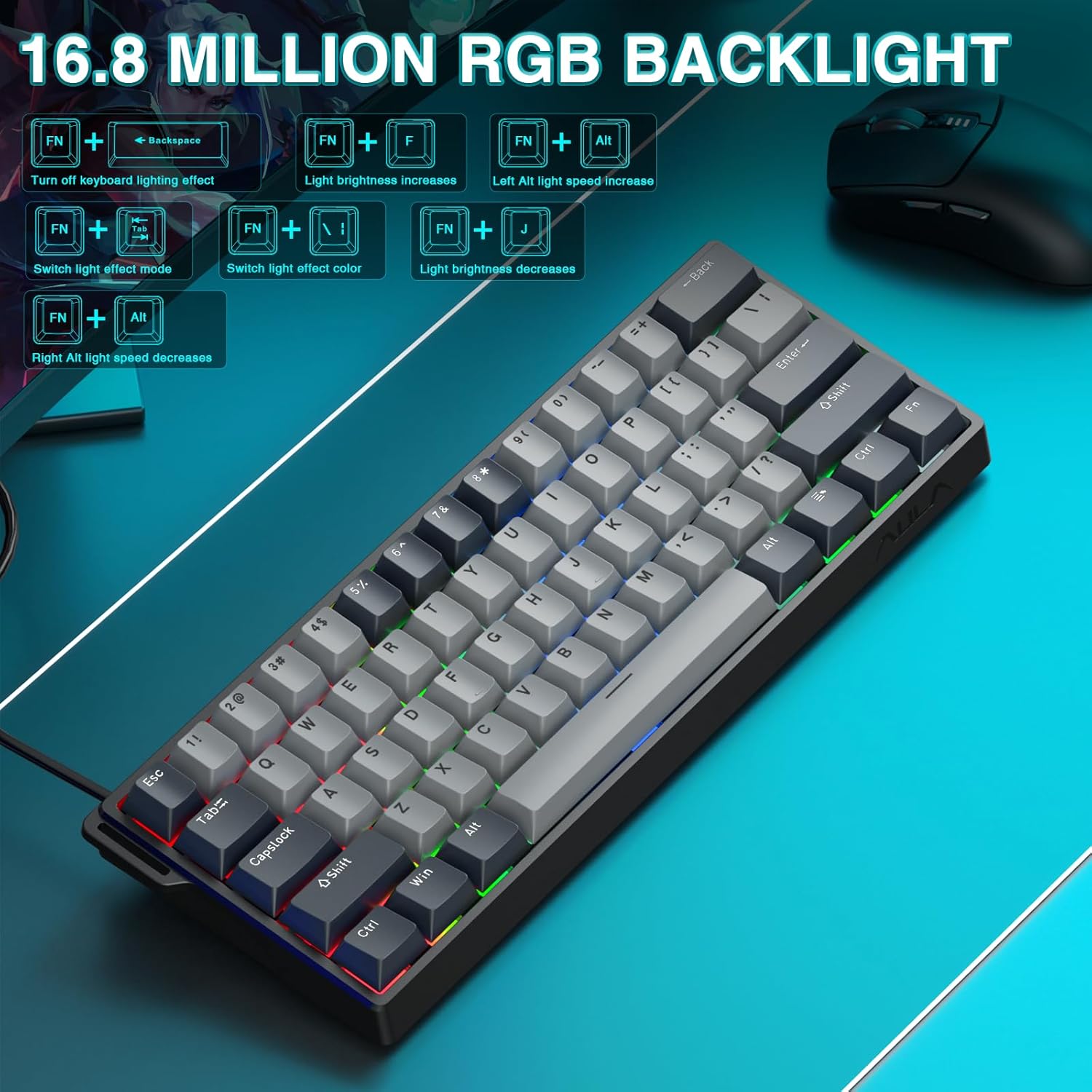
3.3 Динамик RGB гэрэлтүүлэг
The keyboard offers 16.8 million customizable RGB color options and various lighting effects. Use the following key combinations for quick adjustments:
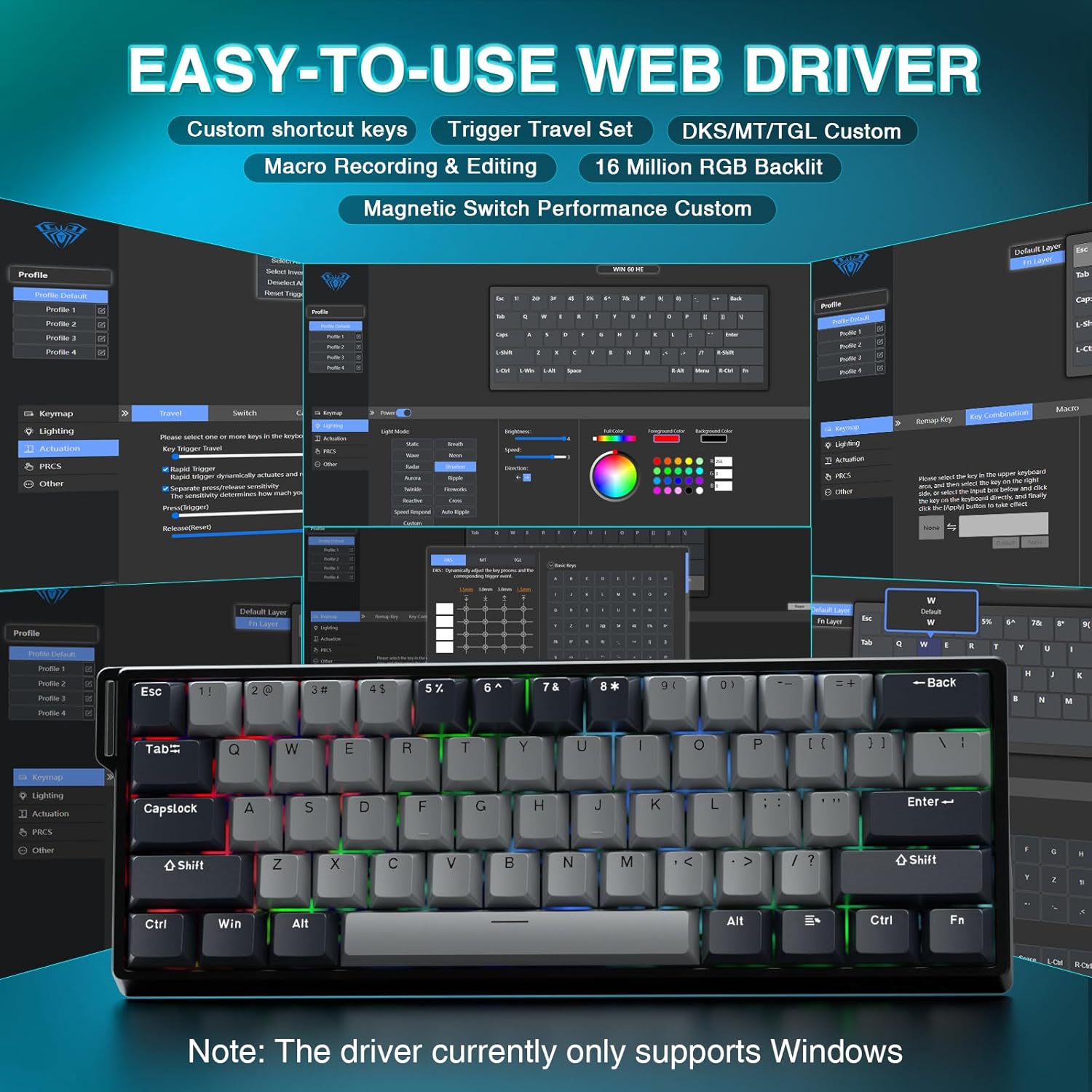
-ийг баталгаажуулах web driver settings haven't disabled lighting.
5.3 Keys Sticking or Not Registering
Clean around the affected keycap to remove any debris.
If a specific switch is faulty, consider replacing it using the hot-swappable feature (refer to Section 4.2).
Check the actuation point settings in the web driver; it might be set too high or too low for your preference.
6. Техникийн үзүүлэлтүүд
Онцлог
Дэлгэрэнгүй
Загвар
WIN60 HE PRO
Гарны төрөл
60% Mechanical Gaming Keyboard
Шилжүүлэгчийн төрөл
Hall Effect Magnetic Switch, Hot-Swappable
Холболт
USB-C утастай
Санал хураалтын хувь
8000 Гц
Онцлог шинж чанарууд
Rapid Trigger Mode, Adjustable Actuation, RGB Backlit, Programmable Keys, Hotkeys and Media Keys, Portable
Тохиромжтой төхөөрөмжүүд
Laptop, PC Windows (Not compatible with PS5/PS4, OBOX)
Бүтээгдэхүүний хэмжээс
11 x 5 x 1.1 инч (27.94 x 12.7 x 2.79 см)
Зүйлийн жин
2.18 фунт (0.99 кг)
Үйлдвэрлэгч
AULA
Figure 6: Detailed comparison of AULA WIN60 HE series magnetic switches.
7. Баталгаат хугацаа ба дэмжлэг
For warranty information, technical support, or service inquiries, please refer to the warranty card included with your product or visit the official AULA/CORBOBO website. You may also contact the seller directly through your purchase platform for assistance.
AULA WIN60 Wired Magnetic Switch Keyboard Product Manual This manual provides a comprehensive guide to the AULA WIN60 Wired Magnetic Switch Keyboard, covering its features, functions, and operating modes for both PRO/Max and Standard editions. Learn about backlight adjustments, system switching, shortcut key descriptions, and magnetic switch adjustment methods.
AULA F99/F9APRO 3-in-1 Hot-Swappable RGB Gasket Mechanical Keyboard User Manual This manual provides detailed instructions and features for the AULA F99/F9APRO mechanical keyboard, including connectivity options (2.4G, Bluetooth, Wired), RGB lighting effects, shortcut key functions, and operating instructions in multiple languages.
AULA F75 механик гарын хэрэглэгчийн гарын авлага Discover the features and operating instructions for the AULA F75 3-in-1 Hot-Swappable RGB Gasket Mechanical Keyboard. This manual covers connectivity, functions, specifications, and troubleshooting.
AULA F108 Pro 3-in-1 Mechanical Keyboard: User Manual & Features Comprehensive guide to the AULA F108 Pro 3-in-1 mechanical keyboard. Details connectivity (Wired, 2.4G, Bluetooth), RGB lighting, LCD screen functions, shortcut keys, system compatibility, and specifications.