Танилцуулга
Thank you for choosing the Trevi XF 3150 KB Portable Karaoke Speaker. This powerful 130W speaker is designed to deliver high-quality audio with a Bass Reflex system, two 8-inch speakers, and a 1-inch tweeter. It features wireless audio connectivity, USB/SD card playback, AUX input, and dedicated inputs for microphones and guitars. Enjoy the integrated multicolor LED disco lights and the True Wireless Stereo (TWS) function for an enhanced audio experience. The speaker operates on an integrated rechargeable battery or via the included power adapter, offering versatility for any occasion. This manual provides essential information for safe and efficient use of your device.

Урд view of the Trevi XF 3150 KB portable karaoke speaker, showcasing its design and active multicolor LED lights.
Тохиргоо ба анхны хэрэглээ
1. Хайрцагнаас задлах ба бүрэлдэхүүн хэсгүүд
Carefully remove all components from the packaging. Ensure the following items are included:
- Trevi XF 3150 KB Portable Karaoke Speaker
- Микрофон
- Алсын удирдлага
- Цахилгаан кабель
- Баталгаат карт
2. Асаах ба цэнэглэх
The speaker can be powered by its internal rechargeable 7.4V battery or by connecting it to a power outlet using the included power adapter. For first use, it is recommended to fully charge the battery.
- Цэнэглэж байна: Connect the power cable to the DC IN port on the rear panel of the speaker and then to a power outlet. The charging indicator will illuminate.
- Асаах/унтраах: -г удаан дар ХҮЧ button on the control panel or remote control to turn the speaker on or off.
3. Control Panel Overview
Familiarize yourself with the main controls located on the top panel of the speaker.

Нарийвчилсан view of the speaker's control panel, showing various input and sound adjustment knobs, along with function buttons.
4. Алсын удирдлагатай функцууд
Багцад багтсан алсын удирдлага нь алсаас тохиромжтой ажиллах боломжийг олгодог.

The remote control for the Trevi XF 3150 KB speaker, featuring buttons for mute, mode, record, playback, volume, channel selection, scan, EQ, and power.
5. Wireless (Bluetooth) Connection
Connect your smartphone, tablet, or laptop wirelessly to the speaker.
- Чанга яригчийг асаана уу.
- дээр дарна уу MODE button until "BLUE" appears on the display, indicating Bluetooth mode.
- Enable Bluetooth on your device and search for "Trevi XF 3150 KB".
- Хослуулах чанга яригчийг сонгоно уу. Баталгаажуулах дуу хоолой амжилттай холболтыг илтгэнэ.

Illustration of connecting a smartphone to the speaker via Bluetooth for wireless music streaming.
6. TWS (Жинхэнэ утасгүй стерео) функц
Сайжруулсан стерео туршлагыг авахын тулд та хоёр Trevi XF 3150 KB чанга яригчийг утасгүйгээр холбож болно.
- Хоёр чанга яригч хоёулаа асаалттай, Bluetooth горимд байгаа эсэхийг шалгаарай.
- On one speaker (the primary), press and hold the TWS/REP товч.
- Үндсэн чанга яригч нь хоёрдогч чанга яригчийг хайж олоод холбогдох болно. Баталгаажуулах дуу нь амжилттай хослуулсныг илтгэнэ.
- Once connected, pair your device to the primary speaker via Bluetooth as described above.

Diagram illustrating the True Wireless Stereo (TWS) function, allowing two speakers to connect for a wider soundstage.
7. USB/SD картыг тоглуулах
Аудио тоглуулах files directly from a USB flash drive or micro-SD card.
- USB флаш дискийг дотор нь оруулна уу USB port or a micro-SD card into the SD slot on the rear panel.
- дээр дарна уу MODE товчийг дарж USB эсвэл SD горимыг сонгоно.
- Playback will start automatically. Use the playback controls (Play/Pause, Next/Previous Track) on the control panel or remote.
8. AUX оролт
3.5 мм аудио кабель ашиглан гадаад аудио төхөөрөмжийг холбоно уу.
- 3.5 мм-ийн аудио кабелийн нэг үзүүрийг холбоно уу AUX ДАХЬ port on the speaker and the other end to the audio output of your external device.
- дээр дарна уу MODE товчийг дарж AUX горимыг сонгоно.
- Гадаад төхөөрөмжөөсөө тоглуулах болон дууны хэмжээг хянах.
9. Микрофон ба гитарын оролт
Connect the included microphone or a guitar for karaoke or live performances.
- Микрофоныг холбоно уу MIC IN port (6.3mm jack) or a guitar to the GITAR IN port (6.3mm jack) on the rear panel.
- ашиглан микрофоны дууг тохируулна уу MIC VOL knob and guitar volume using the ГИТАР БАТ knob on the control panel.
- -г ашиглана уу MIC BASS, МИК ТРЕЛЬ, ЭХО, ба ХОЁРОЛТ knobs to fine-tune the microphone sound.
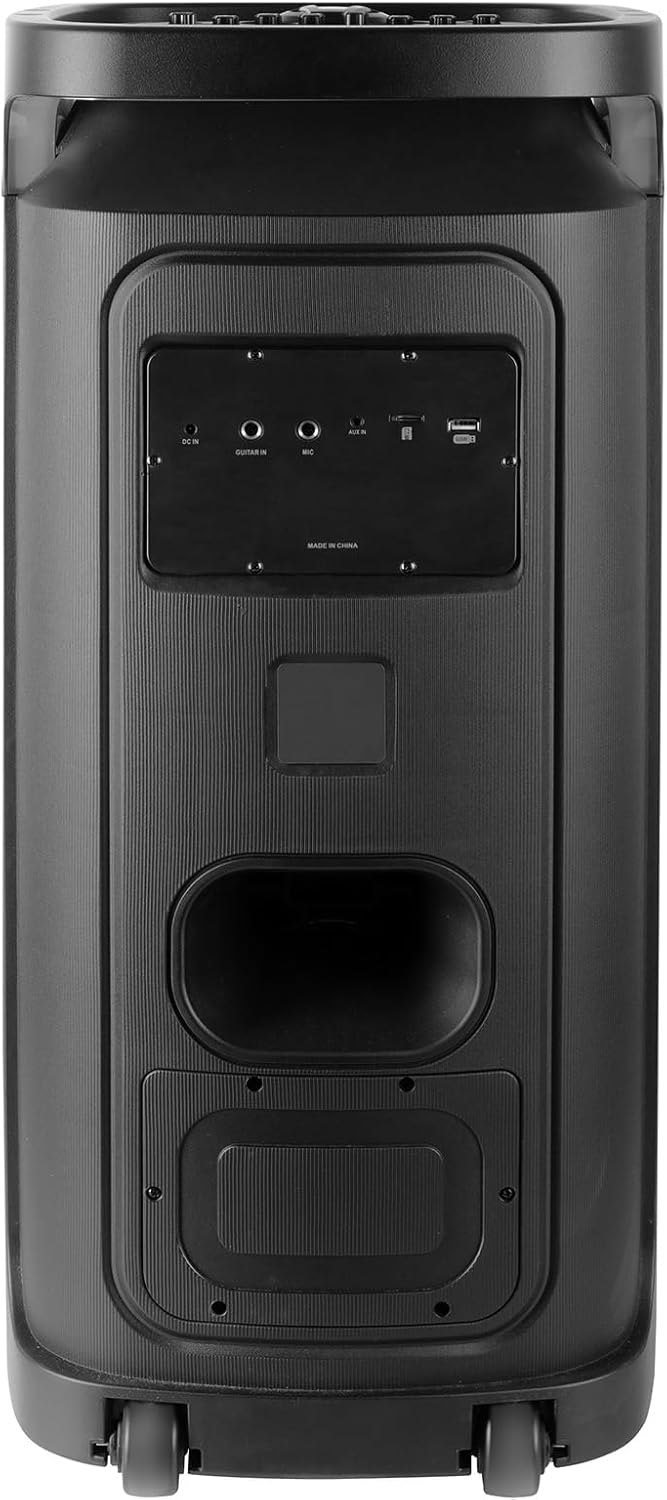
Rear panel of the Trevi XF 3150 KB speaker, displaying the various input ports including DC IN, AUX IN, MIC IN, GUITAR IN, USB, and SD card slot.
Ашиглалтын заавар
1. Үндсэн аудио тоглуулах
Once an audio source is connected (Bluetooth, USB, SD, AUX), use the following controls:
- Эзлэхүүн: Adjust the main volume using the large central knob or the VOL + / VOL- удирдлага дээрх товчлуурууд.
- Тоглуулах/түр зогсоох: дээр дарна уу ТОГЛОХ/ЗОГСООХ товч.
- Дараагийн / Өмнөх бичлэг: -г ашиглана уу ДАРААГИЙН болон ӨМНӨХ товчлуурууд.
- Тэнцвэржүүлэх: дээр дарна уу EQ button on the remote to cycle through preset equalization modes (e.g., Pop, Rock, Jazz, Classic, Flat).
- Басс/Тебль: -г ашиглана уу басс болон ТРЕБЛ knobs on the control panel for manual sound adjustment.
- Нэмэлт басс: дээр дарна уу НЭМЭЛТ БАС button for enhanced bass output.
2. Караоке функц
Utilize the included microphone and dedicated controls for karaoke sessions.
- Connect the microphone as described in the Setup section.
- Тохируулах MIC VOL таны хүссэн түвшинд.
- Ашиглах ЭХО болон ХОЁРОЛТ knobs to add vocal effects.
- The PRI (Microphone Priority) button can be pressed to lower the music volume automatically when speaking into the microphone.
3. Disco Light Effects
Enhance your listening experience with dynamic multicolor LED lights.
- дээр дарна уу LED button on the control panel to turn the disco lights on or off.
- The lights will cycle through various colors and patterns automatically.

The Trevi XF 3150 KB speaker displaying its dynamic multicolor LED disco light effects, creating a party atmosphere.
Засвар үйлчилгээ
1. Цэвэрлэгээ
Чанга яригчийнхаа гадаад төрх байдал болон ажиллагааг хадгалахын тулд:
- Цэвэрлэхийн өмнө цахилгааны кабелийг үргэлж салгаж байгаарай.
- Гаднах гадаргууг зөөлөн, хуурай даавуугаар арчина.
- Өнгөлгөөг гэмтээж болзошгүй тул зүлгүүрийн цэвэрлэгч, лав, уусгагчийг бүү ашигла.
- Аливаа нүхэнд чийг орохоос зайлсхий.
2. Зайны арчилгаа
To prolong the life of the integrated rechargeable battery:
- Эхний хэрэглээний өмнө зайгаа бүрэн цэнэглэ.
- Байнга зайгаа бүрэн шавхахаас зайлсхий.
- If storing the speaker for an extended period, charge the battery to approximately 50% and recharge every few months.
- Do not expose the speaker to extreme temperatures, as this can affect battery performance.
Алдааг олж засварлах
If you encounter issues with your Trevi XF 3150 KB speaker, refer to the following common problems and solutions:
| Асуудал | Боломжит шалтгаан | Шийдэл |
|---|---|---|
| Чанга яригч асахгүй байна. | Батерей дууссан эсвэл цахилгааны кабель холбогдоогүй байна. | Connect the power cable and charge the battery. Ensure the power button is pressed correctly. |
| Дууны гаралт байхгүй. | Volume is too low, incorrect input mode, or audio source issue. | Дууны хэмжээг нэмэгдүүлэх. дээр дарна уу MODE button to select the correct input. Check the audio source device. |
| Bluetooth төхөөрөмжийг холбох боломжгүй. | Speaker is not in Bluetooth mode, device is too far, or already paired to another device. | Ensure speaker is in Bluetooth mode. Move device closer. Disconnect from other devices and try again. |
| Микрофон ажиллахгүй байна. | Microphone not connected properly, MIC VOL is low, or microphone is faulty. | Ensure microphone is securely plugged into the MIC IN port. Increase MIC VOL. Test with another microphone if available. |
| TWS холболт амжилтгүй боллоо. | Speakers are too far apart, or one speaker is not in Bluetooth mode. | Ensure both speakers are in Bluetooth mode and within close proximity. Repeat the TWS pairing steps. |
Үзүүлэлтүүд
| Загварын нэр | XF 3150 КБ |
| Брэнд | Треви |
| Гаралтын хүч | 130 Вт (Хамгийн их) |
| Чанга яригчийн хэмжээ | 2 x 8-inch woofers, 1 x 1-inch tweeter |
| Холболтын технологи | Bluetooth, USB, SD, AUX |
| Утасгүй холбооны технологи | Bluetooth |
| Эрчим хүчний эх үүсвэр | Battery, Corded Electric (7.4V rechargeable battery) |
| Онцлог шинж чанарууд | Built-in Microphone, Wireless Connectivity, Disco Lights, TWS Function |
| Бүтээгдэхүүний хэмжээс | 34D x 32.6W x 74H см |
| Зүйлийн жин | 1 кг |
| Хяналтын арга | Алсын удирдлага |
| Аудио гаралтын горим | Стерео |
| Суурилуулах төрөл | Шал зогсож байна |
| Зөвлөмж болгож буй хэрэглээ | For smartphones or tablets, For computers, For home parties, For karaoke |
| Тохиромжтой төхөөрөмжүүд | Smartphone, Tablet, Laptop, MP3 Player, Computer, Karaoke System |
Баталгаат хугацааны мэдээлэл
Энэ бүтээгдэхүүн нь хамт ирдэг Хязгаарлагдмал баталгаат хугацаа. Please refer to the included warranty card for detailed terms and conditions, including coverage period and claim procedures. Keep your proof of purchase for warranty service.
Дэмжлэг
For further assistance, product information, or to explore other Trevi products, please visit the official Trevi brand store: