Танилцуулга
The KiiBoom Jade75 is a 75% layout mechanical keyboard featuring a unique resin molding and CNC+UV crafted case. It offers versatile connectivity options including Bluetooth 5.0, 2.4GHz wireless, and USB-C wired modes. Designed for customization, it supports QMK/VIA programming and hot-swappable switches, alongside dynamic RGB backlighting. This manual provides detailed instructions for setting up, operating, and maintaining your KiiBoom Jade75 keyboard.
Багцын агуулга
Upon unboxing your KiiBoom Jade75 keyboard, please verify that all the following items are included:
- KiiBoom Jade75 Mechanical Keyboard
- USB-C кабель
- Товчлуур татагч
- Шилжүүлэгч татагч
- Хэрэглэгчийн гарын авлага
- Additional Switches (if included in specific package)
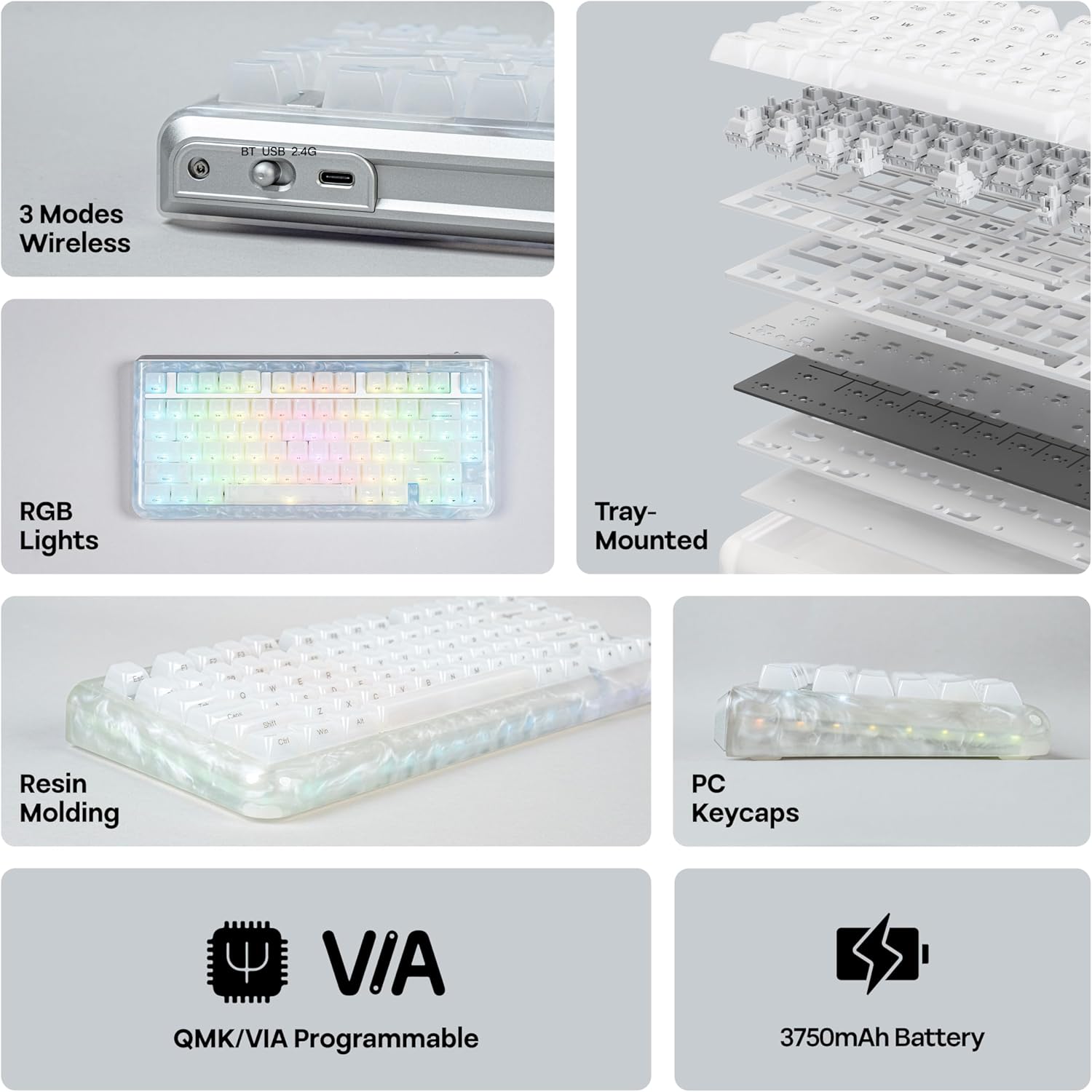
Image: KiiBoom Jade75 keyboard with its accessories, including a USB-C cable, keycap puller, and switch puller.
Video: An unboxing of the KiiBoom Jade75 keyboard, showcasing the packaging, included accessories, and a demonstration of the typing sound and RGB lighting.
Бүтээгдэхүүн дууссанview
The KiiBoom Jade75 features a compact 75% layout, combining essential keys with a space-saving design. Its resin molding provides a durable and aesthetically pleasing translucent case, complemented by a tray-mounted design for a stable typing experience. The keyboard is equipped with south-facing RGB backlighting for vibrant illumination.
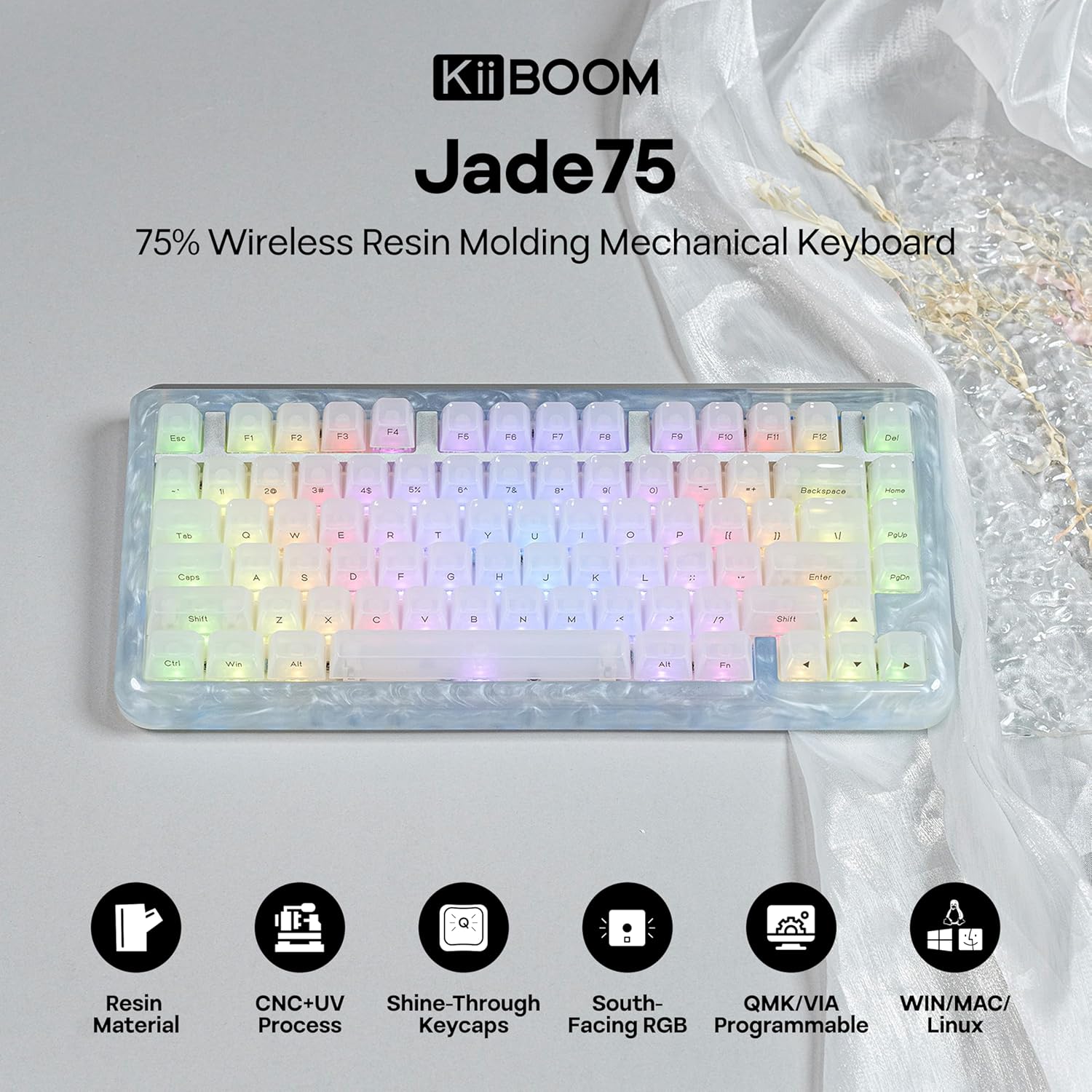
Зураг: Дээрээс доош view of the KiiBoom Jade75 keyboard, showcasing its 75% layout, translucent resin case, and keycap design.
Тохиргоо ба холболт
The KiiBoom Jade75 offers three connectivity modes: 2.4GHz wireless, Bluetooth 5.0, and USB-C wired. Choose the mode that best suits your device and usage.
1. USB-C утастай горим
- Өгөгдсөн USB-C кабелийг гарын USB-C порт руу холбоно уу.
- Кабелийн нөгөө үзүүрийг компьютер дээрээ байгаа USB порт руу холбоно уу.
- Гар автоматаар танигдаж, ашиглахад бэлэн болно.
2. 2.4GHz утасгүй горим
- 2.4GHz USB хүлээн авагчийг олоорой (ихэвчлэн гар дээрх тасалгаанд хадгалагддаг).
- 2.4GHz хүлээн авагчийг компьютер дээрээ байгаа USB порт руу холбоно уу.
- On the keyboard, switch the mode selector to 2.4G.
- The keyboard should automatically connect to the receiver. If not, press Fn + R хослолыг эхлүүлэх.
3. Bluetooth 5.0 горим
The keyboard supports up to three Bluetooth devices.
- On the keyboard, switch the mode selector to BT.
- Дарж удаан дарна уу Fn + Q, Fn + W, эсвэл Fn + E for 3-5 seconds until the corresponding key flashes, indicating pairing mode.
- On your device (computer, tablet, smartphone), enable Bluetooth and search for "KiiBoom Jade75".
- Select the keyboard to pair. The key will stop flashing once connected.
- Хосолсон Bluetooth төхөөрөмжүүдийн хооронд шилжихийн тулд дарна уу Fn + Q, Fn + W, эсвэл Fn + E товчхон.

Image: Visual representation of the KiiBoom Jade75's three connectivity modes: Bluetooth, 2.4GHz wireless, and USB-C, showing compatibility with laptops, PCs, tablets, and gaming consoles.
QMK/VIA-ийн тохируулга
The KiiBoom Jade75 is QMK/VIA programmable, allowing for extensive customization of key assignments, macros, and lighting effects. This feature is ideal for users who require a personalized keyboard layout and functionality.
- Download the VIA software from the official KiiBoom website or the VIA GitHub repository.
- Connect your keyboard to your computer via USB-C cable.
- Launch the VIA software. The software should automatically detect your Jade75 keyboard.
- Use the VIA interface to remap keys, create custom macros, adjust lighting settings, and define different layers for various functions.
- Өөрчлөлтүүд гарт бодит цаг хугацаанд хэрэгжинэ.
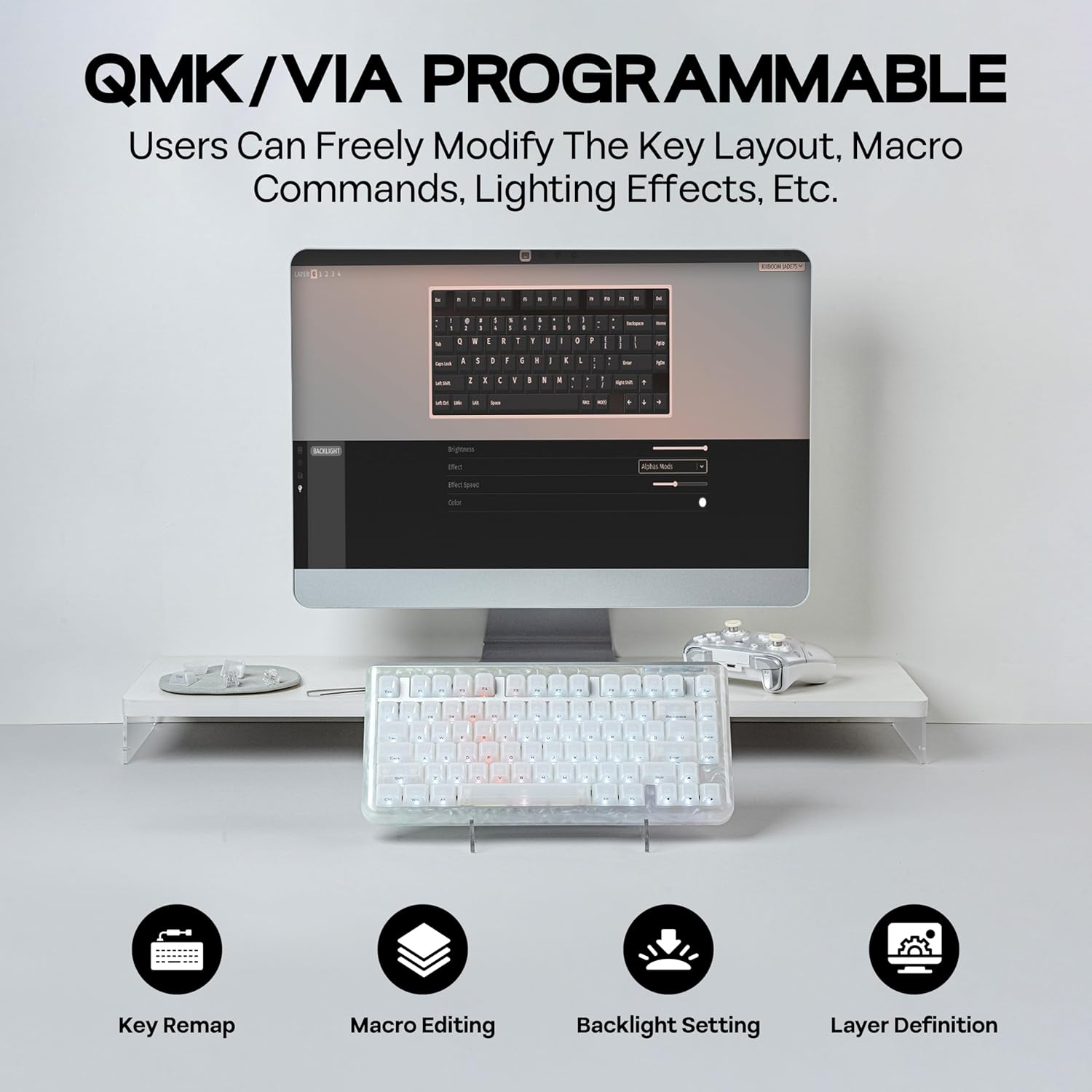
Image: A computer screen displaying the QMK/VIA software interface, illustrating options for key remapping, macro editing, backlight settings, and layer definition for the KiiBoom Jade75 keyboard.
RGB гэрэлтүүлгийн хяналт
The KiiBoom Jade75 features dynamic RGB backlighting with 16.8 million color options and various customizable modes. The south-facing RGB LEDs enhance the visual appeal, especially with the translucent resin case.
- Toggle Backlight Effects: дарна уу Fn + \| арын гэрэлтүүлгийн янз бүрийн горимуудаар шилжих.
- Toggle Sidelight Effects: дарна уу Fn+Z to change the sidelight effects.
- Гэрэл асаах/унтраах: дарна уу Fn + Backspace to toggle the keyboard lighting on or off.
- Гэрэлтүүлэг/хурд тохируулах: Use the VIA software for fine-tuning brightness, speed, and specific color settings.

Image: The KiiBoom Jade75 keyboard illuminated with colorful RGB backlighting, demonstrating various lighting effects and key combinations for control.
Халуун сольж болдог унтраалга
The KiiBoom Jade75 features a hot-swappable PCB, allowing you to change mechanical switches without soldering. This enables easy customization of your typing feel and sound.
- Түлхүүрийн тагийг арилгах: Хүссэн товчлуурын тагийг зөөлөн авахын тулд товчлуурын тагийг татагчийг ашиглана уу.
- Шилжүүлэгчийг устгах: Use the switch puller to carefully grip the top and bottom clips of the switch and pull it straight up.
- Шинэ шилжүүлэгч оруулах: Шинэ унтраалгын зүүг хэлхээний самбар дээрх нүхнүүдтэй зэрэгцүүл. Шилжүүлэгчийг байрандаа товших чимээ гартал зөөлөн дар. Зүүг нугалаагүй эсэхийг шалгаарай.
- Түлхүүрийн тагийг солих: Түлхүүрийн тагийг шинэ унтраалга дээр буцааж байрлуул.
Жич: Ensure the keyboard is disconnected or powered off before changing switches to prevent accidental key presses or damage.

Зураг: Нарийвчилсан view of the KiiBoom Jade75's hot-swappable PCB, demonstrating the process of removing and inserting switches, along with a close-up of a KiiBoom Linear Switch and plate-mount stabilizer.
Засвар үйлчилгээ
Proper maintenance ensures the longevity and performance of your KiiBoom Jade75 keyboard.
- Товчлуурын хавтсыг цэвэрлэх: Use the keycap puller to remove keycaps. Clean them with mild soap and water, then dry thoroughly before reattaching.
- Кейс цэвэрлэх: Wipe the resin case with a soft, damp даавуу. Өнгөлгөөг гэмтээж болох хүчтэй химийн бодисоос зайлсхий.
- Тоос арилгах: Түлхүүр болон унтраалгын хоорондох тоос шороо, хог хаягдлыг зайлуулахын тулд шахсан агаар ашиглана уу.
- Батерейны арчилгаа: For optimal battery life, avoid fully discharging the keyboard frequently. Charge it regularly using the provided USB-C cable.
Алдааг олж засварлах
If you encounter issues with your KiiBoom Jade75, refer to the following common solutions:
- Гар хариу өгөхгүй байна:
- Гар цэнэглэгдсэн эсвэл USB-C-ээр холбогдсон эсэхийг шалгана уу.
- Check the mode switch (2.4G, BT, USB-C) is set correctly.
- For wireless modes, ensure the receiver is plugged in (2.4G) or Bluetooth is enabled and paired (BT).
- Компьютер эсвэл төхөөрөмжөө дахин асааж үзнэ үү.
- Бүртгүүлээгүй түлхүүрүүд:
- Remove the keycap and switch for the affected key. Re-insert the switch firmly, ensuring pins are straight.
- Боломжтой бол өөр унтраалгаар туршина уу.
- RGB гэрэлтүүлэг ажиллахгүй байна:
- Ensure lighting is turned on (Fn + Backspace).
- Check lighting settings in the VIA software.
- Bluetooth салгах:
- Гар нь таны төхөөрөмжийн ойр орчимд байгаа эсэхийг шалгаарай.
- Гарыг төхөөрөмжтэйгээ дахин холбоно уу.
- Бусад утасгүй төхөөрөмжүүдийн хөндлөнгийн оролцоог шалгана уу.
If issues persist, please contact KiiBoom customer support for further assistance.
Үзүүлэлтүүд
| Онцлог | Дэлгэрэнгүй |
|---|---|
| Брэнд | KiiBoom |
| Загвар | Jade75 |
| Зохион байгуулалт | 75% |
| Холболт | 2.4GHz утасгүй, Bluetooth 5.0, USB-C утастай |
| Кейсийн материал | Resin Molding & CNC+UV Crafted |
| Товчны материал | PC (поликарбонат) |
| Шилжүүлэгч | Hot-Swappable (KiiBoom Linear Switch) |
| Арын гэрэлтүүлэг | RGB (Өмнөд харсан) |
| Програмчлах чадвар | QMK/VIA Compatible |
| Тохиромжтой төхөөрөмжүүд | Тоглоомын консол, зөөврийн компьютер, компьютер, ухаалаг утас, таблет |
| Үйлдлийн системүүд | Windows, Mac, Linux |
| Бүтээгдэхүүний хэмжээс | 12.99"L x 12.99"W x 1.77"H |
Баталгаат болон дэмжлэг
KiiBoom products are designed for quality and durability. For warranty information, product support, or technical assistance, please visit the official KiiBoom webсайт эсвэл харилцагчийн үйлчилгээтэй шууд холбогдоно уу. Баталгаат нэхэмжлэл гаргахын тулд худалдан авалтаа нотлох баримтаа хадгалаарай.
Official KiiBoom Store: KiiBoom Store on Amazon


