1. Аюулгүй байдлын мэдээлэл
Please read and understand all safety instructions before installing or using the MONTECH HS02 PRO PC Case. Failure to follow these instructions may result in damage to the product, personal injury, or voiding of the warranty.
- Цахилгааны аюулгүй байдал: Ensure all power components are properly grounded and connected. Disconnect power before performing any installation or maintenance.
- Харьцуулах: The case contains tempered glass panels. Handle with care to prevent breakage. Avoid dropping or subjecting the case to strong impacts.
- Агааржуулалт: Ensure adequate airflow around the case to prevent overheating. Do not block ventilation openings.
- Байгаль орчин: Operate the case in a dry, stable environment. Avoid extreme temperatures, humidity, and direct sunlight.
- Хүүхэд ба тэжээвэр амьтад: Keep the product and its components out of reach of children and pets. Small parts can be a choking hazard.
2. Багцын агуулга
Verify that all items listed below are present in your package. If any items are missing or damaged, please contact Montech customer support.
- MONTECH HS02 PRO ATX Mid-Tower PC Case
- Дагалдах хэрэгслийн хайрцаг (эрэг, цахилгаан зангиа, бэхэлгээ гэх мэт)
- Хэрэглэгчийн гарын авлага (энэ баримт бичиг)
- Pre-installed GF120 V2 ARGB Fans (5x)
3. Бүтээгдэхүүн дууссанview
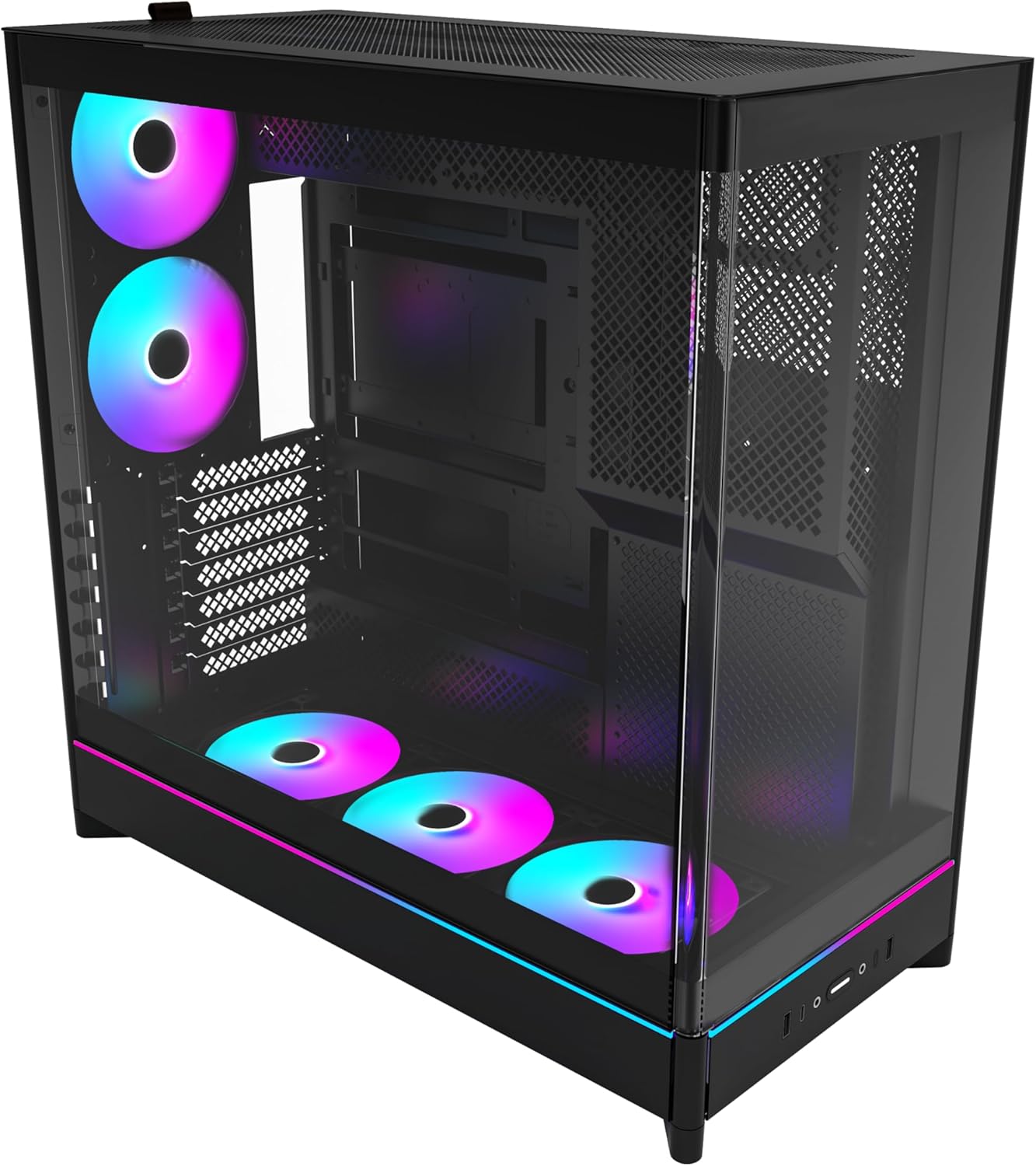
The MONTECH HS02 PRO is a high-airflow ATX mid-tower PC case designed for optimal thermal performance and aesthetic appeal. It features a unique reversible layout and a sturdy curved tempered glass front panel.
Гол онцлогууд:
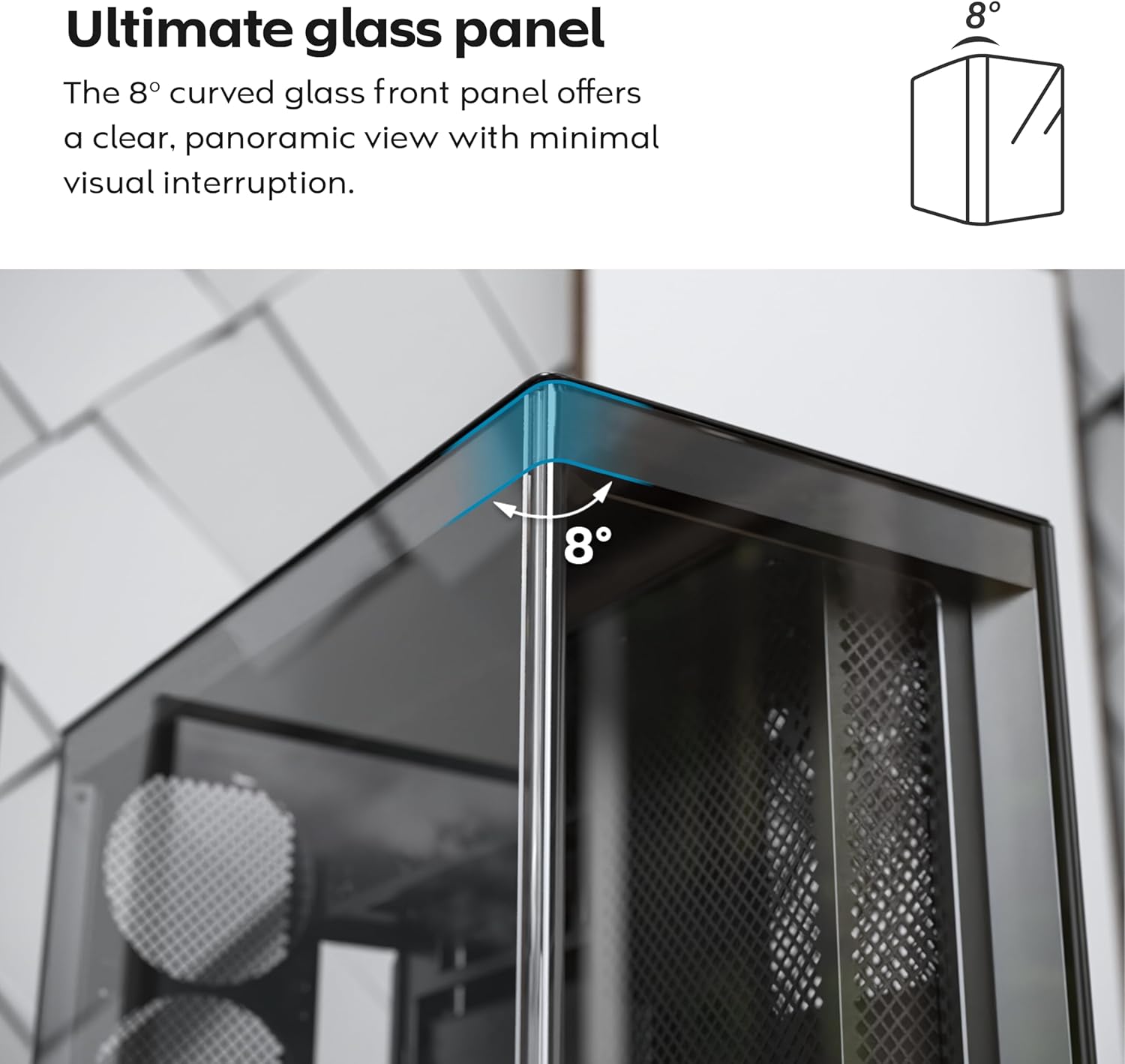
- 8-Degree Curved Glass Panel: The front tempered glass panel features a subtle 8-degree curved edge, offering a distinctive and refined view of the interior with minimal visual distortion.
- Урвуу дизайн: A top-down reversible layout allows the entire setup to be positioned on either the left or right side, showcasing your build from your preferred angle.
- Vertical Ventilation: Bottom air intake and top exhaust create a natural chimney effect for efficient heat dissipation.
- Босоо GPU бэлэн: Rotatable PCIe slots enable an instant vertical GPU setup without requiring an extra holder or stand.
- Угаалтууртай дизайн: Доод талын хонхойсон сэнс болон эх хавтангийн зохион байгуулалт нь цэвэрхэн, саадгүй талыг хадгалдаг view.
- Pre-installed ARGB PWM Fans: Comes with 5 pre-installed GF120 V2 ARGB fans, fully syncable with motherboard lighting control.
- Back-Connect эх хавтан бэлэн боллоо: MSI Project Zero, ASUS BTF болон бусад стандарт болон back-connect эх хавтангуудыг дэмждэг.
- AmpХадгалах багтаамж: Supports multiple storage drives (HDD/SSD) for flexible and expandable storage options.
Бүрэлдэхүүн хэсгүүдийн таних тэмдэг:





4. Тохиргоо ба суурилуулалт
This section provides general guidelines for setting up your MONTECH HS02 PRO PC case. For detailed component-specific instructions, refer to your motherboard, GPU, and PSU manuals.
4.1 Хэргийг бэлтгэх
- Савлах: Хайрцгийг савлагаанаас нь болгоомжтой салга. Тээвэрлэлтийн явцад ямар нэгэн эвдрэл гарсан эсэхийг шалгана уу.
- Самбарыг арилгах: Gently remove the tempered glass side panel and the rear metal side panel. The tempered glass panel is secured with toolless latches.
- Дагалдах хэрэгслийн хайрцаг: Шаардлагатай бүх эрэг болон бэхэлгээний хэрэгслийг агуулсан дагалдах хэрэгслийн хайрцгийг хайрцагнаас олоорой.
4.2 Эх хавтангийн суурилуулалт
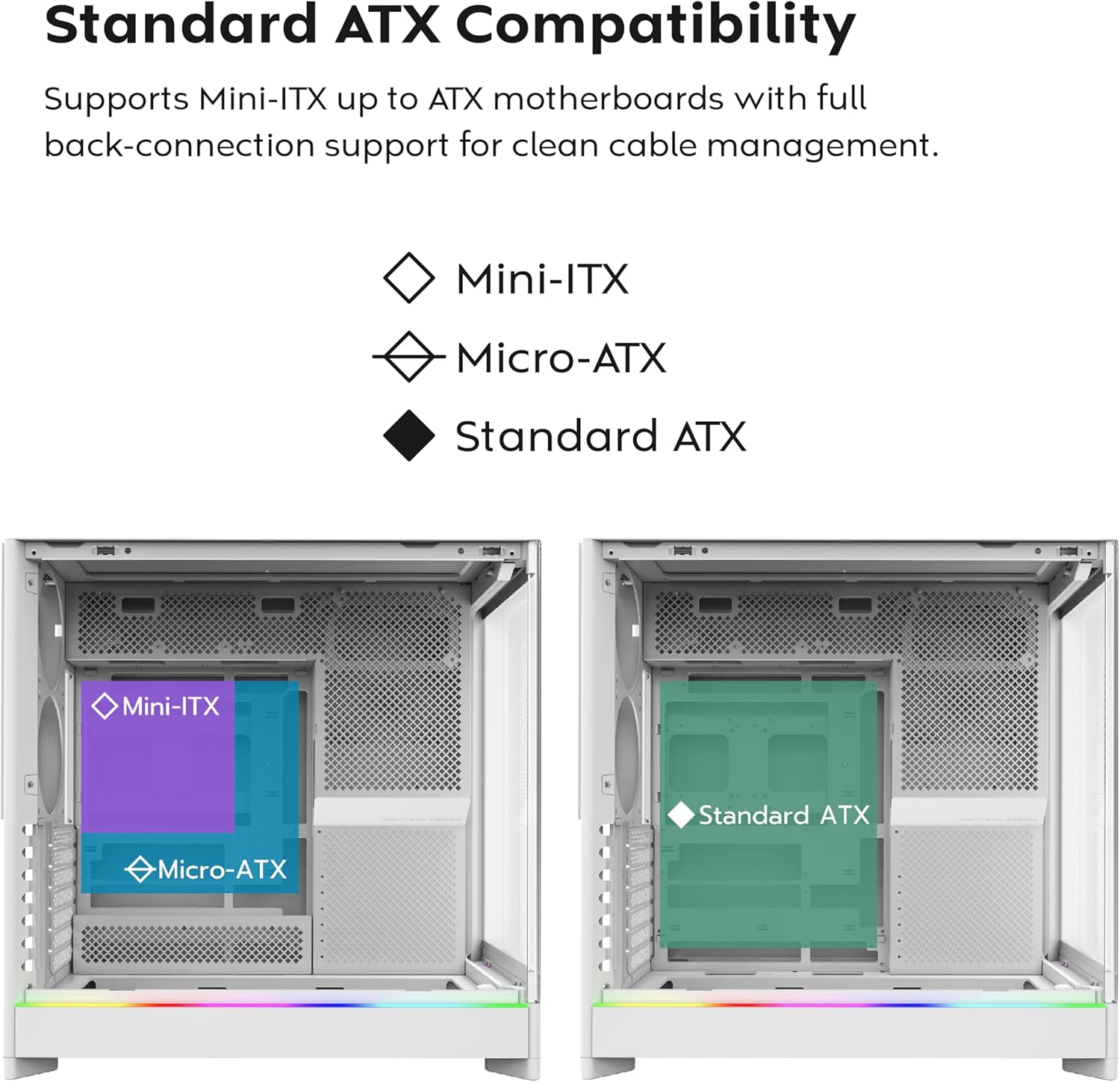
- Standoffs: Ensure the correct standoffs are installed for your motherboard form factor (Mini-ITX, Micro-ATX, or ATX). Adjust if necessary.
- Оролт/Гаралтын Бамбай: Install your motherboard's I/O shield into the rear opening of the case.
- Суурилуулалт: Carefully align your motherboard with the standoffs and gently lower it into place. Secure it with the provided screws.
- Back-Connect Motherboards: If using a back-connect motherboard, ensure proper alignment with the designated cutouts for cable routing.
4.3 Цахилгаан хангамжийн нэгж (PSU) суурилуулах
- Суурилуулалт: The PSU mounts at the bottom of the case. Slide the PSU into its designated bay from the rear.
- Хамгаалах: PSU-ийг хайрцагны арын боолтоор бэхлээрэй.
- Кабель холболт: Route necessary power cables through the cable management cutouts to the motherboard and other components.
4.4 Хадгалах хөтч суурилуулах (HDD/SSD)
- Драйв-тай тэмцэх газар: Utilize the designated drive bays for 3.5" HDDs and 2.5" SSDs.
- Суурилуулалт: Secure drives using the provided screws or toolless mechanisms where applicable.
4.5 График карт (GPU) суурилуулах
- PCIe үүрүүд: Remove the necessary PCIe slot covers.
- Хэвтээ суурилуулалт: Insert the GPU into the primary PCIe slot on your motherboard and secure it with screws.
- Vertical Installation (Optional): The rotatable PCIe slots allow for vertical GPU mounting. Rotate the bracket and install your GPU vertically. A PCIe riser cable (not included) is required for vertical mounting.
4.6 Cooling System Installation (Fans/Radiators)
- Урьдчилан суулгасан фенүүд: The case comes with 5 pre-installed ARGB PWM fans. Connect their power and ARGB cables to your motherboard or a fan controller.
- Additional Fans/Radiators: The case supports additional fans and radiators at the top, rear, and bottom. Refer to the specifications for supported sizes.
- AIO Cooler: Install your All-in-One (AIO) liquid cooler radiator and fans according to the cooler's instructions, utilizing the available mounting points.
4.7 Кабелийн менежмент
-г ашиглах ample space behind the motherboard tray and the cable management cutouts to route and secure cables. This improves airflow and aesthetics.
5. Ашиглалтын заавар
Once all components are installed and secured, you can power on your system.
5.1 Асаах
- Дагалдах төхөөрөмжүүдийг холбох: Connect your monitor, keyboard, mouse, and other peripherals to your system.
- Цахилгааны утас: Connect the PSU power cable to a wall outlet and flip the PSU's power switch to the 'ON' position.
- Цахилгаан товч: Press the power button on the front I/O panel of the case.
5.2 Front I/O Panel Functions
- USB 3.0 портууд: USB 3.0 нийцтэй төхөөрөмжүүдийг холбоход зориулагдсан.
- USB Type-C порт: For connecting USB Type-C compatible devices.
- Аудио Жак: Чихэвч эсвэл чанга яригчийн хувьд.
- Микрофоны Жак: Микрофон холбоход зориулагдсан.
- Цахилгаан товч: Системийг асаах эсвэл унтраахын тулд.
- LED товчлуур: To cycle through the 29 ARGB lighting modes for the pre-installed fans and integrated light strip.
6. Засвар үйлчилгээ
Тогтмол засвар үйлчилгээ нь таны компьютерын эд ангиудын оновчтой ажиллагаа, урт хугацааны ашиглалтыг хангахад тусална.
- Тоос цэвэрлэх: Periodically clean dust filters (top, bottom, front) to maintain optimal airflow. Use compressed air to remove dust from internal components.
- Glass Panel Cleaning: Use a soft, lint-free cloth and a non-abrasive glass cleaner to clean the tempered glass panels. Avoid harsh chemicals.
- Кабелийн менежмент: Кабель нь агаарын урсгал болон сэнсний ирэнд саад болохгүйн тулд кабелийн чиглүүрийг үе үе шалгаж байгаарай.
- Сэнсний үзлэг: Ensure all fans are spinning freely and quietly. Clean fan blades if dust buildup is significant.
7. Алдаа засах
This section addresses common issues you might encounter. For more complex problems, consult Montech customer support or a qualified technician.
Нийтлэг асуудал ба шийдэл:
| Асуудал | Боломжит шалтгаан | Шийдэл |
|---|---|---|
| Систем асахгүй байна. | PSU switch off, power cables loose, faulty PSU/motherboard. | Ensure PSU switch is ON. Check all power connections (24-pin, CPU, GPU). Test PSU if possible. |
| Fans are not spinning or RGB is not working. | Fan cables disconnected, ARGB cables disconnected, faulty fan/controller. | Verify fan power and ARGB headers are securely connected to motherboard/controller. Use the LED button to cycle modes. |
| Агаарын урсгал муу эсвэл өндөр температур. | Dust buildup, obstructed vents, incorrect fan orientation. | Clean dust filters and internal components. Ensure fans are oriented correctly for intake/exhaust. Check for cable obstructions. |
| Front I/O ports not functioning. | Front panel connectors loose or incorrectly connected to motherboard. | Refer to your motherboard manual to ensure all front panel headers (USB, audio) are correctly connected. |
8. Техникийн үзүүлэлтүүд
Detailed technical specifications for the MONTECH HS02 PRO ATX Mid-Tower PC Case.
| Онцлог | Тодорхойлолт |
|---|---|
| Загварын нэр | HS02 PRO Glass Black with Fans |
| Загварын дугаар | HS02PB |
| Кейсийн төрөл | Дунд цамхаг |
| Эх хавтангийн нийцтэй байдал | ATX, Micro-ATX, Mini-ITX (with back-connect support) |
| Хэмжээ (LxWxH) | 32 x 52.4 x 58.8 инч (ойролцоогоор 81.3 x 133.1 x 149.4 см) |
| Зүйлийн жин | 24.2 фунт (ойролцоогоор 10.98 кг) |
| Урд самбар | Curved Tempered Glass (8-degree) |
| Урьдчилан суулгасан фенүүд | 5x GF120 V2 ARGB PWM Fans |
| Хөргөх арга | Air (Vertical Ventilation / Chimney Effect) |
| Цахилгаан хангамжийн угсралтын төрөл | Доод бэхэлгээ |
| Урд I / O портууд | 2x USB 3.0, 1x USB Type-C, Audio, Mic, Power Button, LED Button |
| GPU цэвэрлэгээ | Up to 420mm (supports vertical GPU with rotatable PCIe slots) |
| Хадгалах булан | Multiple HDD/SSD support |
| Өнгө | Хар |
9. Баталгаат хугацаа ба дэмжлэг
Баталгаат хугацаа болон техникийн дэмжлэг авахыг хүсвэл албан ёсны Montech-ээс лавлана уу webсайт эсвэл харилцагчийн үйлчилгээтэй шууд холбогдоно уу. Баталгаат нэхэмжлэл гаргахын тулд худалдан авалтаа нотлох баримтаа хадгалаарай.
- Монтех албан ёсны Webсайт: www.montechpc.com
- Харилцагчийн үйлчилгээ: -д хандана уу webимэйл болон утасны дэмжлэг зэрэг холбоо барих мэдээллийг авах сайт.


