Танилцуулга
Thank you for choosing the Kiwi KAP 6730 Air Purifier. This manual provides essential information for the safe and efficient use of your device. Please read it thoroughly before operation and retain it for future reference.
The Kiwi KAP 6730 is designed to improve indoor air quality using advanced filtration technology, including a medical-grade H13 HEPA filter, to capture various airborne particles and odors.
Аюулгүй байдлын чухал заавар
Гал түймэр, цахилгаанд цохиулах, гэмтэх эрсдлийг бууруулахын тулд цахилгаан хэрэгсэл ашиглахдаа аюулгүй байдлын үндсэн арга хэмжээг үргэлж дагаж мөрдөөрэй.
- Төхөөрөмжийг ашиглахаасаа өмнө бүх зааврыг уншина уу.
- Цахилгаан хангамж нь ботьтой таарч байгаа эсэхийг шалгаарайtage-г төхөөрөмжийн шошгон дээр заасан.
- Гэмтсэн утас, залгууртай төхөөрөмжийг бүү ажиллуул.
- Цахилгааны утсыг халсан гадаргуугаас хол байлга.
- Төхөөрөмж, утас, залгуурыг ус болон бусад шингэнд дүрж болохгүй.
- Агаар цэвэршүүлэгчийг цэвэрлэх эсвэл засвар үйлчилгээ хийхээс өмнө залгуураас нь салга.
- Агаарын оролт, гаралтыг хааж болохгүй.
- Энэ хэрэгсэл нь зөвхөн дотор ашиглах зориулалттай.
- Хүүхдийн гар хүрэхгүй газар хадгална.
Бүтээгдэхүүн дууссанview
The Kiwi KAP 6730 Air Purifier features a compact design with an intuitive control panel and multi-stage шүүлтүүрийн систем.

Зураг: Топ view of the Kiwi KAP 6730 Air Purifier, highlighting the circular control panel with various function icons including power, fan speed, timer, and Wi-Fi connectivity. The top grille for air output is also visible.

Зураг: An exploded diagram of the Kiwi KAP 6730 Air Purifier, illustrating its internal components. The image shows the outer casing, the fan assembly, and the cylindrical multi-layer filter system, with arrows indicating airflow and the capture of dust and pet hair by different filter stages.
Гол онцлогууд:
- Medical-grade H13 HEPA filter for effective air purification.
- Олон тооныtage шүүлтүүрийн систем.
- Intuitive control panel.
- Компакт, хөнгөн загвар.
- Smart connectivity (Wi-Fi enabled).
Тохиргоо
Савлаж байна
- Агаар цэвэршүүлэгчийг савлагаанаас нь болгоомжтой авч хая.
- Remove all packaging materials, including any protective films or bags.
- Тээвэрлэлтийн явцад гэмтэл гарсан эсэхийг шалгана уу. Хэрэв эвдэрсэн бол ажиллуулж болохгүй, хэрэглэгчийн дэмжлэгтэй холбоо барина уу.
Filter Installation (if not pre-installed)
The air purifier comes with a multi-layer filter. Ensure it is properly installed before first use.
- Агаар цэвэршүүлэгчийг доош нь эргүүл.
- Суурийн тагийг цагийн зүүний эсрэг эргүүлж түгжээг нь тайлж, салга.
- Шүүлтүүрээс хуванцар савлагааг ав.
- Insert the filter into the air purifier, ensuring it sits securely.
- Replace the base cover and twist clockwise to lock it into place.
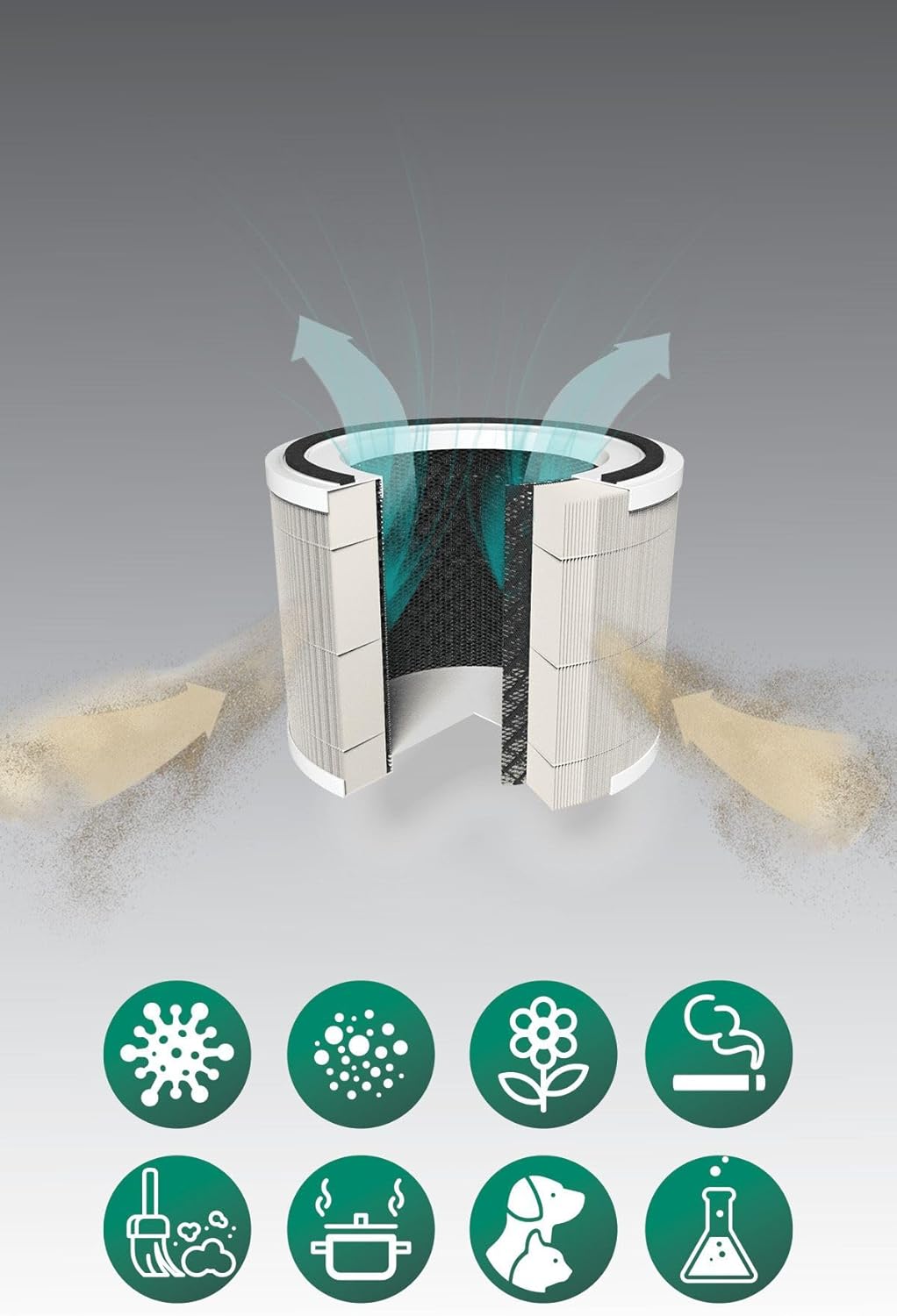
Зураг: A cutaway diagram illustrating the multi-layer filter system of the Kiwi KAP 6730 Air Purifier. Arrows show air entering and exiting the filter. Below the filter, icons represent various airborne pollutants that the system is designed to filter, including bacteria, dust, pollen, smoke, pet dander, cooking odors, and chemical fumes.
Байршил
- Агаар цэвэршүүлэгчийг хатуу, тэгш гадаргуу дээр байрлуулна.
- Ensure there is at least 15-30 cm (6-12 inches) of space around all sides for optimal airflow.
- Avoid placing near heat sources, direct sunlight, or in damp орчин.
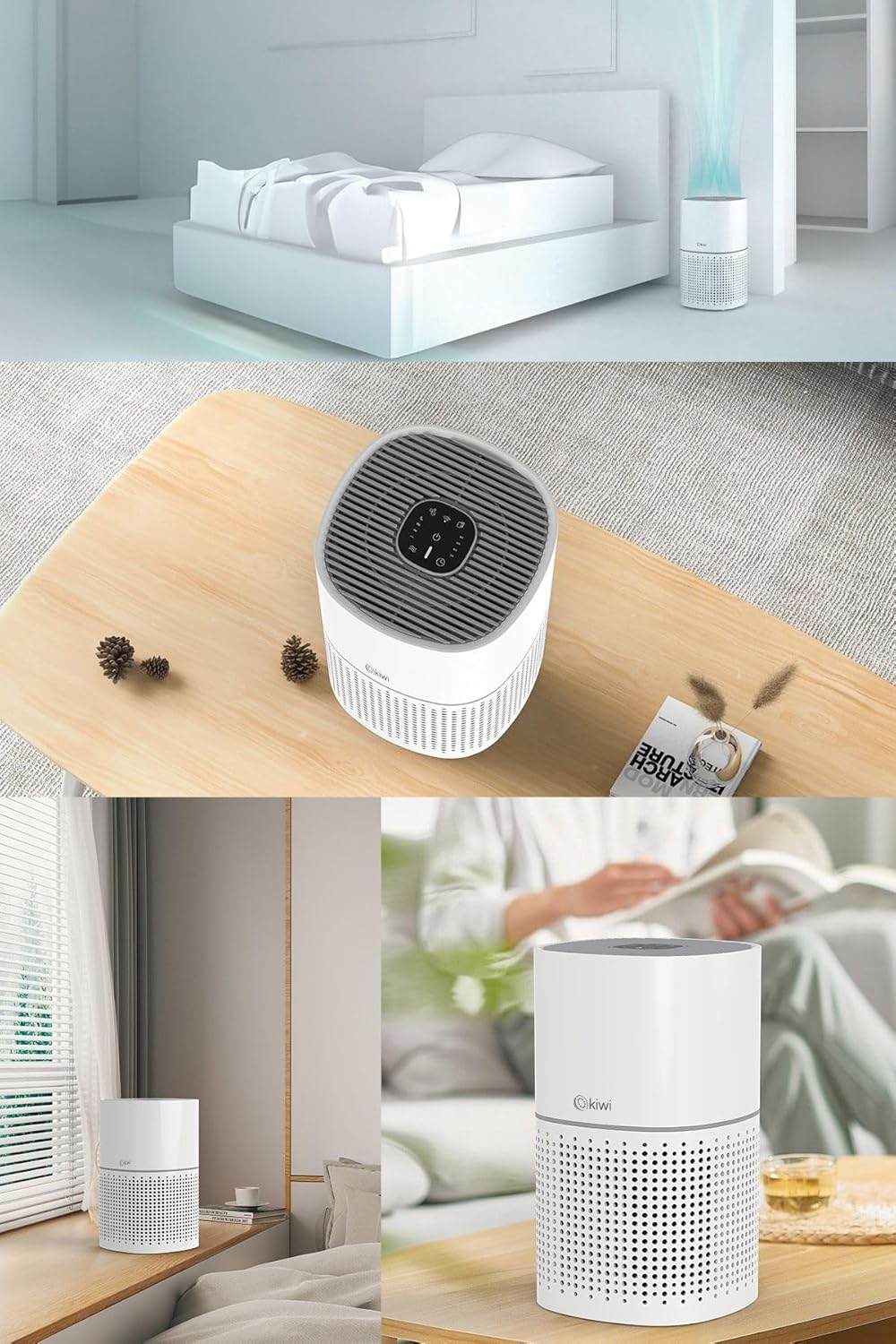
Зураг: A collage of images showing the Kiwi KAP 6730 Air Purifier in different home environments. It is depicted on a bedside table in a bedroom, on a wooden table in a living area, and on a windowsill, demonstrating its compact size and versatility for placement.
Эрчим хүчний холболт
Цахилгааны утсыг тохирох цахилгаан залгуурт холбоно уу.
Үйл ажиллагаа
Хяналтын самбарын функцууд
Агаар цэвэршүүлэгчийн дээд хэсэгт хяналтын самбар байрладаг.
Зураг: Нарийвчилсан view of the circular control panel on the top of the Kiwi KAP 6730 Air Purifier. Icons for power, fan speed, timer settings (1H, 2H, 4H, 8H), sleep mode, and Wi-Fi connectivity are clearly visible, along with an indicator light.
- Асаах товч (⏻): Press to turn the air purifier ON or OFF.
- Сэнсний хурдны товчлуур (💨): Press to cycle through different fan speeds (e.g., Low, Medium, High, Auto).
- Цаг хэмжигч товчлуур (⏱): Set the operating time (e.g., 1 hour, 2 hours, 4 hours, 8 hours). The unit will automatically turn off after the set time.
- Унтах горимын товчлуур (🌙): Activates sleep mode, reducing fan speed and dimming indicator lights for quiet operation.
- Wi-Fi Button (📶): Press and hold to activate Wi-Fi pairing mode for smart control via a mobile application.
- Шүүлтүүрийг дахин тохируулах заагч: Illuminates when the filter needs replacement. Press and hold after filter replacement to reset.
Smart Control (App)
The Kiwi KAP 6730 can be controlled via a dedicated mobile application. Follow the app's instructions for pairing and remote control.

Зураг: The Kiwi KAP 6730 Air Purifier positioned in a room, with a hand holding a smartphone in the foreground. The smartphone screen displays a mobile application interface, indicating that the air purifier can be controlled remotely via a smart app, showing air quality readings and control options.
Засвар үйлчилгээ
Тогтмол засвар үйлчилгээ нь таны агаар цэвэршүүлэгчийн ашиглалтын хугацааг уртасгаж, оновчтой ажиллагааг хангана.
Гадна талын цэвэрлэгээ
- Цэвэрлэхийн өмнө агаар цэвэршүүлэгчийг үргэлж салга.
- Гадна талын гадаргууг зөөлөн арчиж, damp даавуу.
- Зүлгүүрийн цэвэрлэгч, лав, уусгагчийг бүү ашигла.
- Ensure no water enters the interior of the appliance.
Шүүлтүүрийг солих
The filter life depends on air quality and usage. The filter replacement indicator will illuminate when a new filter is needed (typically every 6-12 months).
- Агаар цэвэршүүлэгчийг салга.
- Агаар цэвэршүүлэгчийг доош нь эргүүл.
- Суурийн тагийг цагийн зүүний эсрэг эргүүлж түгжээг нь тайлж, салга.
- Хуучин шүүлтүүрийг аваад зохих ёсоор нь хая.
- Unpack the new filter and insert it into the air purifier.
- Replace the base cover and twist clockwise to lock it into place.
- Plug in the air purifier. Press and hold the Filter Reset button (often the Wi-Fi or a dedicated filter icon) for 3-5 seconds until the indicator light turns off.
Жич: Only use genuine Kiwi replacement filters to ensure proper performance and maintain warranty validity.
Алдааг олж засварлах
| Асуудал | Боломжит шалтгаан | Шийдэл |
|---|---|---|
| Агаар цэвэршүүлэгч асахгүй байна. | Холбогдоогүй; Цахилгаан залгуурын эвдрэл; Цахилгаан товчийг дараагүй байна. | Ensure the power cord is securely plugged in. Try a different outlet. Press the power button firmly. |
| Reduced airflow or purification efficiency. | Blocked air inlets/outlets; Dirty filter; Filter packaging not removed. | Check for obstructions and clear them. Replace the filter if the indicator is on or if it appears dirty. Ensure all filter packaging is removed. |
| Ер бусын дуу чимээ. | Filter not installed correctly; Foreign object inside; Unit not on a level surface. | Check filter installation. Unplug and inspect for foreign objects. Place on a stable, level surface. |
| Шүүлтүүрийг сольсны дараа шүүлтүүр солих индикатор асаалттай хэвээр байна. | Шүүлтүүрийг дахин тохируулаагүй. | Press and hold the Filter Reset button for 3-5 seconds until the light turns off. |
| Wi-Fi/App-д холбогдох боломжгүй байна. | Incorrect Wi-Fi password; Router too far; App not updated; Wi-Fi pairing mode not activated. | Ensure correct password. Move unit closer to router. Update app. Press and hold Wi-Fi button to activate pairing mode. Consult app instructions. |
Үзүүлэлтүүд
| Онцлог | Дэлгэрэнгүй |
|---|---|
| Загвар | KAP-6730 |
| Брэнд | КИВИ |
| Өнгө | Цагаан |
| Шүүлтүүрийн төрөл | H13 HEPA Filter (Medical Grade) |
| Эрчим хүчний эх үүсвэр | Утастай цахилгаан |
| Бүтээгдэхүүний жин | 2 кг |
| Холболт | Wi-Fi (Smart App Control) |
| Хэмжээ (ойролцоогоор) | Компакт дизайн |
Баталгаат болон дэмжлэг
For warranty information and customer support, please refer to the warranty card included with your product or visit the official KIWI webсайт.
You can also contact customer service for assistance with troubleshooting or replacement parts.
KIWI Official Webсайт: www.kiwi.com.tr (Жич: Энэ бол орлуулагч юм URL, please refer to your product documentation for the correct support webсайт.)


