Танилцуулга
This manual provides instructions for the Karlsson KA6039GY LED Retro Flat Alarm Clock. Please read this manual carefully before use and retain it for future reference. This alarm clock combines a slim design with warm wooden details and an LED display, suitable for various environments.
Бүтээгдэхүүн дууссанview
The Karlsson KA6039GY LED Retro Flat Alarm Clock is constructed from durable MDF material and features an integrated wireless charging pad.
Урд View
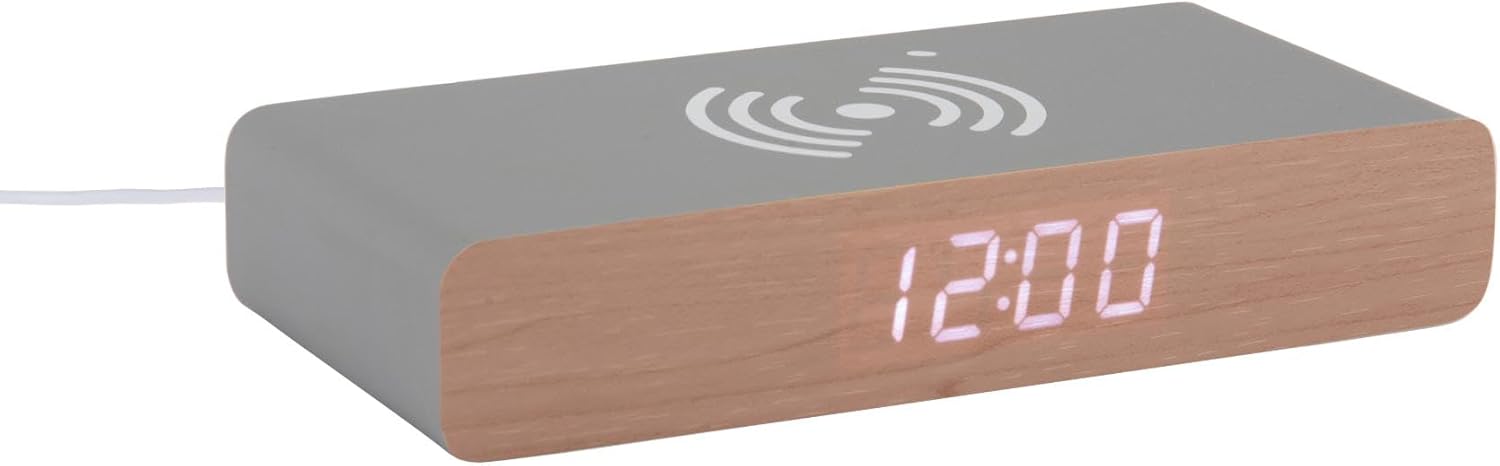
This image displays the front of the Karlsson KA6039GY alarm clock, highlighting its LED time display and the integrated wireless charging pad symbol on the top surface.
Өнцөгтэй View

This image provides an angled perspective of the alarm clock, showcasing the LED display, the wireless charging icon, and the "KARLSSON" brand name printed on the side.
Арын View болон Хяналтууд

This image shows the back panel of the alarm clock, detailing the control buttons for settings and the power input port.
Тохиргоо
Эрчим хүчний холболт
- Connect the provided power cable to the power input port on the rear of the alarm clock.
- Цахилгааны кабелийн нөгөө үзүүрийг тохирох цахилгаан залгуурт холбоно уу.
- The LED display will illuminate, indicating the device is powered on.
Ашиглалтын заавар
Цагийг тохируулах
- Locate the time setting button on the rear panel.
- Press and hold the time setting button until the hour digits begin to flash.
- Use the adjustment buttons (e.g., Up/Down or +/-) to set the correct hour.
- Press the time setting button again to switch to minute adjustment.
- Use the adjustment buttons to set the correct minutes.
- Press the time setting button one more time to confirm and exit time setting mode.
Сэрүүлэг тохируулах
- Locate the alarm setting button on the rear panel.
- Press and hold the alarm setting button until the alarm hour digits begin to flash.
- Use the adjustment buttons to set the desired alarm hour.
- Press the alarm setting button again to switch to alarm minute adjustment.
- Use the adjustment buttons to set the desired alarm minutes.
- Press the alarm setting button one more time to confirm and exit alarm setting mode.
- To activate or deactivate the alarm, press the alarm setting button briefly. An indicator (e.g., a small icon) on the display will show if the alarm is active.
Using the Wireless Charging Function
The top surface of the alarm clock features an integrated wireless charging pad.
- Ensure the alarm clock is powered on.
- Place your Qi-compatible device (e.g., smartphone) directly onto the wireless charging symbol on the top surface.
- Төхөөрөмж цэнэглэж байгааг харуулах ёстой. Хэрэв цэнэглэхгүй бол дэвсгэр дээрх байрлалыг нь тохируулна уу.
Засвар үйлчилгээ
Арчилгаа, цэвэрлэгээ
To ensure the longevity and proper function of your alarm clock, follow these maintenance guidelines:
- Цэвэрлэхийн өмнө цахилгааныг салга.
- Гадаргууг зөөлөн, хуурай эсвэл бага зэрэг арчина damp даавуу. Зүлгүүрийн цэвэрлэгч, уусгагч эсвэл химийн шүршигч хэрэглэж болохгүй.
- Avoid exposing the device to excessive moisture or direct sunlight.
- Төхөөрөмжийг задлах гэж бүү оролдоорой.
Алдааг олж засварлах
Нийтлэг асуудал ба шийдэл
| Асуудал | Боломжит шалтгаан | Шийдэл |
|---|---|---|
| Дэлгэц унтраалттай байна | Цахилгаан холболт байхгүй | Ensure the power cable is securely connected to the clock and the power outlet. |
| Time/Alarm cannot be set | Товчлуурыг зөв дараагүй байна | Refer to the "Setting the Time" or "Setting the Alarm" sections and ensure buttons are pressed and held as instructed. |
| Утасгүй цэнэглэгч ажиллахгүй байна | Device not Qi-compatible or misaligned | Ensure your device supports Qi wireless charging. Reposition the device on the charging pad. Check if the clock is powered on. |
| Сэрүүлэг дуугарахгүй байна | Сэрүүлэг идэвхжээгүй | Ensure the alarm is activated (check for alarm indicator on display). |
Үзүүлэлтүүд
Бүтээгдэхүүний техникийн үзүүлэлтүүд
- Загвар: KA6039GY
- Брэнд: Карлссон
- Материал: БСХС
- Өнгө: Mouse Grey
- Хэмжээ (Ө x H): 7.6 см х 3 см
- Жин: 486 гр
- Эрчим хүчний эх үүсвэр: Сүлжээгээр тэжээгддэг
- Онцлогууд: LED display, Wireless charging pad
Баталгаат болон дэмжлэг
Баталгаат хугацааны мэдээлэл
This product comes with a standard manufacturer's warranty. For specific warranty terms and conditions, please refer to the documentation included with your purchase or contact Karlsson customer support.
Хэрэглэгчийн дэмжлэг
For technical assistance, troubleshooting, or warranty claims, please contact your retailer or visit the official Karlsson webсайт:


