1. Танилцуулга
Худалдан авалт хийсэнд баярлалааasing the Supersonic Professional Stereo Amplifier AV-972SA. This amplifier is designed to provide high-fidelity audio for your home entertainment or karaoke system. With its versatile features, including USB/SD card playback, FM radio, and microphone inputs, it offers a powerful and clear sound experience. Please read this manual carefully before operating the unit to ensure proper use and to maximize its performance.
2. Аюулгүй ажиллагааны чухал заавар
- Эрчим хүчний хангамж: Эрчим хүчний хангамжийн хэмжээг баталгаажуулна ууtage matches the requirements specified on the unit (220V~250V/50Hz).
- Агааржуулалт: Агааржуулалтын нүхийг хааж болохгүй. Үйлдвэрлэгчийн зааврын дагуу суурилуулна.
- Ус ба чийг: Энэ төхөөрөмжийг бороо, чийгэнд бүү тавь. Ваар зэрэг шингэнээр дүүрсэн зүйлийг төхөөрөмж дээр тавьж болохгүй.
- Дулаан: Радиатор, халаалтын төхөөрөмж, зуух болон бусад төхөөрөмж (үүнд ampөргөгч) дулаан үүсгэдэг.
- Цэвэрлэгээ: Зөвхөн хуурай даавуугаар цэвэрлэ.
- Үйлчилгээ: Энэ бүтээгдэхүүнд өөрөө үйлчлэх гэж бүү оролдоорой. Бүх засвар үйлчилгээг мэргэшсэн үйлчилгээний ажилтнуудад хандаарай.
- Чанга яригчийн холболт: Ensure correct polarity when connecting speakers to prevent damage to the ampөргөгч ба чанга яригч.
3. Үндсэн шинж чанарууд
- Luxury Color Pointer Screen Display
- High-Fidelity Stereo Dynamic Ampилүү амьд дизайн
- Bass-enhancement Technology
- Хүчтэй 3000 Вт гаралт
- Professional Karaoke FM Radio Tuner
- USB/SD Card Playback for MP3 files
- Low Leak Magnetic Ring type Voltage
- Optimized for use with 12", 15", and 18" loudspeakers
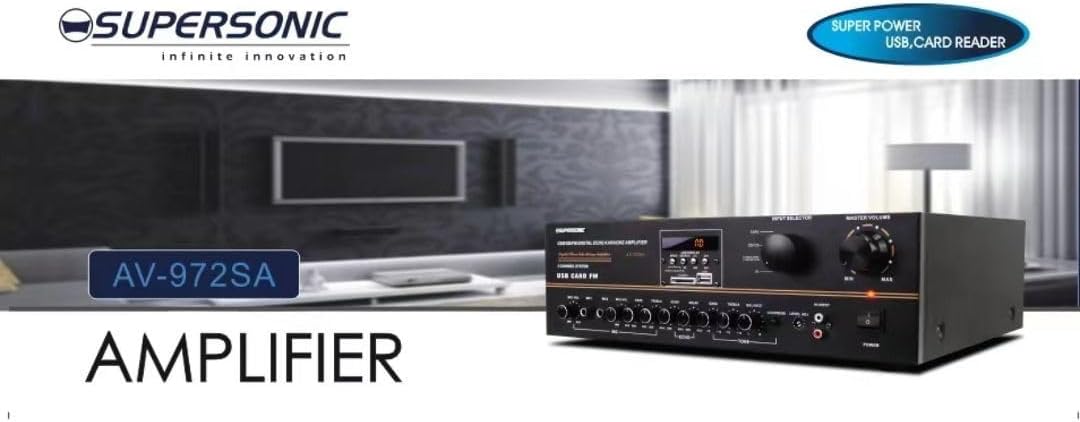
Зураг 3.1: A visual representation of the key features of the Supersonic AV-972SA amplifier, including its display, power output, and connectivity options.
4. Бүтээгдэхүүн дууссанview
The Supersonic AV-972SA amplifier features a user-friendly front panel for easy control and a rear panel for all necessary connections.
4.1 Урд самбар

Зураг 4.1: Урд view of the Supersonic AV-972SA ampөргөгч, үзүүлэнasing its controls, display, and input ports in a home setting.
Урд самбар нь дараахь зүйлийг агуулна.
- Цахилгаан товч: эргүүлнэ ampилүү амьд асаах эсвэл унтраах.
- Мастер дууны хяналт: Нийт гаралтын хэмжээг тохируулна.
- Басс/Гадна давтамжийн удирдлага: Adjusts low and high frequency response.
- Оруулагч сонгогч: Switches between different audio sources (e.g., USB, SD, FM, AUX).
- USB/SD картны үүр: Аудио тоглуулах зориулалттай files-г USB диск эсвэл SD картаас шууд хуулж болно.
- FM Tuner Controls: For radio station selection and tuning.
- Микрофоны оролтууд: For connecting microphones for karaoke or public address.
- Дэлгэц: Одоогийн горим, замын мэдээлэл эсвэл FM давтамжийг харуулна.
4.2 Арын самбар
The rear panel provides all necessary connections for speakers, power, and external audio sources.
- Илтгэгч терминалууд: Connect your loudspeakers here. Ensure correct polarity (+ to + and - to -).
- Аудио оролт (RCA): For connecting external audio devices like CD players, DVD players, or other audio sources.
- Цахилгааны утасны оролт: Connect the provided power cord here.
- FM антенны оролт: Connect the FM antenna for improved radio reception.
5. Тохируулах гарын авлага
Follow these steps to set up your Supersonic AV-972SA ampамь нас:
- Байршил: -ийг байрлуул amplifier on a stable, flat surface with adequate ventilation around it. Avoid direct sunlight, heat sources, or areas with high humidity.
- Чанга яригчийн холболт: Connect your loudspeakers to the speaker terminals on the rear panel. Match the positive (+) terminal on the amplifier to the positive (+) terminal on your speaker, and the negative (-) to the negative (-). Ensure all connections are secure. This amplifier is designed to work best with 12", 15", or 18" loudspeakers.
- Аудио эх үүсвэрийн холболт:
- Гадаад төхөөрөмжүүд: Connect your CD player, DVD player, or other audio sources to the RCA audio input jacks on the rear panel.
- USB/SD карт: Insert a USB flash drive or SD card into the respective slot on the front panel.
- FM антен: Connect the FM antenna to the designated input on the rear panel for optimal radio reception.
- Эрчим хүчний холболт: -ийг баталгаажуулах amplifier's power switch is in the OFF position. Connect the power cord to the amplifier's power input and then plug it into a suitable 220V~250V/50Hz AC power outlet.
6. Ашиглалтын заавар
6.1 Асаах/унтраах
дээр дарна уу Цахилгаан товч on the front panel to turn the amplifier ON. The display will illuminate. Press it again to turn the ampөргөгч OFF.
6.2 Selecting Audio Source
-г ашиглана уу Оролт сонгогч button or knob on the front panel to cycle through available audio sources: USB, SD, FM, or AUX (RCA input).
6.3 Дууны түвшин болон аяыг хянах
- Мастер боть: -г эргүүл Мастер боть knob to adjust the overall sound level. Start with a low volume and gradually increase it.
- Басс/Тебль: -г ашиглана уу Басс болон Гурав дахин knobs to fine-tune the low and high frequencies of the audio output to your preference.
6.4 USB/SD карт тоглуулах
Once a USB drive or SD card containing MP3 audio files is inserted, the amplifier will automatically switch to USB/SD mode and begin playback. Use the control buttons (Play/Pause, Next, Previous) on the front panel to manage playback.
6.5 FM радиогийн ажиллагаа
Select the FM input using the Оролт сонгогч. Use the FM tuner controls to scan for and select radio stations. The display will show the current frequency.
6.6 Microphone Usage (Karaoke)
Connect your microphones to the microphone input jacks on the front panel. Adjust the microphone volume and echo effects (if available) using the dedicated controls. Ensure the main volume is set appropriately to avoid feedback.
7. Засвар үйлчилгээ
- Цэвэрлэгээ: Disconnect the power before cleaning. Use a soft, dry cloth to wipe the exterior of the ampөргөгч. Шингэн цэвэрлэгч эсвэл аэрозоль шүршигч хэрэглэж болохгүй.
- Агааржуулалт: Хэт халалтаас урьдчилан сэргийлэхийн тулд агааржуулалтын нүхэнд тоос шороо, хог хаягдал байхгүй эсэхийг тогтмол шалгана.
- Хадгалах: Хэрэв хадгалж байгаа бол amplifier for an extended period, ensure it is in a cool, dry place, away from direct sunlight and extreme temperatures.
8. Алдаа засах
| Асуудал | Боломжит шалтгаан | Шийдэл |
|---|---|---|
| Хүч чадалгүй | Цахилгааны утас холбогдоогүй байна; Цахилгааны залгуур эвдэрсэн байна; Amplifier power switch off | Check power cord connection; Try a different outlet; Ensure power switch is ON |
| Дууны гаралт байхгүй | Volume too low; Incorrect input selected; Speaker wires loose or incorrectly connected; Faulty audio source | Increase master volume; Select correct input; Check speaker connections and polarity; Test with a different audio source |
| FM хүлээн авах чадвар муу байна | Antenna not connected or poorly positioned; Weak signal | Connect FM antenna securely; Adjust antenna position; Try manual tuning |
| USB/SD тоглуулахгүй байна | Буруу file format; USB/SD card faulty or not inserted correctly; Amplifier not in USB/SD mode | Баталгаажуулах files are MP3 format; Reinsert USB/SD card; Select USB/SD input mode |
9. Техникийн үзүүлэлтүүд
| Онцлог | Тодорхойлолт |
|---|---|
| Брэнд | Дуунаас хурдан |
| Загварын дугаар | AMP-AV972SA |
| Гаралтын ватtage | 3000 Вт |
| Холболтын технологи | USB |
| Онцлог шинж чанар | Компакт дизайн |
| Өнгө | Хар |
| Бүтээгдэхүүний хэмжээс | 25D x 45W x 26H сантиметр |
| Зүйлийн жин | 1 кг |
| Хяналтын арга | Хүрэх |
| Эрчим хүчний хангамж | 220V ~ 250V / 50Hz байна |
10. Баталгаат хугацаа ба дэмжлэг
This Supersonic AV-972SA ampөргөгч нь а-тай хамт ирдэг 6 Months Manufacturer's Warranty худалдан авсан өдрөөс эхлэн. Энэхүү баталгаа нь хэвийн ашиглалтын үеийн үйлдвэрлэлийн согогийг хамарна. Энэ нь буруу ашиглалт, осол, зөвшөөрөлгүй өөрчлөлт, эсвэл зохисгүй суурилуулалтаас үүдэлтэй хохирлыг хамрахгүй.
For warranty claims or technical support, please contact your retailer or the Supersonic customer service department. Please have your proof of purchase and product model number (AMP-AV972SA) ready when contacting support.


